.png)
Person, Address and Contacts
Scope and Purpose
The purpose of this document is to provide a conceptual summary of person, address, and contacts.
Its scope extends to across requirements for maintaining data integrity for best conflict assessment as well as client facing and management reporting outcomes.
Highlights
With this concept document, decision makers will be able to re-assess their file intake processes to mitigate the risk of person and address duplication resulting in unwanted conflict assessment and reporting outcomes.
-
Regardless of the number of roles (client, vendor) or supporting roles (referral source, employer) attributed to a person, the person should only exist once in the database. Exception: If the person is also a member.
-
Although an address can have many users - associated to many different persons or contacts – it must only exist once in the database with its one “Best” owner. For example the address for your firm or a client should only exist once in the database.
-
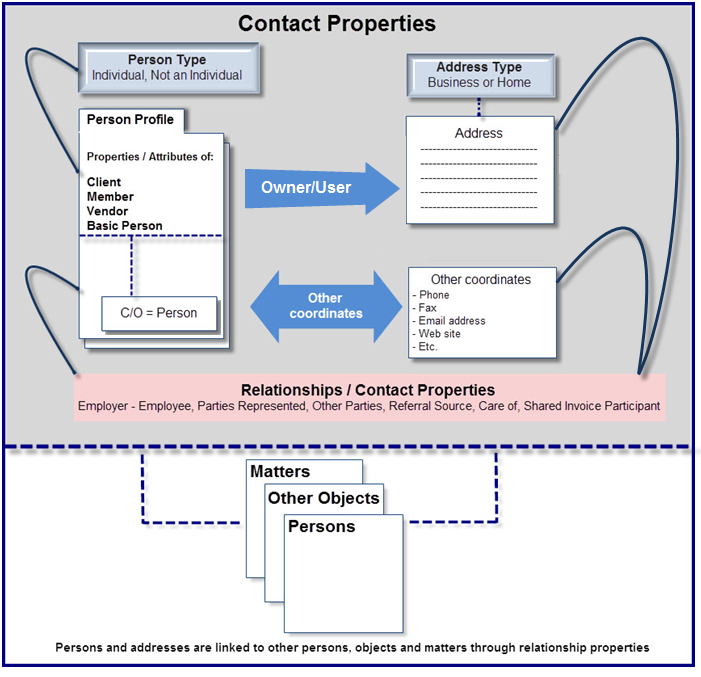
The contact is a person-address combination which is associated to another person with its “Best” relationship characterized through a firm defined contact category. Most persons selected as contacts are individuals, but it is possible to select a non-individual as a contact.
-
A client must have one AR Contact – the final authority if there is an issue with the client’s ability to meet its financial commitments to the firm – as well as at least one default billing contact.
-
Beyond a selected number of system required contact categories, all other categories used to better explain the relationship of the party represented and other parties are firm defined. Categories should align to the firm’s areas of practice to best describe the relationship without being overly granular.
-
The care-of (C/O) is a second person which can be added to the contact properties form to reflect a relationship with an alternate place of business or equivalent. Most person selected as care-of (C/O) are not individuals.
The Person
Person Summary
Acumin’s functional actors – clients, contacts, vendors, members and remaining parties - originate with the concept of unique-person within the same database.
Persons are created only once, using the profile for individuals or for business/units. The latter is intended to accommodate all non-individual persons, for example legal entities, businesses, formal or informal associations, families and/or groups of loosely associated individuals.
Person Highlights
-
A person can be created without a relationship to another person or object (matter, invoice etc.), as an individual or not.
-
Regardless of perspective - individual or non-individual – the person’s properties forms contain attributes in context of role – basic person, client, vendor or member.
-
The same person should exist only once in the database. As new client and matter information is entered to trigger the potential conflict assessment process, if the client or anyone one of the parties involved are found, the person must be selected so it can have a new role added to pre-existing relationships. For example, a basic person is found and selected to become a client, and once a client it is selected to become a vendor. Although the person has client and vendor attributes, the basic person exists only once. Exception: If a member is also a client or vendor, the underlying person should be duplicated.
-
A member or basic person, client and/or vendor can be selected as a contact, and/or for supporting roles such as referral source, employee, employer, c/o etc.
The Address
Address Summary
The address is a person-coordinate that requires a “best” address owner for users be able to leverage contact management functionality .
For example, if you need to create a new contact – Janet Smith, CTO for the XYZ Bank - you should be creating the address with the XYZ Bank Head Office as the “best” address owner.
Address Highlights
-
An address can only have one address owner – the first person the address is created for. Although it is possible to change the address owner, the address cannot be orphaned.
-
The same address can be used by an unlimited number of persons or contacts, making them address users.
-
Persons that are clients need at least one address. There is no limit to the number of addresses that can be associated to a person as owner or user.
-
If an address owner moves, then the content of the address properties is changed to reflect the address of the new location. In this case all address users would be immediately connected to the new place of business or the new home.
Use Case
The address owned by ABC Co. – a client – has as contact address users, many of the employees of the organization which have been set up as client contacts or parties represented. If ABC Co. moves, once the address properties is modified to reflect the new location, all of the address users will be impacted.
Carolina Givens, CEO of ABC Co. becomes a private client of the law firm, at which point her home address is added to her person properties form with her as owner. In this case, depending on the client’s request for any one of her personal matters, the billing contact properties for Carolina Givens as client, can include her home address or workplace address (ABC Co.)
Lawyers working for other law-firms are added as opposing counsel on matters for ABC Co. They would be contact address users of the address owned by the law-firm they work for.
The Contact
Contact Summary
The contact is an person and address combination which is associated to a another person - the main person for the contact. Although the main person is typically a client, it can be a vendor, member or basic person.
A contact can be associated to a matter, in which case the client for the matter is the contact’s main person.
Contacts are associated to their main person through a “Best” relationship (contact category). The contact category is intended to provide relationship information for visibility and context to potential legal or business conflicts.
Contact Highlights
-
Contacts can be created as client, vendor or member contacts as well as matter-level parties represented or matter-level other parties.
-
To add any new contacts, the user will be required to search for the person first to avoid creating the same person twice.
-
A person can have multiple contacts, as well as be a contact to multiple other main persons in the database.
-
A contact can have more than one contact category to define the relationship with its main person.
-
Most contacts are persons with a profile of individual so they can be used in context of “Attention to:” when generating a printed or emailed invoice output for example. If the contact also has a a C/O, the C/O must be included in the C/O field to ensure all three parties are considered when building the addressee section of a document.
The Structure of the Contact
The contact – the person and address combination - is unique within the main person in which it was created. For example, if Dr. Peter Jennings is associated to 1 Bay Street, Toronto as expert witness for Matter 1 for Novax Pharmaceuticals, then this combination remains unique for Novax Pharmaceuticals, to be used with any other matter.
From a practical perspective, this means that if the contact properties form for Dr. Peter Jennings combined with 1 Bay Street, Toronto is modified in any way, for example a change from the business address to his home one, the addition of his mobile number, or giving him a second contact category; all the matters for Novax Pharmaceuticals using this contact - would reflect the change made. However, if the same Dr. Peter Jennings and same 1 Bay Street, Toronto address combination also existed within another main person, this second contact properties would not be impacted by the change.
Contact Change of Address
A change of address within contact properties means that the individual will receive mail or packages at the changed location.
For example, Susan Hamel was created as Senior Manager for ABC Co. using ABC Co.’s corporate address in Toronto, where her office was located. However once promoted to VP Western Canada, her office was relocated to regional headquarters for western Canada in Edmonton Alberta. This would trigger a change of address within contact properties – from the address for corporate headquarters to the address for regional headquarters.
This is not the same as changing the address for the company’s corporate headquarters from Toronto to London, reflecting a physical move for the address owner – ABC Co. A move would require a change of address to the corporate headquarters address-properties of ABC Co.’s, so it no longer reflects the Toronto address but the new one in London. This is the same use-case described in the address section for this document.
Contact Categories
Most contact categories are firm defined. It is possible to modify them, add new ones or delete unused ones.
Required Contact Categories
In addition to the contact category that best reflects the status of the contact in context of the client, the following system-required contact categories reflect additional mandatory settings at the client or matter level. These contact categories cannot be modified or deleted.
Billing Contact
Every client must have at least one of its contacts categorized with a classification from the firm’s list of choices, defined as “also Billing Contact”. If there is more than one billing contact set at the client level (common for larger clients), set the most often used one as the default, so it is automatically captured during new matter creation, else it will be an arbitrary selection.
As it is possible for a matter to have more than one billing contact, set at the matter level the most often used one as the default, so it is automatically captured during new invoice creation, else it will be an arbitrary selection.
AR Contact
Every client must have one of its contacts categorized with a classification from the firm’s list of choices, also identified as “AR Contact”. This is the person that is ultimately responsible for the client’s credit relationship with the firm, a point of contact when a serious credit issue arises. For this reason, the “AR contact” is only one at the client-level and cannot exist at the matter level.
Although this contact is often the main billing contact, for large clients where there may be multiple billing contacts, the AR contact may not also be a billing contact.
Statement of Account Contact
The statement of account groups all the invoices outstanding for a client by invoice recipient, unless the client or the matter has a different contact set as “Statement of Account Contact”. In this case, the statement of account contact is the recipient of the statement of account (reminder notice) for all the invoices with an outstanding balance.
As the default statement of account contact is the billing contact used for the affected invoices, the statement of account contact is only added to client properties when someone else other than the billing contact should receive the statement of account, for example the “AP Department.
If the reminder notice for a matter of a client with a different statement of account contact needs to go to its billing contact, then the matter is the exception and the billing contact at the matter level will need to be identified as also the statement of account contact
Marketing Contact
Firms working with Marketing licensing will also need to identify the parties represented at the client and/or matter level that are also marketing contacts.
Special Use-Cases
In addition to the firm-defined list of contact categories and the system-required ones, the following contact category and contact settings have a special use-cases.
The Primary Contact
The primary contact category is used to classify the automatically created contact for a new client. It can be exchanged for a category more representative of the contact itself
When a new client is created, the application will automatically use the client combined with the address to create the first contact As the automatically created contact requires a contact classification, it uses the “Primary Contact”. This general use default contact category can also be used to fill in source application gaps on conversion. Regardless of how the assignment of “Primary Contact” was made, this value can be changed to reflect a classification in context of the firm’s defined list of choices at any tie during the life cycle of the client or matter.
The Carbon Copy (CC) Contact Setting
When a carbon copy of an invoice needs to provided to a party represented, once the contact properties is completed with a firm-defined contact category, ensure it is NOT set s billing contact, exit the contact properties form and right-click to set it as carbon copy.
The Default Billing Contact Setting
It is possible to set more than one party represented as a billing contact within a client so it can be an available choice when a new matter is created and/or within a matter so it can be an available choice when a new invoice is created, therefore once the contact properties is completed with a firm-defined contact category and set as also billing contact, exit the parties represented list for the client and/or matter and right-click to select the one that should be considered a default.
Impact on New Client Creation
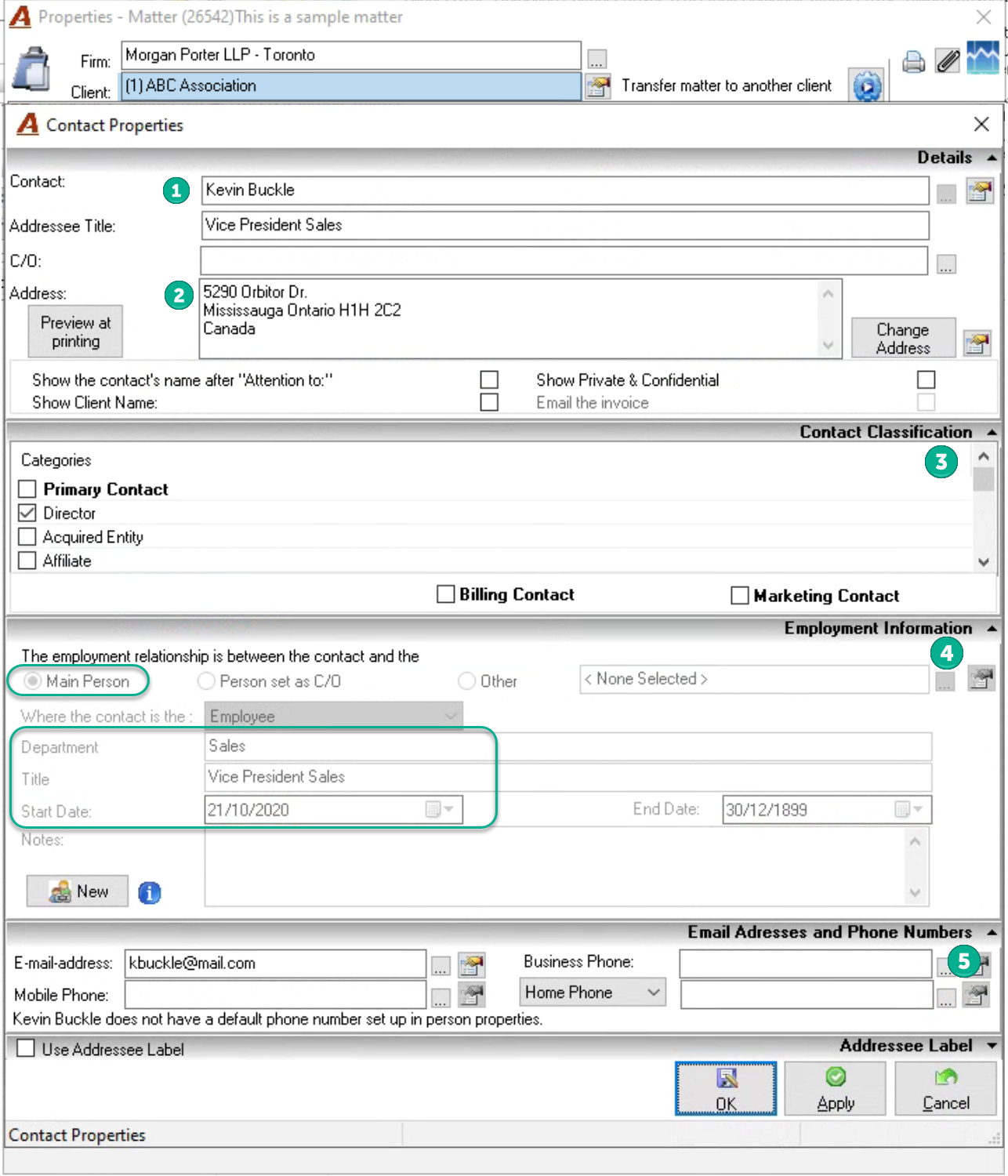
When a new client is created, a contact combining the client and the client’s address is automatically created using the Primary, Billing and AR categories. If the client is an individual, it is likely that the automatically created contact is adequate, however if the client is not an individual, the contact properties is generally updated to include an individual person instead.
For example, a new client – Novax Pharmaceuticals – is created with an address at 1 Bay Street, Toronto. The client wizard automatically creates a contact properties form with Novax Pharmaceuticals as the contact, 1 Bay Street, Toronto as the address, and assigns it the Primary, Billing and AR contact categories. As part of the file intake process process, Novax Pharmaceuticals is replaced by Dr. Peter Jennings as the Primary, Billing and AR contact for ABC Co. at 1 Bay Street, Toronto.
Other Contact Categories
The other contact categories are used to make the conflict assessment process easier. If the contact is adequately categorized, the person responsible for assessing if there is a potential conflict will understand the role of the contact in context of the main person (often a client). This relationship makes the analysis easier for the person responsible for clearing potential conflicts.
Contact Level
Client Level:
Contacts created at this level are available for use as a party represented for any matter. For example an insurance adjustor is likely to be involved in multiple insurance defense matters, in which case the contact at the client level categorized as “Insurance Adjustor” is included as party represented on relevant matters.
Matter Level:
Contacts created at this level are not available for selection within other matters for the same client. For example, an expert witness for a litigation matter for the same insurance client. In this case we do not want to add it to the list of client level contacts as it is only a relevant party represented for the one matter.
The Care-Of (C/O)
C/O Summary
The C/O is a person - typically not an individual - used within the properties of a contact in context of the address used. When the document or package is to be sent to an individual (the contact) that is works for a different organization that is not the client, then the C/O field integrates this second person into the contact information.
As the C/On is assigned during the creation of the contact properties form, the default address options will include those of the C/O.
C/O Highlights
-
Persons selected as C/O are non-individuals, often reflecting the place of employment of the individual person selected as the contact.
-
To add a C/O the user will need to search for the organization first, to avoid creating the same organization more than once.
-
If the organization selected as C/O has an address, it will be available for selection along with the address of the owner of the contact (the main person – typically a client).
-
Regardless of role within the database, any person found can be added as the C/O for a contact.
-
A person can be the C/O to multiple other persons in the database.
Use Case
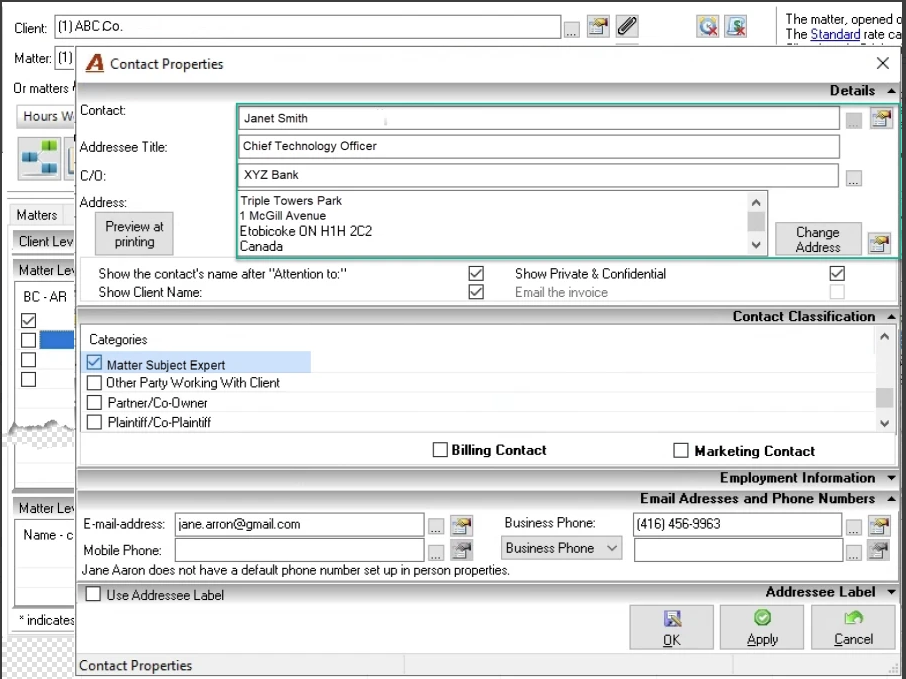
The client, ABC Co., has Janet Smith, CTO for the XYZ Bank – as a party represented matter subject expert for Matter 1. All communication to be sent to Janet must go to her place of employment – the XYZ Bank, at 1 McGill Avenue.
The contact properties for client ABC Co. used with Matter 1 will have the individual person Janet Smith as the contact, non-individual person XYZ Bank as C/O, 1 McGill Avenue (the address of XYZ Bank) as the address.
Email Adressess and Phone Numbers
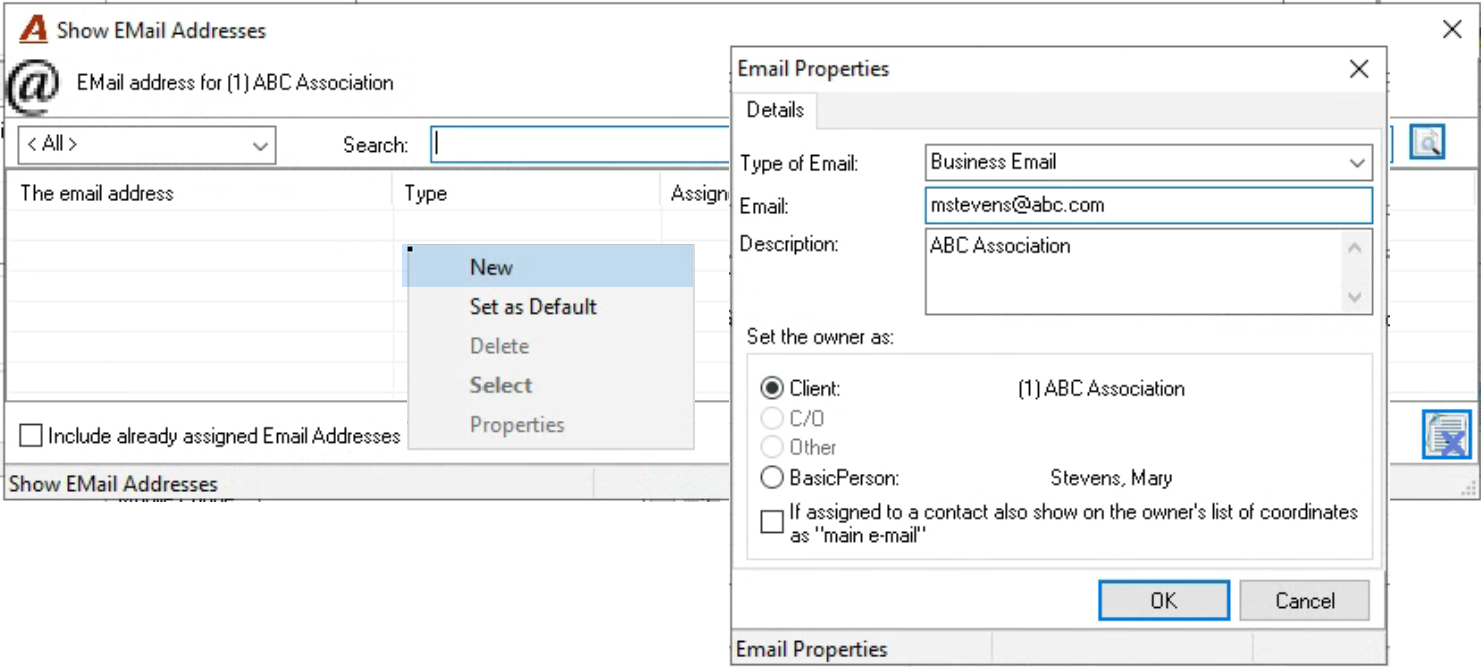
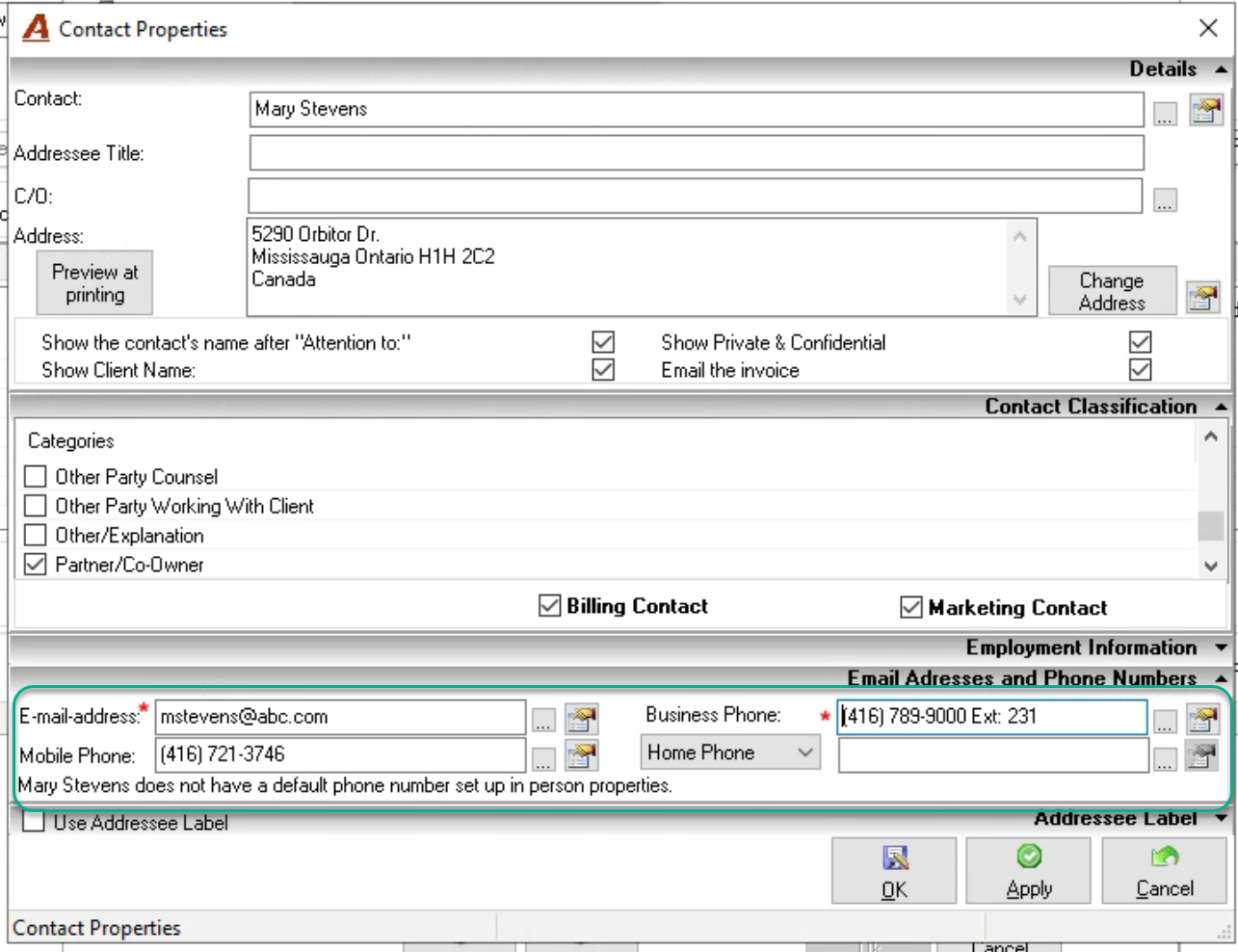
The email address and the phone numbers are person-coordinates should reflect a “best” owner for greater clarity when looking to contact someone by email or phone.
For example, if you need to create a new contact – Janet Smith, CTO for the XYZ Bank - you should be creating the business email address and business direct lines, general lines with extensions or company issued mobile phones with XYZ Bank as the “best” owner for these coordinates, and personal email address and mobile phone with Janet Smith’s person properties as the “best” owner for these other ones.
Email Address and Phone Highlights
Although it is possible for an email address or phone number added during contact creation to be included in the coordinates of the client as well as the person selected as contact, this should be a rare situation. Most often if not always the email or phone number should included as a client coordinate or a coordinate for the person that is contact (an OR situation).
The email address and/or phone number added can set to so it is available for selection with another contact for the same client. This too is a rare situation as emails and phone numbers are typically not shares.
An email address and/or a phone number can be set to be mandatory.
Employment Information
The Employment Information panel is used to capture the employer’s information for the contact when the contact is an individual.
The Owner of the Main Properties Form is the Client and the Employer
This occurs when the contact is a party represented for an employment matter, the employer information is part of the know your client process for a client that is an individual, or when the firm leverages employment information for marketing and/or CRM efforts.
The Owner of the Main Properties Form is not a Client but is the Employer
This occurs when the contact is an “Other Party” for an employment matter or a contact to a non-client person, for example the firm’s banking institution.
The C/O is the Employer
This occurs when the contact is a “Party Represented” or “Other Party” to a third party that is not main properties form holder. For example, a medical expert witness employed by a medical consulting firm.
The Employer is Other than the Owner of the Main Properties or the C/O
When the employer is not the main person that the contact it is being associated to nor the C/O, but someone completely unrelated, the employer will need to be added to the employment panel.
Summary