.png)
Scope and Purpose
The purpose of the "Know Your Client" functionality is to provide visibility to stakeholders of the client's status in context of the firm's verification policy when handling funds on behalf of the client.
Its scope extends to activities involving receiving, disbursing, or transferring client funds.
Overview
The Canadian Federal Government passed legislation known as "Proceeds of Crime (Money Laundering) and Terrorist Financing Act (the Act)." This act requires that law firms (one of multiple entities covered) identify and verify clients who conduct financial transactions.
The circumstances that trigger the "duty" to "verify" involve the "handling" of funds on behalf of the client (trust management with respect to Acumin). In other words, specific activities defined as "engaging in or giving instructions in respect of receiving, disbursing or transferring funds" of the client.
Highlights
Individual clients have the first name, last name, and address as mandatory fields for wizard completion, however it is recommended that they be created with their full name - including middle name as well as personal coordinates other than address, such as phone and e-mail. Many firms expand personal information for individual clients and enter employment information along with coordinates at the individual's place of business or work within the employee/employer section of contact properties.
Non-individual clients have the name, and address as mandatory fields for wizard completion. Enter the organization's full name and the alternate (or "also known as" if any) in the second name field. Use the coordinates section for the business address (main office), the main phone number and the website. It is recommended to set as mandatory the requirement to have one individual person in the contact – party represented list. Many include at least one key employee authorized to act for the matter along as the primary contact and use the employment panel to complete their profile.
Although the non-individual properties form is used to create a group of individuals as the client – for example a husband and wife; everyone must be created as a basic person and associated as a contact in the party represented list to host the information needed for client identification and verification.
On the creation of new applicable matters, most law-firm clients require that the client's properties form is reviewed to ensure continued compliance with the firm's policy on client-identification and verification requirements.
The client properties – information tab – know your client sub-tab, includes a checkbox for users to identify compliance with the firm's verification policy. Users can un-click the verification checkbox if circumstance change and the client require re-verification. Once the re-verification process is complete and the checkbox re-set, the timeline between status will be captured.
For each verification record the application captures the date that verification took place, the member responsible for accepting compliance with the firm's verification policy for this specific client and the reason for the verification or re-verification. Users can generate a print list-view of the verification log in paper form or onto Excel (part of regular print list view functionality).
Although the position of the compliance checkbox triggers the printed confirmation on the trust cheque requisition and deposit slip, to provide visibility of the status to the stakeholders:
-
Firms licensed with the classic or enhanced practice management tools, create a matter universal note type "client identification" – to capture that as a at a given date the client includes information in compliance with the firm's identification policy; as well as a matter universal note type "client verification" – to capture that as at a given date the client was verified in compliance with the firm's verification policy. The same note is created for any new applicable matter.
-
Firms not licensed for the classic or the enhanced practice management tools, use the client-matter dashboard's "status report" permanent note to record compliance with the firm's identification process and verification policy each time a new applicable matter is opened for the client.
Many firms use the client status rejected to identify clients for whom services were withdrawn.
The firm must keep a record and copies of the information gathered and relied-on in the identification and verification process. Acumin can maintain the information in various organization-defined fields created for this use case. In addition, users have the option to leverage the linked document functionality in client properties for quick access to supporting documents.
Process Opportunities
Client Identification
Overview
Clients are identified according to firm-set criteria to know who they are. The requirement to identify a client extends beyond new clients to existing ones for whom the firm will undertake new work. This is important, as some of the information required, obtained and/or recorded for identification purposes could have changed overtime.
The conditions for compliance are typically incorporated into the new business intake process, so that information like client name and address will be required before the user can move to the next step. Many of our law-firm clients also leverage this process to support the identification of the client, by storing captured client identification information within client properties.
Although each organization decides as to what are the necessary requirements to meet client identification obligations, we include recommendations based on how other law-firm clients across the country are operating in this regard.
Data Capture - Individual
If the new client or existing one is an individual or a group of individuals - for example a husband and wife created with the non-individual profile of business/unit, then for every individual client or in a group update or complete the following fields.
The Name
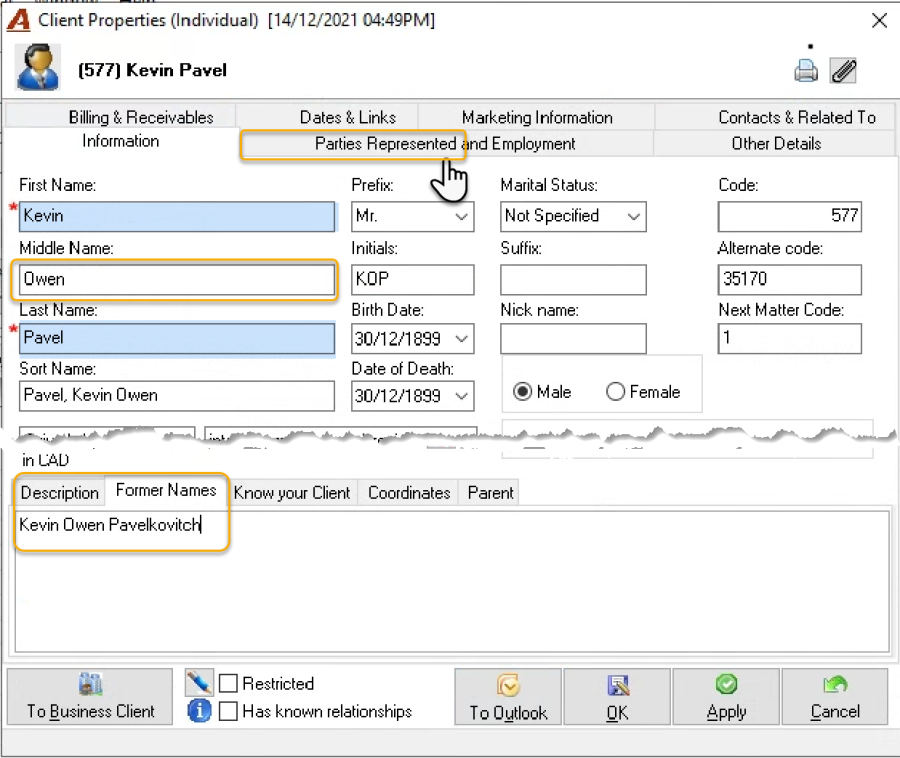
At a minimum the user is required to enter the first and last name to create a new client. The client's name is stored in the client properties form "Information" tab. Although not required, many firms capture the individual's middle name.
If the client is the sum of multiple individuals, create all the individuals with their own person properties – completed with a full name including the middle name and set all persons as client contacts.
Where possible obtain former names for relevant persons and record them in the former name tab of the person or client properties form.
The Coordinates
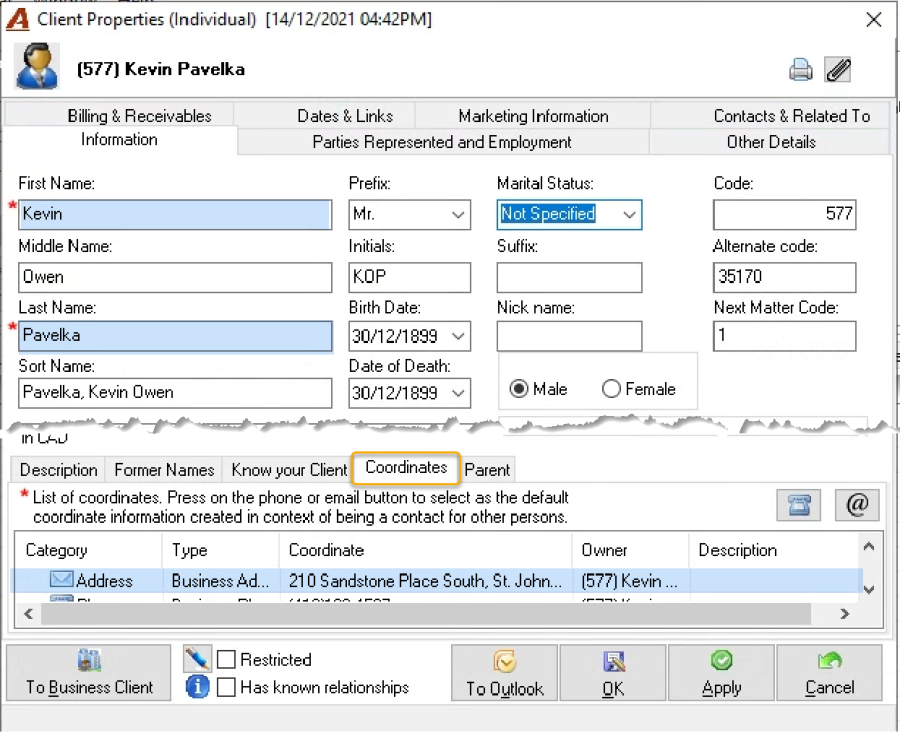
At a minimum the user is required to complete the address while completing the client wizard to create a new client. Many law firm clients also capture at least one telephone number and e-mail address. This information is stored in the client properties form "Coordinates" tab.
The Place of Business or Employment
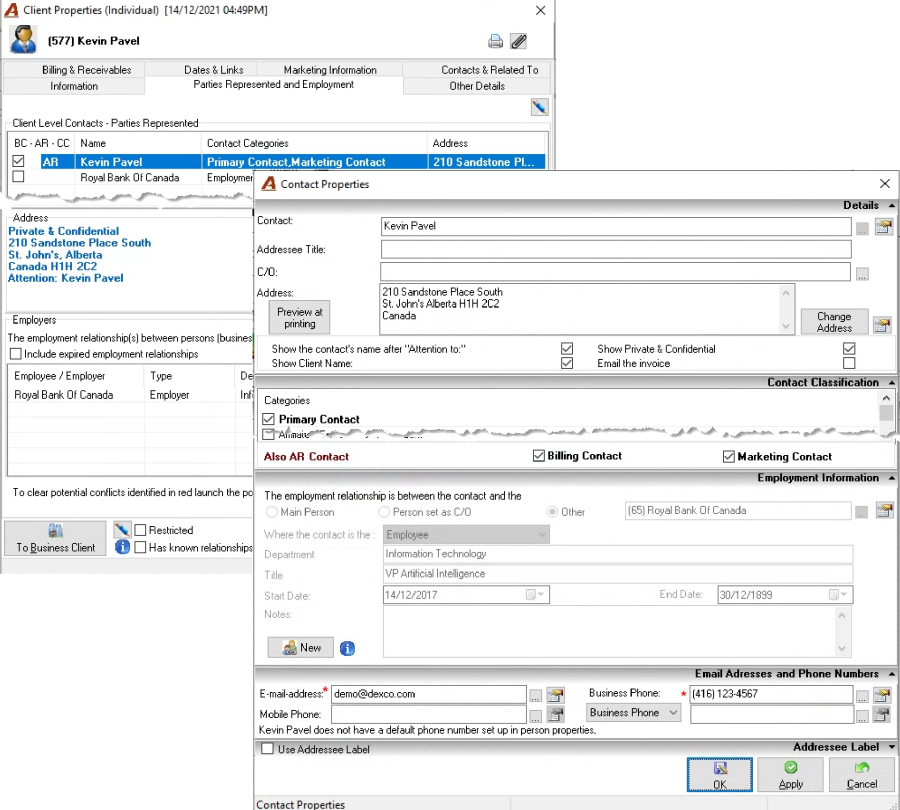
Although there are no mandatory minimum requirements related to the individual's place of business or employment; this information is part of the individual person profile adding value to the conflict assessment processes, marketing initiatives and know your client verification policies.
Once captured, the individual's place of business or employment, including the business telephone number, business e-mail address and occupation, is accessible from the parties represented and employment tab in client properties.
Data Capture – Non-Individual
If the new client or existing one is not an individual but an organization, update or complete the client properties with the information that follows.
Although a group of individuals – for example a husband and wife – is created with the non-individual profile of business/unit; the information required for each is captured and hosted in the individual person properties. The individual persons must be added to the list of parties represented within the client properties for the group of individuals client.
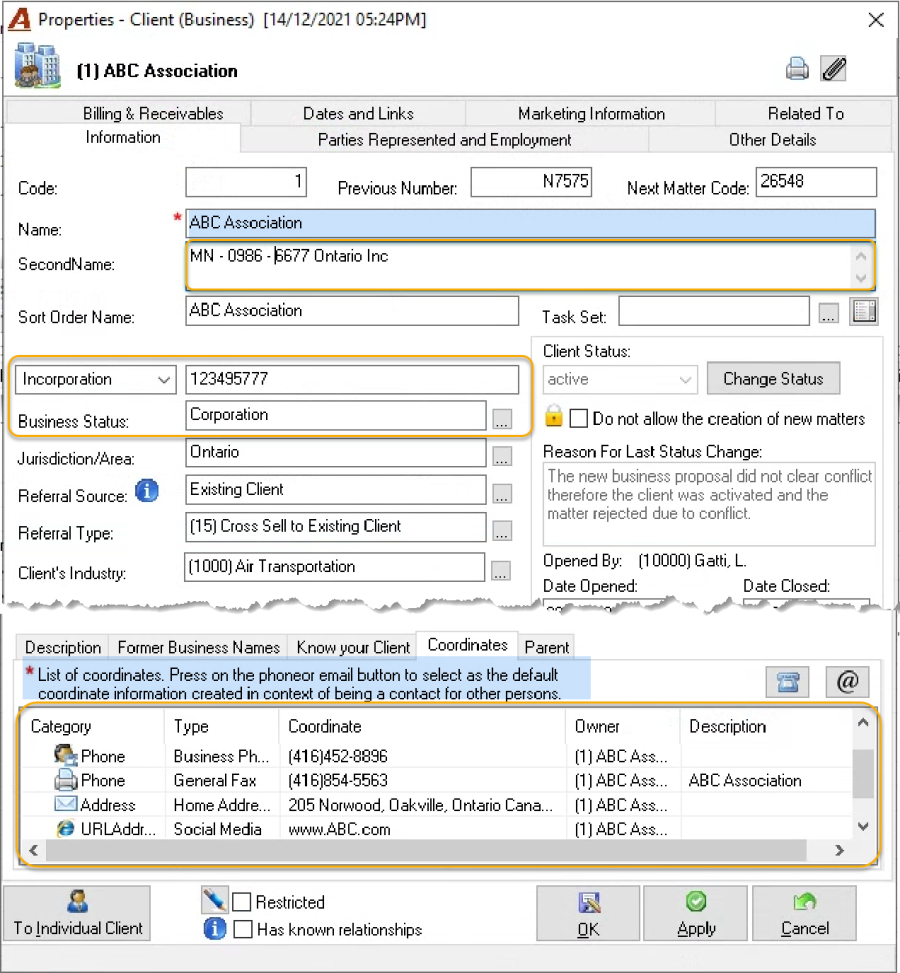
The Name
At a minimum the user is required to enter the name to create a new client. The client's name is stored in the client properties form "Information" tab.
Include marketing names or number company names used at start-up in the second name field.
Where possible obtain former names for relevant persons and record them in the former name tab of the person or client properties form.
The Coordinates
At a minimum the user is required to complete the address while completing the client wizard to create a new client. Many law firm clients also capture the main-line's telephone number, the info e-mail address, and a website. This information is stored in the client properties form "Coordinates" tab.
Incorporation, Business Identification Number or Equivalent
Although there are no mandatory minimum requirements related to the organization's incorporation or business identification number and/or place of issue; this information is part of the non-individual person profile adding value to the conflict assessment processes, marketing initiatives and know your client verification policies.
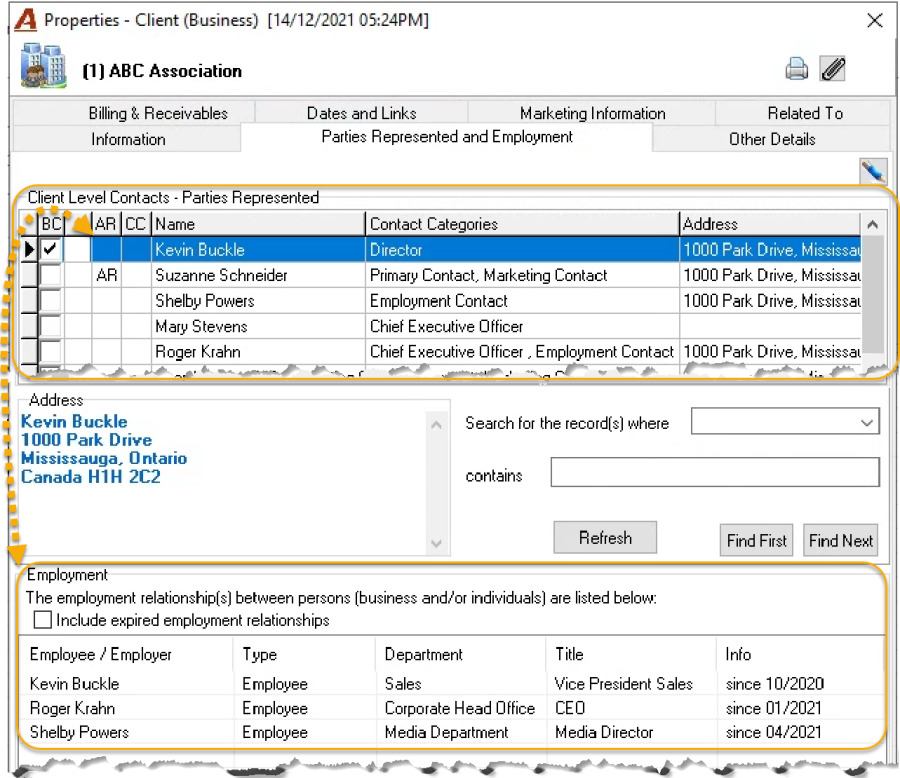
Once captured, the non-individual's business identification information or equivalent, is accessible from the parties represented and employment tab in client properties.
The Group of Individual Client
Everyone which makes part of this client must be added as a contact to the group of individual clients. This implies creating everyone as a basic person using the individual person properties forms, where the know your client information will be hosted.
Other Information
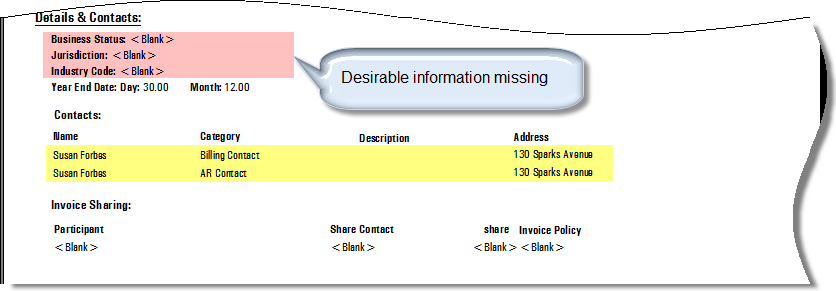
Many law-firm clients require that one individual authorized to give instructions on the matter be added to the parties represented contact list, as well as identification of the client's industry and business status. These can be set as mandatory.
Users can also add other key individuals as party represented client contacts and include their employment information.
Reporting:
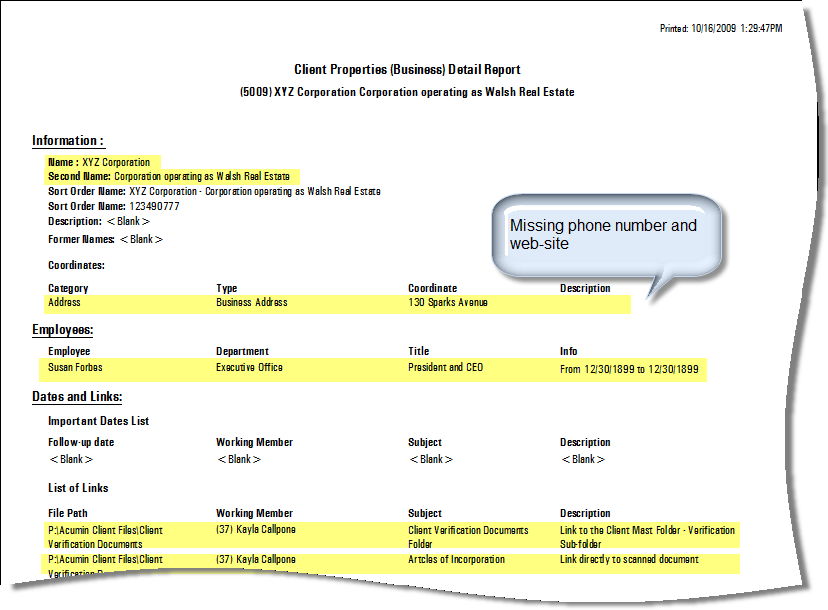
Print the client properties form if someone needs to sign-off on compliance with the client identification policy.
Client Verification
Overview
The circumstances that trigger the duty to "verify" involve the handling of trust funds on behalf of a client. Under these conditions, to comply with the verification requirement; the firm will be required to take reasonable steps to verify the client's "identity" through credible supporting documentation. This will likely require the update of the firm's new matter intake policy to include a verification process which should conclude with the user confirming compliance with the verification policy within Acumin.
If the client is an individual potential credible source documents would include a driver's license, birth certificate, passport or equivalent.
If the client is an organization potential credible source documents would include a certificate of corporate status, a partnership Agreement, a trust Agreement, articles of association or equivalent.
Process
Although each firm decides as to what are the necessary requirements to comply with the client verification obligation, Acumin includes a verification flag within client properties.
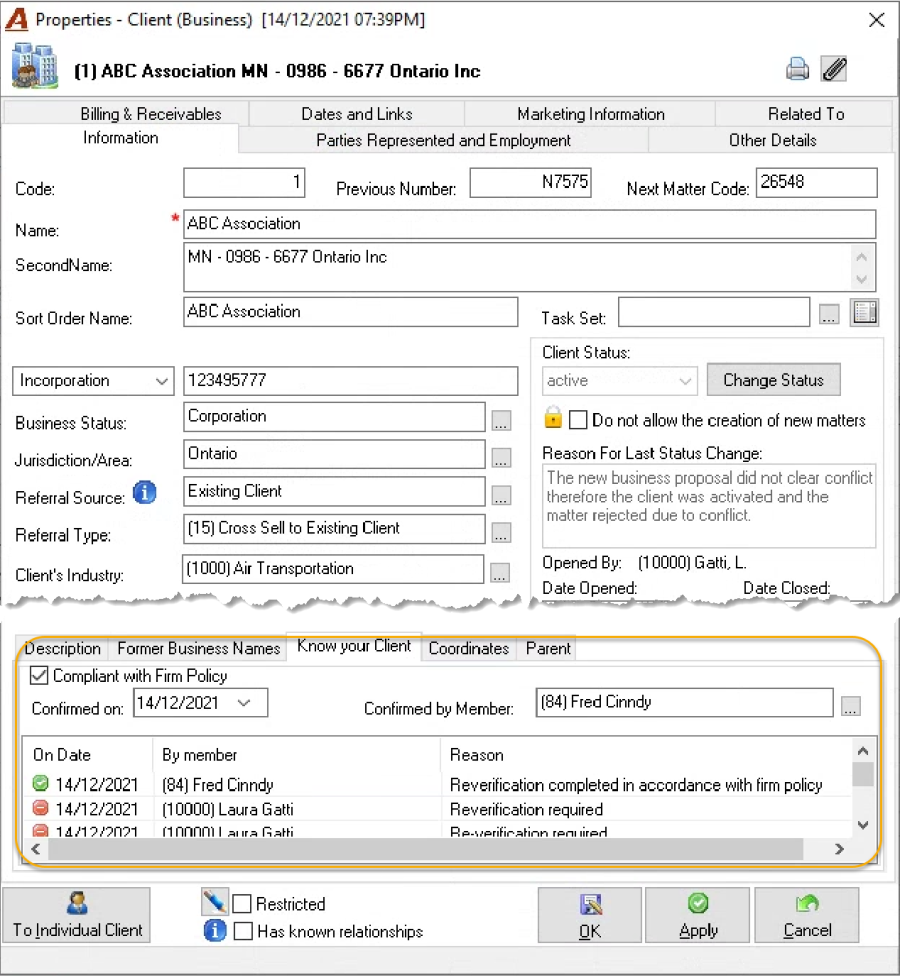
Re-verification may be required if the circumstance of the client change. In this case users should unclick the flag, provide a reason and when the new supporting documentation is verified re-check the client verification status as ON.
The client properties – information tab – know your client sub-tab, includes a checkbox for users to process compliance with the firm's verification policy. Users can un-click the verification flag if circumstance change and the client require re-verification, until the re-verification process is complete to capture the timeline.
For each verification record the application captures the date that verification took place, the member responsible for accepting compliance with the firm's verification policy for this specific client and the reason for the verification or re-verification.
The position of the compliance checkbox triggers the printed confirmation on the trust cheque requisition and deposit slip.
In addition to the use of the compliance checkbox to capture confirmation of policy adherence, firms licensed with the classic or enhanced practice management tools, create a matter universal note type "client identification" – to capture that as a at a given date the client includes information in compliance with the firm's identification policy; as well as a matter universal note type "client verification" – to capture that as at a given date the client was verified in compliance with the firm's verification policy. The same note is created for any new applicable matter.
Firms not licensed for the classic or the enhanced practice management tools, use the client-matter dashboard's "status report" permanent note to record compliance with the firm's identification process and verification policy each time a new applicable matter is opened for the client.
Record Keeping
The firm is required to keep a record of the information gathered and relied on in the identification and verification process as well as keep copies of supporting documents used in compliance with the firm's verification policy.
Acumin can maintain the information entered in the various fields identified within the client identification section of this document. In addition, users have the option to store information used in the verification process in the following manner:
-
Within an organization defined field in client properties, where the options can be documents like driver's license or birth certificate for individuals and incorporation number for non-individuals.
-
Documents used as part of the verification process can be saved and linked to client properties - "Dates and Links" tab. In this case most firms link to an organization defined "Client Verification Documents" folder.
Withdrawal of Services
Many firms use the client status rejected to identify clients whose services were withdrawn. In this case a reason for future reference is recommended.
Other Options
Firms not licensed for the classic or the enhanced practice management tools, use the client-matter dashboard's – status report permanent note to record compliance with the firm's verification policy each time a new matter is opened for the client, in addition to using the compliance confirmation checkbox at the client level.
Set-Up
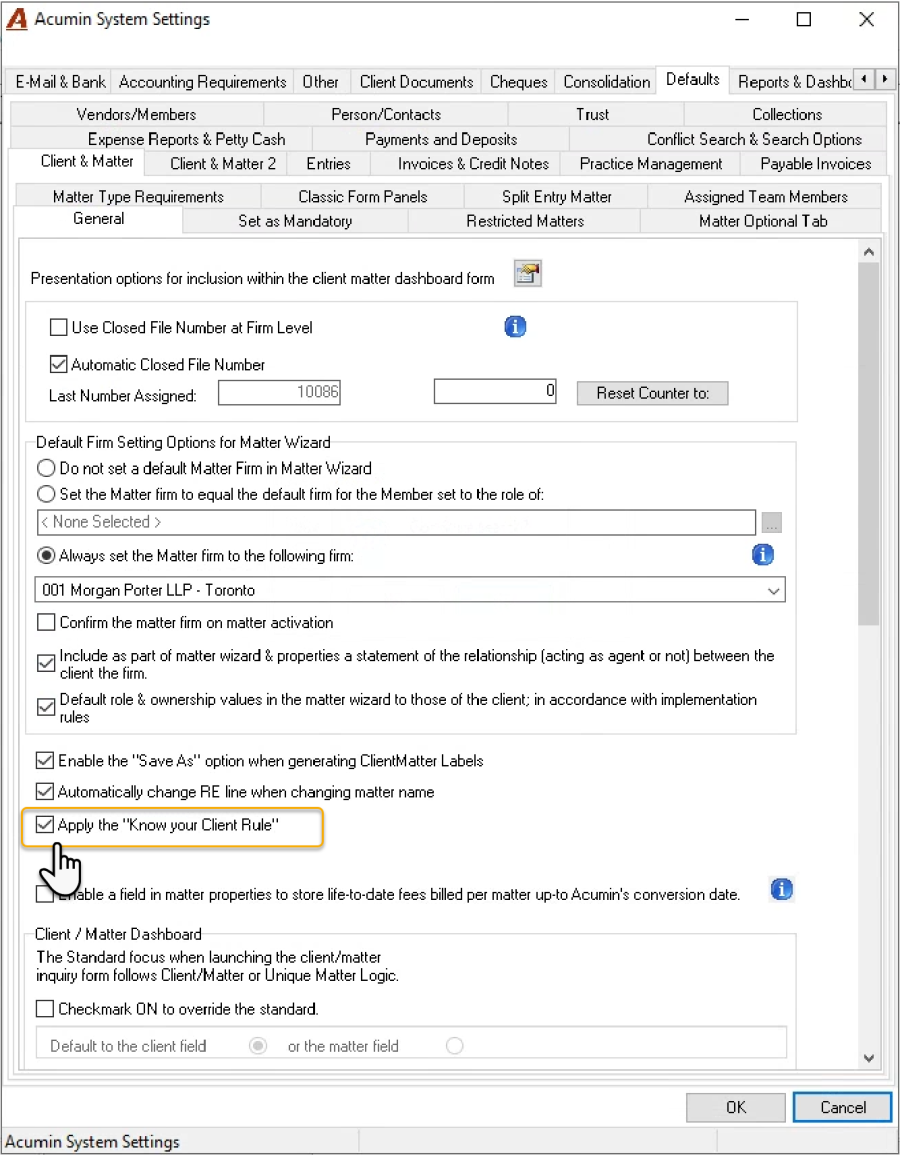
To set up the know your client checkbox and process, checkmark the option in system settings.