.png)
Client Matter Status
Scope and Purpose
The purpose of the client or matter status is to provide stakeholders with tools to limit permitted actions depending on where the matter and/or the client within their customer-journey.
Its scope extends to seven (7) status positions for the client and matter for multiple additional positions when combined.
Highlights
Acumin provides seven potential client and matter level statuses resulting in multiple options with which to define the resulting combined client-matter status in support of firm policy.
The ability to work with multiple statuses in context of the firm’s assigned meaning to each result in the effective management of resources.
Users transacting on matters other than those with a combined client-matter status of Active-Active will be restricted to allowable actions, providing organizations with tools to control appropriate action throughout the life of a matter as well as the client’s journey.
Client Status
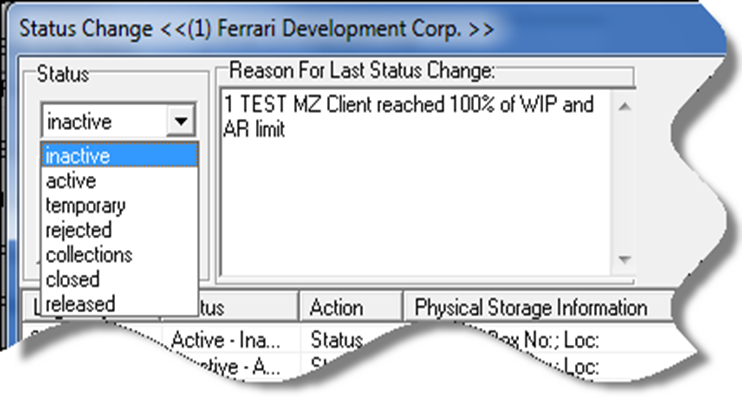
To optimize file management and reporting opportunities, most firms define for stakeholders the use-case for each of the seven (7) potential statuses which follow, in context of the impact on the management of transactional data when it is combined with the matter’s status.
Context and Use-Case
Temporary
When a client is first created it has the status temporary, however, to activate or reject a temporary matter on conclusion of the conflict clearance process, the client must have the status Active.
Best Practice
Although it is possible to create the first matter while the client has the status temporary, most firms activate the client during the last step of the client creation process, for a more effective outcome.
Users leverage the collective client and matter information to assess the combination for potential conflict in a single step, to then activate the matter or reject it due to conflict, without compromising the file intake and conflict assessment process. In this case the client remains active as the next matter may not pose a conflict.
Active
A client must be active for users to activate or reject any new matter due to conflict. The matter-status for active clients, drives the status specific restrictions for matters on otherwise actionable functionality.
Best Practice
To facilitate potential conflict assessments and marketing efforts, most firms keep their clients active, even if all of the client’s matters are closed to differentiate between clients no longer doing business with the firm, out of their own choosing (usually set to closed) or the firm’s choosing due to the credit risk (usually set to rejected).
Collections
Used at the client level, this status defines clients which are not in good receivable-standing, therefore posing a collection risk. This status is considered as an intermediary restriction on matter actions - see impact – providing a timeline for resolution before additional time and disbursement investment are committed on behalf of the client.
Due to its intended use case, matters for clients set to have the status “Collections” retain their status. Firms licensed with the “Business Process Rules (BPR)” engine and collection relevant templates, can automate the change of status based on the firm-defined thresholds for amount and age of the oldest invoice.
Impact
Users cannot post time and/or disbursements or issues invoices on matters for clients that have the status “Collections” regardless of the status of the specific matter. These restrictions limit additional investment in activities that may not be recovered and resulting exposure for increased bad debt expense. Additionally, the firm has greater control of the type of invoice and communication strategy once the client is identified as a potential credit risk (see best practice).
Users can issue trust cheques and proceed with payment of invoices from trust or general deposits for matters where the client has the status “Collection”.
Best Practice
Users can generate individual invoices for clients with status “Collections” from within the “Show Invoice” list-view’s right-click contextual menu if the matter has the status “Active”. The business logic is that the person responsible for the collections process may need to generate the invoice for these matters to create a complete receivable position to present at court and/or to complete an AR write-off for otherwise unbilled time and disbursement.
Inactive
Clients can be inactivated as a response to a variety of problems with the client other than being a collection risk. For example, it is possible to auto-inactivate the client if the requirement for a client-accepted engagement-letter is not received within a specified number of days from the date the client was activated.
As with the collection’s status, the inactivation of the client will trigger an intermediary restriction on matter actions - see impact – providing a timeline for resolution before additional time and disbursement investment are committed.
Due to its intended use case, matters for clients set to have the status “Inactive” retain their status. Firms licensed with the “Business Process Rules (BPR)” engine and collection relevant templates, can automate the change of status based on the firm-defined criteria.
Impact
Users cannot post time and/or disbursements on matters for clients that have the status “Inactive” regardless of the status of the specific matter, limiting the exposure to the firm-defined risk.
Closed
To close a client, all matters must have a status of closed, rejected or released. Typically, this status is used to define clients no longer doing business with the firm by their own choosing, however the physical files for some or all matters remain under the control of the firm.
Clearly defining use of the status closed and sharing this information with all stakeholders, will provide additional meaningful information to the reader of the potential conflict information and user of person information for marketing endeavours. For example, the closed client is an opposing or named party on a future matter for an active firm client and/or the firm’s new marketing strategy includes reaching out to clients who no longer do business with the firm out of their own choosing.
Impact
Matters for clients with status closed, are no longer available for use for any transactions as they must also be closed, rejected, or released, statuses that require all balances be cleared and that limit all new transactions.
When a client has the status closed, new matters for the client cannot be activated.
Rejected:
This status is used to identify clients with a bad credit history with the firm. To reject a client all matters must have a status of closed, rejected or released.
Clearly defining use of the status rejected and sharing this information with all stakeholders, will provide additional meaningful information to the reader of the potential conflict information and user of person information for marketing endeavours. For example, if the rejected client brings a new matter, the reader of the potential conflict results will assess the financial situation to mitigate the credit risk before taking the new work on, or the person responsible for creating a marketing list may choose to exclude clients who no longer do business with the firm out of the firm’s own choosing.
Impact
Matters for clients with status rejected, are no longer available for use for any transactions as they must also be closed, rejected, or released, statuses that require all balances be cleared and that limit all new transactions.
Released
This status defines clients no longer with the firm out of their own choosing, that have taken all their physical files, therefore no longer under the control of the firm. To set a client as “released” all matters must also have a status of released.
Impact
Matters for clients with status released, are no longer available for use for any transactions as they must also be released, a matter status that requires all balances be cleared and that limits all new transactions.
When a client has the status released, new matters cannot be created. On an optional basis, released clients can be excluded from the potential conflict assessment process.
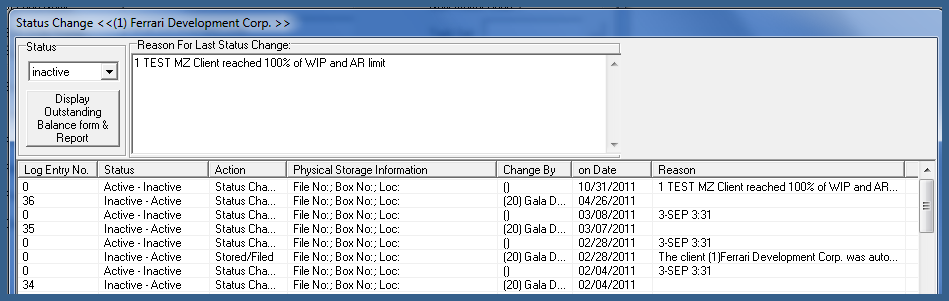
Status Change Log
Information on status changes is logged along with a user or system-set reason when provided.
Matter Status
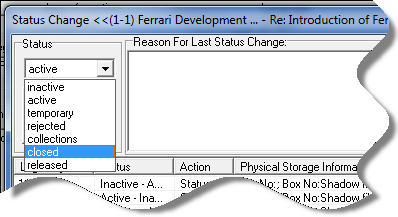
Temporary
When a matter is first created it has the status temporary, to allow the capture of party-represented and other party person information being considered, so it can be leveraged by the potential conflict assessment process as other new matters are being created and considered for activation.
The status temporary has a short life cycle because once it has gone through the conflict assessment process it is either cleared from conflict and accepted as active or rejected due to conflict.
Best Practice
Matters rejected due to credit risk, should be activated, and immediately closed , so the client’s status can be updated to rejected, reflecting a combined client-matter status of “Rejected – Closed”.
Impact
The party-represented and other party person information captured during the temporary matter creation process, ensures that subsequently created matters with a common party creating a potential conflict is not accepted and activated without full visibility that the same party is associated to a potentially more desirable matter that is in the process of being assessed for conflict.
Time and internal disbursements recorded against matters with a combined client-matter status of temporary-temporary or active- temporary remain unposted on the time sheet or quick disbursement sheet. Once the matter is activated, the time and disbursements will post as unbilled-time or unbilled-disbursements respectively.
If the matter is rejected, the time and disbursements will post as rejected entries respectively, measurable as non-chargeable effort and reported as an opportunity loss on work completed for matters rejected due to conflict or clients rejected due to unmitigated credit risk.
Active
The client must be active for a user to be able to activate a new matter, a requirement for users to transact without any status-specific limitations.
Collections
Although credit-risk and/or collection issues are best addressed at the client level, the collection status at the matter level is available to respond to exceptions and/or special circumstances, to demonstrate that the client does not present a credit risk, but that there is a matter specific collection-issue instead.
Best Practice
Users can generate individual invoices for matters with status “Collections” from within the “Show Invoice” list-view’s right-click contextual menu. The business logic is that the person responsible for the collections process may need to generate the invoice for the matter to create a complete receivable position for the matter to present at court and/or to complete an AR write-off for otherwise unbilled time and disbursement.
Impact
Users cannot post time and/or disbursements or issue invoices on matters that have the status “Collections” regardless of the status of the client. These restrictions limit additional investment in activities that may not be recovered and resulting exposure for increased bad debt expense. Additionally, the firm has greater control of the type of invoice and communication strategy once the client is identified as a potential credit risk (see best practice).
Users can issue trust cheques and proceed with payment of invoices from trust or general deposits for matters with the status “Collection”.
Inactive
Used at the matter level, this status is used to identify matters where the legal work has been completed, and administrative functions are being carried out to clear all balances to 0.00 and proceed with to close it.
Best Practice
Users can generate individual invoices for matters with status “Inactive” from within the “Show Invoice” list-view’s right-click contextual menu. The business logic is that the person responsible for the process may need to process a zero-dollar internal invoice to clear unrecovered unbilled entries instead of unbilled entry write-off, to better reflect related financial measures for the matter and timekeepers.
Impact
Users cannot post time and/or disbursements or issue invoices on matters that have the status “Inactive” regardless of the status of the client. These restrictions limit exposure to losses due to incorrectly assigned activities which cannot be recovered and or the use of an incorrect vehicle to clear outstanding balances.
Closed
Used at the matter level, this status identifies matters where all work has been completed, outstanding balances cleared, open actions closed, and required checklist items completed.
Impact
Matters with status closed, are no longer available for any transactions or actions.
Rejected
Used at the matter level, this status identifies matters that could not move forward due to a confirmed conflict of interest or a business conflict that could not be mitigated.
Best Practice
Matters that do not move forward due to credit risk bear the status closed with the client status set as rejected.
Impact
Users cannot transact on matters with status rejected, as it these matters are not available for selection for any type of data entry. However, any un-posted time and/or soft disbursement entries previously recorded while the matter had the status temporary, can be posted once the matter is rejected. The posted time and considered akin to non-chargeable entries. They can be measure and reported on, with no impact on WIP.
Released
Used at the matter level, this status identifies matters no longer with the firm due to the client’s choosing and where the physical file is no longer under the control of the firm.
Impact
Users cannot transact on matters with a status released, as it these matters are not available for selection for any type of data entry. However, on an optional basis released matters can be excluded from the potential conflict assessment process.
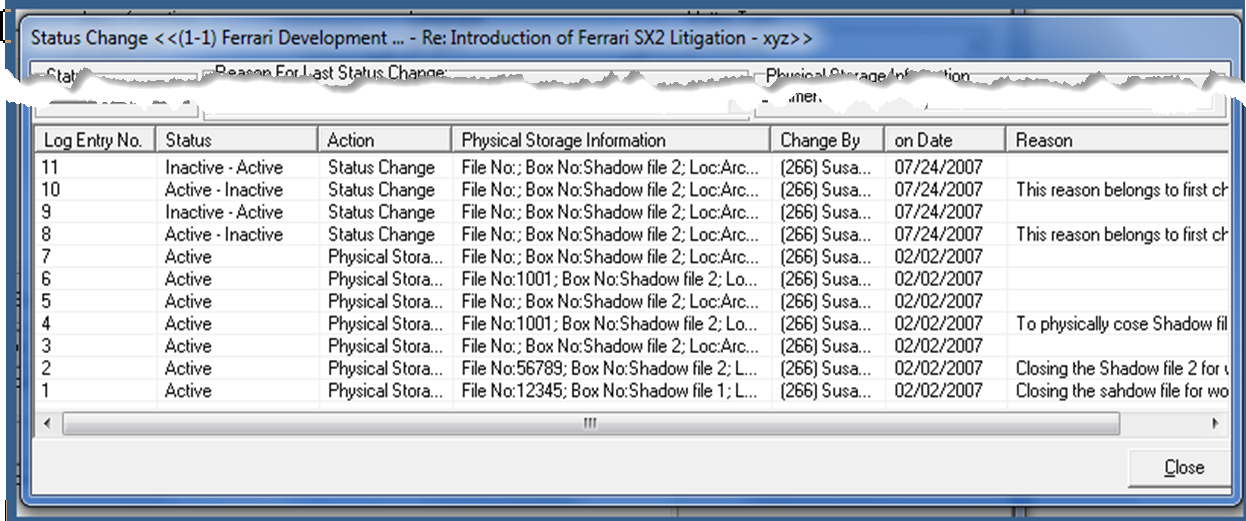
Status Change Log
Information on status changes is logged along with a user or system-set reason when provided. The content of the reason is searchable.