.png)
Net Fees Billed & Master GL Accounts
Net Fees Billed
The net fees billed metric includes the result of actions taken on value worked. Most actions are taken during the invoice preparation process and accounted for when the invoice is posted, for example, fee override (write-ups or write-downs) triggering efficiency gains or losses and/or the application of discounts and premiums. Depending on the report, this metric can also include fees credited.
Based on the position of a system setting option found in the “Other” tab, the net fees billed metric on some reports can also be reduced by fees written-off.
Relationship with Master GL Accounts
There is a relationship between the net fees billed metric and the GL operations measures captured in several master GL accounts.
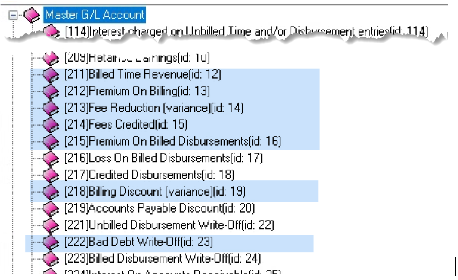
The Billed Time Revenue [id 12] master GL account measure captures the value of work billed in the period. As most invoices include some type of fee adjustment in the form of a write-up, write-down, or discount; to balance the GL to net fees billed metrics included in reports, the GL account balances for other relevant master GL accounts must be considered.
The net fees billed measure for invoiced results includes GL operations captured in the following GL Master Accounts:
|
211 |
Billed Time Revenue [id 12] |
Revenue |
Worked value billed |
|
212 |
Premium On Billing [id 13] |
Revenue |
Fee overrides that increase the fee over the worked value billed (write-ups) |
|
213 |
Fee Reduction (variance) [id 14] |
Revenue |
Fee overrides that decrease the fee from the worked value billed (write-downs) |
|
218 |
Billing Discount (variance) [id 19] |
Contra-revenue |
The net reduction or increase to worked values presented as a visible discount and/or premium on the invoice (Total & Trust tab) |
Depending on the report, the net fees billed metric can also include the fees credited measure which is captured in the following master GL account:
|
214 |
Fees Credited [id 15] |
Revenue |
Fees credited through the issuance of credit notes against invoiced values |
Depending on the report and the position of the application system setting found within Acumin System Settings – Other tab, the net fees billed metric can also include the fees written off measure which is captured in the following master GL account
|
222 |
Bad Debt Write-Off [id 23] |
Expense |
Fees written-off through AR Write-offs |
Master GL Accounts
As it is possible to change the GL account code and name of these master accounts to suit the firm’s chart of account structure within the GL accounts’ properties form, the tree-view presentation includes an id number that does not change. It is always shown at the end of its name.
Use of Supporting GL Schedules
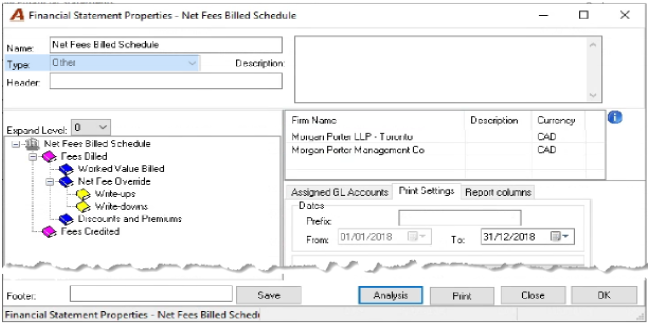
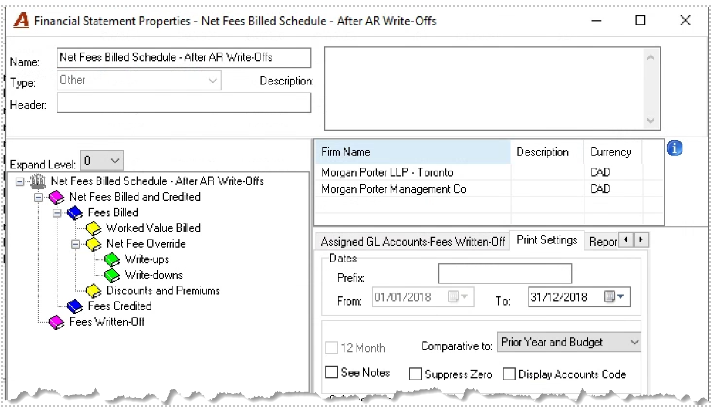
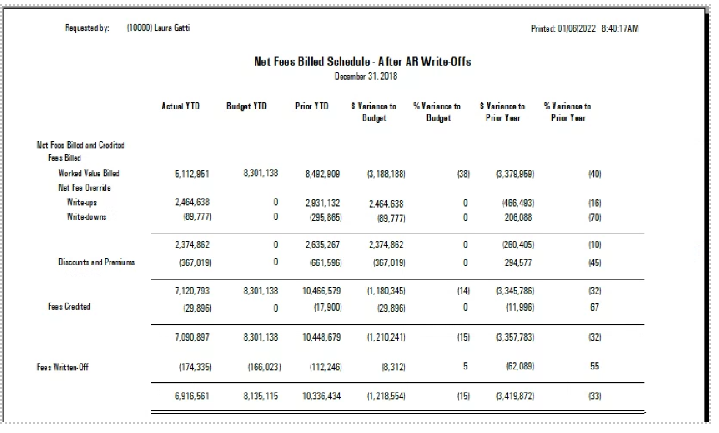
With the financial statement template builder, users can create schedules to capture often-referred-to GL metrics. Schedules are created as statement type ‘Other” so there is no qualification on the kinds of accounts to be included - a control added for use with income statement and balance sheet templates.
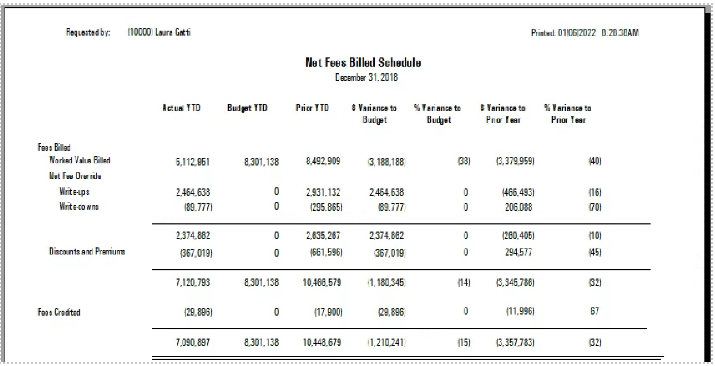
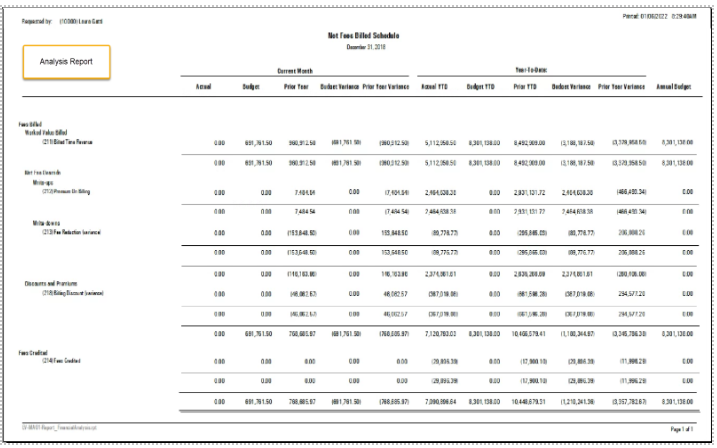
Example of a Schedule that does not include Fees Written Off:
Example of a Schedule that that includes Fees Written Off:
Conclusion
To balance Fees Billed G Operations to Management Reports, the user will need to identify which GL accounts are affected based on the management report selected and complete the balancing exercise in context of how the report presents relevant objects – Invoice, Credit Notes and AR Write-offs – as well as invoice attributes (write-ups, write-downs, and net discounts).