.png)
QUESTION: The current task code available for use with my clients with no A codes, task codes and/or E-codes is “L10 – Litigation”. However none of my e-billing clients are litigation matters.
Is it possible to change the task code from L10 – Litigation to a code named “Corporate”? Or a code named “General”?
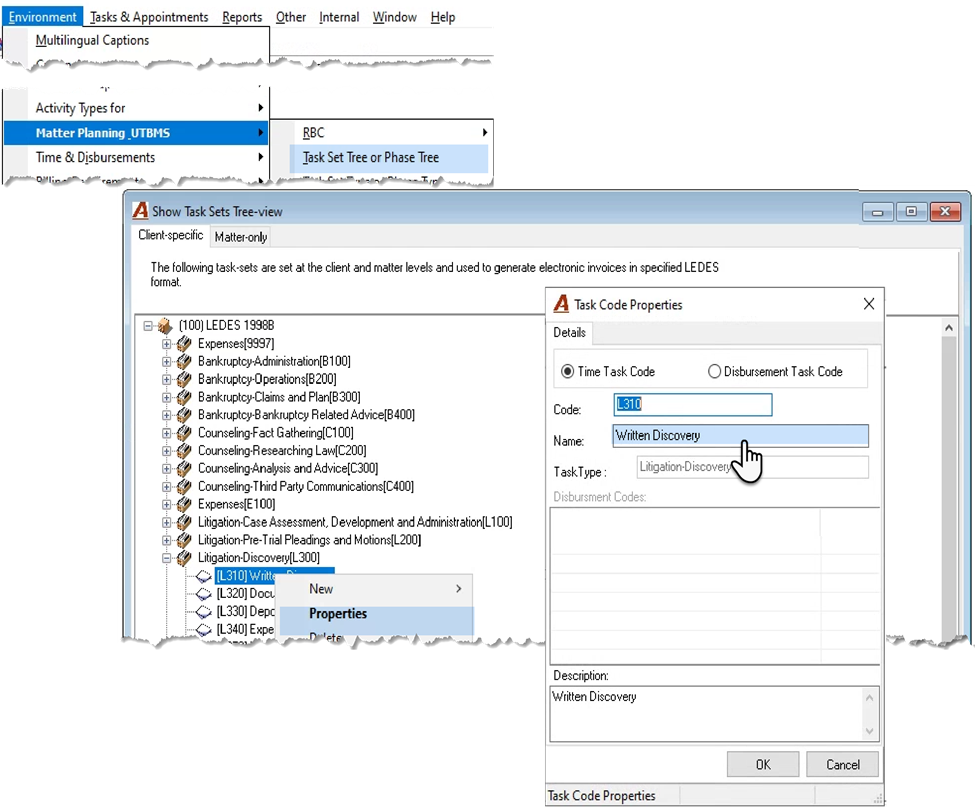
RESPONSE: To change the name of a task code, select the menu option “Task Set Tree or Phase Tree” from “Environment – Matter Planning UTBMS” sub-menu to launch the “Show Task Sets Tree view”. Search and find the task set affected, select it, find the task phase and press on the plus sign to expanded so you can right-click and access the properties of the task code.
Changes to the properties of a task code or task phase as well as content of a task set, will impact all the clients and matters using it.