.png)
Question:
We are currently using the LEDES XML file format, but some clients require submissions in the LEDES 98B format. How can I check if this format is available in my environment?
Response:
To check which LEDES e-billing formats are available in your environment, follow these steps:
-
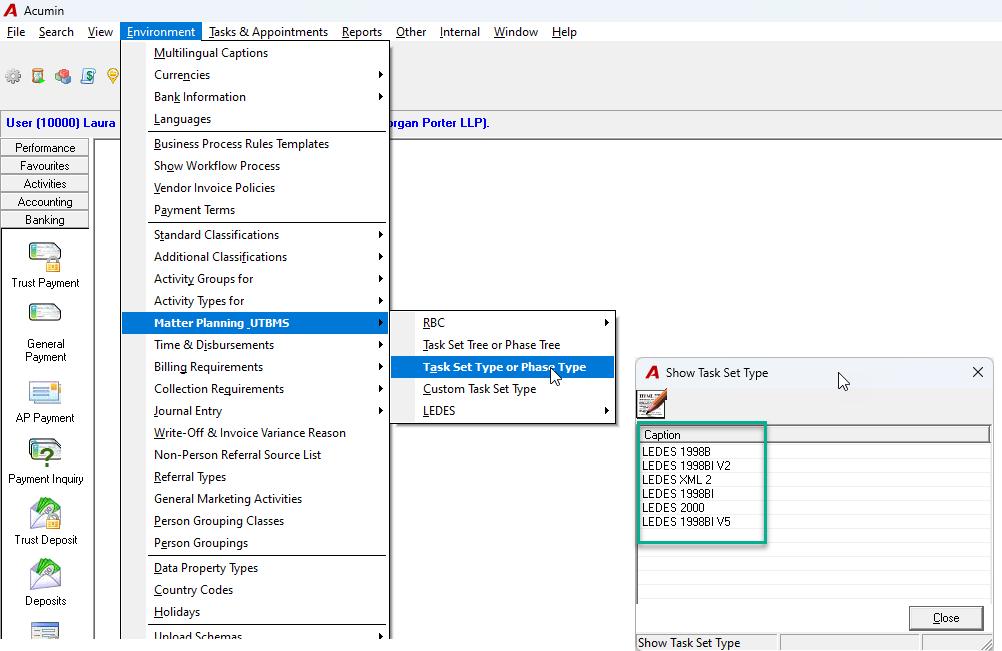
Navigate to Environment > Matter Planning > UTBMS – Task Set Type or Phase Type.
-
A list of available LEDES formats in your system will appear.
-
If the required format is listed, you can begin creating a task set and select the appropriate LEDES format. For guidance on this process, refer to:
E-Billing - General Introduction, Set-up and Process - Quick Start -
If the format you need is not listed, please contact Dexco Support to request its addition to your environment.