.png)
To ensure security and client confidentiality, you will need to register to use the Dexco Support Portal. The good news is it’s only a few steps and you only have to do it once.
Please Note: Your email must be in our support system to register for the portal. If you’ve contacted support within the last year, your email should already be registered. However, if it's not or you encounter an error, please reach out to timothy@dexco.com, and he’ll assist you in getting set up.
Registering for the Support Portal
-
Visit this link: https://dexco.atlassian.net/servicedesk/customer/portals
(Tip: Save this link as a bookmark or favourite in your browser. You will only need to register once.) -
Enter your email address.
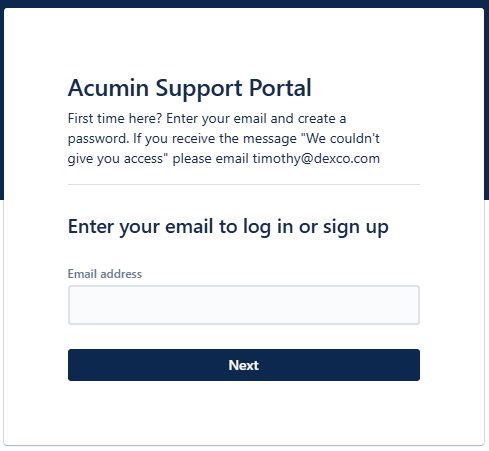
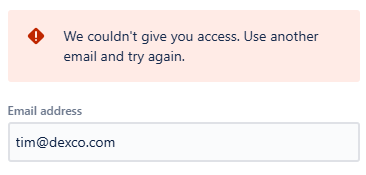
If you receive the error below, your email is not in our support system. Contact timothy@dexco.com and he’ll add you.
-
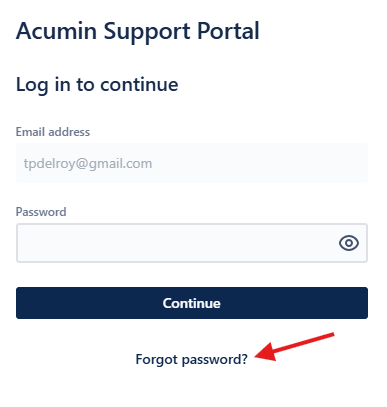
Press “Forgot Password”. (Yes, even if it’s your first time. Apologies that this part is not intuitive, we’re working to change this.)
-
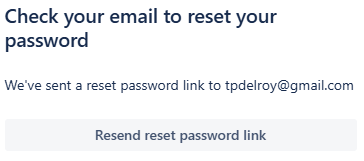
You will receive an email with a link to create a password.
-
Click on the link in your email to set your password
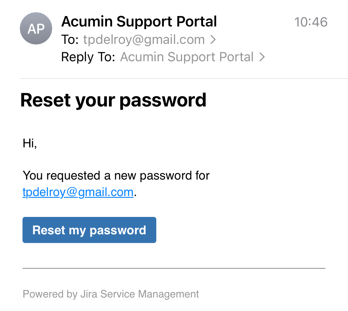
-
Set your password
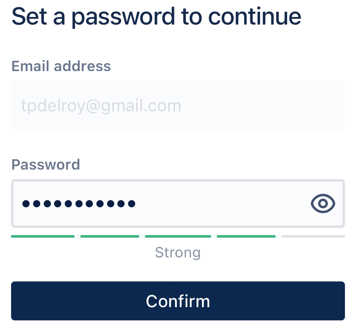
(It must contain at least 8 characters)
-
You’re done!!! Welcome to the Acumin Support Portal!
Next, we recommend you go here to learn more about the portal: https://acumin.scrollhelp.site/kb/support-portal-walkthrough
Or go directly to the portal: https://dexco.atlassian.net/servicedesk/customer/portals