.png)
Environment Overview
Acumin is a client server application. The client is a windows executable, and the server is a MS SQL database server. A windows share is required to host the application, and where common files will be stored. The Acumin application is launched from each user’s workstation through a shortcut to the executable, whose folder structure can be located on the windows share.
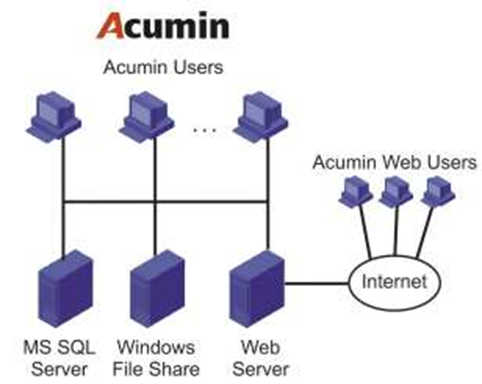
If there is more than one office location within the organization’s structure, there are two common scenarios to accommodate remote connectivity to the centralized server(s): The use of thin client/remote access products through Citrix, Terminal Services, etc. or the use of secondary file/application server.
Acumin does not run on Mac OS or Linux operating systems.
If Acuminweb has been licensed, then IIS is required. IIS will need a secure connection to the database server.
For support purposes Dexco requires a secured VPN connection with access to the database server to meet expectations under our Support model. In addition, there will be additional access requirements during the implementation process, including remote desktop access to the Acumin application/database servers and two dedicated workstations.
Application/Database Server
Note that the size of the server required is completely client dependent but does need to house four variations of the production database for various uses. These databases will be set up by the Dexco conversion and deployment teams.
|
Operating System Processor |
Windows Server 2016 with SQL Server 2017 For VM environments, we recommend starting with a 4 vCPU and increasing the amount if the processor queue length exceeds 10. For physical server environments, manex recommends Intel Xeon E5 or higher, or the equivalent AMD CPU |
|
Server RAM |
For Microsoft SQL Server 2017 we recommend a minimum of 32GB and increasing by 2GB per user over 10 users |
|
SSD/Hard Disk |
SQL Server 2017 requires 6GB of available hard-disk space alone to install. In addition, there must be enough room for the database as well enough to allow for future expansion. The recommended minimum for Acumin is 1TB of hard disk drive space. For best performance, we recommend the use of solidstate drives (SSD) |
In smaller environments, it might be cost effective to have the windows share on the MS SQL server. There is no constraint on where the windows share is if it is on the same physical network as the Acumin client workstations.
Client Workstation
|
Operating System |
Windows 10 Professional |
|---|---|
|
Processor |
For VM Environments we recommend a minimum of 2vCPU for user machines. For physical machines we recommend a minimum of at least 7th Gen i5 or higher, or equivalent AMD CPU |
|
RAM |
Minimum Acumin requirements for user machines VM or physical is 8GB for basic functionality and 16GB for demanding functions (invoicing) |
|
SSD/Hard Disk |
Acumin requires a minimum of 250GB hard disk drive space on user machines. For best performance, solid state drives (SSD) will be required for certain demanding functions (invoicing) |
These recommendations relate to the use of Acumin’s Window client only and therefore should be adjusted in accordance with other software requirements as needed.
In addition to the above, we require check printers that support MICR printing.
If output to Word and/or Excel are a requirement, the versions supported are MS Office versions 2013, 2016 and Office 365.