.png)
QUESTION: Can you please advise where to shut off the message box so it doesn’t pop up every time the user logs in
RESPONSE: The Show Notices message box that is displayed by default when logging into Acumin is part of the standard rule in the E-WIP Statement (Billing management), which provides an Acumin reminder note to both the member responsible to complete the billing intentions and their assistant. The notes will continue to be presented until all matters are identified with their billing intentions under the To Bill tab.
To remove the message there are two options:
-
The user completes the intentions on his/her To Bill tab by using the Set Action option in every matter
-
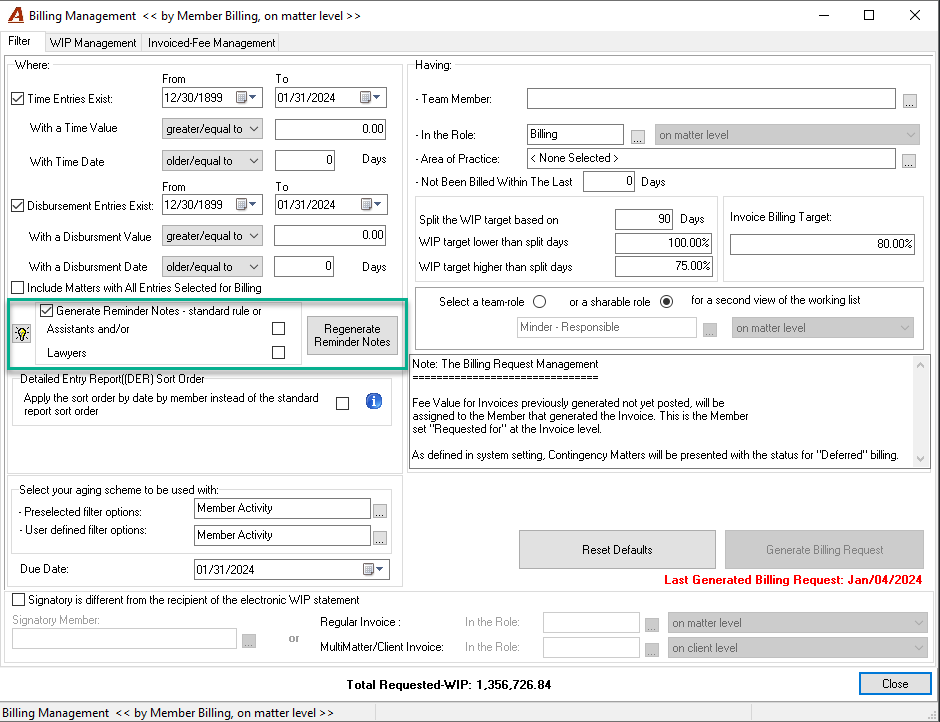
The next time you execute the Billing Management Tool, disable the option called "Generate Reminder Notes" in the Filter tab.
Note that when this option is disabled (OFF), users won't know whether the Billing Management has been run.
Furthermore, the standard rule sends the reminder to the lawyer responsible and the assistant. If you do not want to send the note to the lawyer, you can set up the rule to only send the notice to the assistant by selecting only the option for Assistants.