.png)
Overview
Interest calculated on accounts receivable is based on the historical interest rate category assigned to the matter. As the interest is calculated and stored using the rate category's effectice date, the interest will not be recorded as an accounting transaction and is therefore not reflected on the General Ledger. Consequently, it cannot be writte-off.
Interest Categories
Access to Interest Categories
-
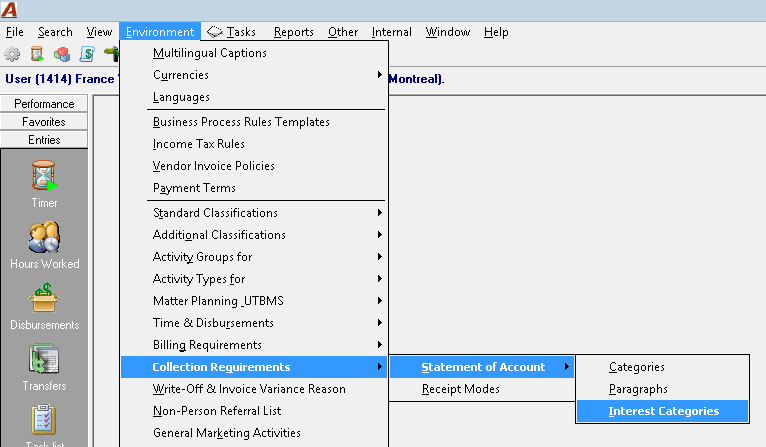
From Environment – Collection Requirements – Statement of Account – Interest Categories, users can create new interest categories and/or manage existing ones.
Creating and Managing Interest Rate Categories
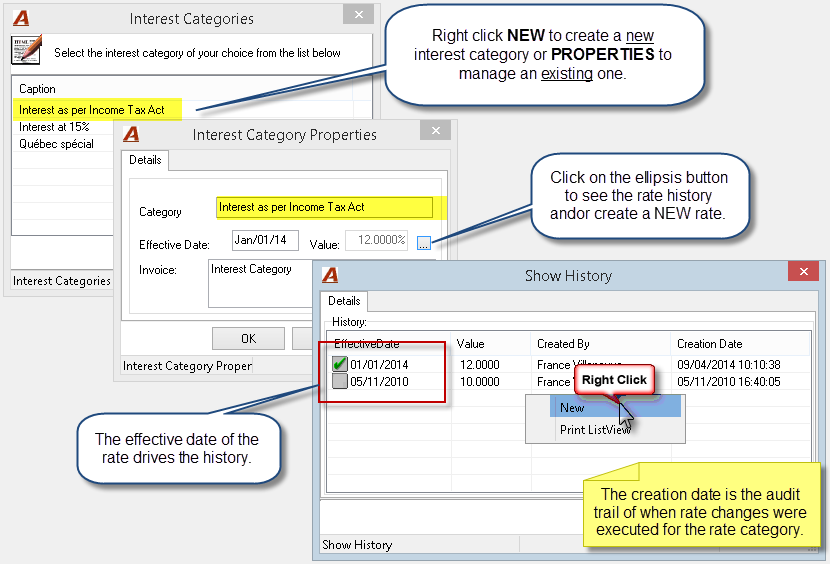
Users can create new interest categories to be applied to specific clients and or matters as well as apply rate changes to existing ones effective a particular date.
Properties – Interest Categories
-
Category: The name of the rate category should be clear and meaningful.
-
The Effective Date: The rate will apply to all invoices with a transaction date within the effective date period.
-
Value: This field displays the current rate value. The ellipsis button provides access to the rate history for the rate category where the user can insert a new rate effective a specific date.
Where to Assign Interest Rate Categories
Firm Properties:
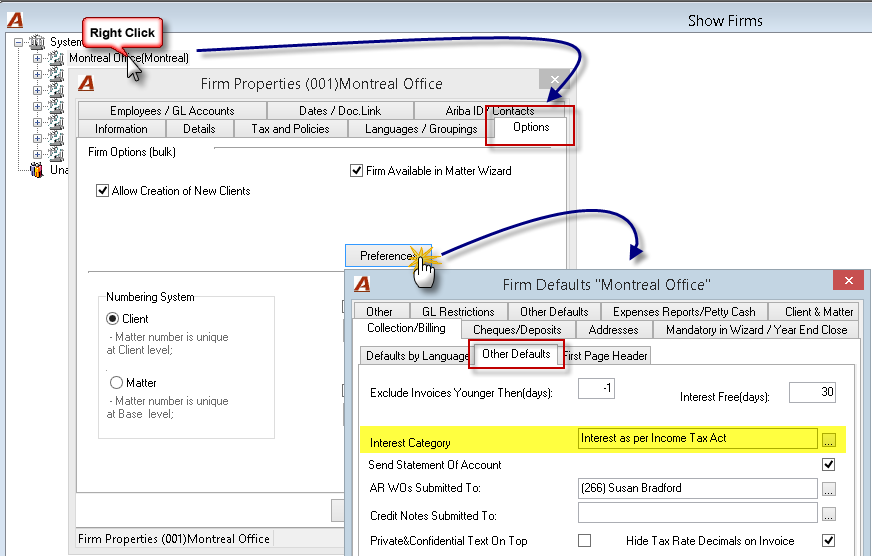
Set the default interest rate category in firm properties – Firm Defaults – Collection/Billing – Other Defaults tab.
Client Wizard and Client Properties:
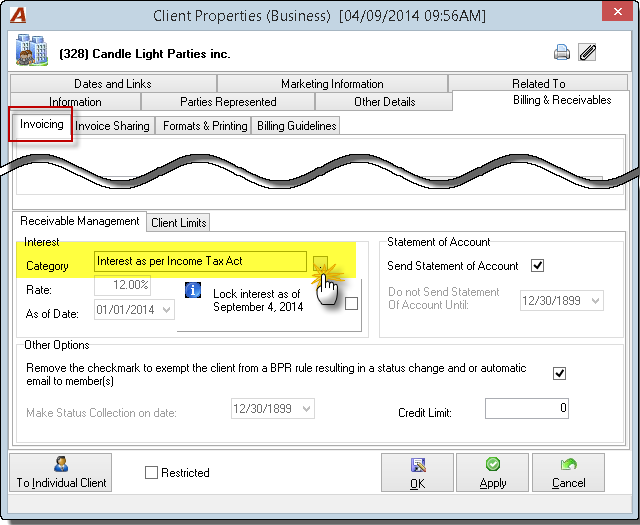
The default value set in firm properties will auto-populate the Client Wizard whereby authorized users can change it as needed as part of the new client creation process. Once a client is created, authorized users can change the assigned rate category through client properties.
Matter Wizard and Matter Properties:
The value set in client properties will auto-populate the matter Wizard whereby authorized users can change it as needed as part of the new matter creation process. Once a matter is created, authorized users can change the assigned rate category through matter properties.
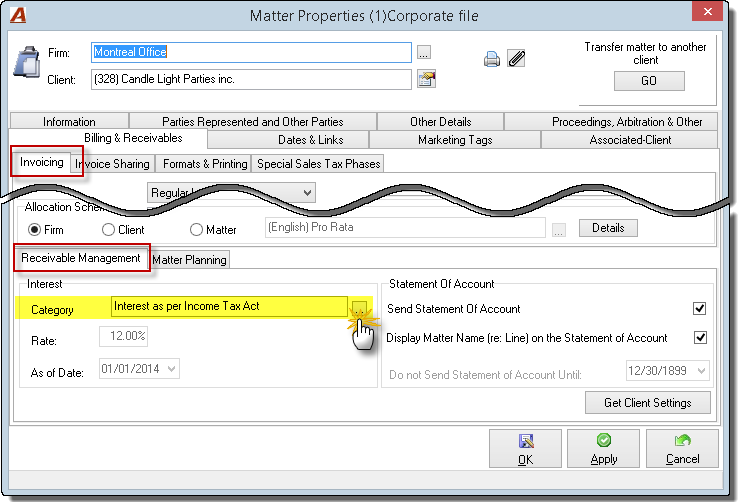
IMPORTANT: If the rate category is changed for a client and matter, the actual change of the rate category is NOT historical. This means that the system does not calculate the interest based on one rate category for a date range and another rate category for the second date range. Once a new rate category is applied to a client or a matter, the interest will re-calculate based exclusively on the history of the new rate category assigned.
Accounting for Interest
-
The interest is calculated based on the rate history of the assigned rate category on a daily basis; however, the latter is not accounted for in the general ledger. In the event that interest is paid, the interest will only be recorded in the general ledger on the transaction date of the deposit.
-
The interest will list on the AR inquiry and statement of accounts as long as the invoice has a balance outstanding or the latter is paid. If an invoice with interest is fully paid or cleared and later restated (through a reversal of payments) the unpaid interest will be re-calculated up-to the current date.
-
Although interest outstanding from previous matters will not appear on future statement of accounts for the same client, payment received for subsequent matters can be used to reduce the interest remaining on previous matters (with no outstanding balance).
-
As the interest is not recorded in the general ledger until it is paid, it cannot be written-off in the same way one writes-off a receivable.
Interest Calculation in the Statement of Account
Although the interest is calculated based on the rate history of the assigned rate category on a daily basis and printed in the statement of account, options to manually trigger the interest calculation from the statement of account filter and/or stop the calculation as of a certain date are available for the authorized user.
Manual Recalculation of Interest in the Statement of Account
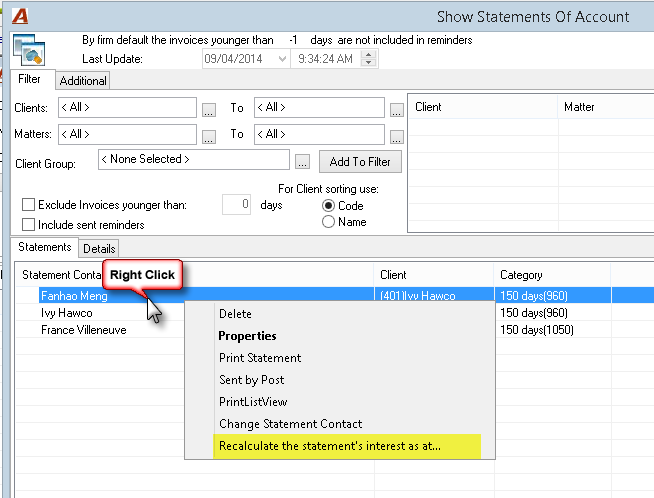
On the Show Statements of Account window, the "Recalculate the statement's interest as at:" option will trigger the calculation of the interest as at a specific date. The authorized user will be able to perform this operation through the right-click contextual menu on the Statements tab.
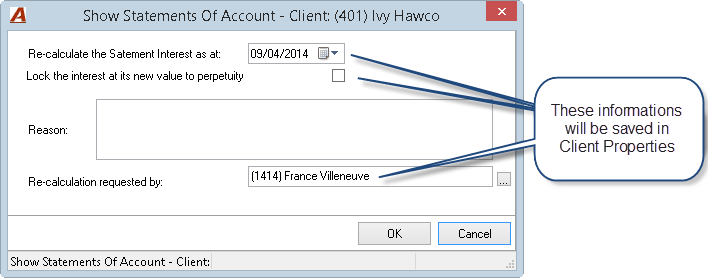
-
On OK, the interest will be recalculated as at the date selected in the "Re-calculate the statement Interest as at:" field. The user will be able to print the statement of account with this new interest amount calculated.
Note that the overnight process will recalculate the interest as at the server date thus overriding the previous manual calculation.
-
If the user wants to save the new value (the one recalculated as at the date selected by the user on then interest re-calculation request form) the "Lock the interest at its new value to perpetuity" must be turned ON;
-
On Cancel – the operation will be cancelled.
The "Lock Interest as of" option in the Client Properties
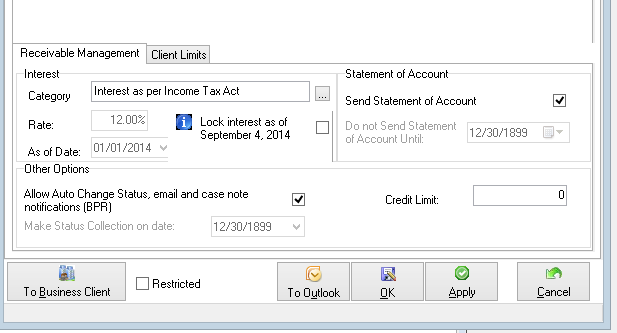
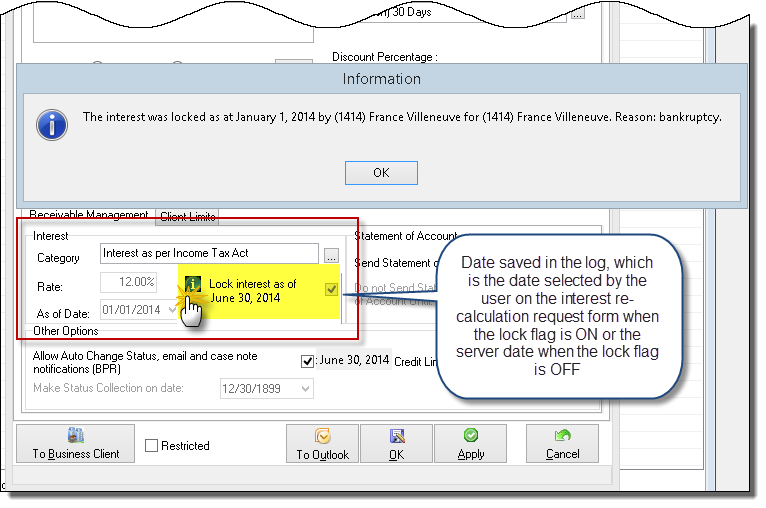
The "Lock interest as of…" flag in the Client Properties under the Billing & Receivables tab:
-
If the "Lock the interest at its new value to perpetuity" flag is OFF in the request form, then the date displayed in this section will be as at the date the interest was most recently calculated and the flag will be unlocked.
-
If the "Lock the interest at its new value to perpetuity" flag is ON in the request form, then the date displayed in this section will be the date previously selected by the user on the interest re-calculation request form and the flag will be locked.
-
By clicking on the information icon, the details of the lock will be shown.
The "Lock Interest as of" information in the Matter Properties
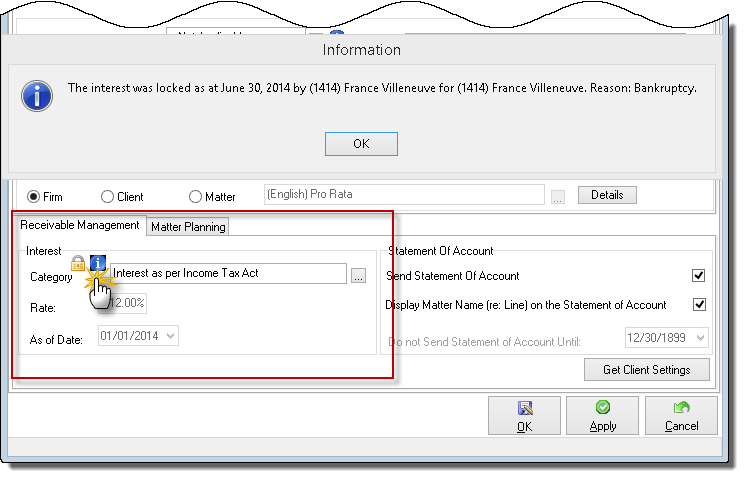
If the interest calculation has been locked at the client level, a lock icon will be displayed in the Interest section in all the matters under the client.
By clicking on the information icon, the details of the lock will be shown.
Removing the Interest Calculation for a Client
Terminating the Interest Calculation for a Client
To stop the interest calculation for a client, you have to remove the interest category from the client properties file.
-
In the Client Properties - Collection & Billing tab , highlight the category content in the interest section, delete it;
-
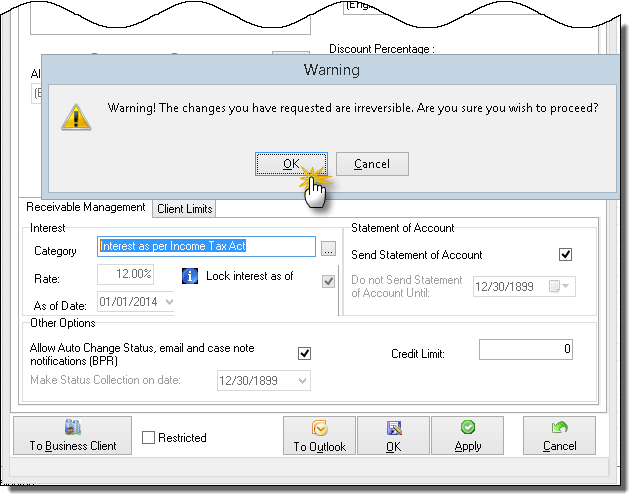
Click on the Apply button, a warning message will appear, click OK if you want to proceed;
-
Click on the OK button to exit from the Client Properties form;
-
Repeat step 1, 2, 3 into the matter properties if you have set an interest category at the matter level.
-
By going back in, you will note the percentage has been modify at 0% (display only);
-
This modification is effective right away in the AR inquiry but not in the statement of accounts module. The information will be available the next day, after the overnight calculation process. If the user would like the change to be effective immediately, the user can click on the "Recalculate the statement's interest as at" option available in the Show Statement of account form to perform the change manually for a specific client.
Resetting the Interest Calculation After Locking the Interest as of a Specific Date
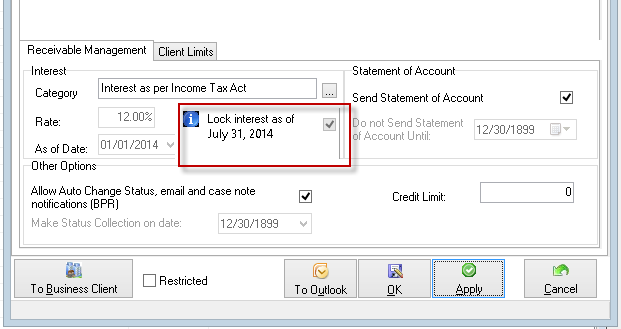
To reset the interest calculation for a client after having it locked, the user will have to remove and reselect the interest category in the client properties form.
-
In the Client Properties - Collection & Billing tab , highlight the category content in the interest section, delete it;
-
Click on the Apply button, a warning message will appear, click OK if you want to proceed;
-
Click on the OK button to exit from the Client Properties form;
-
Repeat step 1, 2, 3 into the matter properties if you have set an interest category at the matter level.
-
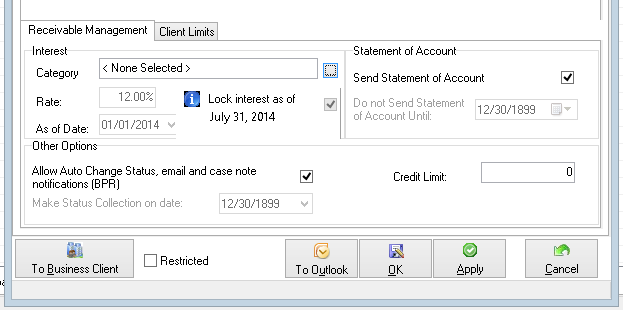
Click OK to exit the client properties, by going back in, you will note the percentage has been modify at 0% (display only);
Note: This modification is effective right away in the AR inquiry but not in the statement of account.
-
Reselect the desired interest category. You will note the percentage will change.
-
This modification will not be effective right away in the AR inquiry and in the statement of account. The information will be available the next day, after the overnight calculation process.
-
If the user wants to see the effect immediately, he can:
-
Ran the update in the statement of account
-
Highlight the client and select the option "Recalculate the statement's interest as at" option available in the Show Statement of account form to run the calculation manually for this client.
-
The interest amount will be updated in the Statement of account and in the AR inquiry.
-
-
In the client properties, the interest section will also be updated accordingly.