.png)
Purpose: Configure the firm-wide default so that “Send Statement of Account” is OFF by default, ensuring newly created Clients and Matters do not have the SOA option set to ON automatically.
Overview
In Acumin, the default position of “Send Statement of Account” (SOA) on new Client creation is inherited from Firm-level defaults. New Matters inherit from their parent Client. To stop SOA from being automatically enabled for new records, set the Firm default to OFF, and verify client and matter behavior.
After changing the Firm default to OFF, existing Clients/Matters keep their current setting. Only newly created Clients/Matters will inherit the new OFF default.
Prerequisites
-
You have permission to modify Environment/System Settings.
-
You understand your firm’s collections policy for SOA distribution.
Step-by-Step: Set Firm Default to OFF
-
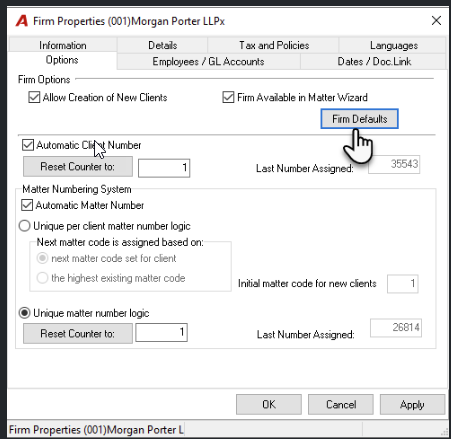
Open View > Firms > Firm Properties.
-
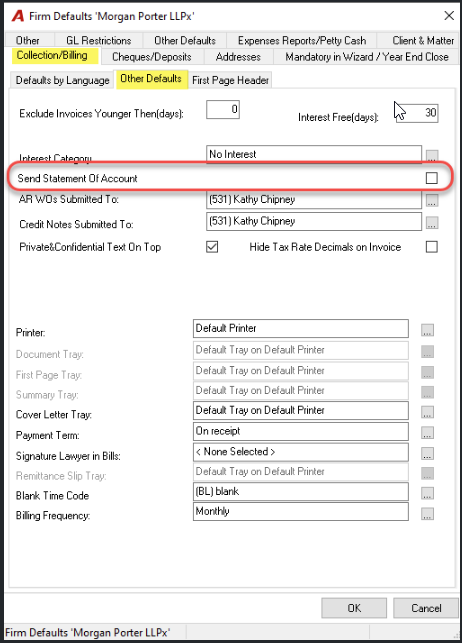
Navigate to the Firm Defaults button to access the Collections/Billing - Other Defaults tab
-
Locate the option “Send Statement of Account” (Firm Default). Change its value to OFF (unchecked). Save your changes.
-
Confirm inheritance behavior:
-
Create a new Client and open Client Properties > Billing & Receivables > Statement of Account section. Verify that “Send Statement of Account” is OFF.
-
Create a new Matter for that Client and open Billing & Receivables – Invoicing > Statement of Account section. Verify that “Send Statement of Account” is OFF (inherited from the Client).
-
Additional Information
New Clients: default SOA flag is OFF; they are excluded from SOA runs unless manually enabled later.
-
New Matters: inherit OFF from the Client, preventing unintended SOA creation per matter.
-
Existing records: unaffected; review selectively if you want to align older Clients/Matters with the new policy.
Trouble shooting;
-
New Matters show SOA ON but Client is OFF: Confirm the Matter was created after changing the Firm default and that the Client’s SOA flag is OFF at creation time (Matters inherit from the Client).
-
Existing Clients keep SOA ON: This is expected. Edit those Client/Matter properties manually or via an approved mass-update process if you need to align legacy records.
-