.png)
Overview
Users working with shared invoices can group and display complete receivable balances for participants inclusive of all shared invoices on which they participate, or for the host client inclusive of all participant balances. Whereas the former shows the balance that the participant is responsible for clearing, the latter shows the total receivable position for all the participants of a shared invoice.
In conclusion, the application shows the receivable position for the affected client, regardless of the results for the client being as a host of the shared structure, a participant, or both.
Highlights
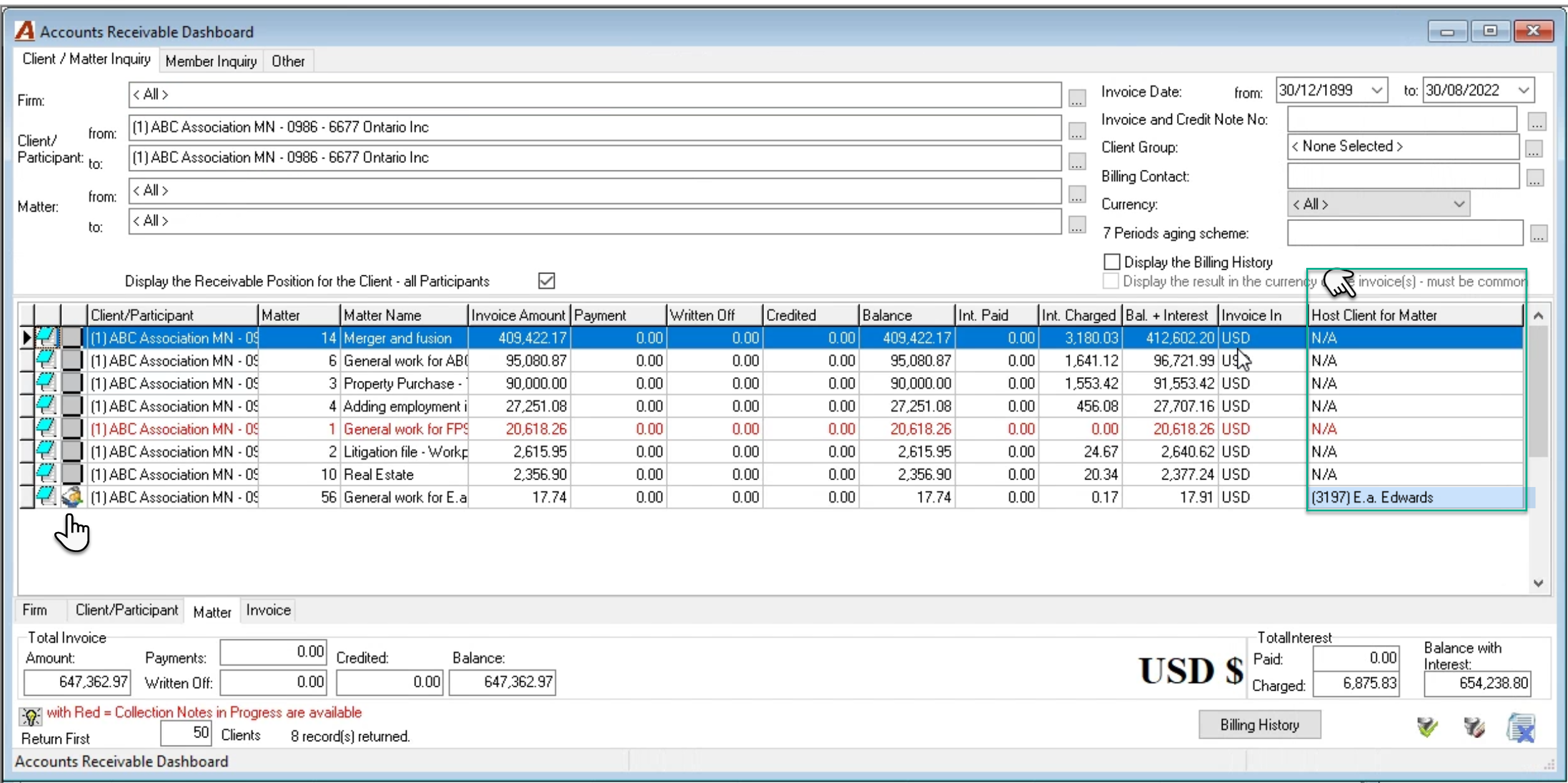
“Display the Receivable Position for the Client – all Participant” checkbox option:
OFF (unchecked): Default position for the Account Receivable Dashboard. In this case, the filtered results will include the receivable balance for the client or matter for “non-shared invoices” as well as “shared invoices” where the client is a participant regardless of the client being a host to the shared invoice or not.
ON (checked marked): the filtered results will include the receivable balance for the client or matter for “non-shared invoices” and “shared invoices” as well as the balance owed by all other participants of shared invoices where the client is the host of the invoice, regardless of the client being a participant to the shared invoice or not.
Participant icon: This icon below identifies a receivable record that is related to a participant that is not also the host client. Host clients that are participants will not have the icon.
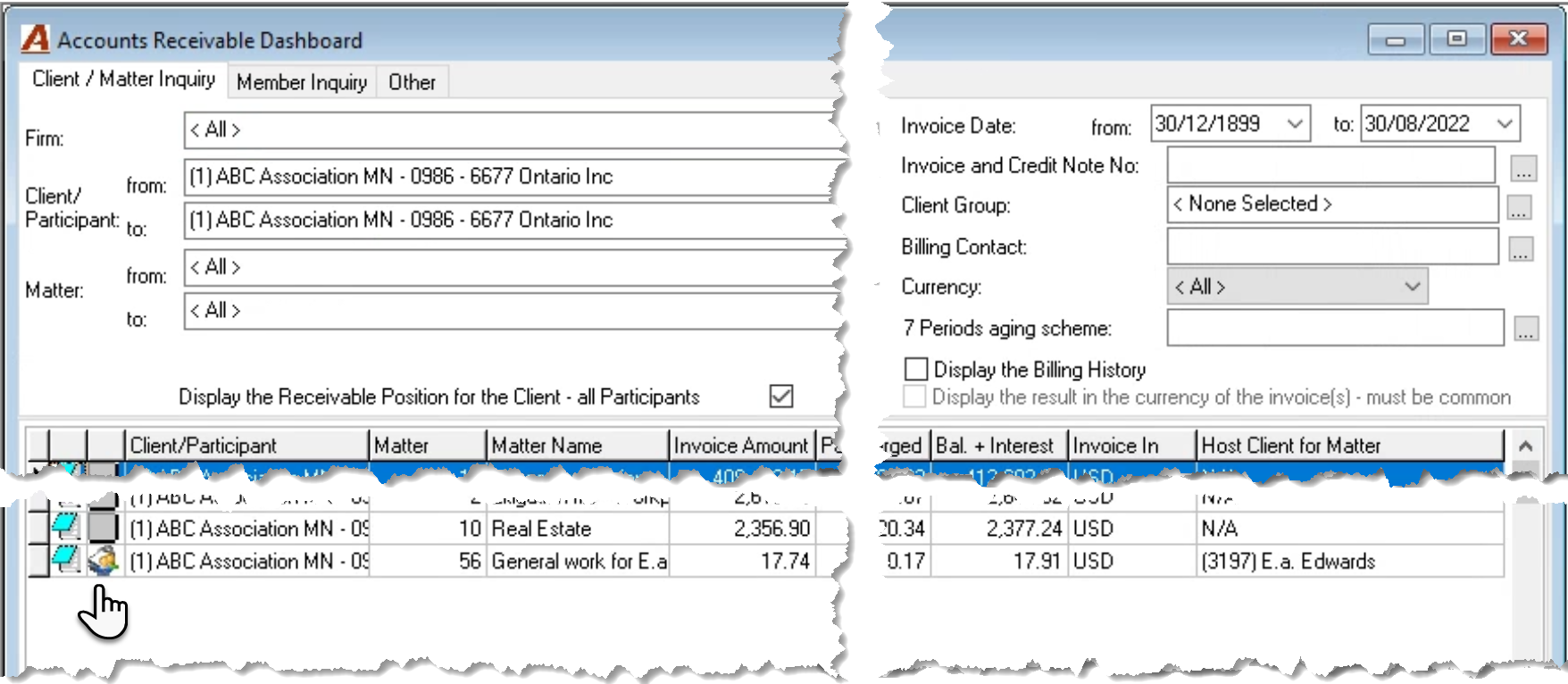
Host Client for Matter: This column shows the host client for the shared structure. Non-shared invoices show a value of “N/A”.
Process
Scenarios for Examples
|
Client |
Matter |
Host client |
Invoice # |
Participants |
Shares |
Total |
|
477 |
1 |
N/A |
9155 |
|
|
608.24 |
|
|
|
|
|
|
|
|
|
477 |
1 |
477 |
9168 |
478 |
883.12 |
1766.24 |
|
|
|
|
|
479 |
883.12 |
1766.24 |
|
|
|
|
|
|
|
|
|
477 |
2 |
477 |
9172 |
477 |
480.73 |
1281.95 |
|
|
|
|
|
478 |
160.25 |
1281.95 |
|
|
|
|
|
479 |
640.97 |
1281.95 |
|
|
|
|
|
|
|
|
|
479 |
1 |
479 |
9180 |
479 |
496.79 |
|
|
|
|
|
|
477 |
467 |
|
Display the Receivable Position for the Client – all Participants
Checkbox option unchecked (OFF)
Client Position Use Case:
To identify the total receivable position for a client, inclusive of AR balances where the client is a participant – has the responsibility to pay their share.
Access Details:
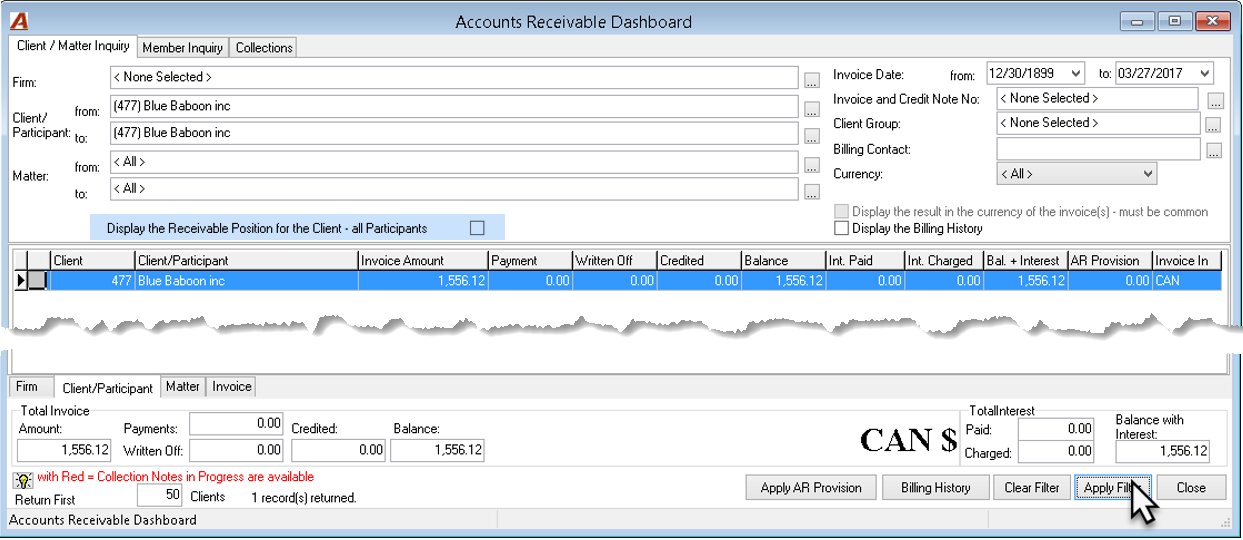
To view the receivable balance by matter or invoice, double click to drill through the selected client and then matter, or press on the Matter or Invoice tabs - bottom of the list view - to view all the matters or invoices for the clients on the client/participant tab.
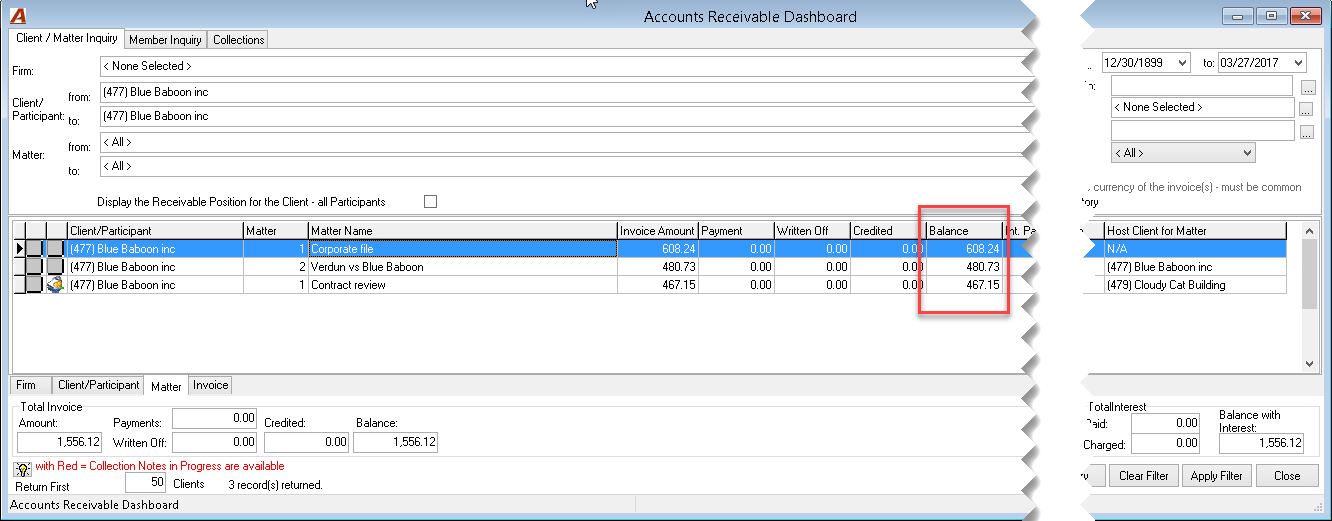
Note: The drill through action is the equivalent of filtering for the specific client, matter, and invoice, whereas navigation across the matter and invoice tabs will show the results by matter or invoice of the initial filter applied.
In this case, the results will show the receivable balances where Client #477 has a balance for non-shared invoices – invoice #9155 and where Client #477 has a balance where he is a participant (host or not) on shared invoices: #9172 and #9180.
|
Client |
Matter |
Host client |
Invoice # |
Participant |
Shares |
Total |
|
477 |
1 |
N/A |
9155 |
|
|
608.24 |
|
|
|
|
|
|
|
|
|
477 |
1 |
477 |
9168 |
478 |
883.12 |
1766.24 |
|
|
|
|
|
479 |
883.12 |
|
|
|
|
|
|
|
|
|
|
477 |
2 |
477 |
9172 |
477 |
480.73 |
1281.95 |
|
|
|
|
|
478 |
160.25 |
|
|
|
|
|
|
479 |
640.97 |
|
|
|
|
|
|
|
|
|
|
479 |
1 |
479 |
9180 |
479 |
496.79 |
963.94 |
|
|
|
|
|
477 |
467.15 |
|
Matter Position Use Case:
To identify the total receivable position for a matter, inclusive of AR balances where the client is a participant – has the responsibility to pay their share.
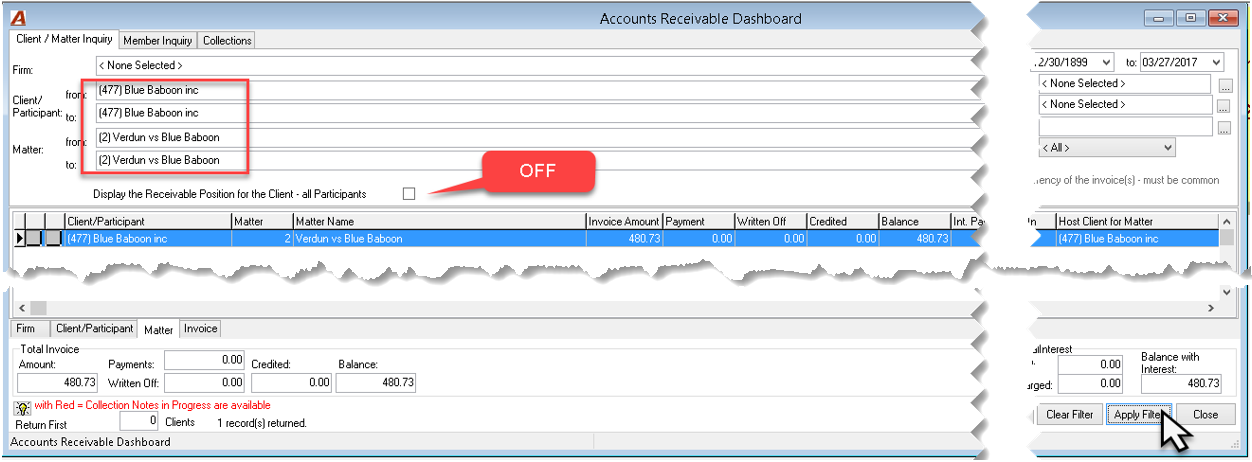
Access Details:
To view the receivable balance by invoice, double click to drill through the selected matter or press on the Invoice tab - bottom of the list view - to view all the invoices for the matters listed on the matters tab.
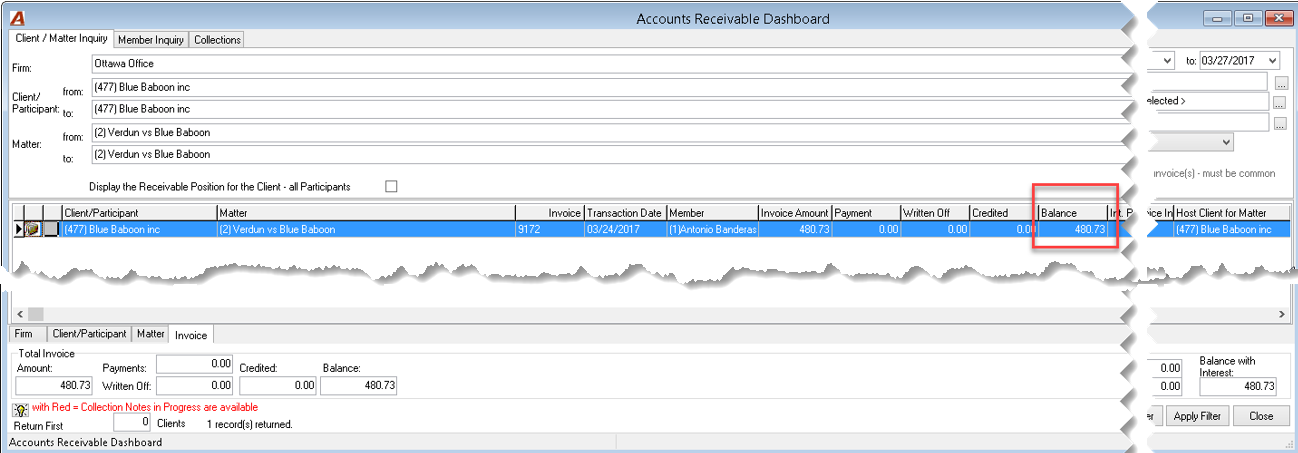
In this case, the results will show the receivable balances where the matter #477-2 has a balance for non-shared invoices – no invoices meet this criterion and where the client #477 is a participant (host or not) on shared invoices #9172 and #9180 for matter 2.
|
Client |
Matter |
Host client |
Invoice # |
Participant |
Shares |
Total |
|
477 |
1 |
N/A |
9155 |
|
|
608.24 |
|
|
|
|
|
|
|
|
|
477 |
1 |
477 |
9168 |
478 |
883.12 |
1766.24 |
|
|
|
|
|
479 |
883.12 |
|
|
|
|
|
|
|
|
|
|
477 |
2 |
477 |
9172 |
477 |
480.73 |
1281.95 |
|
|
|
|
|
478 |
160.25 |
|
|
|
|
|
|
479 |
640.97 |
|
|
|
|
|
|
|
|
|
|
479 |
1 |
479 |
9180 |
479 |
496.79 |
963.94 |
|
|
|
|
|
477 |
467.15 |
|
Invoice Position Use Case:
To identify the total receivable position for a specific invoice, inclusive of AR balances where the client is a participant – has the responsibility to pay their share.
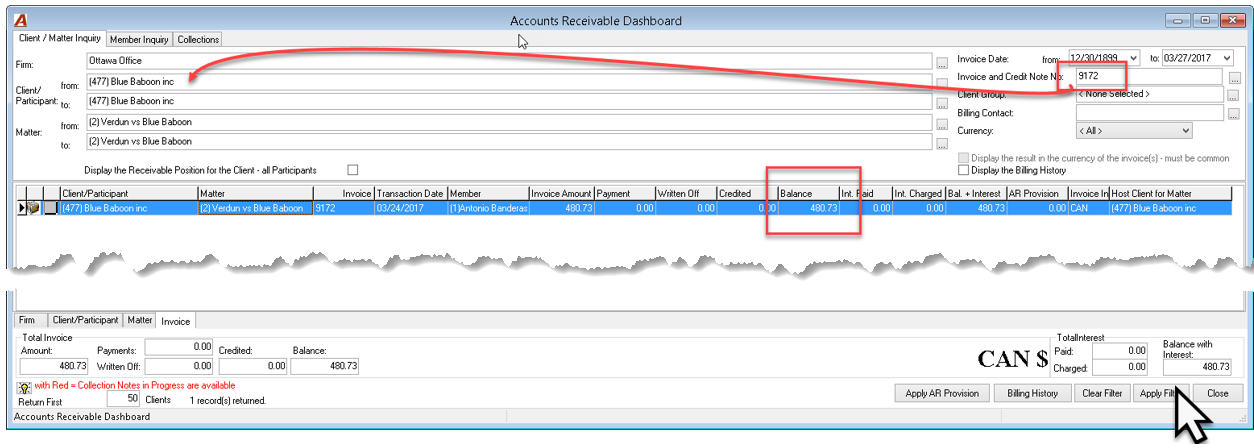
In this case, as invoice #9172 is a shared invoice, the results will show the receivable balance for client 477 as participant (unpaid share only).
|
Client |
Matter |
Host client |
Invoice # |
Participant |
Shares |
Total |
|
477 |
1 |
N/A |
9155 |
|
|
608.24 |
|
|
|
|
|
|
|
|
|
477 |
1 |
477 |
9168 |
478 |
883.12 |
1766.24 |
|
|
|
|
|
479 |
883.12 |
|
|
|
|
|
|
|
|
|
|
477 |
2 |
477 |
9172 |
477 |
480.73 |
1281.95 |
|
|
|
|
|
478 |
160.25 |
|
|
|
|
|
|
479 |
640.97 |
|
|
|
|
|
|
|
|
|
|
479 |
1 |
479 |
9180 |
479 |
496.79 |
963.94 |
|
|
|
|
|
477 |
467.15 |
|
Display the Receivable Position for the Client – all Participants
Checkbox option checked marked (ON)
Client Position Use Case:
To identify the total receivable position for a client, inclusive of AR balances where the client has a responsibility to pay (the client is a participant) as well as the AR balance for all other participants where the client is the host to the shared matter.
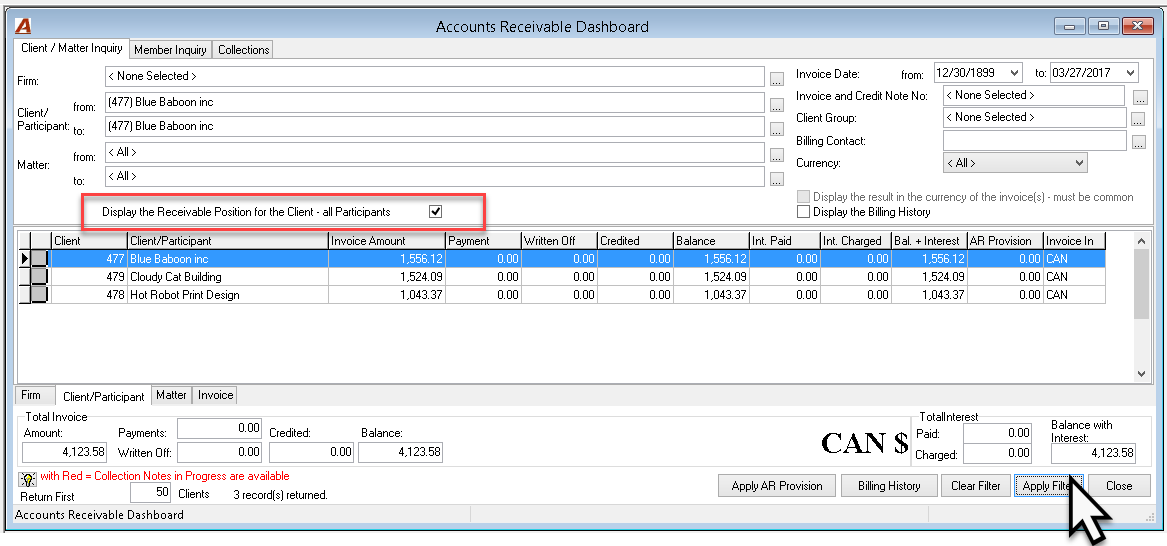
Access Details:
To view the receivable balance by matter or invoice press on the Matter or Invoice tabs - bottom of the list view. This will ensure you capture the balance for all other participants.
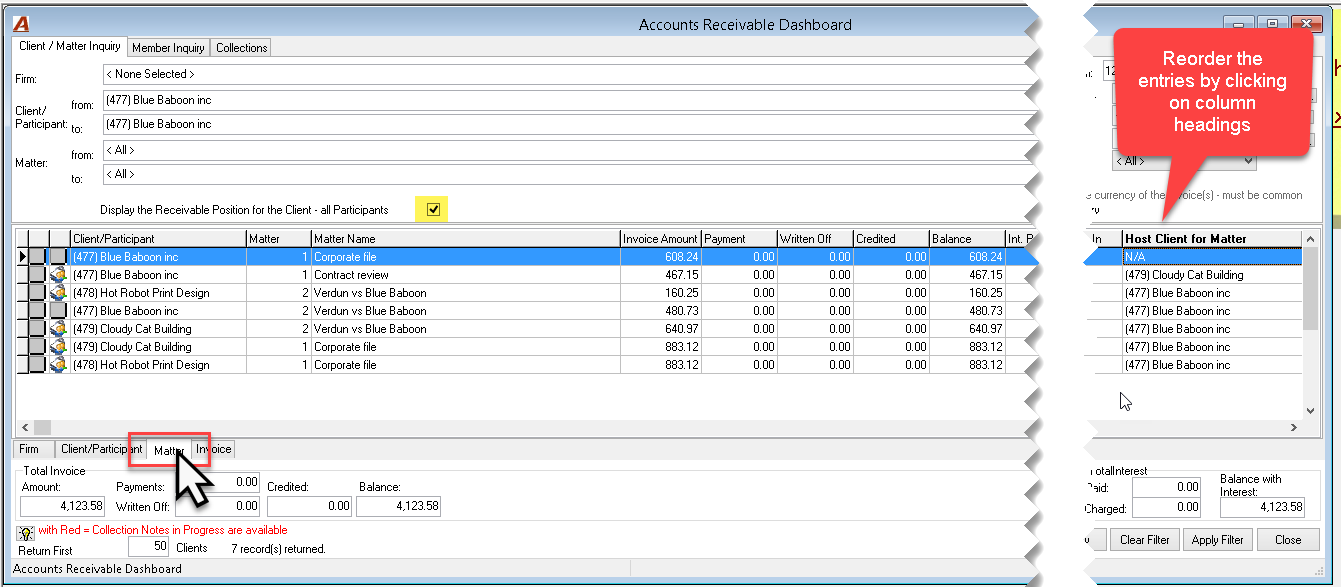
In this case, the results will show the receivable balance for the non-shared invoice for client #477 – invoice #9155; where client #477 is a participant (host or not) - shared invoices #9180 and 9172; as well as for all participants where client #477 is the host of the shared structure - invoices #9168 and #9172
|
Client |
Matter |
Host client |
Invoice # |
Participant |
Shares |
Total |
|
477 |
1 |
N/A |
9155 |
477 |
|
608.24 |
|
|
|
|
|
|
|
|
|
477 |
1 |
477 |
9168 |
478 |
883.12 |
1766.24 |
|
|
|
|
|
479 |
883.12 |
|
|
|
|
|
|
|
|
|
|
477 |
2 |
477 |
9172 |
477 |
480.73 |
1281.95 |
|
|
|
|
|
478 |
160.25 |
|
|
|
|
|
|
479 |
640.97 |
|
|
|
|
|
|
|
|
|
|
479 |
1 |
479 |
9180 |
479 |
496.79 |
963.94 |
|
|
|
|
|
477 |
467.15 |
|
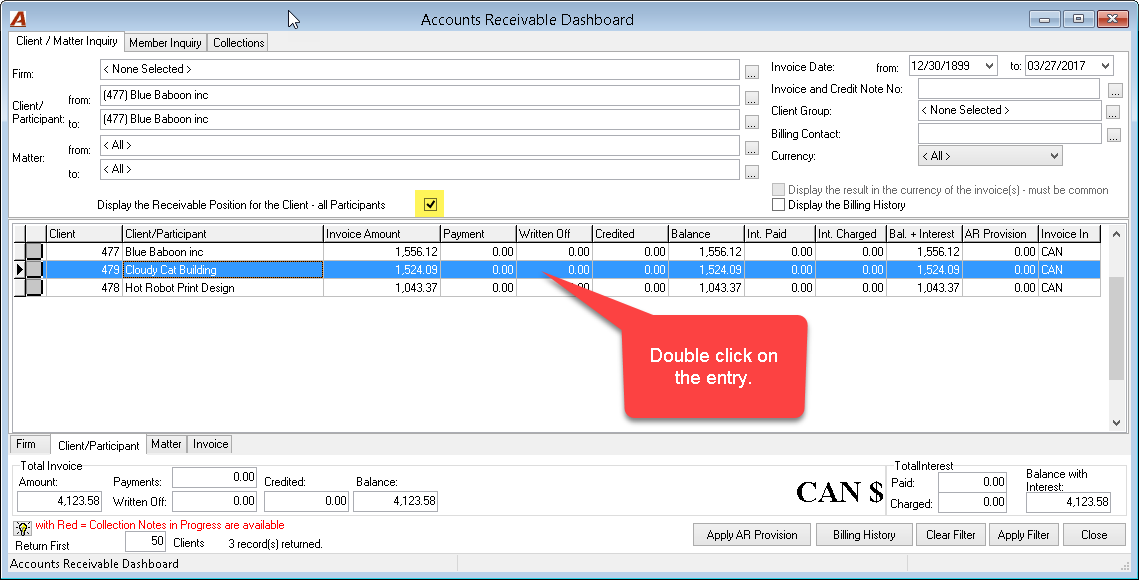
Press on any of the listed records to view the receivable balance details of the client selected, as this action will automatically change the filter content. Once the filter is applied, the same type of information will show to support the position of the checkbox.
Matter Position Use Case:
To identify the total receivable position for a matter, inclusive of AR balances where the client has a responsibility to pay (the client is a participant) as well as the AR balance for all other participants where the client is the host to the shared matter.
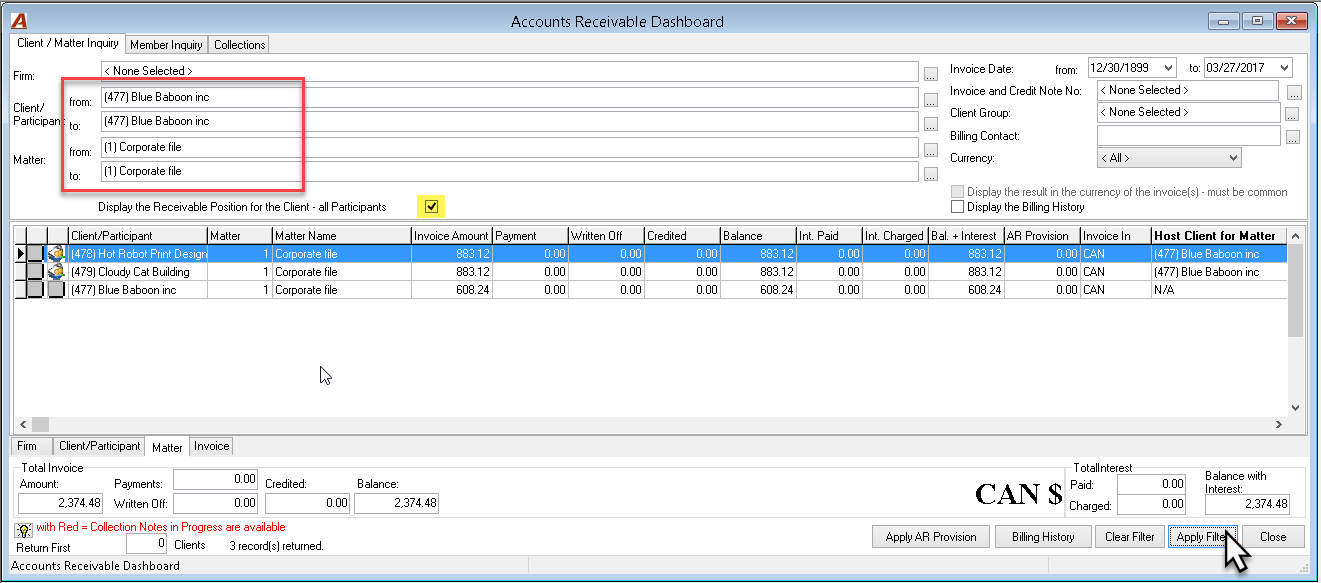
In this case, the results will show the receivable balance for the non-shared invoice for matter #477 - 1 – invoice #9155; where client #477 is a participant (host or not) - shared invoice #9180; as well as for all participants where client #477 is the host of the shared structure for matter #477-1 - invoice #9168
|
Client |
Matter |
Host client |
Invoice # |
Participant |
Shares |
Total |
|
477 |
1 |
N/A |
9155 |
477 |
|
608.24 |
|
|
|
|
|
|
|
|
|
477 |
1 |
477 |
9168 |
478 |
883.12 |
1766.24 |
|
|
|
|
|
479 |
883.12 |
|
|
|
|
|
|
|
|
|
|
477 |
2 |
477 |
9172 |
477 |
480.73 |
1281.95 |
|
|
|
|
|
478 |
160.25 |
|
|
|
|
|
|
479 |
640.97 |
|
|
|
|
|
|
|
|
|
|
479 |
1 |
479 |
9180 |
479 |
496.79 |
963.94 |
|
|
|
|
|
477 |
467.15 |
|
Invoice Position Use Case:
To identify the total receivable position for an invoice, inclusive of AR balances where the client has a responsibility to pay (the client is a participant) as well as the AR balance for all other participants where the client is the host to the shared invoice.
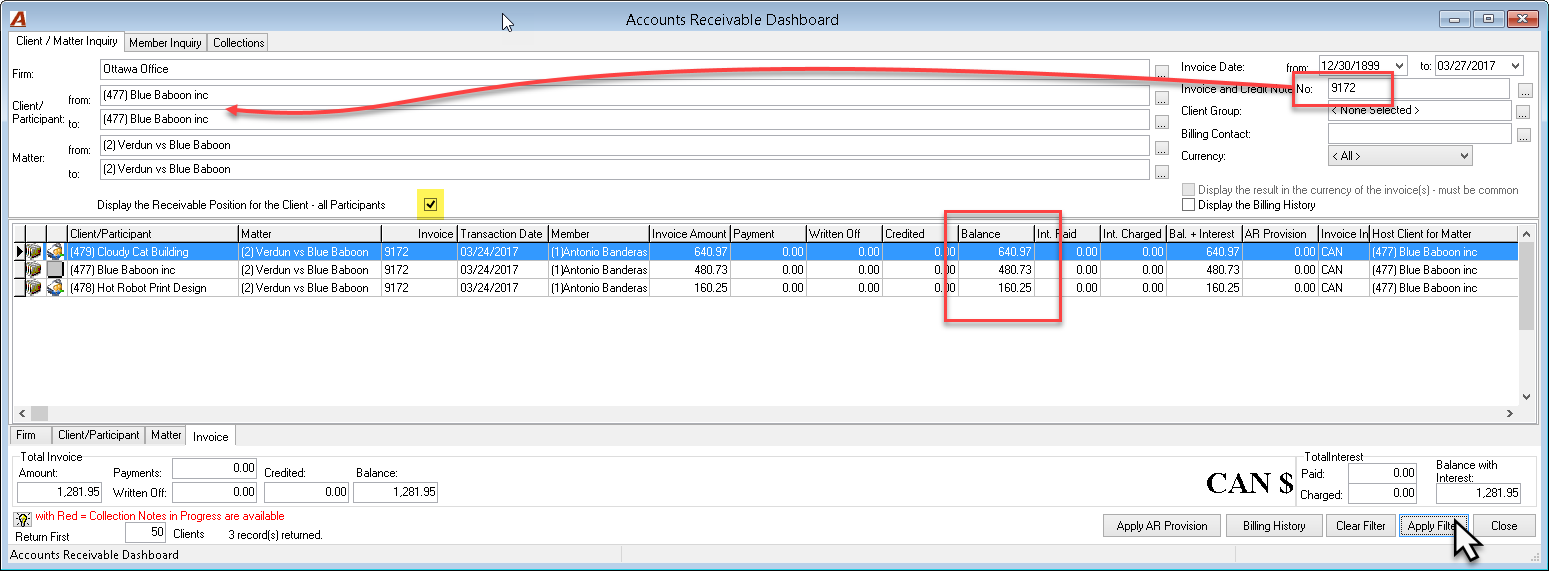
In this case, the results will show the receivable balance for the shared invoice #9172; where client #477 is a participant (host or not) - shared invoice #9180; as well as for all participants - #477, #478 and #479 - where client #477 is the host of the shared invoice structure.
|
Client |
Matter |
Host client |
Invoice # |
Participant |
Shares |
Total |
|
477 |
1 |
N/A |
9155 |
|
|
608.24 |
|
|
|
|
|
|
|
|
|
477 |
1 |
477 |
9168 |
478 |
883.12 |
1766.24 |
|
|
|
|
|
479 |
883.12 |
|
|
|
|
|
|
|
|
|
|
477 |
2 |
477 |
9172 |
477 |
480.73 |
1281.95 |
|
|
|
|
|
478 |
160.25 |
|
|
|
|
|
|
479 |
640.97 |
|
|
|
|
|
|
|
|
|
|
479 |
1 |
479 |
9180 |
479 |
496.79 |
963.94 |
|
|
|
|
|
477 |
467.15 |
|
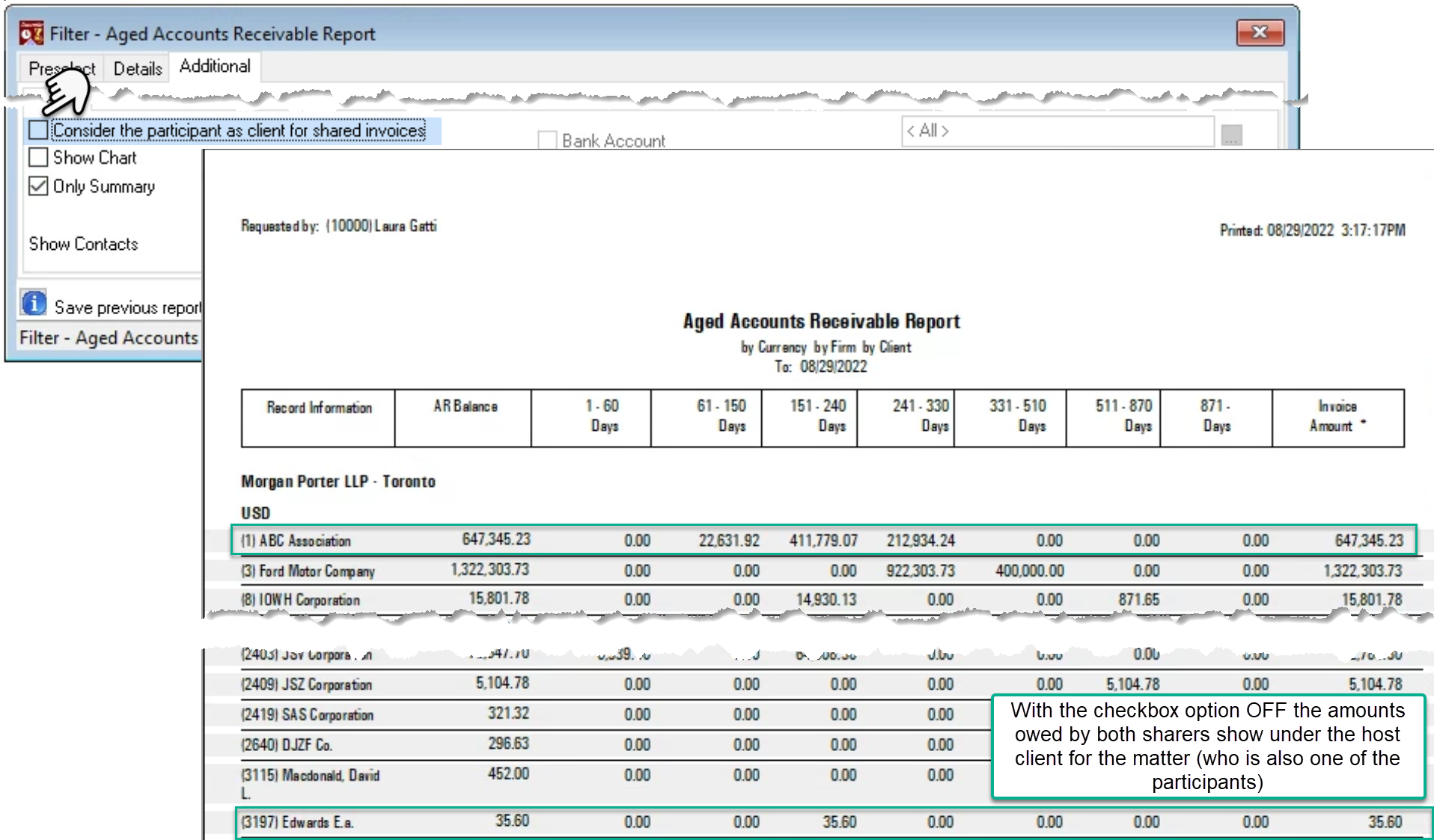
Summary Screenshot
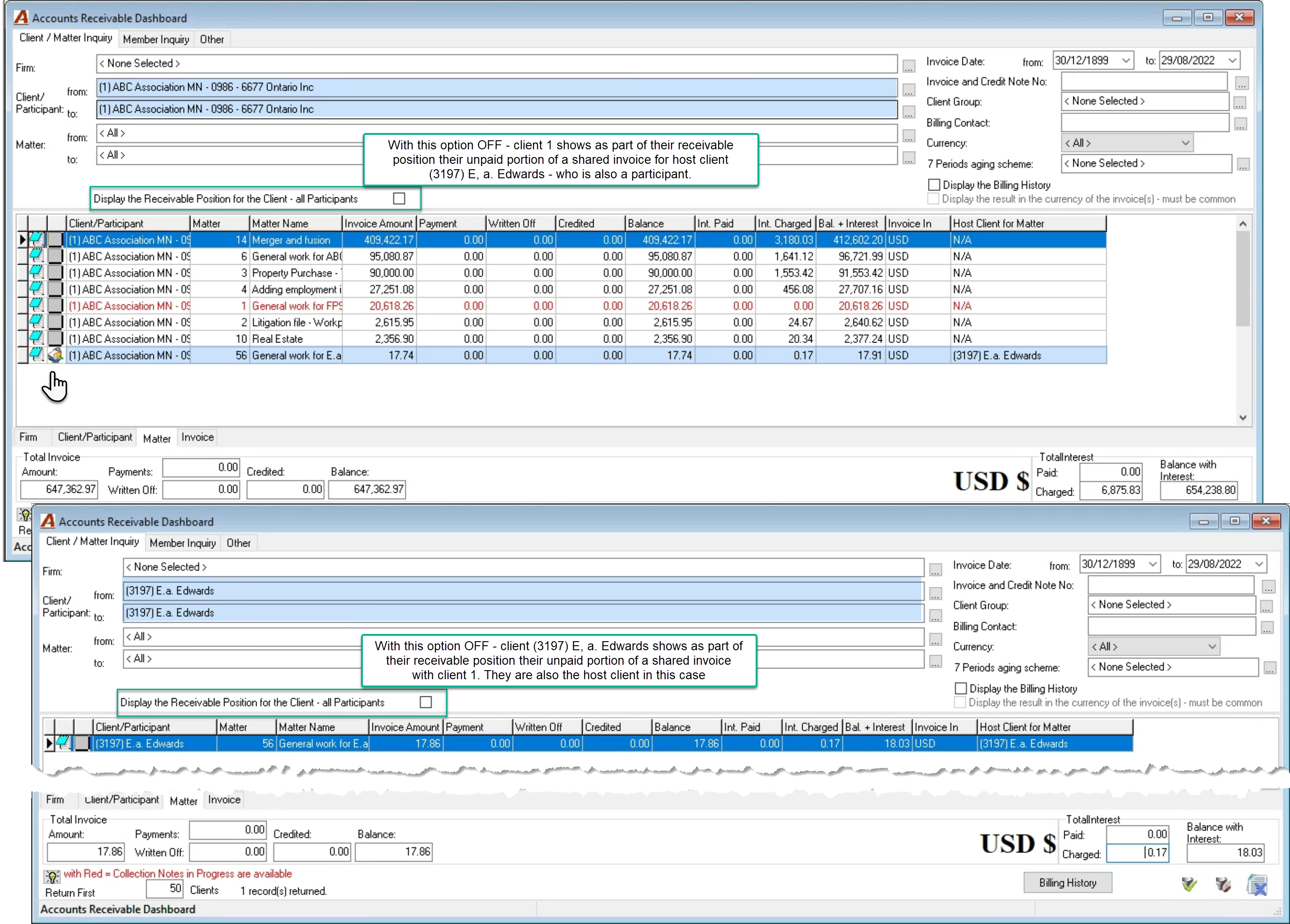
Aged AR
Where the participant is considered the client in context of payment responsibility
Equal to the AR Dashboard checkbox default position – Unchecked OFF
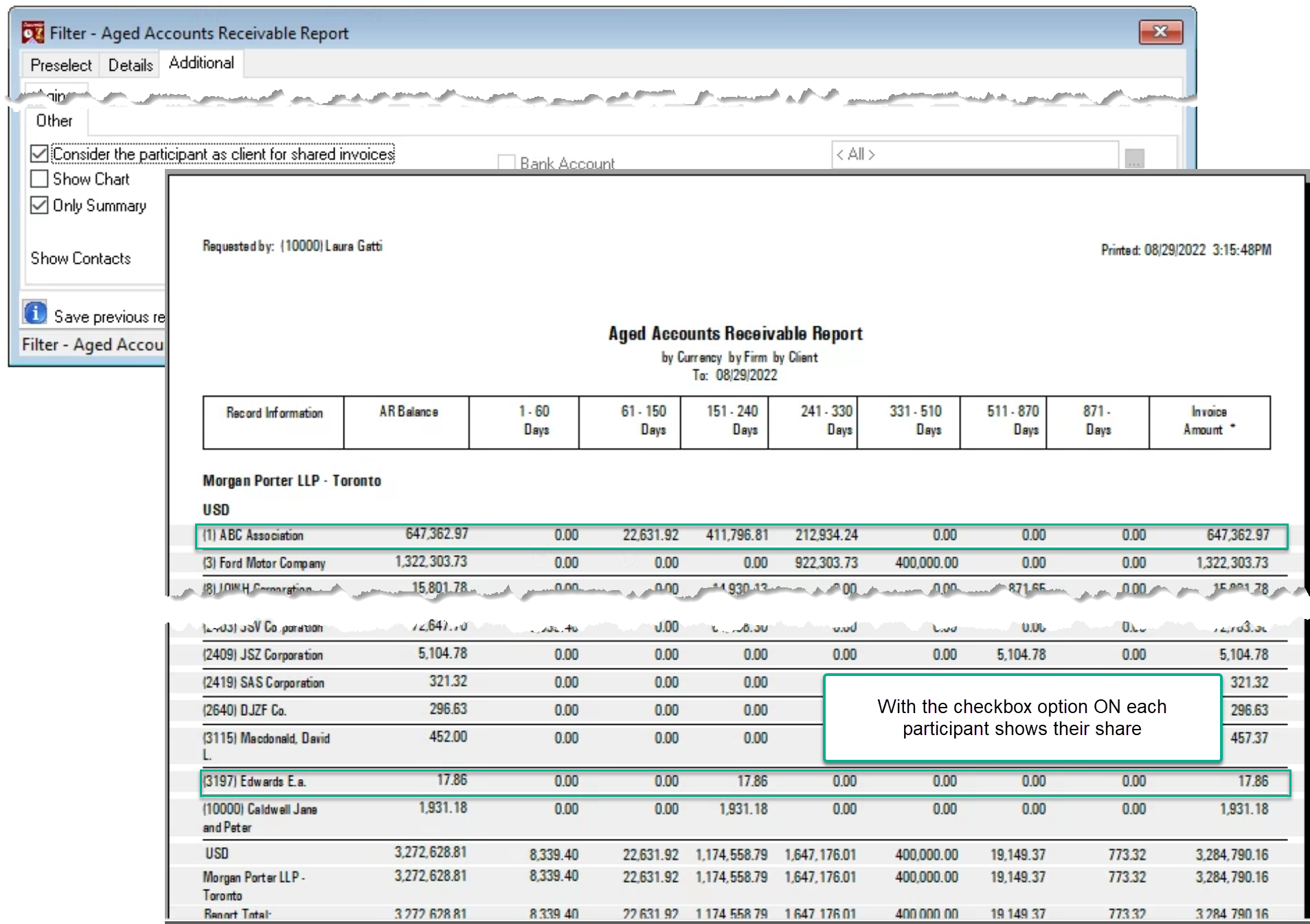
Where the position of participant will be ignored
Equal to the AR Dashboard checkbox check marked ON