.png)
QUESTION: We’ve noticed the tabs have changed in Word upon generation of an invoice from Acumin. Once the invoice is save in Word there are further changes to the Tab that causes extra lines.
RESPONSE:
The user generates an MS Word Invoice from Acumin. The invoice will generate as expected. The invoice is saved using MS Word Version. Upon retrieving the invoice, extra empty lines appear within the invoice.
This is caused by an MS Word Version compatibility. The Word Templates have been built under a different MS Word Version using the .doc extension.
This issue has been resolved moving forward with Acumin 2.0 and using Crystal Invoice.
Within your existing version of Acumin, the following workaround alternatives exist:
Option 1: Save as you do now and when retrieving the saved copy, manually delete the extra tab.
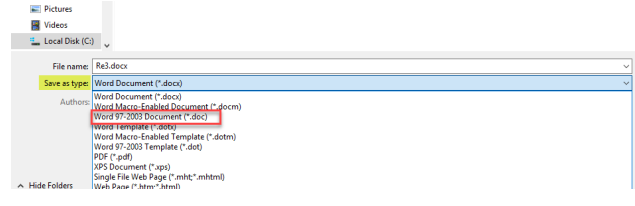
Option 2: When you save, change the file type to *.doc
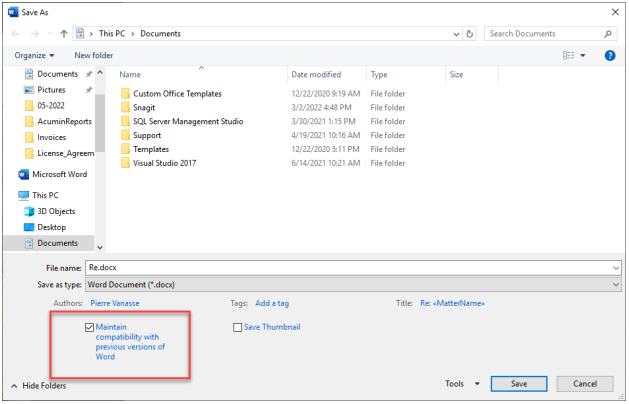
Option 3: When you save, check the option to Maintain compatibility with previous versions of Word. Once done, this option will remain checked going forward until you uncheck it.
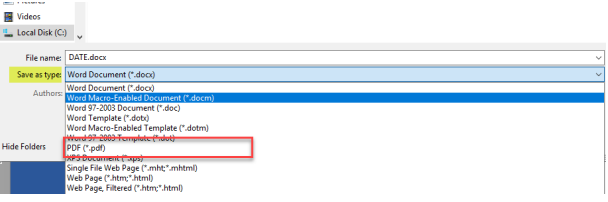
Option 4: Save under PDF format.
It would be important and not recommended that you make any changes directly to the invoice templates themselves, as these will be overwritten/replaced with any subsequent update.