.png)
QUESTION: Why does a change to the statement of account contact in client or matter properties not change the statement of account recipient? Why after changes made to the Statement of account contact, the SOA module creates a statement of account for the old contact?
RESPONSE: Changes to the statement of account contact in client or matter properties impact new invoices created for the client all matters or the specific matter, depending on the level where the change was completed . These changes are reflected on the “statement of account” contact section of the invoice properties’ details tab of invoices created after the change is made, without impacting previously created invoices.
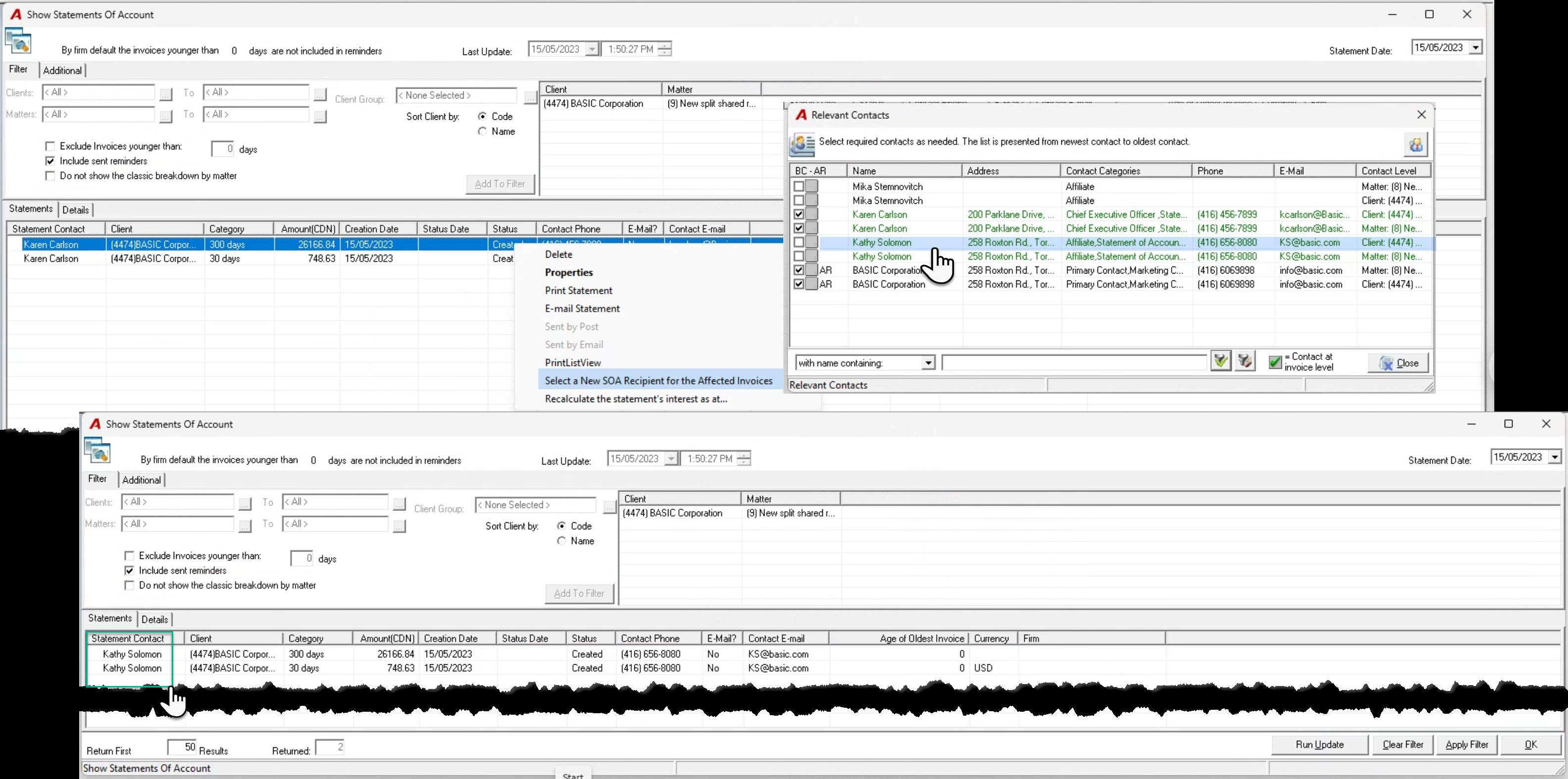
To update an SOA already calculated with the old contact captured when the invoice was posted (the recipient of statement of accounts on existing invoices, from the statement of account list view right click and “Select a New SOA Recipient for the Affected Invoices” to launch the list of potential client and matter level contacts, right-click and select to complete the process.
Alternatively, delete the SOA record, make the update to the “Statement of Account” section of the invoice properties’ details tab for affected invoices, and update the SOA calculated values (Run Update) or re-access the SOA the day after in which case the new calculated SOA will reflect the new recipient.