.png)
Context and Use Case
A pre-billed or anticipated disbursement is a matter related cost that can only be created within the structure of an unposted invoice properties. Because of its required association to an invoice, if the invoice is deleted the pre-billed or anticipated disbursements and its related GL operations are also deleted and if the invoice is cancelled the pre-billed or anticipated disbursements and its related GL operations are reversed.
Use Case
Use this option when the disbursement must be billed - included in an invoice – before it can be recorded against the affected matter. For example, when the disbursement is known but the vendor invoice is not yet received, or the internal cost has not yet occurred.
Process
Access
Invoice Properties – Entries Tab – Billing Selection List view. Right-click to access the contextual menu and select “New” – “Pre-billed (Anticipated) Disbursement”.
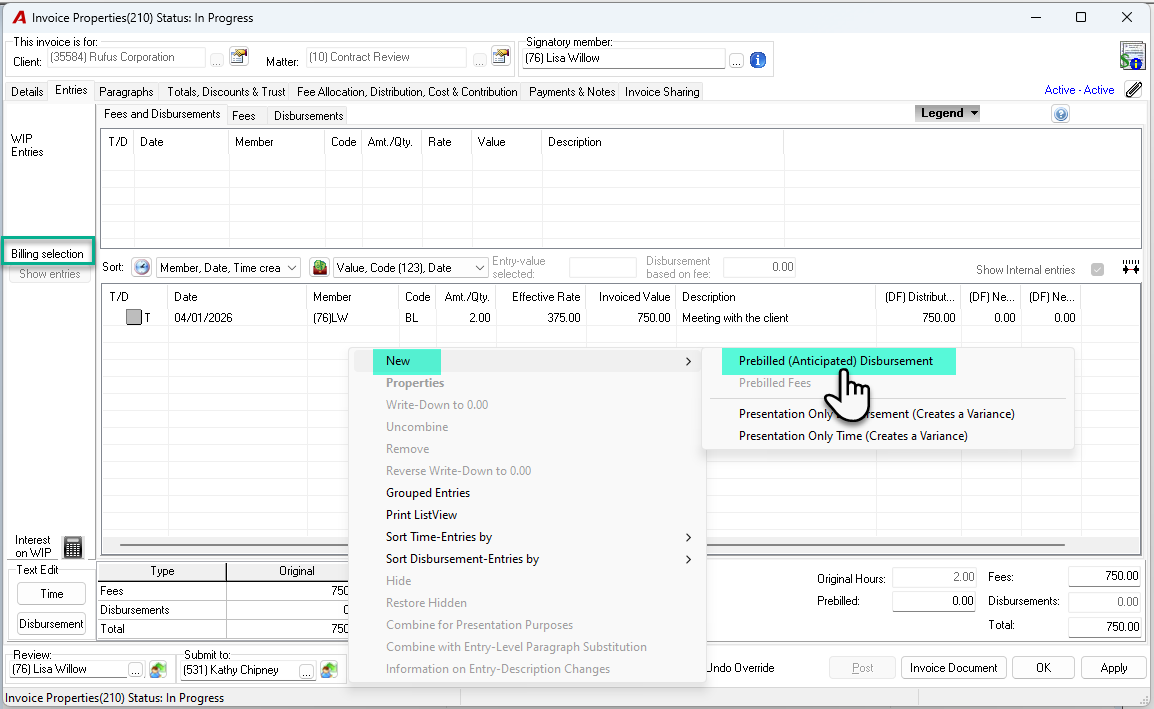
Post the Anticipated or Pre-Billed Disbursement
Complete the disbursement entry properties form and press OK to accept and exit.
The function will create the pre-billed or anticipated disbursement, resulting in a positive disbursement entry within the “Billing selection” of the invoice properties – entries tab, and a related negative disbursement entry within the “WIP Entries” section of the same invoice properties entries tab; as well as the below GL operations:
-
DR Recovery GL account assigned to the disbursement code.
-
CR Unbilled disbursements (UBD)
-
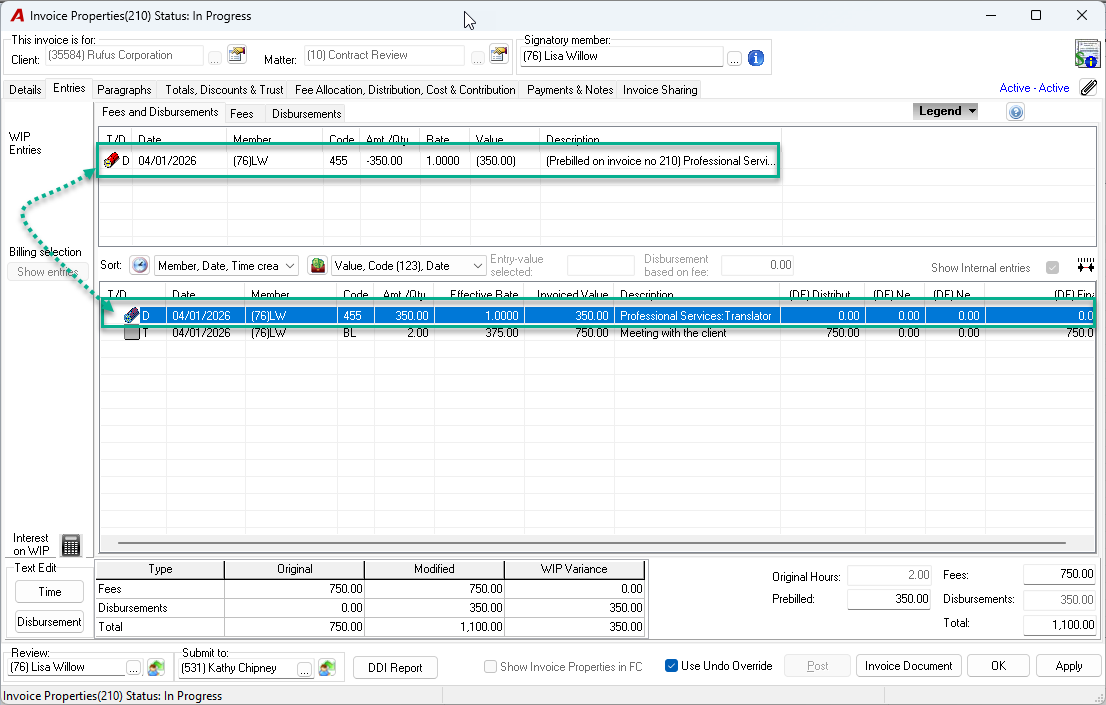
Pre-billed disbursements are deemed to be chargeable, therefore once a pre-billed disbursement is created, relevant change of chargeability options is disabled.
Post the Invoice with the Anticipated Disbursement
When the affected invoice is posted, the pre-billed or anticipated disbursement will trigger the following GL operations which will eliminate the temporary impact on recovery.
-
DR Accounts Receivable;
-
CR Recovery GL account assigned to the disbursement code.
-
If the invoice be deleted before it is posted, the pre-billed disbursement will also be automatically deleted as well as its related GL operations.
Post the Disbursement Incurred
On receipt of the supplier invoice or when the internal cost is incurred, create, and post the disbursement in context of the firm’s procedures - quick payment, AP voucher or disbursement entry. Use the same disbursement code used to create the pre-billed or anticipated disbursement and apply it to the same matter. On Post the following GL operations are triggered:
-
DR Unbilled disbursements (UBD)
-
CR Bank (Quick payment); Accounts Payable (AP Voucher) or Recovery Account (Disbursement Entry)
-
Invoice Cancellation
As part of the cancellation process the two (2) entries (positive and negative) will revert to WIP with the invoice number and the cancellation date in the description. This process nullifies the impact to WIP and eliminates any potential conflict or timing difference with the recording of the actual disbursement completed through quick payment, AP voucher or disbursement entry.
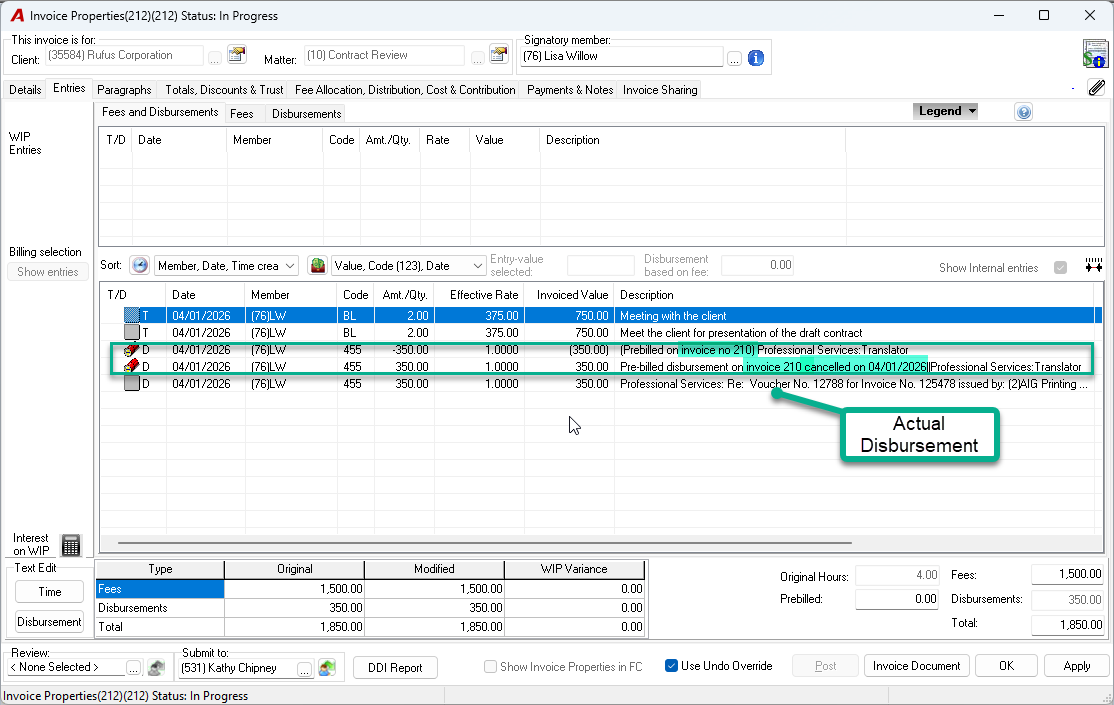
When the new replacement invoice is created, include both entries in the billing section of the entries tab to clear them as well as the actual disbursement, if it is already recorded as UBD. If not, create a new pre-billed or anticipated disbursement to proceed with the intended transaction.
Clear the Anticipated Disbursement Negative Portion
As both the anticipated disbursement and the disbursement itself are recorded using the same disbursement code against the same matter, to clear the anticipated disbursement negative portion in WIP, include it along with the disbursement in the next invoice written down to zero.
Although the pre-billed or anticipated disbursement’s value and its final actual value should be close if not identical, it is possible to have gains and/or losses over time. In this case the variance will be recorded against the corresponding master GL account when the positive and negative values are applied to the ensuing invoice for the same client/matter.
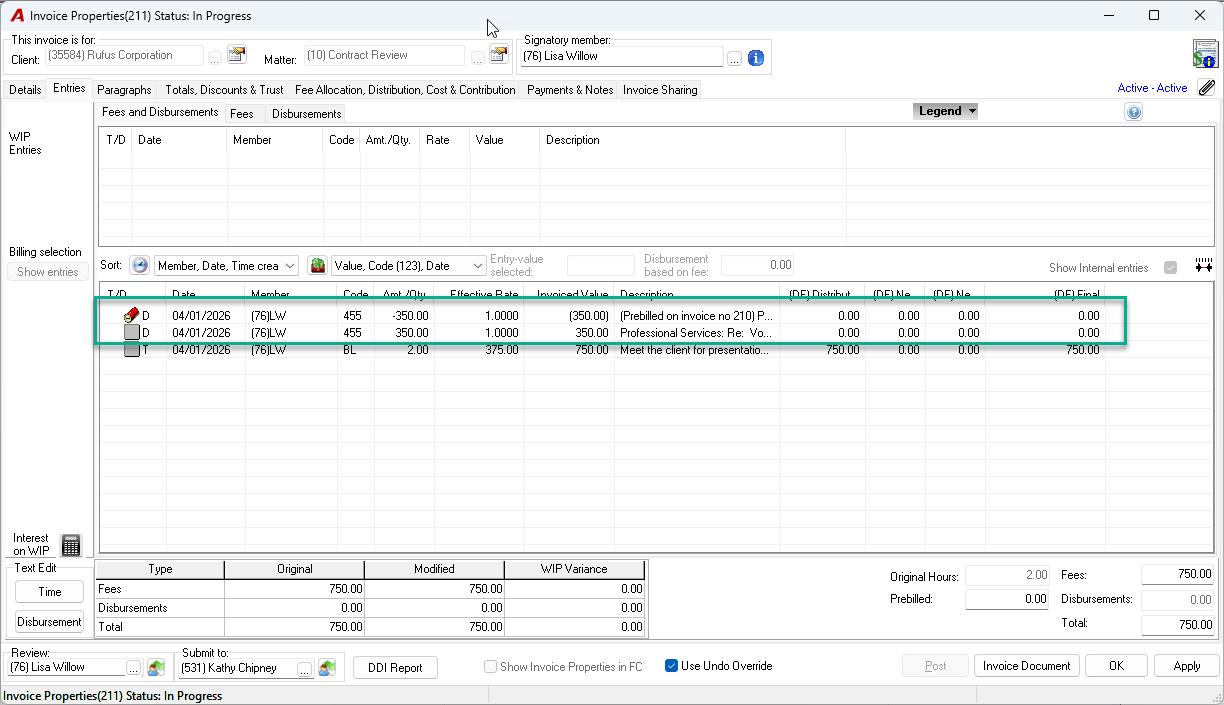
If the pre-billed or anticipated disbursement is included in the final invoice for the matter, the negative portion of the pre-billed or anticipated disbursements and the disbursement itself can be removed using the unbilled entry write off function during the matter inactivation and closing process.
Overcharging Anticipated Disbursements Options
When there is an overcharge resulting from a difference between the pre-billed or anticipated disbursements and the actual disbursement cost; remove the excess using a quick payment payable to the client in trust with the same disbursement code, deposit the quick payment into the trust account and apply the trust funds as payment of invoices from trust. If the client has already paid and prefers a refund the quick payment should be made payable to the client.
Use of the AcuminTraining Database and the Display GL Operations Function
To see the GL operations in action for any of the scenarios included in this document, try the process in AcuminTraining with the display GL operations feature ON.