.png)
Overview
The referral source and referral type are two organization-defined reportable dimensions, with the referral type being the grouping variable for the more granular referral source. These dimensions work in unison to disseminate revenue and profit sources at different levels.
Referral Source:
The referral source can be a person – a contact, a client, a member, or a vendor; with a profile of an individual or a unit, or a non-person or event.
Referral Type:
The referral type is a classification of the referral source, designed to group the more granular person and non-person referral sources for more strategic context.
Referral Type and Referral Source
a) Use of Referral Source
Where the Referral Source is a Person
Acumin supports the creation and maintenance of persons in the form of clients, contacts, vendors and or members, with the profile of an individual or a unit (entity, group of individuals etc.). As a result, any person referring a client, or a mandate can be assigned as the referral source for the client and the matter.
For example, the referral source for a new mandate is an individual named Jean-Pierre Bart, currently an attorney with a firm in New York, but originally a member of the law firm receiving the new mandate. In this example, Jean-Pierre Bart will be associated to the new matter created for the new mandate as its referral source. It would also be useful if his profile (person properties) included an association between Jean-Pierre Bart and the Law Firm that employs him in New York, as the latter becomes a potential lead for the marketing team to consider.
Where the Referral Source is not a Person
Acumin also supports the creation and maintenance of non-person referral source titles which can be assigned as the referral source for the client and the matter. Typically, this is a comprehensive list that is representative of the organization’s marketing and public relations strategy.
For example, a new mandate for an employment negotiation matter tabled by an existing client with many insurance defence files with the law-firm, is awarded. When asked the source for the new mandate the existing client cites awarding the mandate because of reading a new media blog on employment challenges published by the firm.
b) Use of Referral Type
The potential granularity needed to effectively manage referral sources is supported by the “Referral Type” attribute, which will include titles that group the more granular person and non-person referral sources.
Example Where the Referral Source is a Person
In this case, Jean-Pierre Bart, would also be further classified with a referral type of “Firm Alumni”, giving the firm the opportunity to measure the number of mandates and/or new clients referred by Jean-Pierre Bart as well as by all “Firm Alumni”.
Example Where the Referral Source is a Non-Person
In this case, media blogs are one of multiple new digital media initiatives launched by the Firm, therefore the selection would also be further classified with a referral type of “Digital Media”. This gives the firm the opportunity to measure the number of mandates and/or new clients because of “Media Blogs” as well as all “Digital Media”.
c) Example of Reporting Opportunities
With the referral source and referral type identified, decision makers could report on the following measures:
-
How many new clients are referred by “Firm Alumni” with the option to identify the key referral sources for new clients within the group for a more granular assessment of specific relationships instead of the broader group of former employees;
-
How much new work is generated from “Firm Alumni” by Area of Practice, or Area of Practice Group, with the option to identify key referral sources within the group so they can be targeted to help us grow within specific Areas of Practice or Area of Practice Groups.
-
How much revenue is generated from new clients or new matters (mandates) referred by “Firm Alumni” in total or by Market Sector by Area of Practice.
-
How effective are digital media strategies in bringing in new profitable clients or matters, are there some strategies which bring in more profit.
d) Commonly Used Non-Person Referral Titles
|
Non-Person Referral Sources |
Description/Referral Type |
|
Firm Reputation, Walk-ins |
Has heard of Firm but not from specific named sources. In this case the referral type should be “Firm Marketing Initiatives” |
|
Existing Client |
Used when opening matters for the same existing client, with no additional effort. In this case the referral type should be “Existing Client Efforts” |
|
Directory Listing |
In this case the referral type should be “Classic Advertising Media” |
|
Firm Publications |
In this case the referral type should be “Classic Advertising Media” |
|
Online Search Engine |
In this case the referral type should be “Digital Media” |
|
Firm’s Website |
In this case the referral type should be “Digital Media” |
|
Social Media –Facebook Twitter |
In this case the referral type should be “Digital Media” |
|
Blogs |
In this case the referral type should be “Digital Media” |
|
Media Stories and Articles |
In this case the referral type should be “Classic Advertising Media” |
|
Magazines, Trade Publications, etc. |
In this case the referral type should be “Classic Advertising Media” |
|
Yellow Pages |
In this case the referral type should be “Classic Advertising Media” |
|
Magazines, Trade Publications, etc. |
In this case the referral type should be “Classic Advertising Media” |
|
Media Stories and Articles |
In this case the referral type should be “Classic Advertising Media” |
|
Firm Hosted Seminars, Conferences and/or Events |
In this case the referral type should be “Firm Marketing Initiatives” |
|
Other Seminars, Conferences and/or Events with Firm Name Visibility |
In this case the referral type should be “Firm Marketing Initiatives” |
|
Direct Mail, Email or Alerts Email |
In this case the referral type should be “Firm Marketing Initiatives” |
|
Community or Hospital Event with Firm Name Visibility |
In this case the referral type should be “Firm Public Relations Initiatives” |
Not Defined and Not Available Titles should be added to the list of non-person referral sources
e) Commonly Used Referral Type Titles
|
Referral Type |
Description |
|
Client Retention Efforts |
Used with the “Existing Client” non-person referral source |
|
Lawyer/Attorney Reputation |
Used with the member’s name in the referral source field when the client has heard of the lawyer from specific named sources. |
|
Cross Sell to Existing Client |
Used with the member’s name in the referral source field when a member has referred a matter for an existing client to another member of the firm. |
|
Self-Generated |
Used with the member’s name in the referral source field when the client or matter was referred by the member himself. |
|
Community Service or Activity |
Used with the member’s name in the referral source field when the client or matter was referred by the member himself through community service efforts. |
|
Personal Marketing Initiatives |
Used with the member’s name in the referral source field when the client or matter was referred by the member himself through personal marketing activities. |
|
Family, Friends Acquaintances |
Used when the person in the referral source field doing the referring has one of the relationships listed with a member of the firm. |
|
Firm Alumni |
Used when the person in the referral source field doing the referring is a former member of the firm. |
|
Client Referral |
Used when the person in the referral source field doing the referring is or is related to an existing client of the firm. |
|
Inter Law-firm Group |
Used with the Law-Firm doing the referring in the referral source field, if the referring law-firm is part of a law-firm referral group. |
|
Other Law Firm |
Used with the Law-Firm doing the referring in the referral source field. |
|
Other Lawyer or Attorney |
Used when the person in the referral source field doing the referring is another lawyer or attorney outside of the firm. |
|
Other Professional Firms or Business |
Used with the Professional Services Firm doing the referring in the referral source field. |
|
Other Professional |
Used when the person in the referral source field doing the referring is another professional. |
|
Financial, Insurance or Government Institution |
Used with the financial, insurance or government institution doing the referring in the referral source field. |
|
Classic Advertising Media |
Used with the selection of magazines, trade publications, directories, listings, media stories, articles etc.as referral source |
|
Firm Marketing Initiatives |
Used when the selection in the referral source field is not a person but “Firm Reputation” or an action/event of the Firm. |
|
Digital Media |
Used with the selection of online search engines, firm’s website, Social Media platforms, blogs etc, in the referral source field |
f) Optional, Mandatory and Level Best Practice
Optional versus Mandatory:
To generate valuable and reliable measures on a consistent basis, reporting dimensions should be mandatory. Null values will skew results making the financial information and measures less meaningful and potentially misleading. Instead of allowing for null values, it is recommended that the law-firm set the referral source and type as mandatory and include non-person referral source options “Not Defined” and “Not Available”.
“Not Defined” is intended to capture the situations where it is expected that the information will become available at follow-up whereas “Not Available” is intended to capture the situations where the information is not and will not be available (typically set after follow-up yields no results). The former allows for follow-up, whereas the latter can pin-point the responsible members not capturing the information needed to complete report on the success of marketing and business development initiatives.
Level - Client, Matter or Both:
It is considered best practice for organizations looking to assess the source of their business and wanting to avoid potential business conflicts when engaging new clients or accepting new matters, to complete the referral source and referral type fields for both the client as well as the matter, on a timely basis.
-
Level: The referral source for a new client is always the referral source its first new matter but matters for existing clients may be sourced from referral sources relevant at the time the new matter is opened.
By using both levels consistently, the user captures the required level of granularity necessary to accurately measure the impact of the referral sources when capturing new clients, as well as when capturing new mandates, without additional effort. The referral source asked must always be for the new matter, so when the new matter is for a new client, the same information is entered at the client and also at the matter level.
-
Timing: To mitigate potential business conflicts with referral-sources as well as enhance the level of accuracy in the selection of the referral source, it is considered best practice to capture the referral source early in the process.
The best practice recommendation is to set the referral source and type as mandatory during the client and/or matter creation process, in which case the user will select “Not Defined” to mitigate unwanted delays in file opening when if the information is not provided. This allows for a timed follow-up process by member responsible for the matter.
Set-Up
a) System Settings
The firm can enable the use of the referral source and type from within the client and matter wizard, the client and matter properties form as well as the Enhanced Client & Matter Request Form (forms subject to licensing). The firm can also decide if these will be mandatory fields or not.
-
Go to Environment – System Configuration – Acumin System Settings;
-
Defaults Tab – Client & Matter Tab – Set as Mandatory sub-tab;
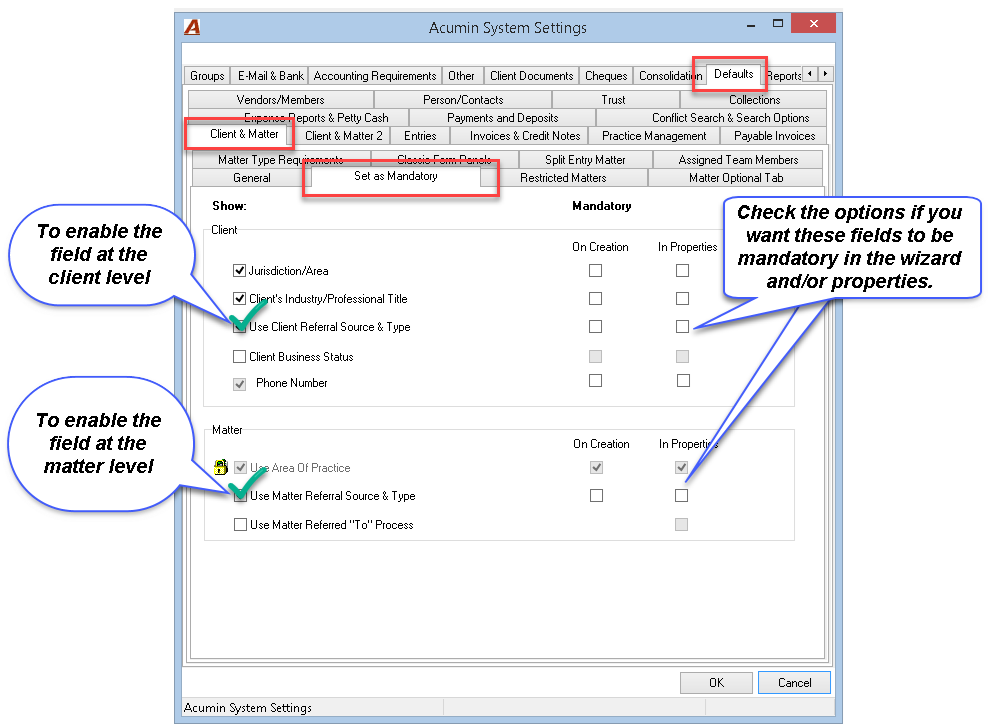
GOOD TO KNOW
-
The referral source and referral type are a set; therefore, the mandatory and optional requirements apply equally to both.
-
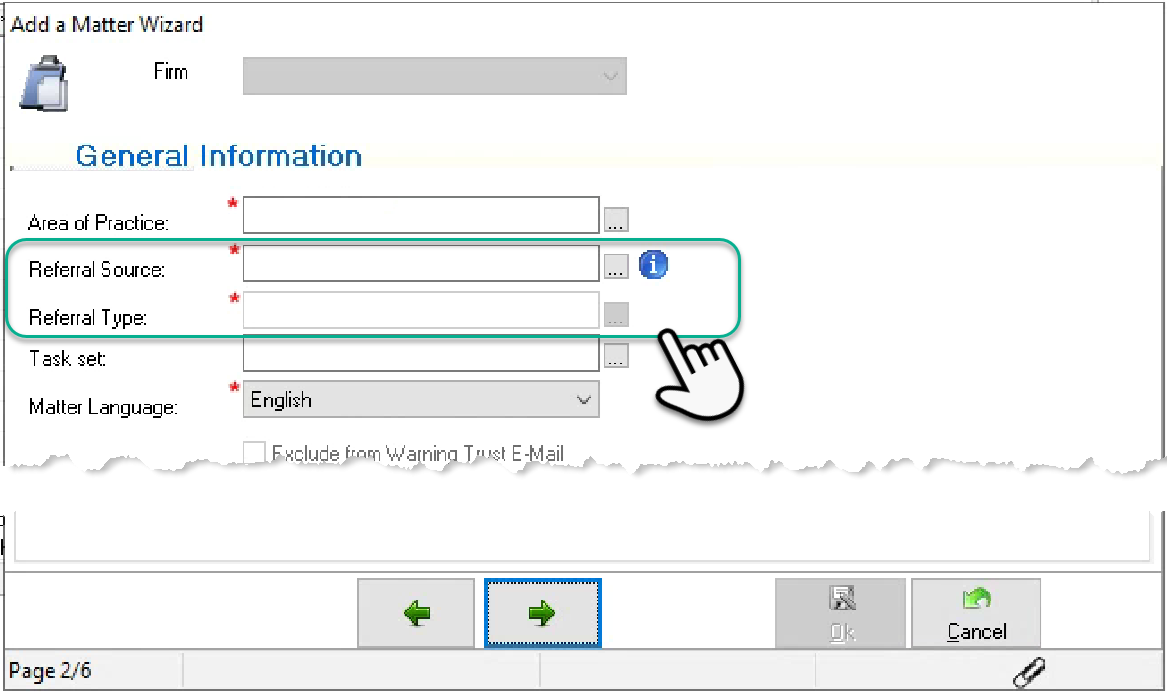
Whether the referral source and referral type are set as mandatory or optional, the referral type field and its ellipsis button will remain disabled until a referral source is selected by the user.
-
If the referral source selected is "Not Defined", then the referral type will remain disabled and it will be immediately auto populated with the "Not Defined" value. For the user to be able to complete the referral type to something other than "Not defined" the user must select a referral source different than "Not Defined".
-
If the user selects a referral source other than "Not Defined", then he or she will not be able to select the referral type as "Not Defined". The referral type equal to "Not Defined" is only a valid system-populated option when the referral source value is equal to "Not Defined".
b) List of Non-Person Referral Source Titles
To create non-person referral source title content, select the “Non-Person Referral Source List” option found within the “Environment” menu and right-click to select “New.”
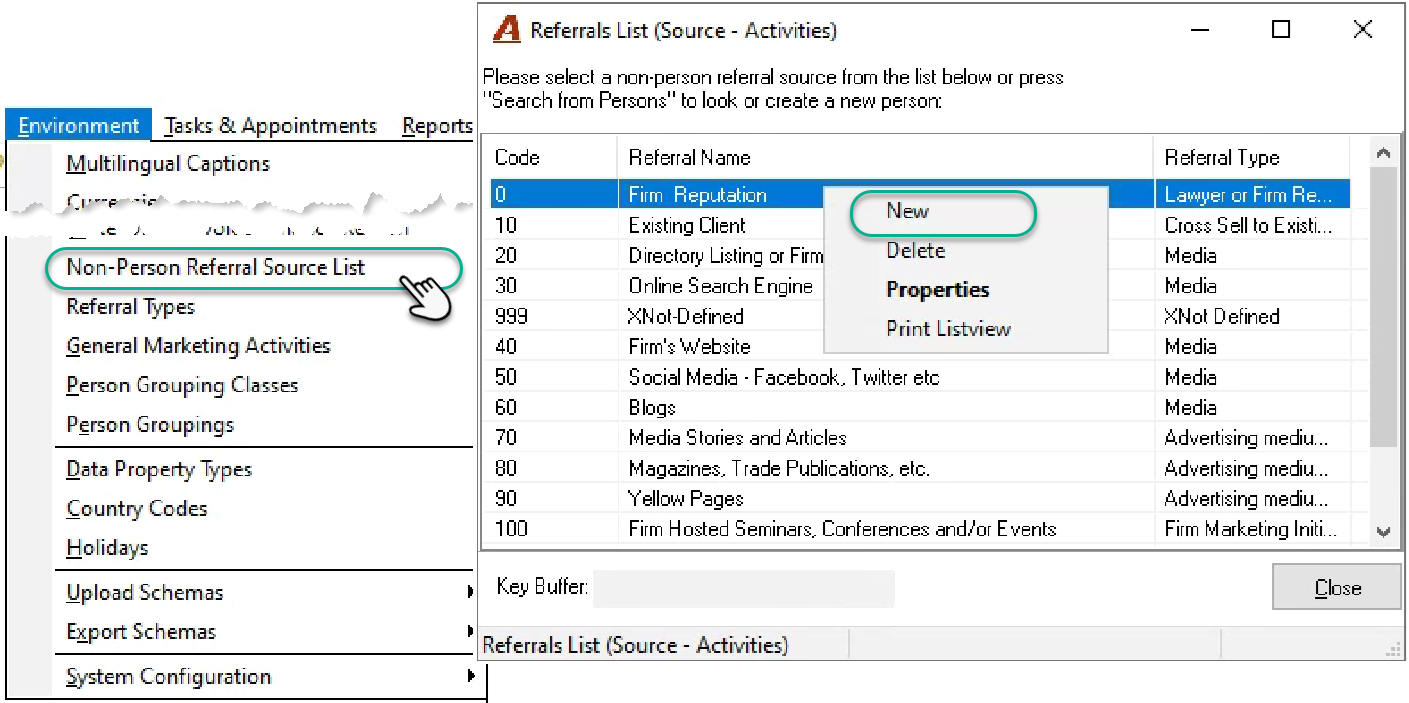
Although the authorized user is creating a non-person referral, Acumin will follow the process for creating a business/unit, therefore this action will launch the Search Tool (new person) form.
Enter the referral source in the search string field and launch the search. For example, enter “Firm’s Website” – press on the “Add Criteria” button followed by “Execute” to proceed with a search as if “Firm’s Website” were a regular person.
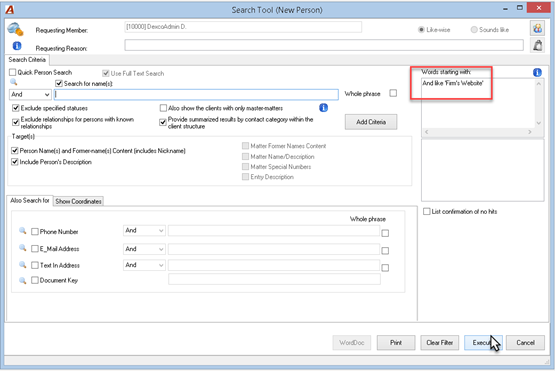
If “Firm’s Website” is not found as a valid person, the information panel will appear. Select the “Proceed with New Business/Unit Person” button.
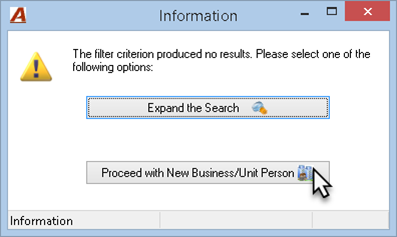
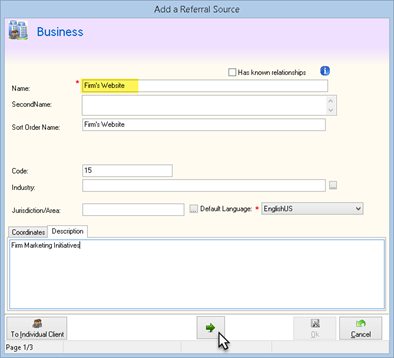
Enter the referral name within the name field on the “Add a Referral Source Wizard” form. The name can also be entered in the Sort Order name, code and description fields in the
Description tab. Click on the Arrow button to proceed to the end of the wizard and press on Ok to conclude the process.
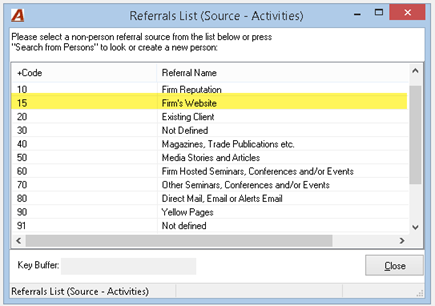
The non-person referral source will list on the “Referral Source” List
c) List of Referral Type Titles
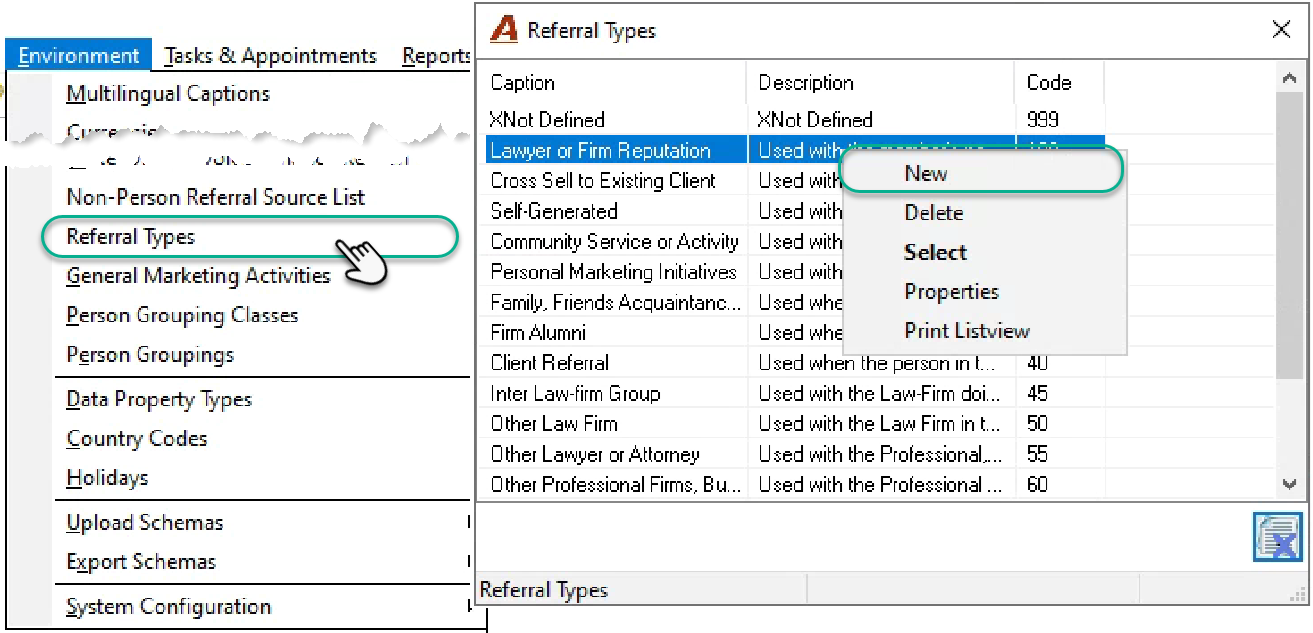
To create referral type title content, select the “Referral Types” option found within the “Environment” menu and right-click to select “New.”
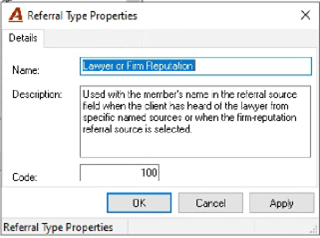
Complete the Name, Description and Code within the corresponding “Referral Type Properties” form and press OK to accept
File Opening Referral Process
a) New Client
If you are creating a new matter for a new client, add the new matter’s referral source to the new client. Access the client’s “Referral Source” ellipsis button found within the client wizard to launch list of non-person referral sources as well as the option to search for, find and/or create a person referral source.
For circumstances where the referral source is a person (individual or business/unit), click on the “Search from Persons” button to launch the Search Tool and find the existing person or create the new one.
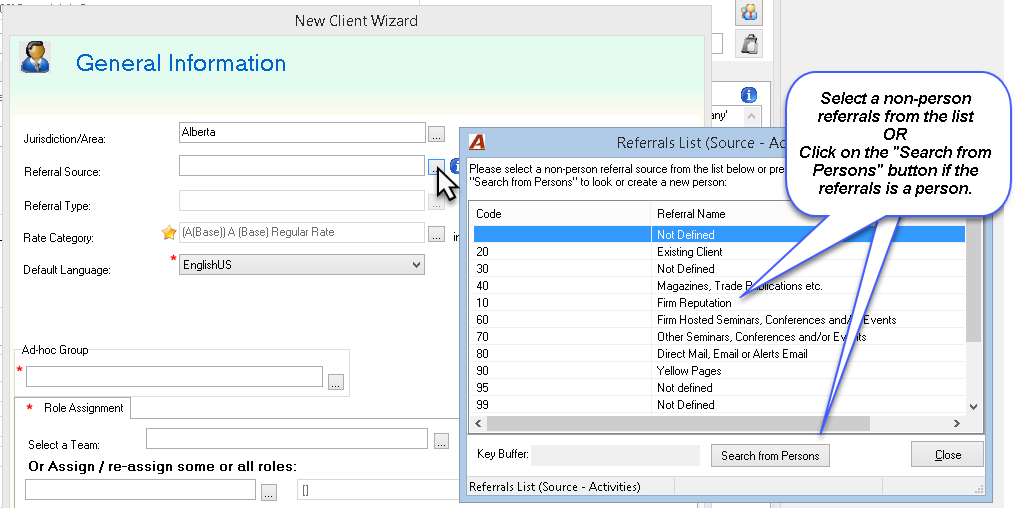
Once the referral source is selected, click on the client’s “Referral Type” ellipsis button found within the client wizard to launch list of referral types with which to classify the rereferral source.
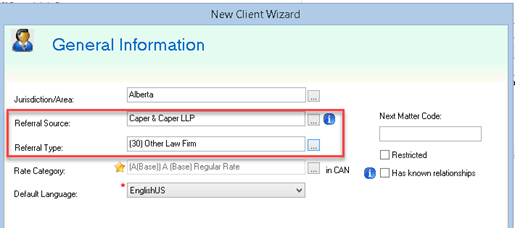
b) New Matter
If you are creating a new matter for a new or existing client, add the new matter’s referral source to the new matter. Access the mater’s “Referral Source” ellipsis button found within the matter wizard to launch list of non-person referral sources as well as the option to search for, find and/or create a person referral source.
For circumstances where the referral source is a person (individual or business/unit), click on the “Search from Persons” button to launch the Search Tool and find the existing person or create the new one.
Access to Referral Information
a) Client properties
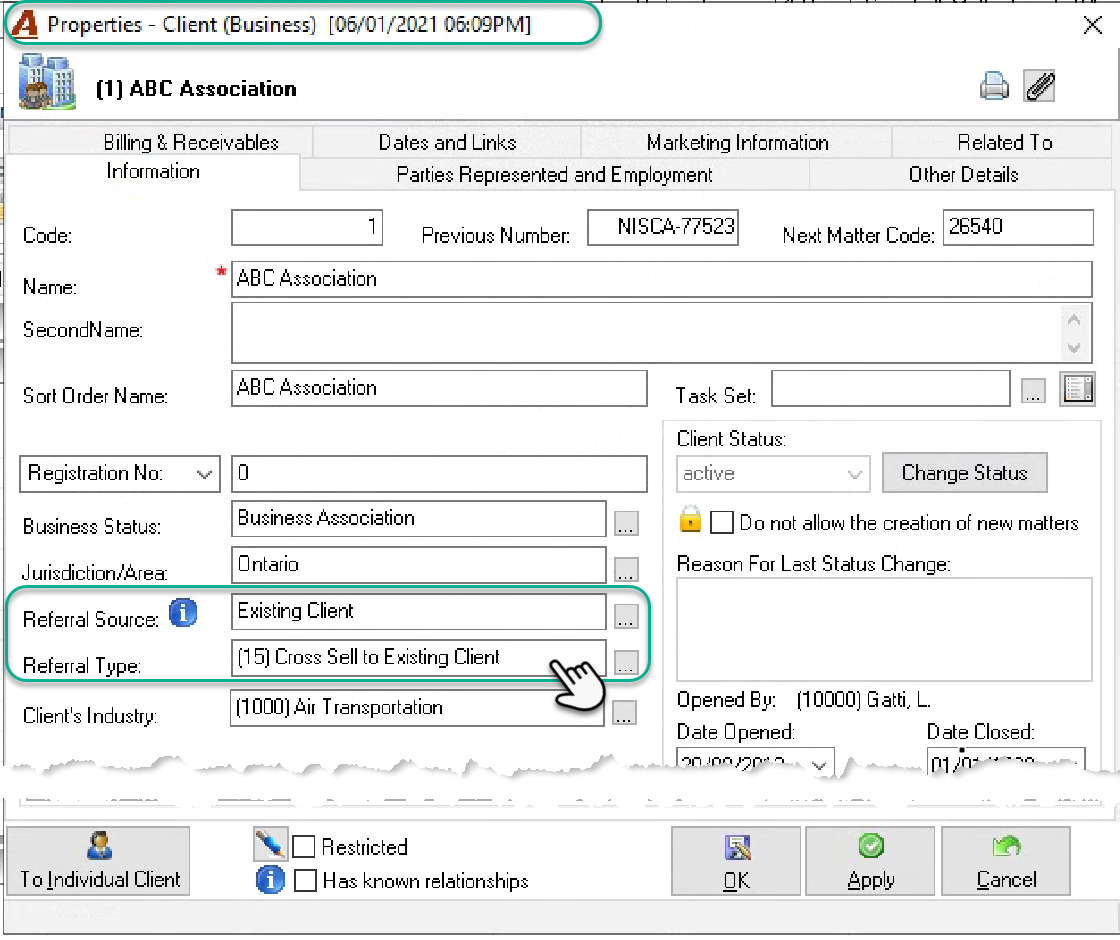
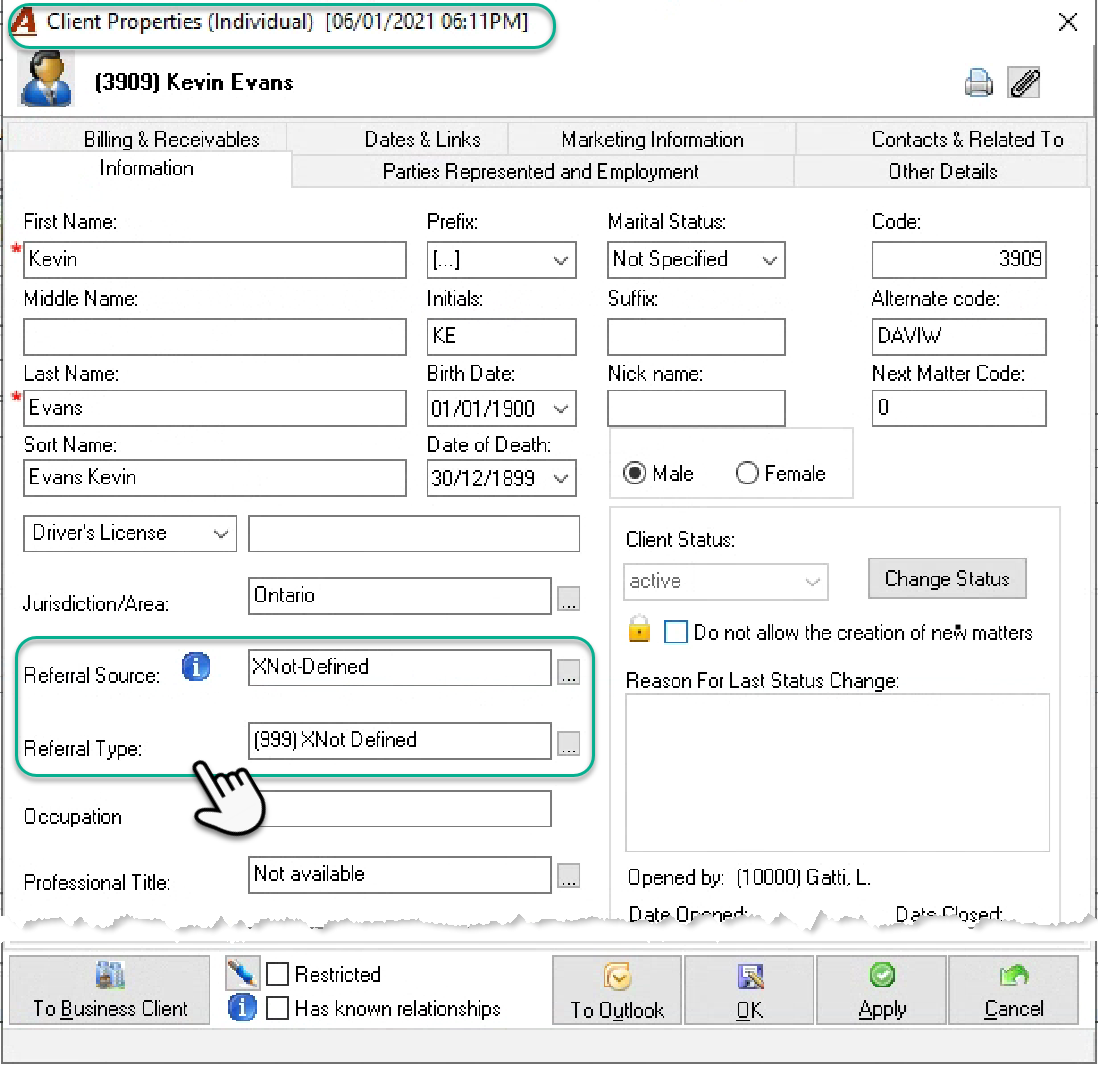
b) Matter properties
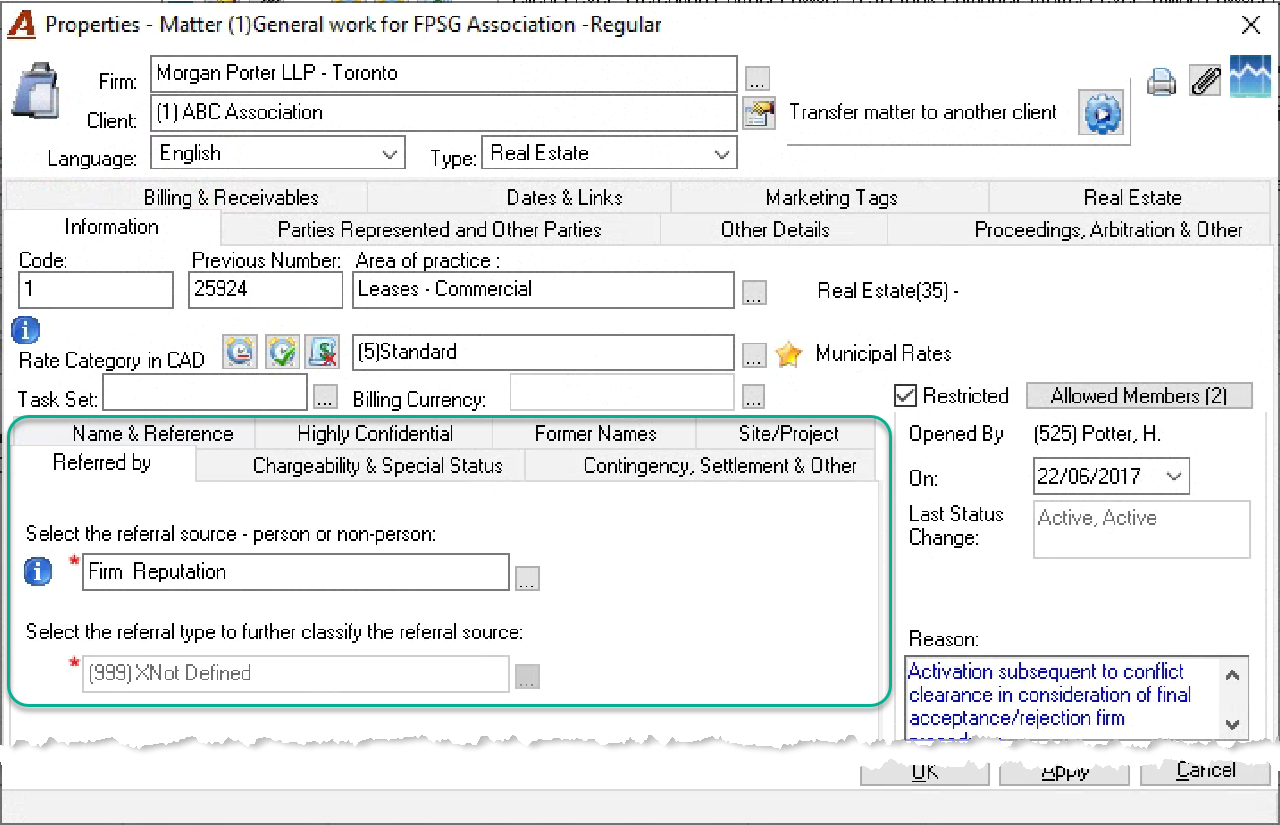
c) Client/Matter Dashboard
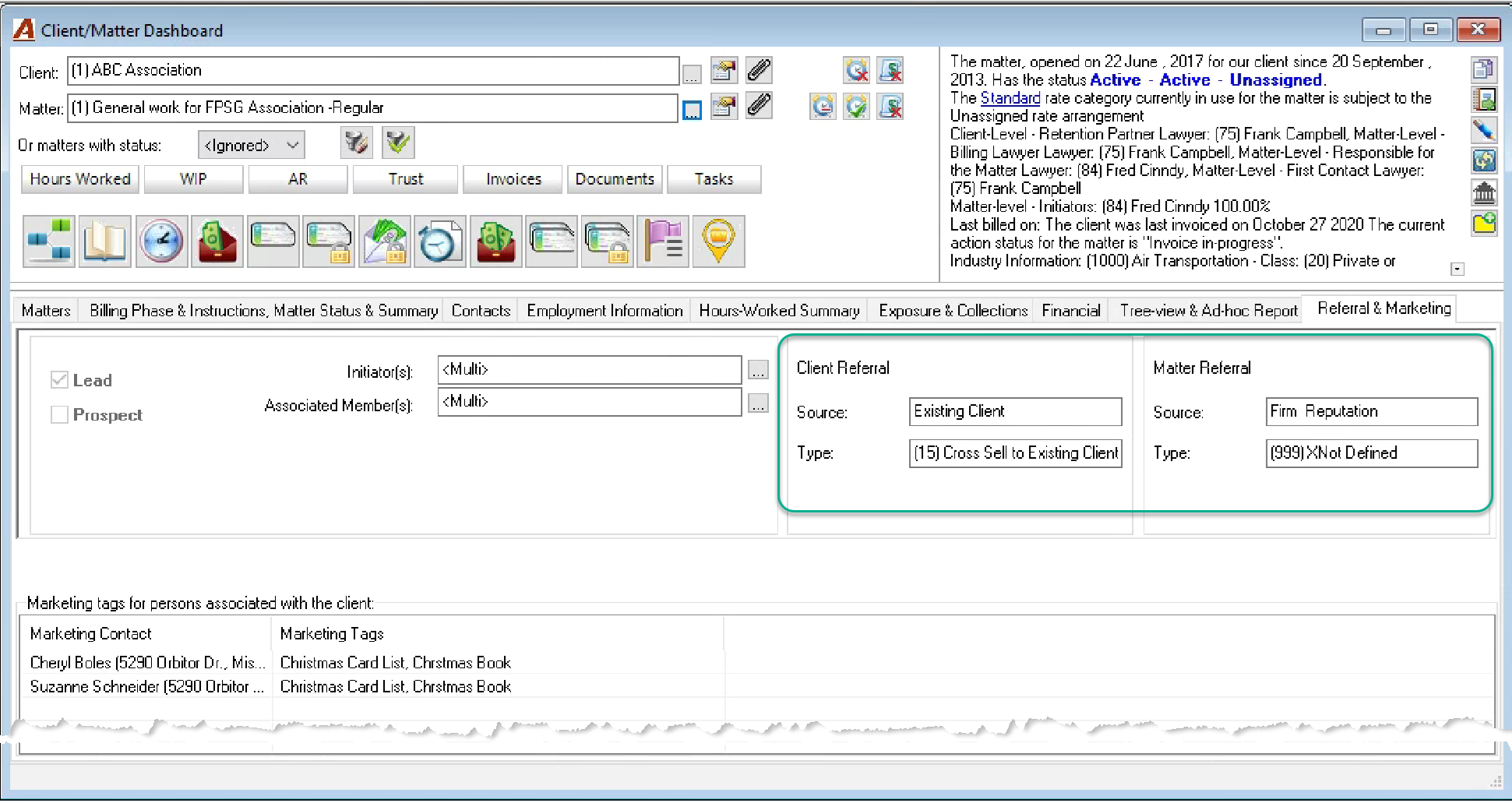
d) Condensed Client/Matter Report
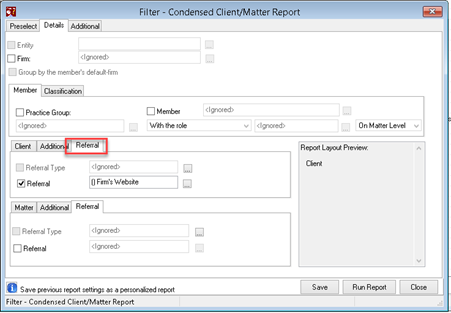
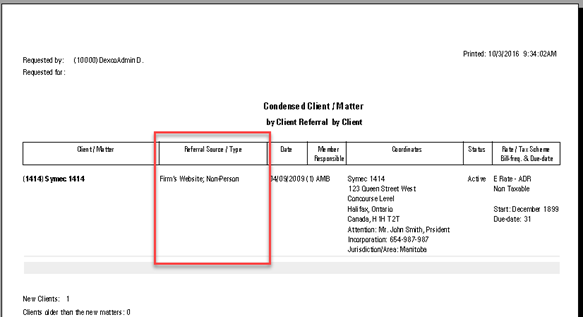
a) Revenue Reports
-
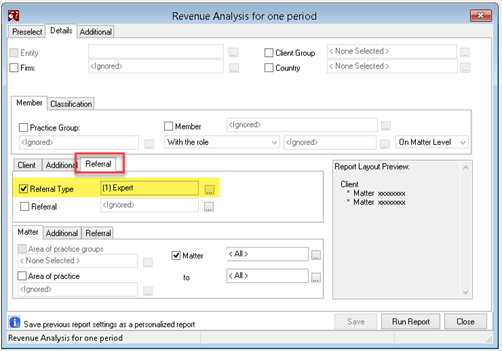
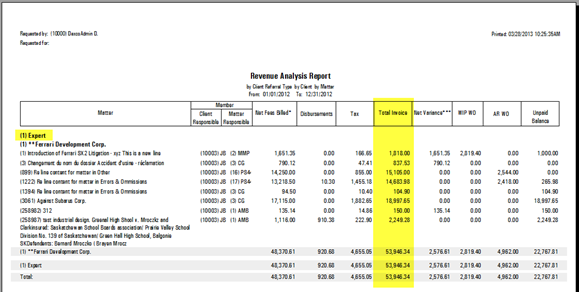
Revenue Analysis - One period,
-
Revenue Analysis - Multiple Period
-
Revenue - Fees Analysis
-
Billing report
a) Conflict Assessment Process and Search tool
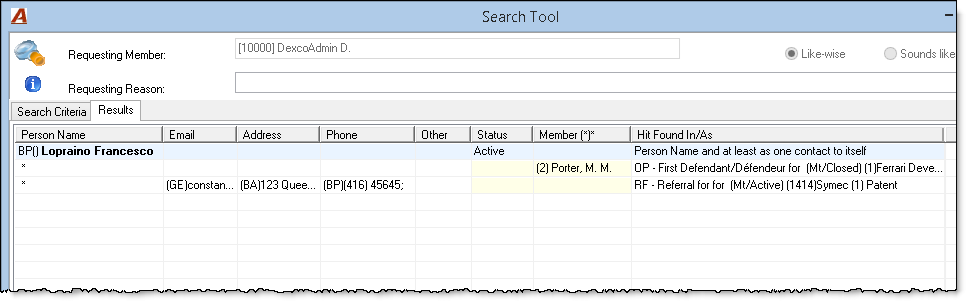
If the referral source is a person, then the status of the person as a referral source will be included within the results of the search tool, native to the conflict assessment process.
Non-Person referral sources do not impact the conflict assessment process therefore they are excluded
.