.png)
Introduction
Scope and Purpose
The potential conflict assessment process is designed to eliminate redundant data entry, limit unexpected timing-based potential conflicts, simplify the person-selection process by highlighting relationships, facilitate readership of potential conflict results, streamline conflict clearance decision-making and mitigate the risk of phantom matters.
Generally viewed as one of the last steps in the potential new matter conflict assessment and acceptance process, decision makers depend on the data-steward’s accurate execution of firm policies and procedures with respect to database management practices, in order to effectively prioritize new-matter acceptance, access prior process-results and clear matters from potential-conflict. In practical terms, this means that the decision maker must be able to rely on the data-steward’s competency in executing the process in order to trust the potential conflict results - report or list-view format – in order to clear the new matter from conflict.
As a critical component of the conflict assessment process, supporting-members use the search tool in accordance with firm policies in order to capture parties represented and other parties along with their relationships. As a result, when searching for persons associated with new matters, the process involves:
-
The application of relevant search criteria and the use of pertinent search tools during execution;
-
An understanding of the unwanted impact on the potential conflict results when creating duplicate persons instead of creating a new relationship;
-
The elimination of non-relevant persons found;
-
The selection of the right person and relationship:
-
Whereby existing persons are presented to the decision maker with all of their pre-existing relationships to ease final conclusions, or;
-
Whereby the creation and selection of a new person implies no pre-existing relationships for the decision maker to asses.
-
-
An understanding of the implications on the potential conflict assessment process when new data-entry in the context of potential new matter creation is deferred in order to avoid having new matters rejected due to conflict.
In conclusion new persons created or existing persons selected, will have a relationship with the new client and/or matter being created; expressed by the selected firm-defined party-represented or other party category, and/or by the employee, employer and/or referral source relationship.
It is the presentation of these new potential client and/or matter associated persons along with any pre-existing relationships to other persons or matters in the database that trigger a best-practice potential conflict assessment and clearance process, and provides the decision maker with an effective platform from which to clear the matter from conflict.
Conceptually, the search-process for persons' associated to the potential new client and/or matter is an integral part of both the potential conflict assessment procedure as well as the new matter and client (if applicable) creation process. The search progression requires that the data-steward search, find, eliminate and/or create associated persons, inherently affecting database relationships which are later included within the potential conflict results report or form intended to be read by the decision maker.
The Potential Conflict Assessment Process:
Use of Temporary Matters & Its Benefits
The search-tool is available as a separate option from the potential conflict assessment and new matter creation processes and it is therefore available for use in other capacities. On the other hand the potential conflict assessment and new matter creation processes cannot be concluded without application of the search-tool.
As part of an effective integrated process, it is considered best practice for data-stewards to create temporary matters from the initial search process. This progression provides the best possible information-outcomes for the decision makers and their ability to proceed with confidence when clearing a matter from conflict or rejecting a matter due to conflict.
The benefits of capturing parties represented and other parties searched, within the context of temporary new matters can be summarized as follows:
-
It eliminates redundant data entry. If there are 10 parties to be searched for a matter being considered, where the temporary matter is not created as part of the process, the same 10 parties will need to be re-entered and re-searched with the same level of competency as when originally executed.
-
It limits unexpected timing-based potential conflicts. If the parties searched are not saved in context of a new temporary matter, left undocumented and unrelated to the potential new work and/or as non-existent persons within database, will limit the required visibility of potential new work. With the fluidity found within most law-firm clients, the unavailability of information on new matters under consideration and their related person-relationships, affects the effectiveness and timeliness of potential conflict-related decisions by others. The ability to create temporary matters provides decision makers with the needed matter profiles to mitigate the risk of unexpected timing-based potential conflicts. It further limits resulting unwanted business outcomes, the need for post-acceptance conflict waivers and/or explanations for non-detection and the need for affected matters to be referred-out at a loss.
-
It simplifies the person-selection process by highlighting relationships. When the parties involved are searched, it is not the person-hit that is important as much as the persons' relationships to others in the database. If a person is searched, found, selected and categorised in context of the new potential matter, the decision maker will have access to pre-existing relationships when making decisions. If a new person is otherwise created, the absence of pre-existing relationships provides the decision maker with information on reduced risk. As this level of database content is integral to successful analysis of results, creating the same person more than once produces the false absence of existing relationships and obscures the clarity needed by the decision maker when assessing the matter and associated parties for potential conflict.
-
It facilitates readership of potential conflict results. As part of new matter creation, the data steward searches the parties represented and other parties, inherently eliminating irrelevant hits through the selection of the right person or where warranted the creation of a new one. As a result the decision maker will have access to the list or parties involved in the new potential matter, and their relationships to others within the database. This is a succinct list of relevant persons involved that excludes unrelated hits eliminated as part of the process making it easier for the decision maker to read and analyse the results.
-
It streamlines conflict clearance decision-making. The list of relevant persons and their relationships to others in the database or its absence thereof, facilitates the ability for the decision maker to conclude on potential conflict considerations. The information offered at the end of this process is paired down to significantly streamline conflict clearance or rejection decision making – a critical element to timely and effective new matter creation procedures within law-firm clients.
-
It mitigates the risk for phantom matters. The creation of new temporary matters as part of the potential conflict assessment process provides an important audit trail when the matter is rejected. The reasons for rejection can be documented for future consideration, with further risk management opportunities including date management, notes, the capture of non-cash disbursements and/or time investments subject to firm policy, the ability for the data-steward to trigger a non-engagement letter as well as other firm policy requirements which may be part of disengagement process.
The Impact of an Effective Search Process
-
To maintain data integrity, reduce redundant data entry and be able to rely on accurate potential conflict assessment reports; a person must be entered in the database only once. Before creating a new person, the latter must be thoroughly searched and if found eliminated as not being the same person.
-
When a search results are bypassed or ignored, the risk for duplicate persons is greatly increased. With person duplication the decision-makers responsible for conflict clearance risk missing absent but existing relationships to other persons in the database not reflected on the potential conflict assessment results report. This forces the decision maker to have to re-assess person search results and potentially review unnecessary and lengthy lists of names that should have been considered in the elimination or selection process by the data-steward.
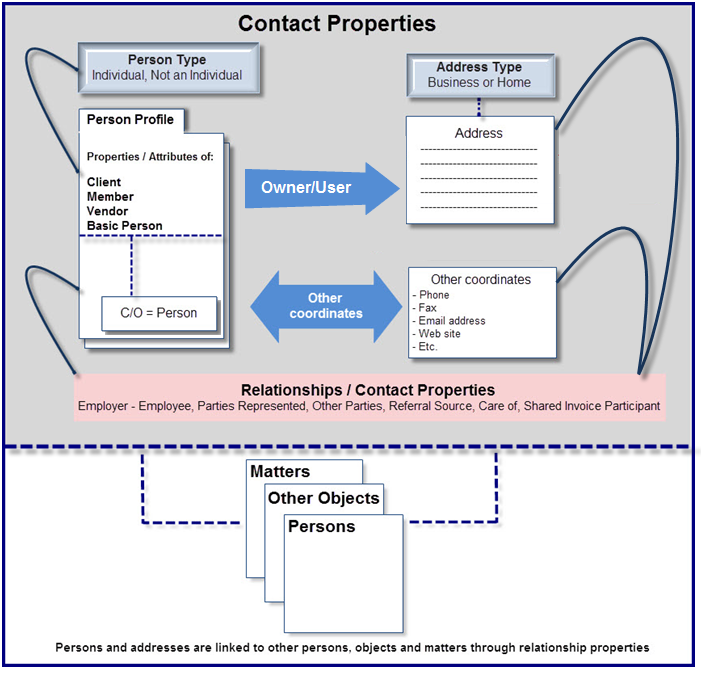
Summary of Person, Address and Contact Properties
-
A person – individual or not an individual - should exist only once in the database;
-
A person can exist with multiple profiles. A unique person – once created - can be selected multiple times to have additional profile attributes such as:
-
A general contact,
-
A care-of (c/o 🙂 for a contact,
-
An employee of another person on the database,
-
An employer to other persons in the database,
-
A referral source,
-
A client level contact with a defined relationship – contact category,
-
A matter level contact – parties represented with a defined relationship – contact category,
-
A matter level contact – other parties with a defined relationship – contact category,
-
A client,
-
A vendor,
-
A member (a person related to the firm as an employee or a partner),
-
A firm or office.
-
-
With each selection process a new relationship is made and a role created for that person in relation to other persons in the database. For example a person can have the attributes of:
-
A Vendor, as well as,
-
A Client, as well as,
-
An employer of other contacts and clients of the firm, as well as,
-
A matter's parties represented, as well as,
-
A referral source, and/or;
-
A care-of (c/o).
-
-
An address should exist only once in the database;
-
An address can be associated to many different persons regardless of their roles. The most common use of an address owned by a person is within the many contact properties of the same person;
-
An address should be owned by its logical owner.
-
Example: Joe Smith is a party represented for ABC Company located at 1000 Mulberry Road – Suite 300. If the address does not exist, it should be created as a coordinate of ABC Company (and not Joe Smith). Joe Smith would be associated to the address through the one of the contact properties of ABC Company;
-
Example: Mary Jane Stewart is a lawyer with Merrick and Associates LLP. To add Mary Jane Stewart as opposing counsel to the matter's other parties list, we would create the person "Mary Jane Stewart" and use (select) the address owned by Merrick and Associates LLP within the address field, as well as add Merrick and Associates LLP as c/o. If Merrick and Associates moves, we change the address only once and it will be correct for all address users (i.e. all the lawyers working for Merrick and Associates LLP).
-
-
A person can have many different addresses associated to itself (as owner or user);
-
Unlike application defined relationships such as referral source, employer or employee – or roles (client, vendor or member), the contact properties form is used to capture a firm-defined relationship between a person, an address, its parent object (a client, a matter, a vendor, another contact etc.) and where applicable a care-of.
Applicable System Settings
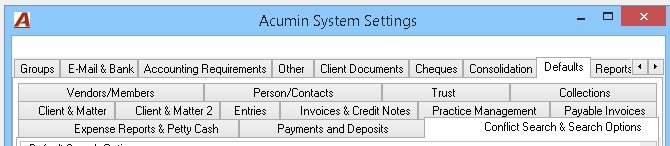
The "Conflict Search & Search Options" sub-tab found within the Defaults tab of the Acumin System Settings properties form includes a variety options to personalize the conflict assessment process.
Potential Conflict Form Access Points
As with matter reactivation requirements, the new client and matter creation process ends with the potential conflict form, where the authorized user accepts or rejects the matter on conclusion of:
-
The new client or matter wizard;
-
The existing matter re-activation process, or;
-
The "Conflict Clearance" function – option available on the right-click contextual menu of the new client and matter requests list-view.*
Users can re-access the potential conflict form from the following access points:
-
On "Conflict Search" – right-click function from temporary clients or matters found within the "View" main menu option;
-
The "Potential Conflicts" icon found within the "Dashboard" task bar.
-
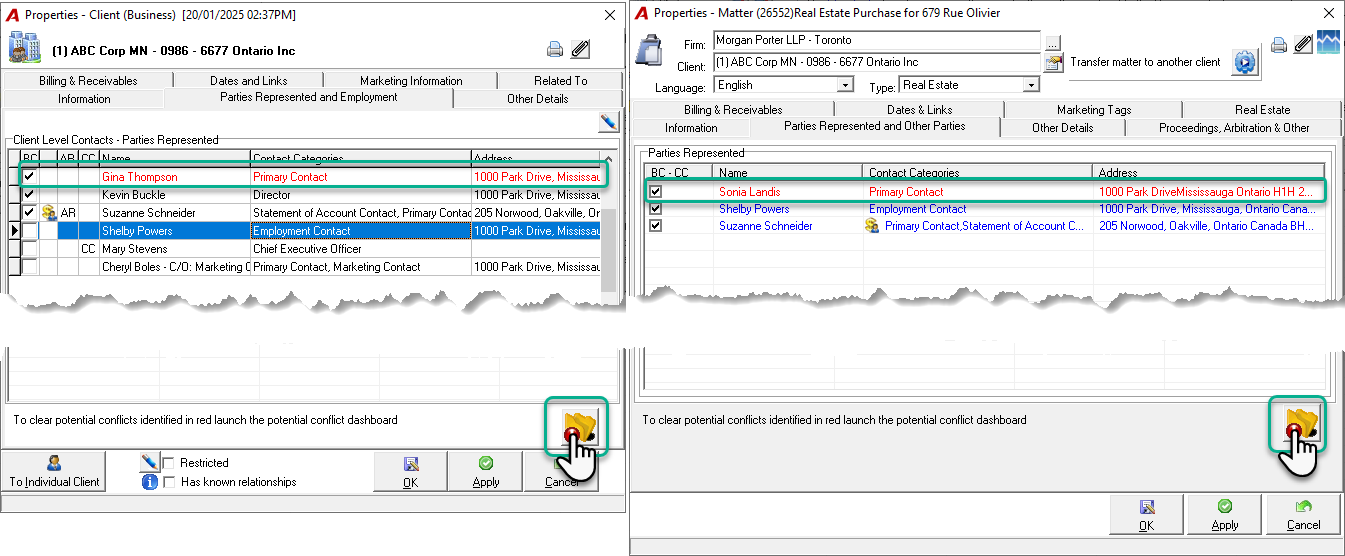
The “Clear Conflict” button, located in the “Parties Represented and Employment” tab of the Client Properties and the “Parties Represented and Other Parties” tab of the Matter Properties, is used to clear contacts displayed in red that were added after the initial activation.
The Potential Conflict Form - General
The potential conflict search can be executed at the client or at the matter level. If executed at the matter level the user has the option to include the client's information at the same time by check-marking the "Include Client's Information" checkbox in the "Search From" section.

Best Practice Consideration:
-
Set the member requesting the new matter as the "requesting member" and the member responsible for potential conflict-clearance assessment as the "authorized-by" member.
-
When creating a new matter for a new client, activate the client without executing a conflict clearance process. Ensure that the "Include Client's Information" checkbox in system settings is pre-set to ON by default so that client and matter information are presented at the end of the matter creation process within the potential conflict results report;
-
If the matter is set to status rejected due to conflict, the client will remain active. This reserves the "rejected" status at the client level for bad-credit clients providing for expanded status use-case between client and matter.
The Potential Conflict Form – Criteria tab
The person properties form allows users to identify selected persons as having known relationships. The option to "Exclude relationships for persons with known relationships" eliminates visibility of relationships for persons identified in this manner, limiting potential redundant information from listing on affected output sources.
The Potential Conflict Form – Criteria Tab
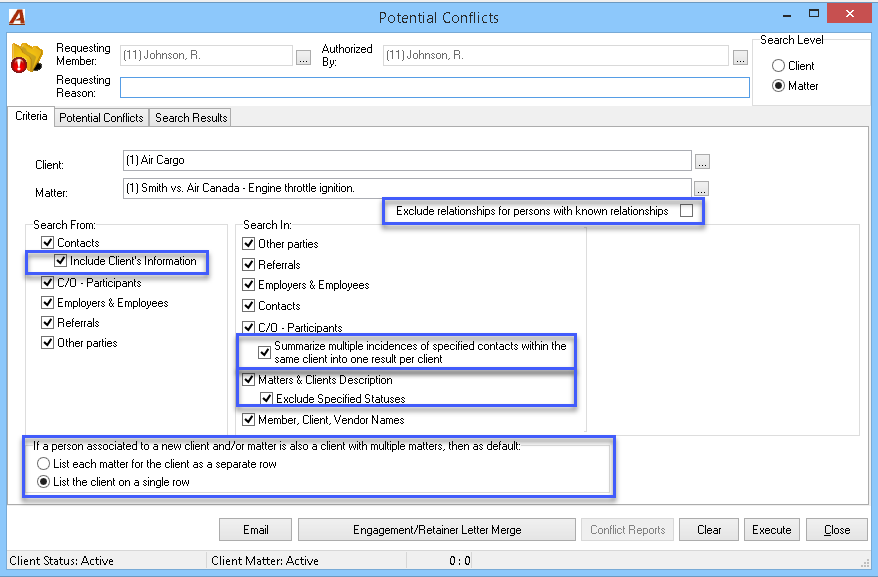
Whether the potential conflict form is launched as part of the new client – matter creation process or due to existing client – matter re-activation requirements – the latter will be pre-populated with the affected client and matter, else these variables should be entered by the user.
-
Search From: Includes the person relationships which may have been populated in the affected client and/or matter;
-
Search In:
-
Includes where the application will search;
-
The ability to "summarize multiple incidences of specified contacts* within the same client into one result per client";
-
The ability to search to the matter and client description field should there be misuse and instead of creating or selecting persons and identifying relationships the end-user is entering this information as text in the client and/or matter description fields (not recommended);
-
The option to exclude specified statuses**
-
Where a person associated to the new client or matter is already an existing client with multiple matters then the criteria tab is pre-set to show the person (the client) in a single-row presentation format instead of listing the person and its association to each of its matters individually.
*Specified Contacts: Contact categories which will summarize across matter for a client-based presentation
**Specified Status: Statuses to be excluded from the potential conflict results
The Potential Conflict Tab
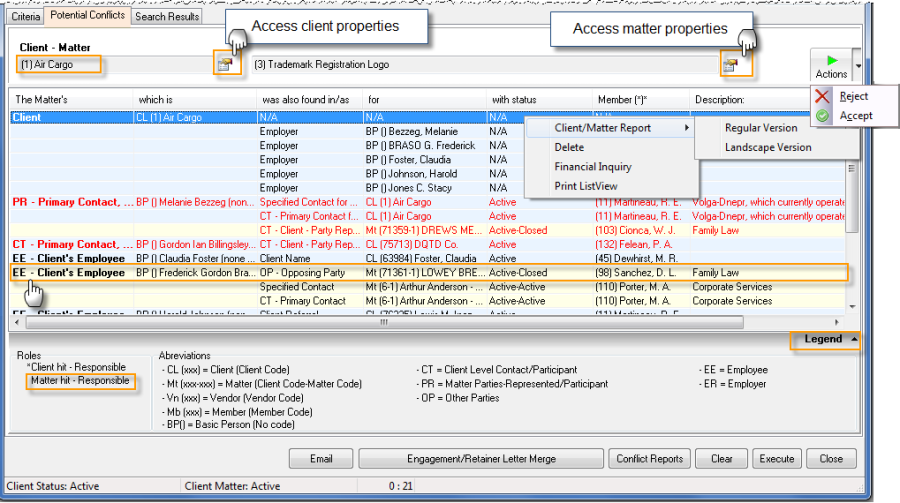
The potential conflict tab lists all the persons included within the affected client and matter. For each person list the tab content includes relationships with other persons found within the database. Example: Air Cargo's employee – Frederick Gordon, was also found as opposing party for matter (71361-1) Lowey, Brenda – Domestic Matter – Family Law with status closed and the matter responsible member (98) D.L. Sanchez.
-
New clients and matters list all of the content in red until the matter is accepted or rejected. Existing clients list persons added to the client or matter subsequent to activation or rejection in Red. Highlight an un-accepted person and right-click to select "Accept". These additions need to be considered and cleared individually.
-
Persons associated to the affected client and/or matter, which have other relationships with persons (clients, vendors etc.) list with a pale green background. Those that have other relationships with matters list without background colour.
-
Users can right-click on a client or matter to access the contextual menu to launch the client and matter report in regular or landscape format, the financial inquiry dashboard or the client or matter's properties form.
-
Accept or Reject will change the status of the matter and close the form, whereas close will retain the matters current status.
-
Depending on system settings selected, law-firm clients can separate the acceptance process from the conflict clearance process. The separation implies that there are additional checkpoints of an administrative nature which are completed after conflict clearance and before activation.
Best Practice Consideration: Organizations that use consistently meaningful status options benefit from concretely defined client-matter status alternatives to better assess client and or matter acceptance beyond traditional conflict clearance. For example the use of rejected at the client level when a client exhausts firm credit, helps to identify clients that are considered a bad credit risk should they re-appear at a later date.
The Search Results Tab
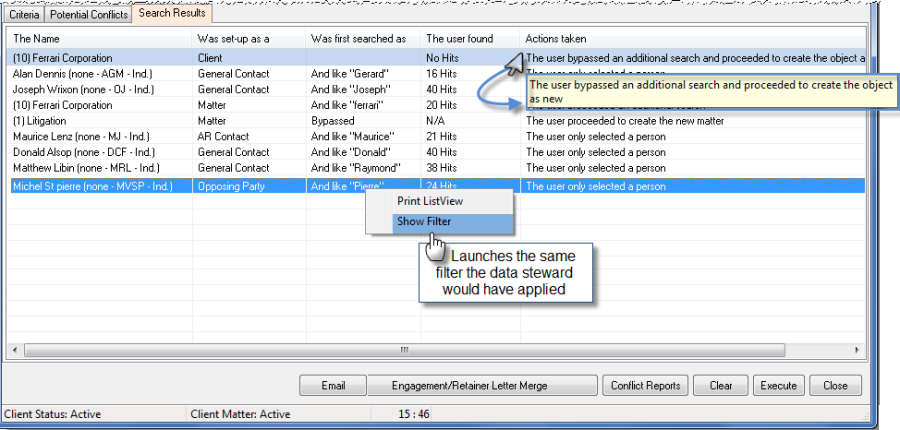
The search results tab captures search string(s) used for each person associated with the temporary new client-matter combination. For each search string the search tab also lists the number of hits and the action taken.
Example: When the client Ferrari was created the user bypassed the search and proceeded to create Ferrari as new, whereas when Michel St. Pierre was created as the matter's opposing party, the user used the search string "pierre" – found 24 hits and selected one as the correct Michel St. Pierre
-
If the user executes more than one search for the person selected or created the search results tab will show all search strings applied as well as the number of hits and resulting action;
-
The search results tab in combination with the potential conflict results enables the decision maker to effectively assess potential conflicts;
-
Right-click "show filter" from the contextual menu provides decision makers with the option to re-launch the same search criteria for a detailed view of the search results which were available to the data steward during the selection and /or elimination process.
Best Practice Consideration: Organizations that use the referral source to accurately record the source of business as well as the member properties to capture an accurate member structure can use the potential conflict assessment process in consideration of potential conflicts of a legal, business and human-resource nature.
Email and Reporting Options
-
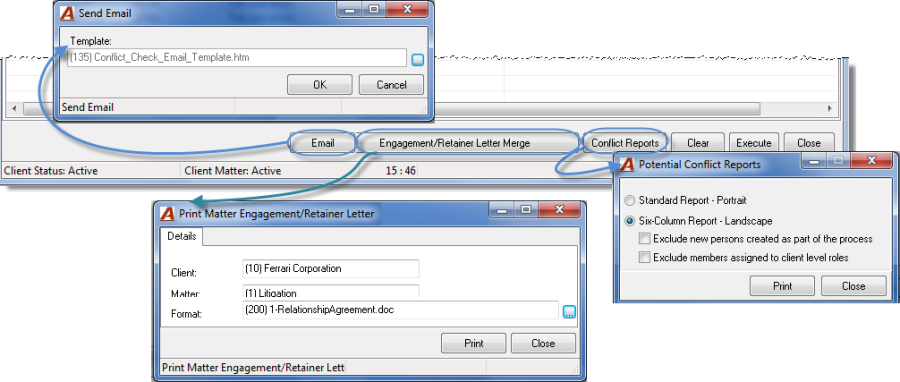
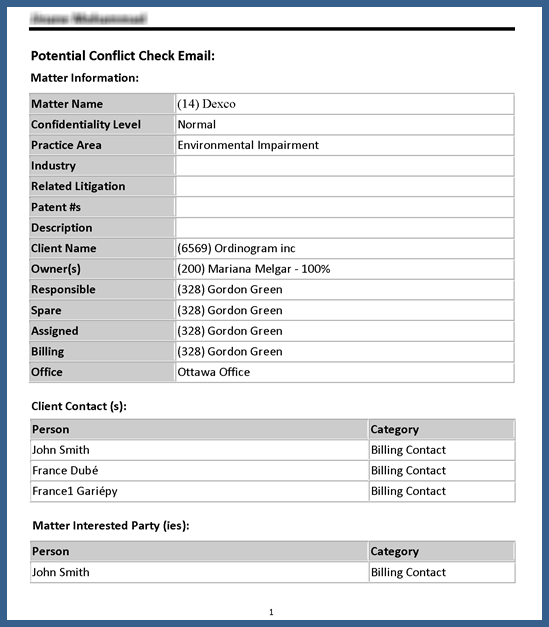
Subject to licensing, the potential conflict email is automatically created and sent using a pre-defined rule-based list of recipients which are further limited if the matter is set as highly confidential. This option requires the conflict email template and supporting rules.
-
Subject to licensing, the engagement/retainer letter merge can be generated as part of the conflict clearance process. This option requires the selection of a engagement or retainer letter template in order to complete the execution of the final document. A disengagement template can be used for matters that are rejected.
-
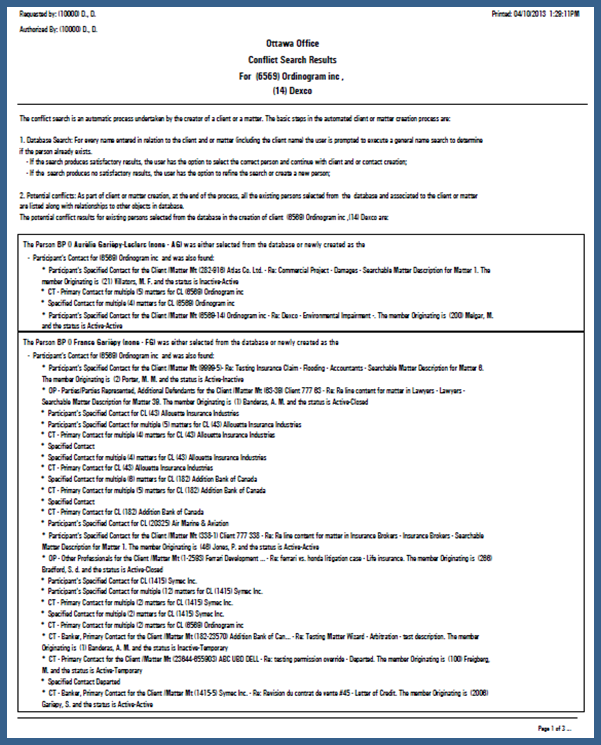
Conflict Reports: The standard portrait report lists the information included in the potential conflicts tab and the search results tab in a format that differs from the list-view.
-
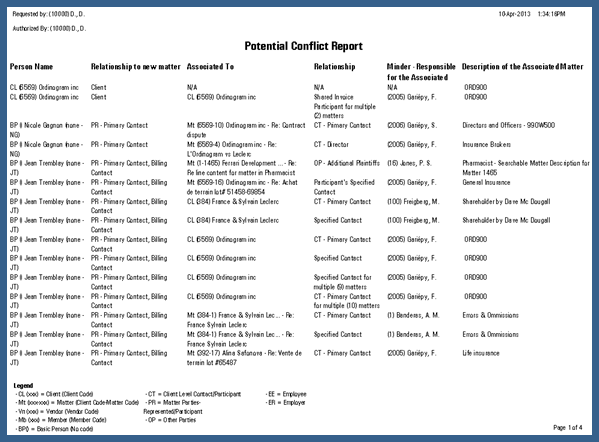
Conflict Reports: The Six Column Report – Landscape lists the content of the potential conflicts report in similar format. This report offers some exclusion options.
Best Practice Consideration: Organizations that use the engagement and/or retainer letter process along with a conflict assessment process that includes the execution of the conflict email along with user-access to the potential conflict form for decision makers have a more effective client and matter opening process which yields a better docket to collected cycle for the converting organization.
Email Template:
Conflict report - Portrait:
"Six Column" Potential Conflict Report
Good to know:
-
If the same contact is set as the billing contact for all matters of a major client, then each time that name is searched and found – as a default – the latter will list the client with the text "affecting multiple matters" to identify the hit. To accomplish this, we recommend that the Primary Contact, Billing Contact, AR Contact and Statement of Account Contact be set as specified contacts within system settings. Users wishing to see one row per matter, can do so at any time by removing the checkmark to the right of the "summarize multiple incidences of specified contacts" checkbox found within the search criteria tab and re-executing the results.
-
To reduce the level of unnecessary relationships it is possible to identify persons as having known relationships. This option, found within person properties is used to identify persons with relationships that are known not to result in potential conflicts within an organization.
-
The "Conflict Search & Search Options" sub-tab as well as the "client & Matter" ones, found within "Acumin System Settings" – "Defaults" includes a variety of default settings and options to further personalize the conflict assessment and new matter creation processes in consideration of the law-firm clients' policies.
Conflict Assessment Process - Best Practices