.png)
QUESTION: Where to activate a new member?
RESPONSE: Although a user needs to be an active member, a member does not need to be a user and remains inactive in perpetuity once there is history for the member.
A new active user needs to be an active member, and for a member to be considered active, he or she needs to be active in at least one firm. Although all new members need to be included in the main firm (001), the latter does not have to ne their default firm or where they are active.
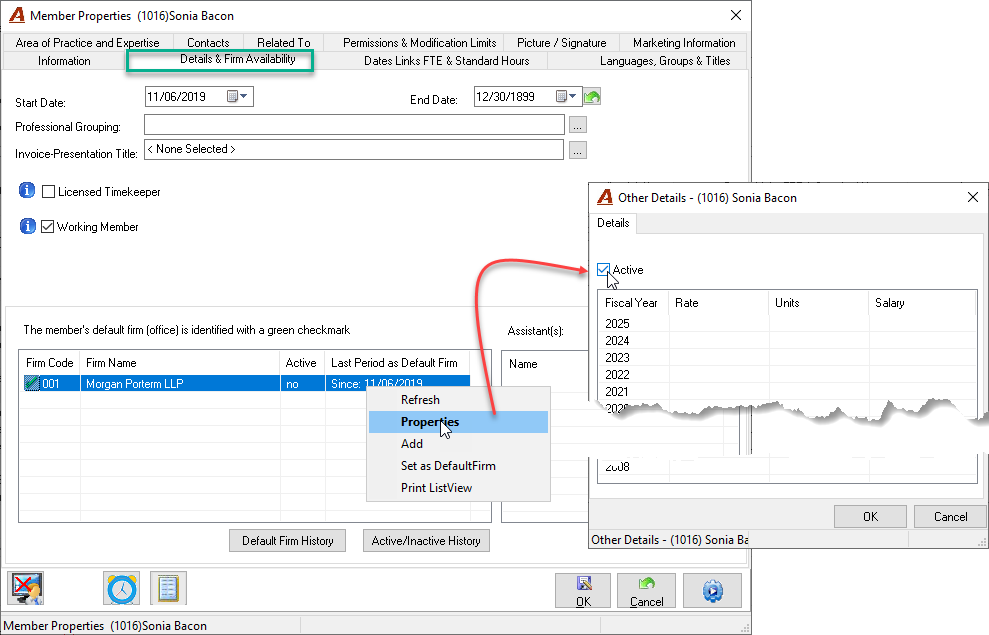
To activate the member, navigate to the “Details & Firm Availability” tab in the properties of the new member. From the list of firms to which the member has been added, highlight the firm on which he or she will be activated and right click to select properties. Checkmark the “Active” checkbox and press OK to accept and exit.
Note that permission “Member Changes 411” must be enabled (Permission Properties - Management - Member)