.png)
QUESTION: We need to update one of our invoice templates (4C3) and set it as the default template for all new clients and matters. How can we do this?
RESPONSE:
Invoice document templates are set at the firm level, and each firm in your environment can have its own default invoice template.
Please note the following:
-
Updating the default invoice template will only apply to new clients and matters created after the change is made.
-
Existing clients and matters will not be affected.
-
If you wish to apply the new template to existing clients and matters, a mini-conversion process is required. This can only be performed by Dexco. To proceed and get a time estimate, please submit a request to support@dexco.com.
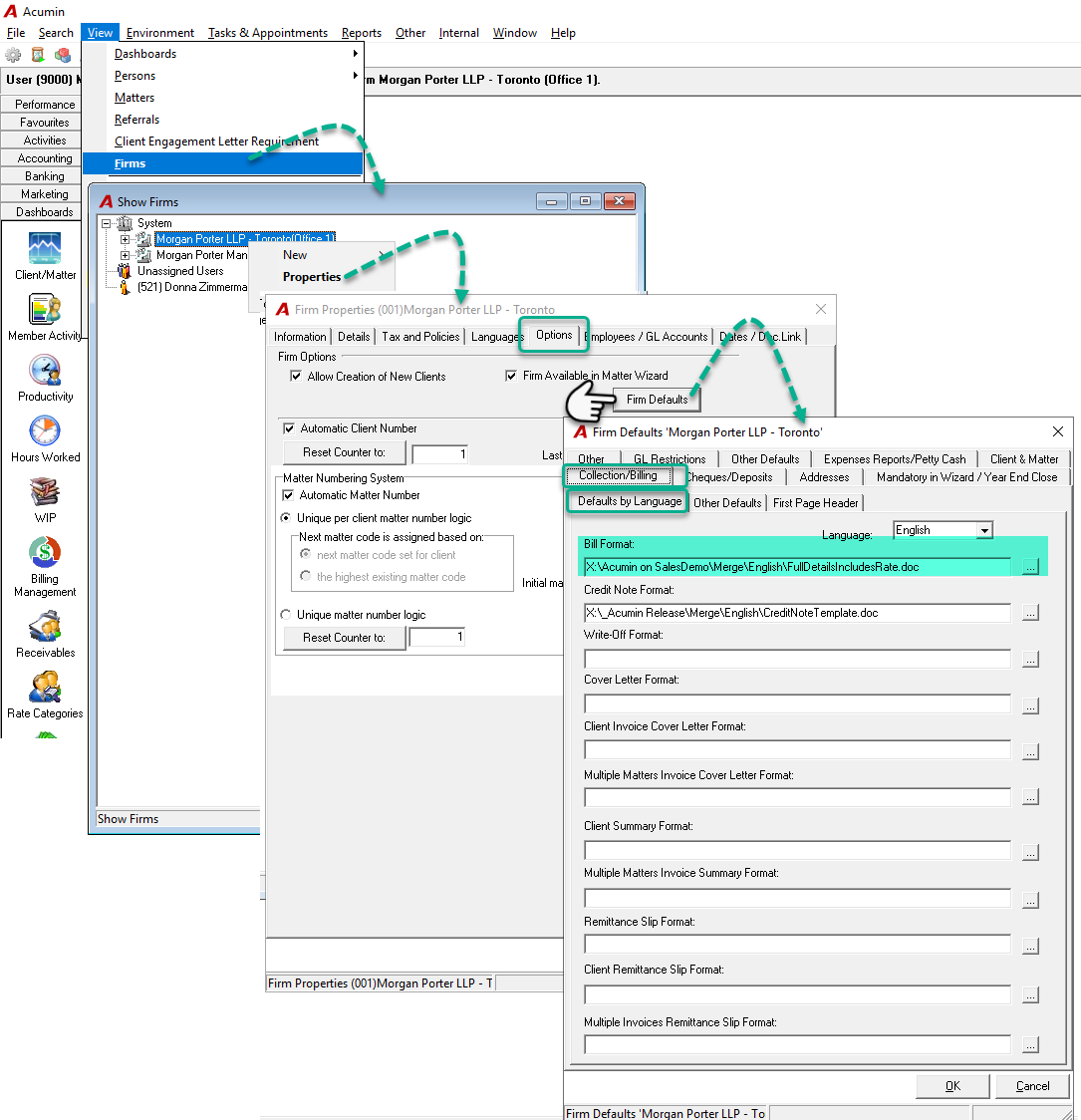
To update the default invoice template for new clients/matters, follow these steps:
-
Go to View > Firm
-
In the Show Firms window, select the appropriate firm
-
Right-click the firm and choose Properties from the context menu
-
In the Firm Properties window, click on the Options tab
-
Click the Firm Default button
-
Under the Collection/Billing – Default by Language sub-tab, select the desired invoice template (e.g., 4C3) in the Bill Format field
-
If your firm uses multiple languages, repeat this selection for each language by choosing the appropriate option in the Language field
Once completed, all newly created clients and matters will use the updated default invoice template.