.png)
Summary
To apply an interest-only payment to an invoice that has already been paid in full, you must enable a specific setting in the Receipt Properties and set the deposit mode to handle interest payments.
Step-by-Step Guide
-
Navigate to Receipt Properties.
-
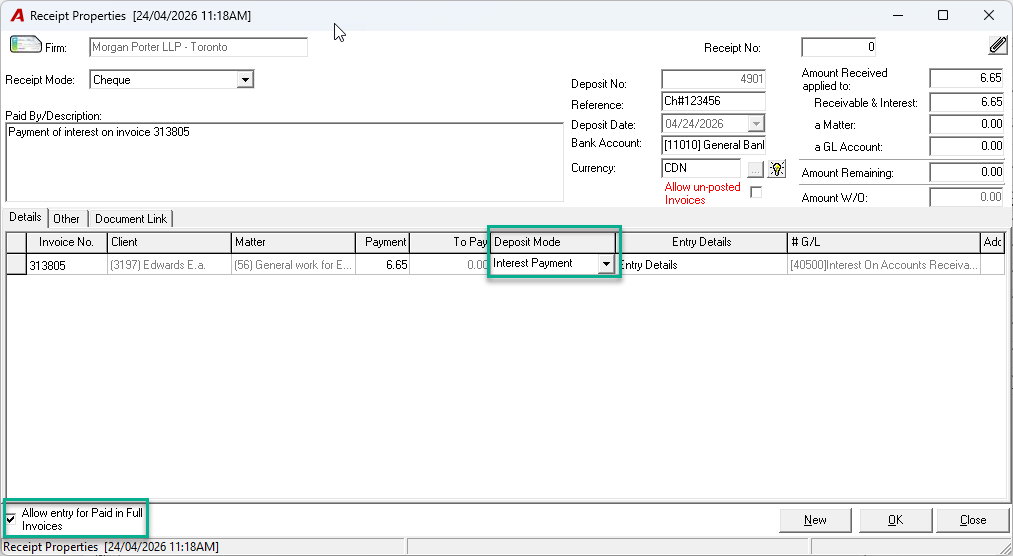
Ensure the checkbox for “Allow entry for Paid in Full Invoices” is enabled.
-
From the “Deposit Mode” dropdown menu, select “Interest Payment”.
-
Enter the value of the payment received in the “Payment” field.
-
Post the receipt. The General Ledger will be updated accordingly, affecting the Bank and Interest accounts.
Note: If you are applying a payment only to the interest portion of an invoice that still has an outstanding principal balance, you should ensure the “Allow entry for Paid in Full” checkbox is disabled.