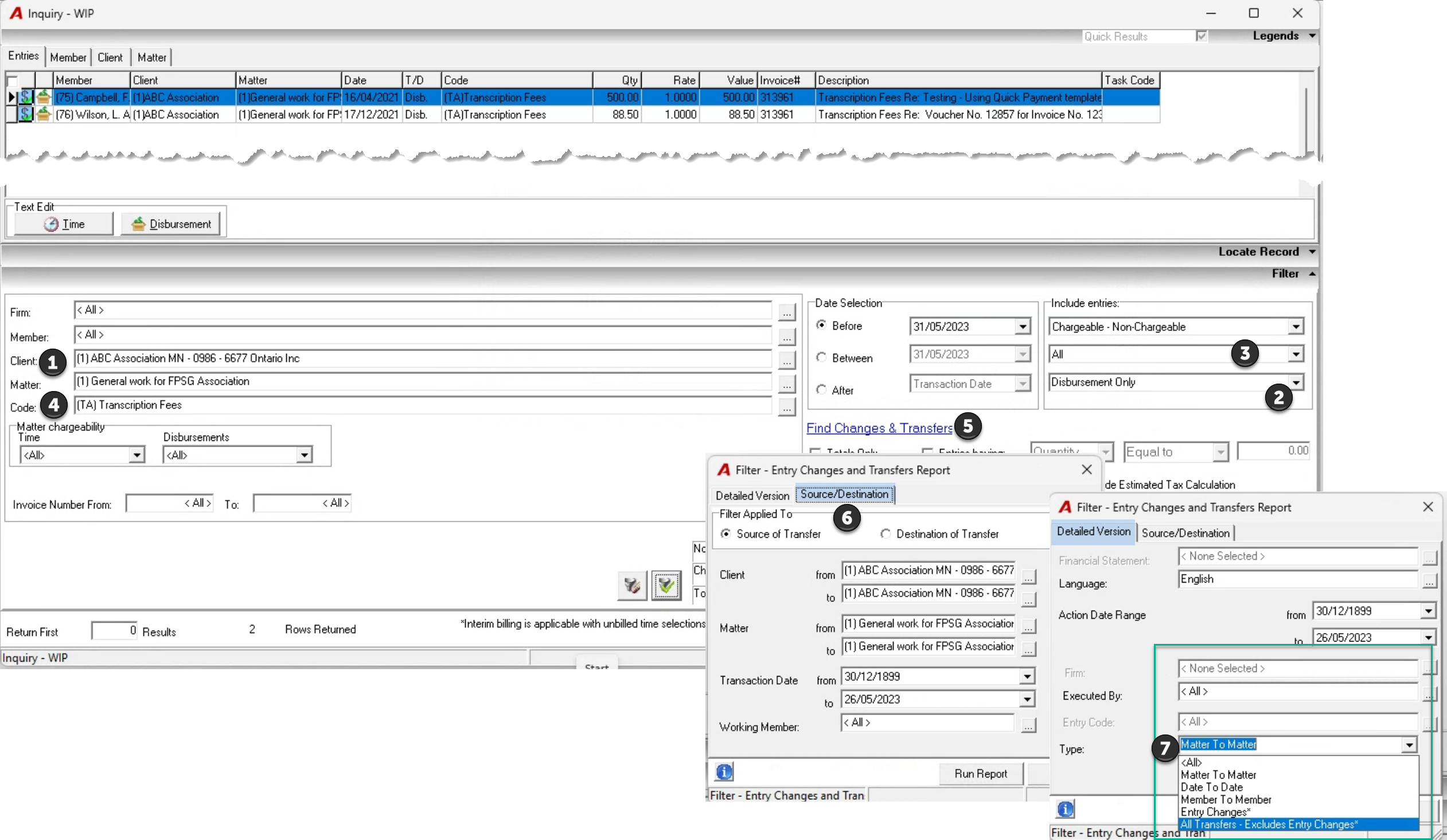
.png)
QUESTION: We can’t find where this disbursement ever made into the client’s WIP. Can you determine what happened to it?
RESPONSE: To find out if the disbursement ever made it to the matter and what happened to it, you can use the WIP inquiry results and transfer report.
-
Enter the client and matter
-
Change “Time and Disbursements” to “Disbursements Only”
-
Change “Unbilled” to “All” to capture all disbursements regardless of status
-
Select the disbursement code (this selection must be made after you set the filter to disbursements only.
-
Confirm that the return of the first number of records is 0 and apply the filter.
If the list f disbursements does not include the disbursement you are looking for, Check if it was transferred or modified.
-
Press “Find Changes and Transfers” hyperlink
-
Confirm that the Source/Destination tab has the client and matter where the disbursement was recorded is in the form to fields and that the radio button “Source of Transfer” is selected. Press on Run Report. If the disbursement is not listed as having been transferred to another matter, proceed to the next bullet.
-
Press on the “Detailed Version” tab and change the “Matter to Matter” default to “All”. Run the report to see if the disbursement had a change of date, member, or value.