.png)
QUESTION: Please advise how do I locate the trust receipt mode list to edit and add new mode, e-transfer?
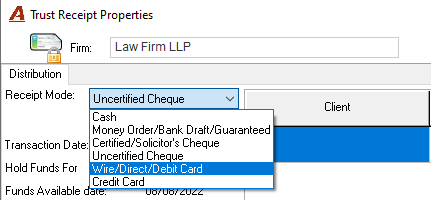
RESPONSE: Once in system settings, navigate to the trust tab and locate the list of receipt modes. On right-click properties you will be able to select listed options and make modifications to the label as well as to the number of days the funds are held.
To reach the “Acumin System Settings” form, select “Environment – System Configuration -System Settings” from the main menu bar. Once on the “Acumin System Settings” form, press Fn-F3 to use the keyword search based on expected form content or as per above, navigate to the tab that best matches what you are looking for. Some tabs have multiple sub-tab content, so they are more generic in their label than others.
Please note that only edits are possible due to the structure of the trust process and reservation of funds. Unlike general receipt modes, trust receipt modes can only be modified. To leverage the list, you can relabel one or more receipt modes, so they present a combined label for akin receipt modes. In this case, e-transfers should be combined with another receipt mode that is similar from a banking perspective. If you want e-transfers on its own then you would need to combine others to provide the space.
Unlike general receipt modes which are simple receipt attributes used for filtering and reporting, the trust ones have hard coded Pids so they can be programmatically embedded in all aspects of trust management options. As a result, if you were to add a new title use the Pid to program what this title or classification should do when reservations are made or funds are held etc. Without this level of programmatic intervention the trust controls and functionality would be compromised.