.png)
QUESTION: Our accounting clerk posted AR WO # 4179 ($387.44), but once it is posted, it shows $387.45 in Dashboards/Receivables, which results in -$0.01 balance.
RESPONSE: These situations may occur within the value rounding process. Beginning in Acumin version 2.0, we have implemented an overnight Quality Assurance (QA) process to automatically address those issues.
If you notice an imbalance, please wait until the next day to verify that the QA process, which will force a series of recalculations to correct the rounding, has run to see if the imbalance remains.
However with versions prior to 2.0, this QA process does not exist and you will need to update manually as follows:
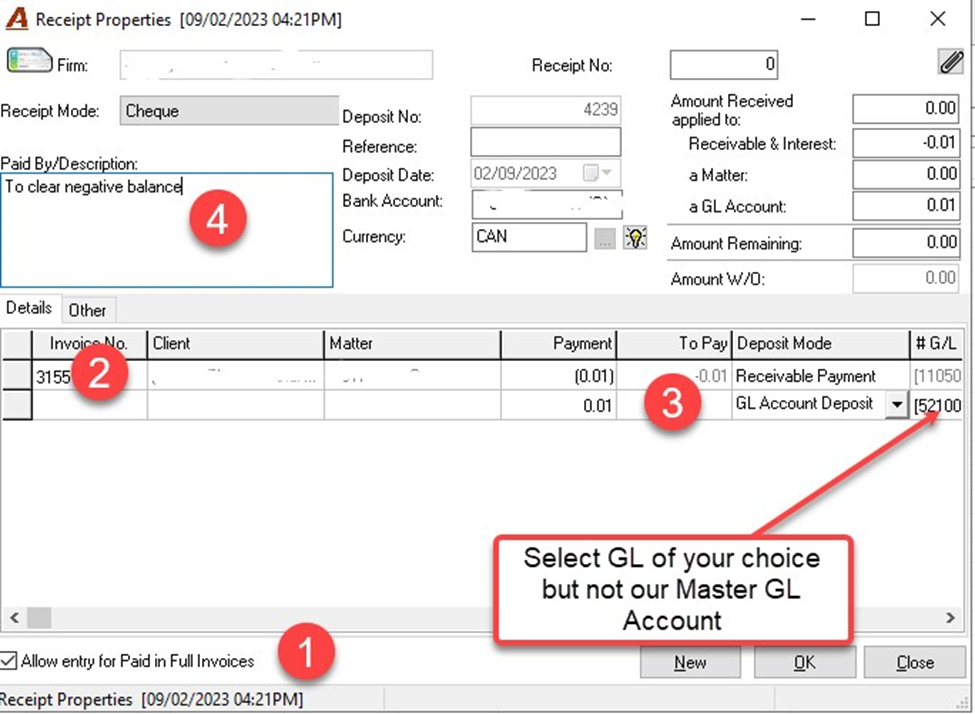
Proceed with a zero-dollar deposit
Start General Deposit
|
1 |
Select option Allow entry for Paid in Full Invoices. |
|
2 |
Enter invoice number where AR shows negative balance. Column to pay will show the negative balance. In the Payment Field, enter the same amount with negative sign. |
|
3 |
Create second line and enter in Field Payment, the same value as row above but positive. Select GL Account of your choice to record the transaction. It could be a miscellaneous expense. |
|
4 |
Use the description field to properly explain the transaction. |
This will create a zero-dollar deposit in your Bank GL Account. Proceed as if this was a General Deposit for posting the transaction.