.png)
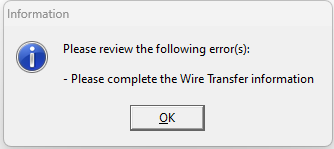
QUESTION: Whenever I update a member profile on Acumin where the payment method option within the Area of Practice and Expertise tab is set to ‘Debit Memo’, I get an error stating “Please complete the Wire Transfer Information”:
We pay people back for expenses by using their member in Acumin, and I can't pay people electronically if I select "cheque". When the payable is posted, I have to reconcile it like a cheque if the cheque method is selected.
RESPONSE: Please make sure that the payment method radio button option on the “Area of Practice and Expertise” tab in member properties is set to Cheque and not debit memo. The debit memo option is a precursor to work completed under an e-banking license available in version 2.0. Once the radio button is set to cheque, the additional requirement message will not be launched, and other modifications can be completed.
If you set by cheque you can change the method when you create the proposed batch to debit memo. If you set to debit memo you will need to complete the bank information which in 11.90 would not have been operational. Once on 2.0 you can enable the e-banking license and move to an EFT process.