.png)
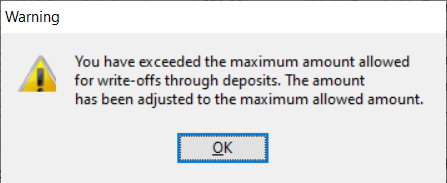
QUESTION: We would like to increase the limit on the function to process fees billed write-offs during the deposit process. Currently we are receiving the following Warning message:
“You have exceeded the maximum amount allowed for write-offs through deposits. The amount has been adjusted to the maximum allowed amount.”
RESPONSE: The limit that controls this type of write-off is set within the “Deposits” sub-tab of the “Cheques and Deposit” tab within the “Firm Defaults” form.
It is possible to process shortfalls on invoice payments received as receivable write-offs when completing the distribution of the payment in the receipt properties form.
On selection of the deposit mode “billed time write-off”, these shortfalls are applied to receivable fees and corresponding sales tax.
As this type of write off has limited functionality, its value is also limited to accommodate shortfalls that do not require additional consideration in context of firm policy. The limit is set within the “Deposits” sub-tab of the “Cheques and Deposit” tab within the “Firm Defaults” form.
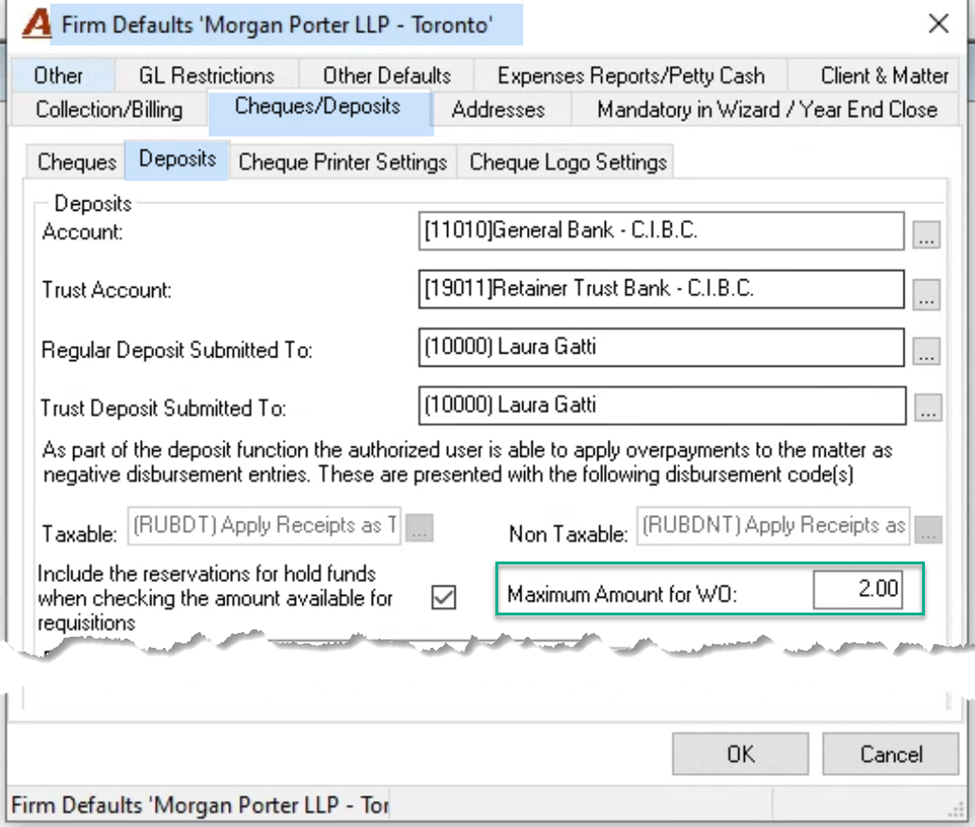
To reach the “Firm Defaults”, once on the firm properties form, navigate to the “Other” tab and press on the button “Firm Defaults” to launch the “Firm Defaults” form. Press Fn-F3 to use the keyword search to find affected fields within the properties form to be considered for modification, or navigate the form content from tab to tab.
To reach “Firm Properties” select “View – Firms” from the main menu bar. Once on the “Show Firms” form, highlight the first firm and right-click to select properties. Press Fn-F3 to use the keyword search to find affected fields within the properties form to be considered for modification, or navigate the form content from tab to tab.