.png)
QUESTION: Is it possible to adjust a setting on the client that allows for the first character in a time entry to be lowercase? Currently, every entry that is saved capitalizes the first character. Which, in most cases is the desired effect. However, I have a lawyer who requires a lowercase 1st character for a variety of entries. Is this possible?
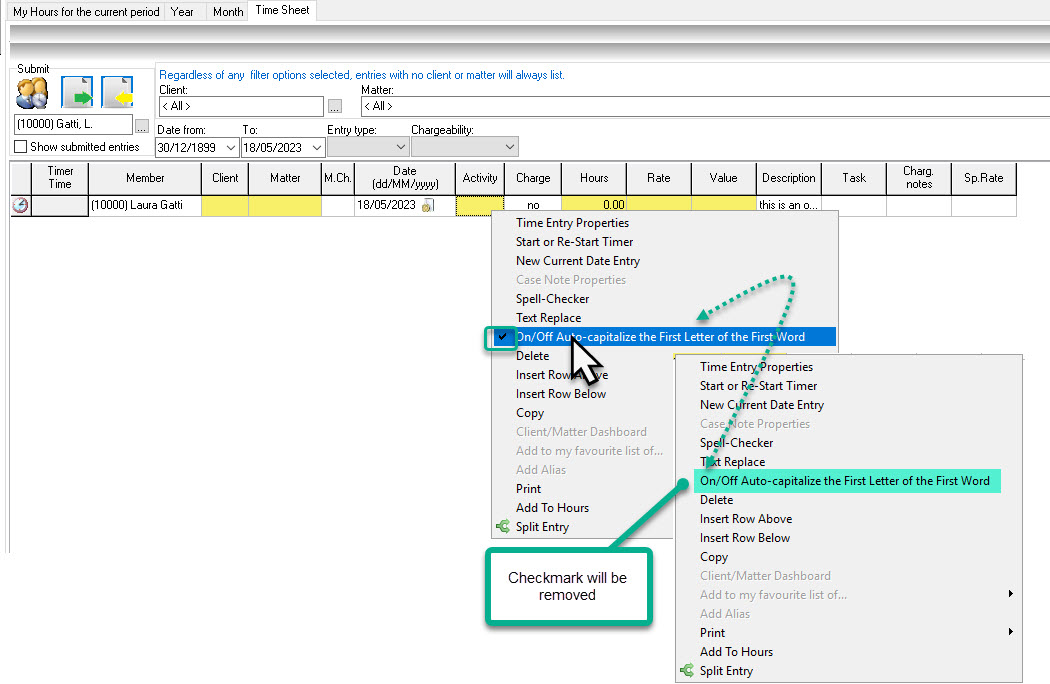
RESPONSE: Yes it is possible to disable the Auto-capitalize First Letter option. You will find it in the Timesheet Tab in the contextual menu. The exact name of the option is: "On/Off Auto-capitalize the First Letter of the First Word". By default this option is always checked ON (checkmark in front of the option). Click on it once to uncheck it. You should see the option without the checkmark in front. This setting should be saved until you enabled it back.