.png)
QUESTION: The hours worked (time) in the My Hours or Hours Worked Monthly Tab does not match the member activity dashboard and reports?
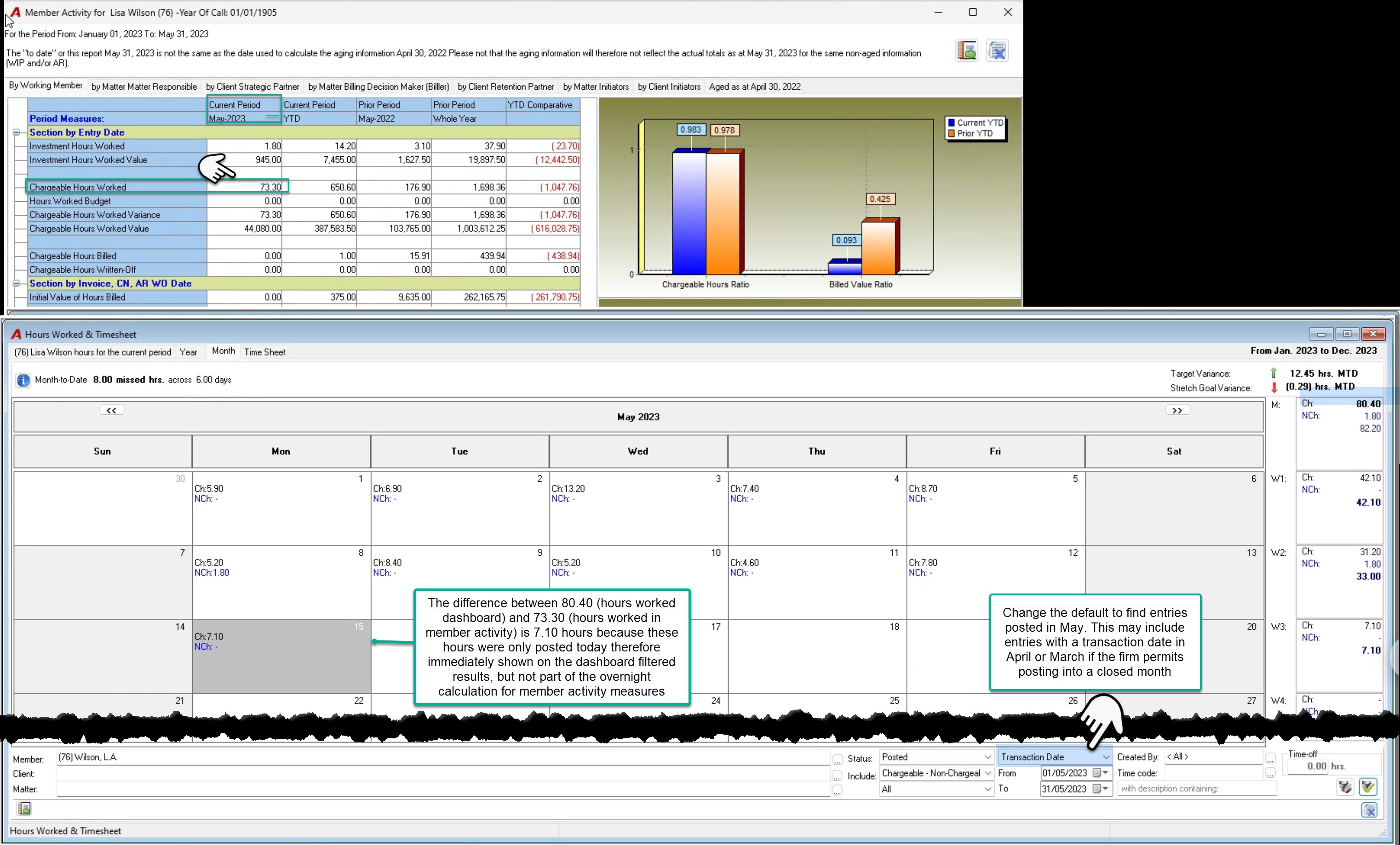
RESPONSE: The hours worked dashboard monthly tab filter and results is intended to provide users with visibility of hours worked as a moving target to encourage up-to-date timekeeping in context of pace measures (My hours tab) and mitigate the potential for missed time. As a result, the chargeable hours worked with the status posted (the filter applied on the screenshot) includes the chargeable hours worked for the timekeeper with a transaction date in May, with the status posted as at the time that the dashboard results are launched. This value will change as time is posted throughout the day. The hours worked posted in any given month can be for time with a transaction date in a prior month not yet closed or closed depending on security.
The member activity measures presented on the member activity dashboard or member activity type reports are intended to provide users with visibility of their status in context of performance for a given period, therefore the measures are always based on posted results at the time the overnight member activity process is triggered. For this reason, member activity hours worked measures presented on member activity reports and dashboards will only include the chargeable hours worked based on transaction date (in this case May) which was posted before the overnight calculation, and any additional hours worked for the same period posted after the overnight calculation has started is excluded until the next overnight process.
Due to the different context and use case of these dashboards and reports, it is possible for the chargeable hours worked measure for some timekeepers to have timing differences at different times in a business cycle.
We include an example of a reconciliation between the two sources using the member activity dashboard, as this measure should be the same as the one on the report. In this example the hours worked posted after the overnight process for hours worked with a transaction date equal to today, therefore easily identifiable.
To complete the same reconciliation for timekeepers experiencing these timing differences, filter the hours worked monthly tab for posted time based on posting date. This is an option on the drop-down box that defaults to posting date, that will capture the hours worked with transaction dates across multiple prior days and/or months posted within a specific day.