.png)
QUESTION: What does this icon within the Billing Section of Invoice Properties mean?
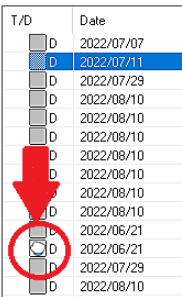
RESPONSE: The icon indicates that the entry was individually modified – the user made the modifications directly within the disbursement entry properties form. If the modifications are made to an individual time entry in the same way during the invoice prearation process, the same icon will be displayed. This is to identified individually modified entries, especially since if the total fee is modified, only those time entries not individually modified are affected based on value worked. Although the imoact is not the same for disbursement entries (you cannot modified total disbursements), the presentation of individually modified ones is the same as for time entries.
Note that if you open its properties and press OK, it updates (even if there are no changes) so the icon will reflect an update. To close without the icon showing, exit with cancel.