.png)
Hours worked - Chargeable and Non-chargeable Report Option
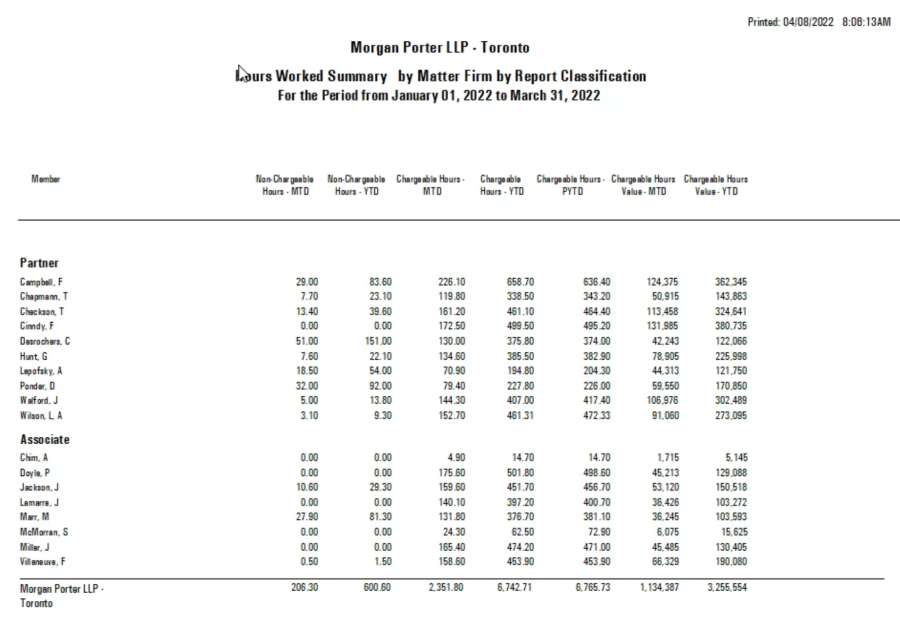
QUESTION: Could you tell me if there is a report in Acumin that lists hours docketed MTD, YTD and PYTD as well as the chargeable amount by lawyer, separated out between chargeable and non-chargeable?
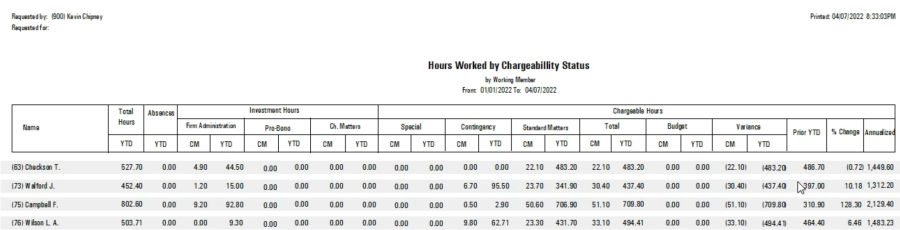
RESPONSE: Our best practice recommendation is the "Hours worked - Chargeability Analysis" report. It can be executed summarized by working member, but also detailed under multiple reporting dimensions for additional perspective. It also includes metrics in context of prior year comparatives as well as a breakdown the main category measures for additional context on where the time is spent. Although some of these measures may not be relevant on converted data (i.e. show as 0.00) the use of the report will parallel use of new matter attributes moving forward.
Alternatively you can build a firm defined member activity summary report.
The following provides further details on the above:
The "Hours Worked – Chargeability Analysis" report is launched from the "Reports – Productivity – Hours Worked" sub-menu. It can be summarized by working lawyer.
The investment hours (productive non-chargeable time) splits between time spent on pro-bono matters, non-chargeable time spent on chargeable matters and all other non-chargeable time spent on internal matters. The chargeable hours are split between matters set to contingency, matters set as special (a matter attribute typically used to identify matters that are rated very differently from the range of normal pricing practices – for example rates for family and friends). It compares to budgeted hours – many firms use the annual target as the basis for the budget used in the working member budget form. The prior YTD is used to show the % change from current YTD and the annualized change as well. This report can be expanded for details by other attributes like industry, area of practice and or client and matter etc. The report can also be ordered by member alphabetically and grouped by reporting classification – partners, associates …
This is a firm created member activity report which is created and launched from the "Show Summary Member Activity Reports" list-view. You can access this list view from the "Reports – Productivity – Member Activity – Member Activity Summary" option. It is missing some prior year measures; however, these measures are planned for inclusion in the next few months. Once created, this report was executed for reporting classifications Associate and Partners ordered by code so partners list first, with the members ordered by second name alphabetically and not showing their member code. As you create this report, you have full control of the labelling.