.png)
Billing Frequency
Scope and Purpose
The purpose of billing frequencies is to facilitate decision making by stakeholders responsible for making billing decisions during the firm’s monthly billing cycle.
Providing visibility of the accumulated unbilled entry value in context of potential billing realization on the monthly generated E-WIP statement (to Bill Tab), the scope of the billing frequency options extends across all matters regardless of fee arrangement - time and billing (hourly) matters, recurring-task matters, single invoice transactional matters and contingency matters – with or without pre-set transaction fees.
Billing Frequency
Highlights
Time and billing matters are generally invoiced monthly to optimize cash-flow in context of the firm’s fiscal periods, unless the client has specific billing guidelines, for example quarterly (every 90 days) or monthly provided that the WIP has reached a certain value.
Recurring-task transactional matters – for example annual returns - are generally invoiced in the billing period when the task is executed. This implies a relationship between the period-based billing frequency (for example annual) and its and start date (February 15th), and the trigger for the recurring task, for example the set-up of an important date during the file intake process.
Single invoice transactional matters generally close within regular business cycles, therefore they bear a billing frequency of “postponed in perpetuity”, often with information as to when the matter should be billed – for example “Real estate transaction to be billed at closing.” This set-up provides visibility of accumulated WIP values on the E-WIP statement (To Bill Tab) and provides a directive when to invoice.
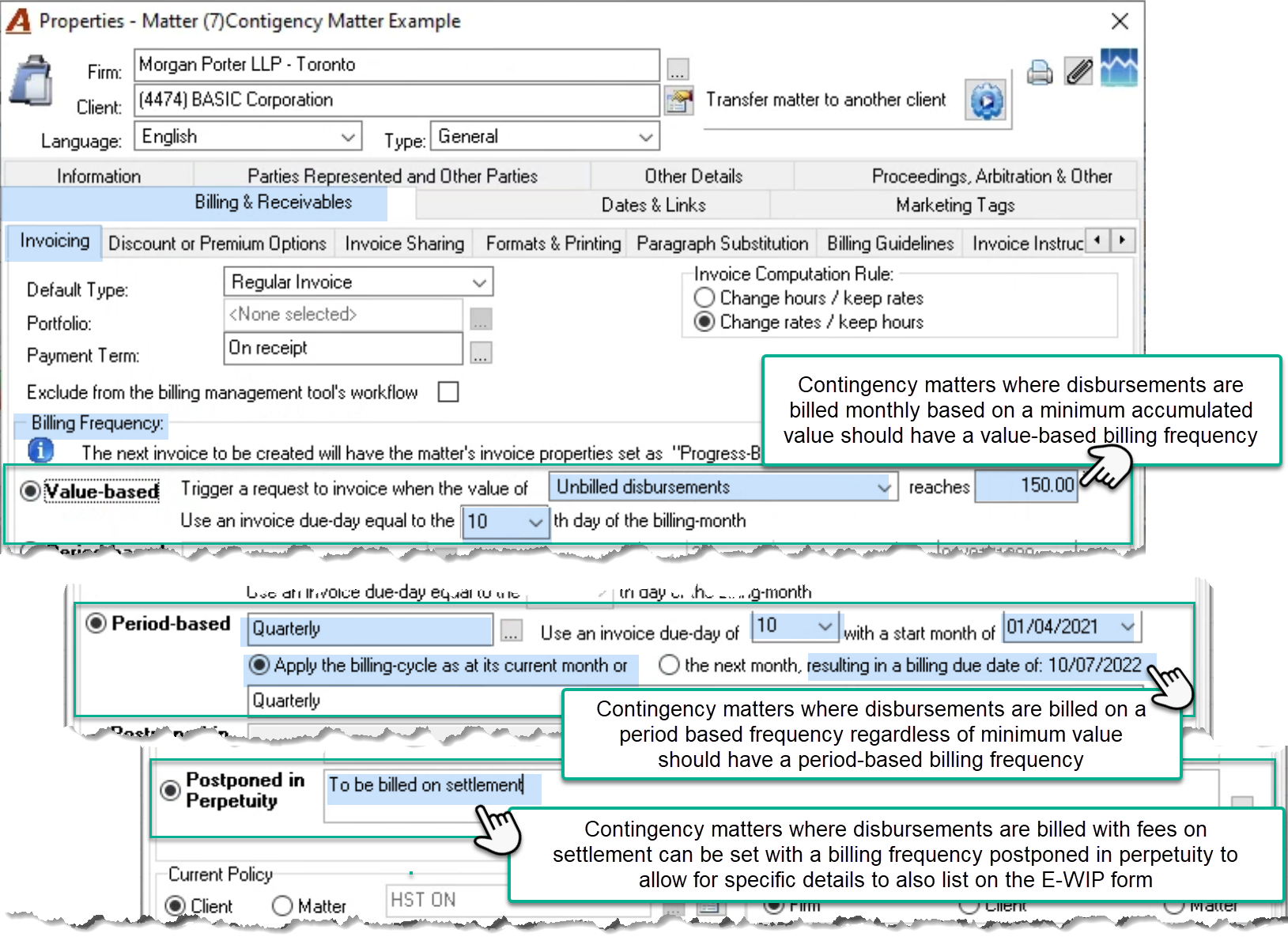
Contingency matters, matters crossing multiple fiscal periods billed on settlement or closing continue to list on the e-WIP statement (to bill tab) with the billing action as "Deferred", showing accumulated unbilled time and disbursements values, and a billing frequency of “Contingency Matter – N/A” until the process for settlement is initiated. However, when contingency matters are combined with a billing frequency, the billing action and billing frequency description on the E-WIP Statement (To Bill Tab) are telling of the matter’s billing requirements.
The billing intention shown on the E-WIP statement, is the result of the billing frequency set-up decisions made in matter properties. As most matters would be opened with a billing frequency decision, the expectation is that matters listed on the E-WIP statement will have a calculated billing intention other than “Not Classified”.
Access
To set-up a billing frequency access the “Invoice – Billing & Receivables” sub tab in client or matter properties.
Client or Matter Level
The client level billing frequency is used to set the default billing frequency for each new matter created, however, the matter level billing frequency is used to calculate the billing action and the content of the billing frequency column in the E-WIP Statement (to Bill tab).
Portfolio of Matters
The multi-matter invoice can be generated in context of a portfolio of matters for a client. In this case the billing frequency of the portfolio supersedes the billing frequency of the matter.
Options
Value Based
The value-based billing frequency triggers the billing action “to Bill” when the criteria is met for the billing cycle, else it will show the billing action “deferred”.
Whereas entry-value filters applied to the billing management process exclude matters that do not meet the criteria, the value-based billing frequency provides visibility of accumulated WIP values otherwise excluded for better decision making. With a billing action “Deferred” and a billing frequency content that includes the criteria supporting the deferral, the billing decision maker can decide on how to clear additional WIP on matters that should have been inactivated or closed, as well as complete a final invoice for a matter which has concluded, yet it does not meet the billing criteria.
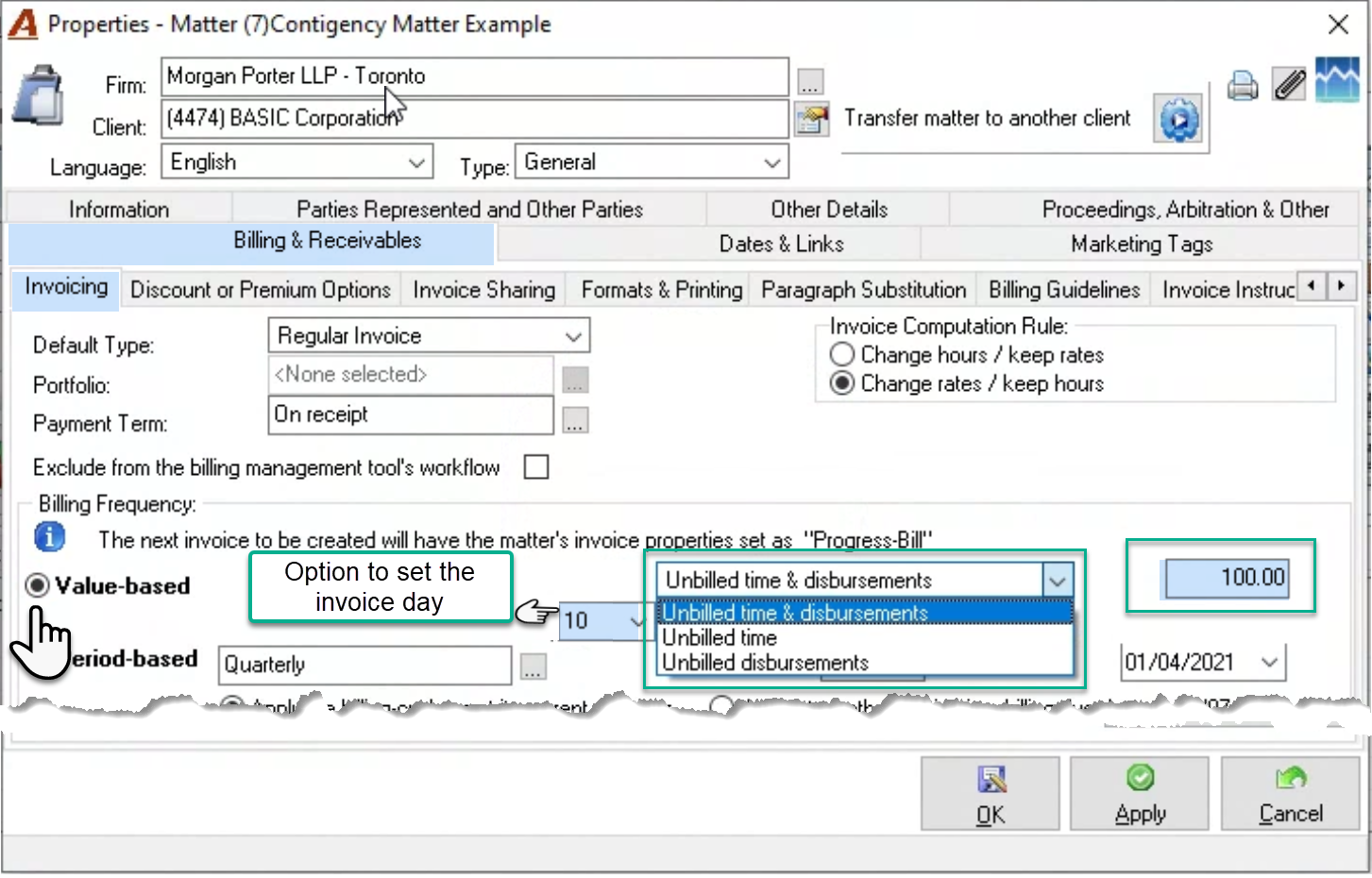
Set the value in context of accumulated unbilled time and/or unbilled disbursements to support required outcomes. For example, if the value-based billing frequency is applied to contingency-based matters with an unbilled disbursements minimum value criterion, the decision maker will know to trigger a disbursement only invoice. If the option to set the invoice day is used, the invoice due date will be calculated for the billing cycle where the billing action is “To Bill”.
Outcome on the E-WIP Statement (To Bill Tab)
The criteria will display within the billing frequency column. If the criteria are met, the matter will show as “To Bill” and the due day (if selected) will show in an active colour. If the criteria are not met, the matter will show as “Deferred” and the due day (if selected) will show in gray.
Period Based
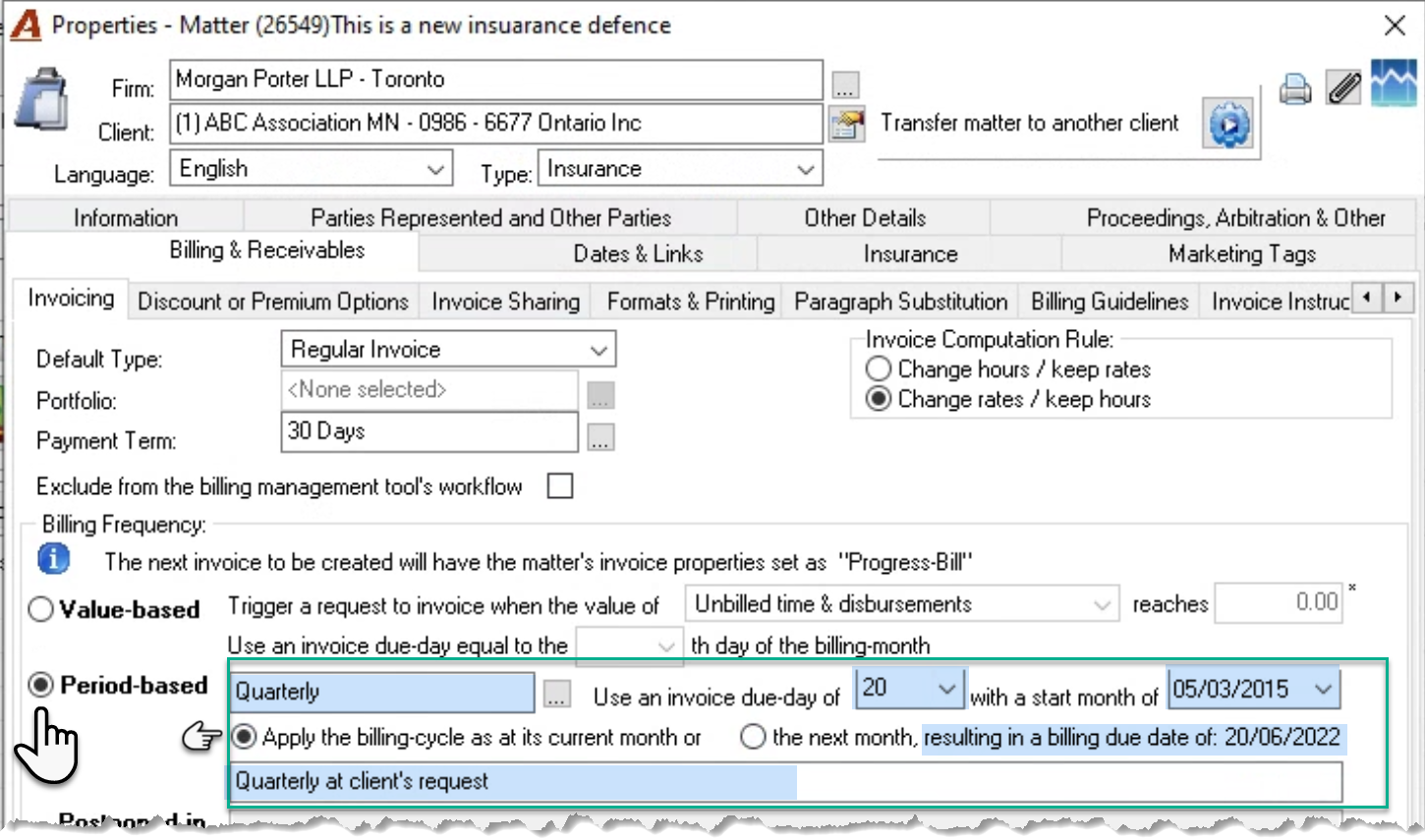
Most often used with non-transactional matters regularly billed in accordance with the firm’s financial goals, period-based billing frequencies are also used to support client requirements – for example where matters must be invoiced every 90-days; or to support area of practice workflows – for example annual returns.
Select the period-based billing frequency that reflects the best timing for the matter in context of the firm’s objectives, or to support the client’s requirements. If you use an invoice due day, select the date to start and the context - radio buttons. They impact the next billing date presented.
Outcome on the E-WIP Statement (To Bill Tab)
Billing frequencies set at 0 months, in essence mean that there is no billing frequency therefore they will show with a billing action of “Not Classified”.
Matters with a future start date will show as “Not Classified” until the first cycle where they show as “To Bill”.
Invoice due days will show in active colour when the billing action is “To Bill”, else they will show in gray.
The billing frequency caption is added to the narrative field for the period-based billing frequency along with any additional content added will be presented on the billing frequency column.
Postponed in Perpetuity
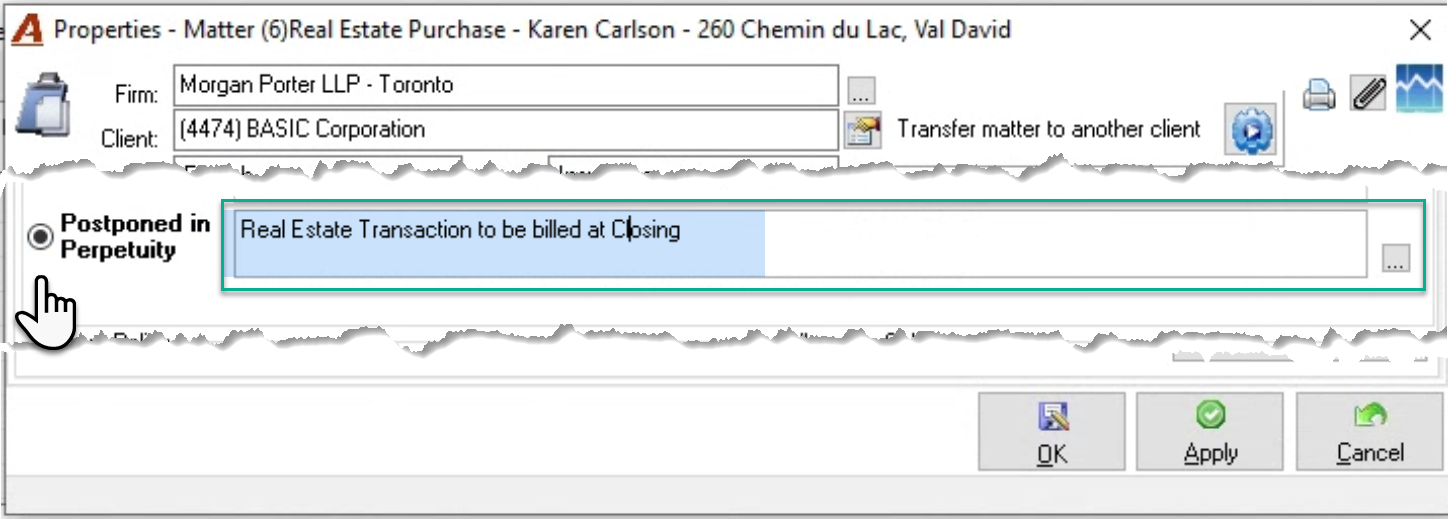
Most often used with single invoice transactional matters billed at closing – for example real estate transactions, as well as contingency matters where the narrative field offers additional information for consideration during the billing decision making process.
Matters set as postponed in perpetuity continue to list on the e-WIP statement (to bill tab) with the billing action set to "Deferred", showing accumulated unbilled time and disbursements values, and a billing frequency inclusive of any narrative added during set-up.
Outcome on the E-WIP Statement (To Bill Tab)
Matters set with a billing frequency of postponed in perpetuity will show with a billing action of “Deferred and a billing frequency statement inclusive of any narrative added by the user.
Contingency Matters
When contingency matters are combined with a billing frequency, the billing action and billing frequency description on the E-WIP Statement (To Bill Tab) will reflect the matter’s billing requirements. For example, the requirement to invoice unbilled disbursements monthly based on minimum value will show on the billing frequency along with the narrative “Contingency Matter”.
Summary
If a due day is selected, it will show in an active colour when the matter has the billing action calculated as “To Bill”, else it will show in Gray.
If the billing frequency is used with a contingency matter, the label “Contingency Matter” will be added in front of the narrative presented on the billing frequency separated by a hyphen.
The highlighted text and values are variables indicative of selections made or narrative entered in corresponding fields.
|
Billing Frequency |
Billing Action |
Presentation on the E-WIP Statement (To Bill Tab) |
|
Value Based |
To Bill - criteria met |
Value of unbilled disbursements reaches 100.00 in the billing period |
|
Deferred - criteria not met |
||
|
Period Based |
Not Classified – until start month |
Quarterly at client’s request |
|
To Bill - criteria met |
||
|
Deferred - criteria not met |
||
|
Period Based 0 months |
Not Classified |
Review WIP and bill at the end of the transaction |
|
Postponed in Perpetuity |
Deferred |
Real Estate - Transaction to be billed at Closing |
|
None |
Not Classified |
N/A |
Matters listed on the E-WIP statement that had an invoice generated which was subsequently deleted or cancelled, will be updated with a billing intention of “Not-Classified” until the billing management tool is executed, or the user updates it with a new billing decision.