.png)
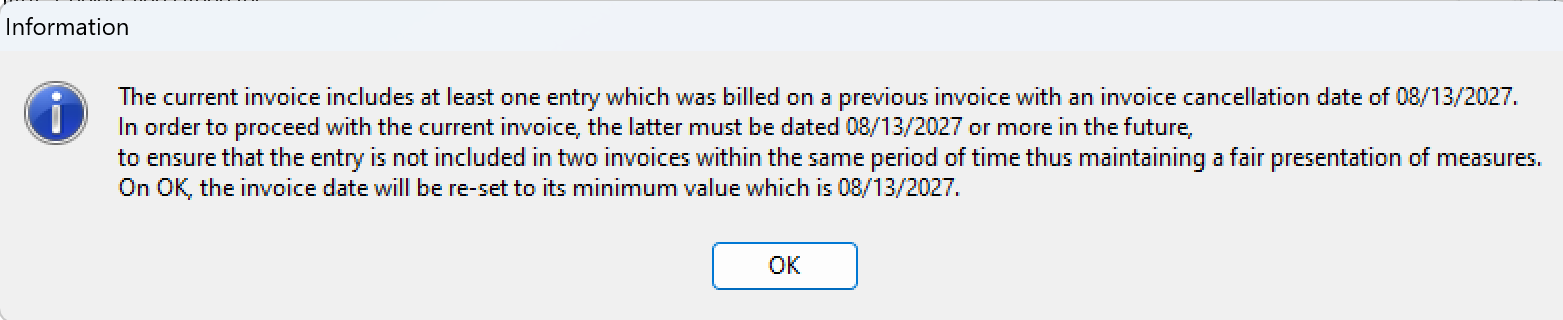
This article explains what to do when you need invoice results to appear in an earlier month, but the system does not allow you to recreate an invoice using a date that is earlier than the cancellation date of a previously cancelled invoice that included one or more of the same entries.
You cannot create a replacement invoice with a transaction date earlier than the cancellation date of a cancelled invoice that contains at least some of the same entries. This rule protects the integrity of transactional timelines and ensures historical, date-sensitive, and balanced reporting.
In practice, this means the earliest possible date for the replacement invoice is tied to the original invoice timeline. A true backdated replacement invoice is not permitted when the same entries were already involved in a cancelled invoice.
Why the system does not allow backdating
Entries that were included on a cancelled invoice remain historically associated with that invoice so reporting can continue to reflect what happened, when it happened, and in what sequence. If the same entries could be reinvoiced using a date earlier than the cancellation date, the system’s historical reporting would become unreliable.
The restriction exists to preserve accurate General Ledger results, fee billed reporting, and other date-sensitive historical measures.
Because of this design, the system prevents recreating the invoice in the way users often expect. Instead, the correction must be handled using an approved workaround that preserves reporting integrity.
Recommended solution
The preferred approach is to use a no-time invoice to move the financial impact into the desired prior period without compromising the database.
-
Create a new no-time invoice with the required invoice date affecting the prior month or prior year that should reflect the fee billed impact.
-
Use the same total value and fee allocation structure as the detailed invoice that was posted in the wrong period.
-
Apply a manual allocation so each allocated-to member receives the correct portion of fee billed for that earlier period.
-
If payments were received and cash allocation is important for reporting in your organization, apply the payment using the actual date received.
-
If a payment was applied in the prior period solely to support reporting, cancel that payment in the current period using a cancellation date that matches the transaction date of the detailed invoice posted in error.
-
Cancel the no-time invoice in the current period using a cancellation date equal to the transaction date of the regular detailed invoice that exists in the current month.
-
Keep or recreate the regular matter invoice in the current month as needed, and reapply any deposit on that current-period invoice if applicable.
This is the most efficient and no-cost solution described in the existing Confluence guidance because it preserves historical reporting while allowing the prior period to reflect the intended billing result.
Expected results
|
Period |
What the system reflects |
Why it matters |
|---|---|---|
|
Prior month/year |
The no-time invoice creates the intended fee billed impact and allocation in the earlier period. |
This allows prior-period reporting to show the desired billed result. |
|
Current month/year |
The no-time invoice is cancelled and offset by the regular detailed invoice in the current period. |
This keeps the net impact balanced without breaking the transaction history. |
|
Across both periods |
The reporting timeline remains historically accurate. |
This protects General Ledger, fee allocation, and date-sensitive reporting outcomes. |
Example:
-
Invoice created in error, dated and cancelled on September 15th;
-
Replacement No-Time invoice created and dated on August 12th;
-
Replacement No-Time invoice cancelled on September 15th
Results:
-
August: The fees billed, and fee allocation measures will include the “No Time” invoice. If a payment is applied to the invoice in August, the corresponding cash allocation measure will also be reflected.
-
As the “No Time” invoice will be cancelled in September replaced with the regular matter invoice for the same value and allocation, the net impact will be 0.
When the client needs invoice detail
The no-time invoice is primarily a reporting solution. If the client requires time and disbursement detail, use the output from the detailed invoice and adjust the presented invoice number and date to match the no-time invoice for client-facing purposes, if your business process allows that.
If the current-month regular invoice has already been cancelled, you can generate a replacement invoice using the oldest date the system allows, save the invoice document, and then use that saved document as the basis for the client copy after updating the visible invoice date and invoice number to correspond to the no-time invoice.
Alternative solution
If the no-time invoice approach is not suitable, there is a less efficient alternative that removes the historical connection to the cancelled invoice by creating new entries.
-
Reverse all affected time and disbursement entries.
-
Write off both the negative and positive sides of the reversed entries.
-
When prompted, allow the system to create a new unposted copy of each entry.
-
Post the new entries.
-
Create a new invoice using those newly created entries.
Because these are new entries, they are no longer linked to the cancelled invoice history in the same way. This can solve the issue, but it requires more effort and is generally considered the less efficient option.
The reverse-and-recreate method should usually be reserved for cases where the no-time invoice process does not meet the operational requirement.
Practical guidance and controls
-
Document both invoice numbers in the invoice notes and in your tracking file so later payment handling is easier.
-
Confirm whether your organization reports on cash allocation before applying or cancelling payments as part of the correction.
-
Use the same fee allocation structure on the no-time invoice so reporting matches the intended result.
-
Do not attempt to bypass the date restriction by reusing the same entries on a backdated replacement invoice.