.png)
Credit Work and Allocated Fees Schemes
Is there a Relationship?
There is no native relationship between credit work and allocated fees. These are independent measures that have different context. Whereas the former is based on the timekeepers’ value worked included in an invoice, the allocated fees are calculated based on the options and attributes of the allocation schema applied to the invoice. However, the allocation schema options allow for the creation of an allocation schema based fully on credit work.
Use of Credit Work Allocation Schemes
Allocation schemes based on credit work (in full or in part) cannot be used with no-time invoices. Allocation schemas for use with the no-time invoice have different options and attributes that are not based on the concept of credit work.
Highlights
The firm has control of the number of allocation schemes it needs and their content.
The credit work measure represents the value worked included in an invoice; therefore, it is not a value that can be allocated or transferred to someone else. It is earned.
During the invoice preparation process the total credit work included in the invoice (the total value worked) represents the initial invoice-fee-value. This fee value is often adjusted through billing adjustments like fee overrides, write-downs to 0.00 etc., as well as discounts resulting in a net fee billed position that is potentially more or less than the initial total credit work.
Allocation schemas based on credit work can be set up to have entry fee overrides or write-downs to zero completed on specific entries or member totals, affect the specific timekeeper instead of all timekeepers, as well as credited fees applied to specific members during credit note preparation instead of applied to allocated-to members based on allocated-to values of the related invoice. As a result, the allocated-to values may not result in a proportionate allocation of net fees billed. For example, a credit-work-based allocation schema that has member/entry specific gains or losses applied directly to the working member, would not be proportionate based on credit-work if the invoice preparer applies fee overrides directly to an entry or a member.
Whereas the gains, losses, and write-downs to 0.00 applied at the entry or member level, and/or the fees credited can be set to apply to specific member selections, the invoice discounts and total feel overrides are allocated to the allocated-to member based on their value worked. As a result, the allocated net fees billed allocated to the allocated-to member by the allocation schema can be a combination of specifically allocated-to values and those based on value worked (credit work).
The No-time (flat fee) invoice is not expected to have credit-work; therefore, the allocation schema options and attributes for this type of invoice are limited to non-credit work alternatives like matter or client role. For this reason, the total allocated fee measure for the organization may not equal the total shared fee measure. Fees for no-time invoices are considered in the allocated value but excluded from the shared fees one.
The ability for users to modify the formula-based fee allocation results, that generates the re-allocation of fees billed from one member to another, therefore the difference between the formula-based fee allocation and final allocation results shown on fee allocation report when executed by working member will show if the allocated-to member will have more or less allocated fees than those attributed by the formula.
Report Outputs
The fee allocation report includes credit work, as well as formula based allocated results and final allocation results.
Pro-rata Example
Access
To access any allocation formula, select “Allocation Schemes” from the “Environment – Billing Requirements” sub-menu
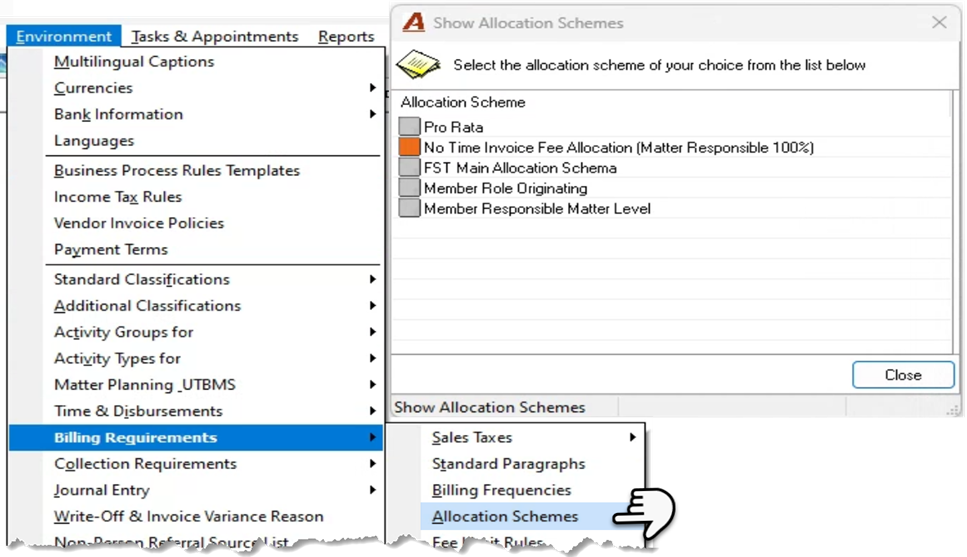
Right click and select New to create a new scheme or highlight one and select Properties to make modifications.
Pro-Rata Example
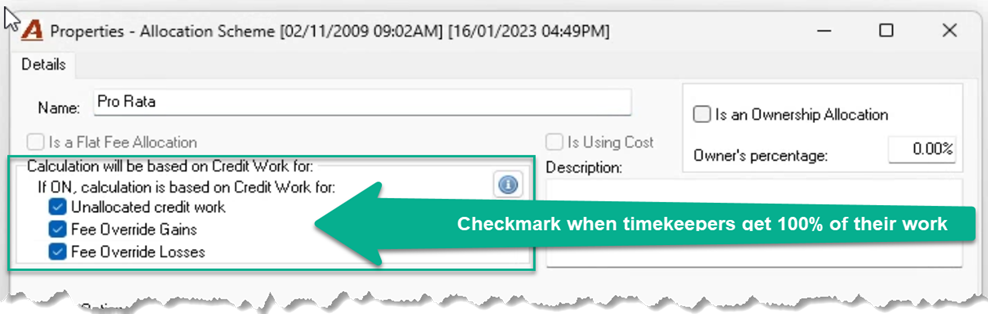
Label the schema.
Credit Work
If the schema will be based on timekeeper worked values (credit work) checkmark the three checkbox options listed in the upper section – of the form
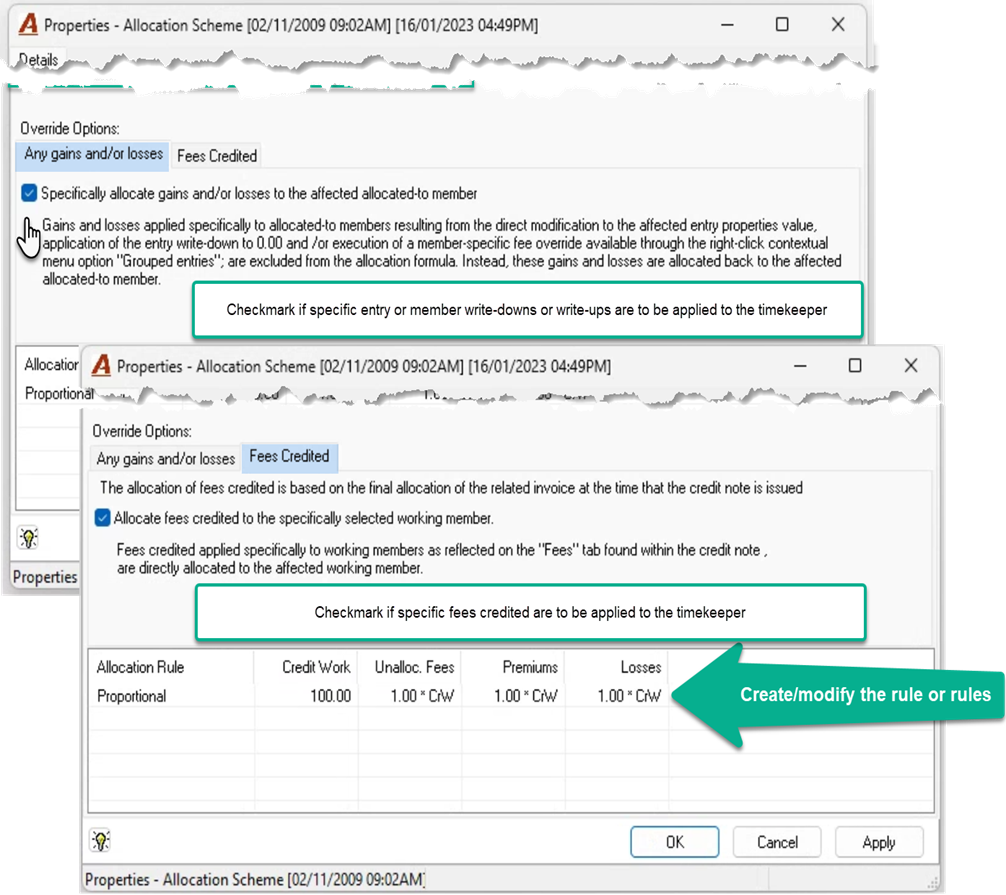
Specific Gains, Losses and Fees Credited:
Checkmark the “Specifically allocate gains and/or losses to the affected allocated-to member” checkbox option found on the “Any gains and/or losses” sub-tab of the “Override Options” section, when the fee override or write-down to 0.00 applied at the entry level or working member level (grouped entries) from within the billing section of invoice properties entries tab, must affect the member directly.
Leave the checkbox option not check-marked, when the fee override or write-down to 0.00 applied at the entry level or working member level (grouped entries) from within the billing section of invoice properties entries tab, must affect the members based on their worked values.
Checkmark the “Allocate fees credited to the specifically selected working member” checkbox option found on the “Fees Credited” sub-tab of the “Override Options” section, when the fees to be credited should be applied to specifically selected members in credit note properties. Leave the checkbox option not check-marked when the fees credited must be applied based on how the related invoice allocated the fees billed ignoring any member selections.
Total Fee Gains, Losses, and Discounts:
Fee overrides completed at the total fee or total invoice level, as well as discounts will be allocated based on worked values and added to specially allocated values when the “Specifically allocate gains and/or losses to the affected allocated-to member” checkbox option and/or the “Allocate fees credited to the specifically selected working member” checkbox option are used.
Allocation Rules
The pro-rata schema starts with a proportional rule based on credit work. In this case the rule affects all members, so they start by getting 100% of their credit work as well as 100% (a factor of 1.00) on unallocated credit work, premium or loss.
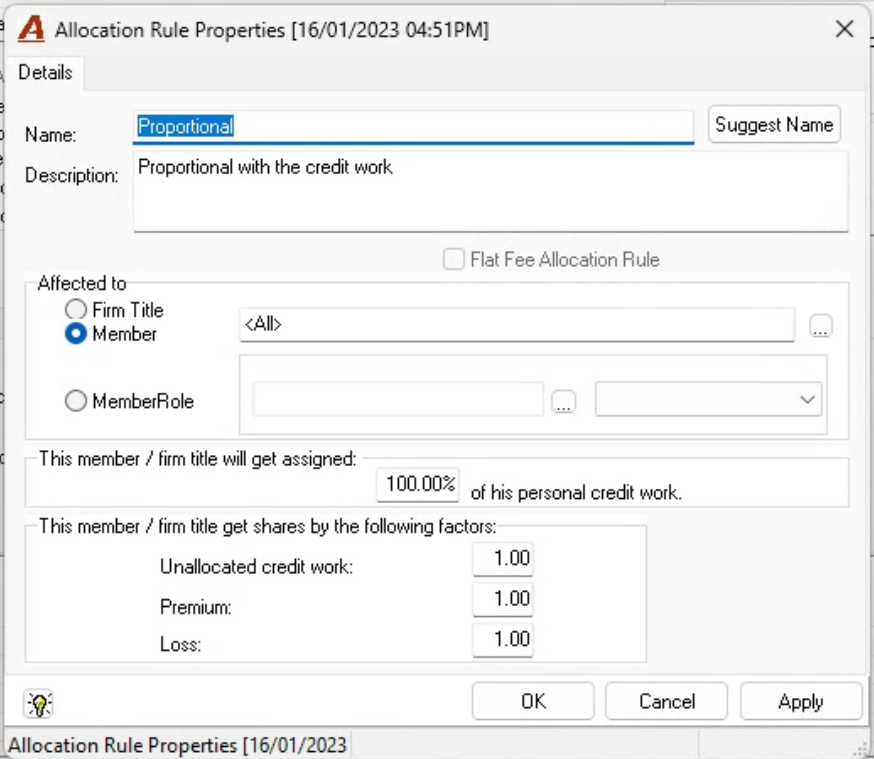
When the rule is title or role based, other rules are required to capture remining members otherwise not covered.