.png)
Scope and Purpose
The purpose of this document is to provides a detailed explanation of the General Ledger (GL) operational framework for managing disbursements in organizations, particularly law firms. It outlines the roles of two key fields—Recovery and Expense—on the disbursement code properties form, which must be linked to firm-assigned GL accounts. It describes how these fields are used to track recoveries (e.g., from client disbursements or surpluses on hard-costs) and expenses (e.g., non-chargeable disbursements or shortfalls on hard-costs).
GL Operations for Disbursements
The disbursement code properties form includes two fields that must be populated with firm assigned GL accounts. These are:
-
Recovery, and;
-
Expense.
Recovery:
In the recovery field the user assigns the GL Account on which he or she wishes to track:
-
The recovery of client disbursements that were directly charged to the firm's expense GL account (a process typically reserved for soft-costs such as photocopies), as well as;
-
The surplus if any on hard-costs, where the vendor is paid its cost but the client has a special rate greater than 100% of cost. In this case the difference is credited to the associated recovery GL account.
Expense:
In the expense field the user assigns the GL Account on which he or she wishes to track:
-
The non-chargeable disbursements. Non-chargeable expenses are not considered assets and cannot be journalized into the "unbilled disbursements" Master GL Account, therefore they are tracked in these associated GL accounts;
-
The shortfall if any on hard-costs, where the vendor is paid its cost but the client has a special rate less than 100% of cost. In this case the difference is debited to the associated expense GL account.
Note to reader:
Organizations can select the same GL account for recovery and expense and re-assign the same GL account across multiple disbursement codes.
Unbilled Disbursements (UBD) Master GL Account:
Chargeable disbursements – recorded through manual disbursement entry processes, disbursement upload processes and/or through the issuance of third party payments and/or the recording of vendor payables; are debited to the unbilled disbursement Master GL Account. Like Accounts Receivable, this GL account is typically considered an asset.
Disbursement code settings
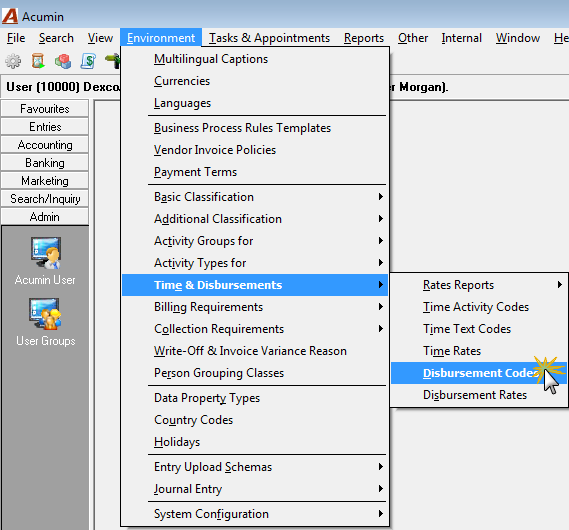
To know which disbursement codes affect which recovery or expense account, the user must access the "Show Disbursement Codes" list-view or the "Disbursement Code" properties form. From environment, select "Time & Disbursements" – "Disbursement codes".
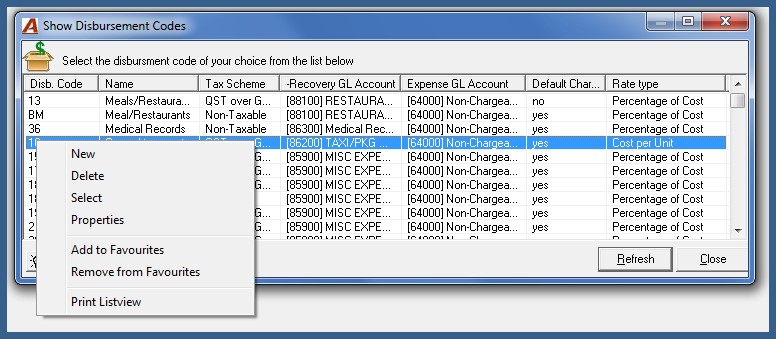
Click on the desired header (our example was on the recovery GL Account) to organize the listview. Right-click and access the contextual menu to select the "properties" menu option which will launch the corresponding disbursement properties form.
Once the GL accounts are assigned to their corresponding recovery and expense fields, the latter are affected by several production level transactions based on the following business and accounting logic:
The GL Accounts associated to the "recovery" field are affected when:
-
The disbursement is recorded independently of its cost (a process typical of soft costs) – in practical terms this means entries executed through the quick disbursement sheet (upload process) or through the disbursement entry form (manual process);
-
The hard cost (third party cost) is payable at a lower rate than the amount to be charged against the matter through quick payments or accounts payable. In this case the disbursement code would have had a disbursement code rate greater than 100% of cost therefore the excess is an additional recovery to the firm which is posted against the GL account assigned to the recovery field.
GL Accounts associated to the “expense” field are affected when:
-
The disbursement is recorded on a non-chargeable disbursement matter (i.e. an internal matter);
-
The disbursement is recorded as a non-chargeable disbursement on a chargeable matter – restricted to authorized users or based on special client and matter disbursement rates;
-
The chargeability of a disbursement is modified by an authorized user. A change in chargeability will affect both the expense GL account and the Master GL Account for UBD (typically an asset);
-
A hard cost (third party cost) is payable at a higher rate than the amount to be charged against the matter through quick payments or accounts payable. In this case the disbursement code would have had a disbursement code rate less than 100% of cost therefore the shortfall is considered an expense recorded against the GL account assigned to the expense field.
It is typical of the law-firm client to charge the matter with the same amount charged by the supplier for the service provided with no effect on the P&L, however in the event that the disbursement code rate is set to more or less than 100%, the shortfall or excess will be posted against the GL account in the expense or recovery of the disbursement code respectively.
Disbursement entries created through Accounts Payable or Quick Payments have the GL Operation attached to the Accounts Payable or Quick Payment Object (cheque or debit memo) – they are one of the same. As a result, when a disbursement is transferred from one matter to another and either the source or destination matter has a special disbursement rate, if the disbursement is linked to an accounts payable or quick cheque object, the disbursement will not be revalued. In addition, modifications to posted disbursements created in this manner are limited in order to maintain the integrity of the main database object (the quick payment or AP voucher).
GL-Operations
On Disbursement Posting:
1. If the disbursement is chargeable and it is entered through the disbursement entry form (Manual or uploaded) then the GL Operation is:
-
Debit – Unbilled Disbursements (generally an asset)
-
Credit – The GL Account assigned to "Recovery" (generally revenue or contra-expense)
This process is typically reserved for soft-costs.
The recovery GL account is assigned based on the expectation that the expense is a firm expense on which the firm is recovering a portion of the total expense. Typical examples are photocopying (where the cost might be spread out across a variety of GL accounts such as lease costs, toner, paper etc.). For this type of disbursement, there is no direct relationship to the posting of expenses. In other words when we pay the phone company for our fax bill we would charge a specific GL account and as a separate operation we would enter the disbursement creating a recovery in the process.
2. If the disbursement is not - chargeable and it is entered through disbursement entry then the GL Operation is:
-
Debit – The GL account assigned to the expense field in the disbursement code properties (generally an expense)
-
Credit – The GL Account assigned to "Recovery" (generally revenue or contra-expense)
Some firms choose to assign soft disbursement codes to the same GL Account in the expense and recovery fields resulting in an IN and OUT with a net effect equal to 0.00.
3. If the chargeable disbursement is recorded through Accounts Payable (AP) or Quick Payments (Cheques or debit memos) then the GL Operation is:
-
Debit – Unbilled Disbursements (generally an asset)
-
Credit – AP (a liability) or Bank (an asset)
If the amount charged to the matter is less or more than the amount payable to the supplier, the difference will be a debit to the expense account or credit to the recovery account. This makes sense as you are either recovering more or less than the exact amount payable to the supplier.
4. If the non-chargeable disbursement is recorded through Accounts Payable (AP) or Quick Payments (Cheques or debit memos) then the GL Operation is:
-
Debit – The GL account assigned to the expense field in the disbursement code properties (generally an expense)
-
Credit – AP (a liability) or Bank (an asset)
At invoicing:
1. Chargeable disbursements billed generate the following GL Operations:
-
Debit – AR
-
Credit – Unbilled Disbursements (generally an asset)
2. Pre-billed (anticipated) disbursements generate the following GL Operation:
When the pre-billed (anticipated disbursement) is created:
-
Debit – The GL Account assigned to "Recovery" (generally revenue or a contra-expense)
-
Credit – Unbilled Disbursements (generally an asset)
At posting of the invoice on which the pre-billed disbursement was created:
-
Debit – AR
-
Credit – The GL Account assigned to "Recovery" (generally revenue or contra-expense)
3. Disbursements for Presentation only generate the following GL Operation when the Invoice is posted:
-
Debit – AR
-
Credit – The master GL account for the positive disbursement variance (where the write-up on recorded unbilled disbursements is journalized)
4. Non-chargeable disbursements included within the billing section at invoicing generate the following GL Operation:
-
Debit – The GL Account assigned to "Recovery" (generally revenue or contra-expense)
-
Credit – The GL account assigned to the expense field in the disbursement code properties (generally an expense)
This reverses the effect of the original non-chargeable entry for a continued effect of 0.00 to profit or loss.
UBD WO or Removal (write-off of unbilled chargeable disbursements or change of status for non-chargeable disbursements):
The WO of unbilled chargeable disbursements generates the following GL Operation:
-
Debit – Bad-debt Expense - Unbilled Disbursements WO (generally an expense)
-
Credit – Unbilled Disbursements (generally an asset)
The removal of non-chargeable disbursements generates the following GL Operation:
-
Debit – The GL Account assigned to "Recovery" (generally revenue or contra-expense)
-
Credit – The GL account assigned to the expense field in the disbursement code properties (generally an expense).
This reverses the effect of the original non-chargeable entry for a continued effect of 0.00 to profit or loss.
Impact on the Income Statement
The impact on the Income Statement will depend on how the affected GL accounts are mapped to the disbursement codes.
-
If the recovery and expense fields for the affected disbursement code are mapped to the same GL account for hard-cost disbursements (typically processed through quick payments or AP) – then the impact to the revenue section and expense section will generally be 0.00 unless the affected disbursement code has a disbursement rate which is not set at 100% of cost. In this case the impact to the profit and loss statement would be the net gain or loss over the cost for the affected disbursement code.
-
If the recovery and expense fields for the affected disbursement code are mapped to different GL accounts for hard-cost disbursements (processed through quick payments or AP) and /or soft-cost disbursements (processed through quick disbursements or disbursement entries) – typical for most clients – the impact to the revenue section and expense section will generally also be 0.00 provided that these GL Accounts are grouped within the same financial statement grouping level – best practice recommendation.
Note to Reader:
If the affected disbursement code has a disbursement rate which is not set at 100% of cost the gain and/or loss will list on their respective GL accounts with the profit & loss statement showing the net over the cost for the affected disbursement code.
Displaying GL Operations
To further asses the GL Operations for any of our functions the end-user can turn the option "display GL Operations" ON. This option is found under the "Other" main menu header.

Turn this setting ON before proceeding to execute the desired function. We recommend that this evaluation be concluded within the Acumin training database in order to be free to create any desired function in question.

On execution of the desired function or option, the user will be prompted with the supporting GL operation. Press OK to accept or Right-click to select the "Print List View" option.
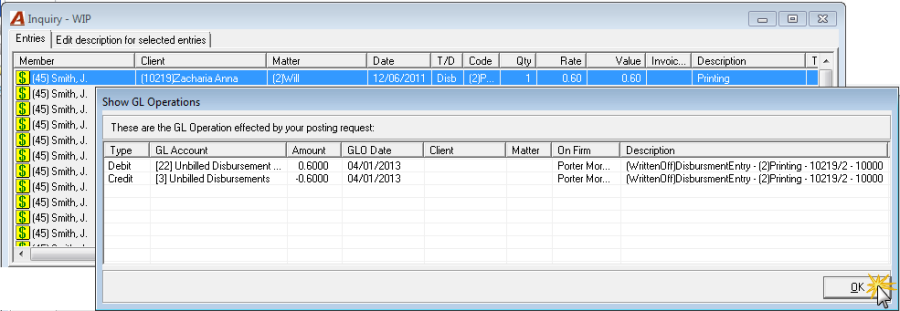
To disable the GL Operation from presentation turn the option "display GL Operations" OFF.