.png)
Overview
When creating a new General Ledger (GL) account for general or trust banking purposes, selecting the appropriate bank account is a required step. Certain fields in the bank account setup are also used when generating printed cheques from the associated GL account. This guide provides step-by-step instructions on how to access, manage, and define the essential details for bank accounts.
Accessing Bank Accounts
To view, create or manage bank accounts:
-
Navigate to:
Environment → Bank Information → Bank Accounts -
The Bank Accounts Form will open.
From this form, you can perform the following actions:
-
New: Create a new bank branch.
-
Select/Properties: Access and edit the properties of existing branches.
-
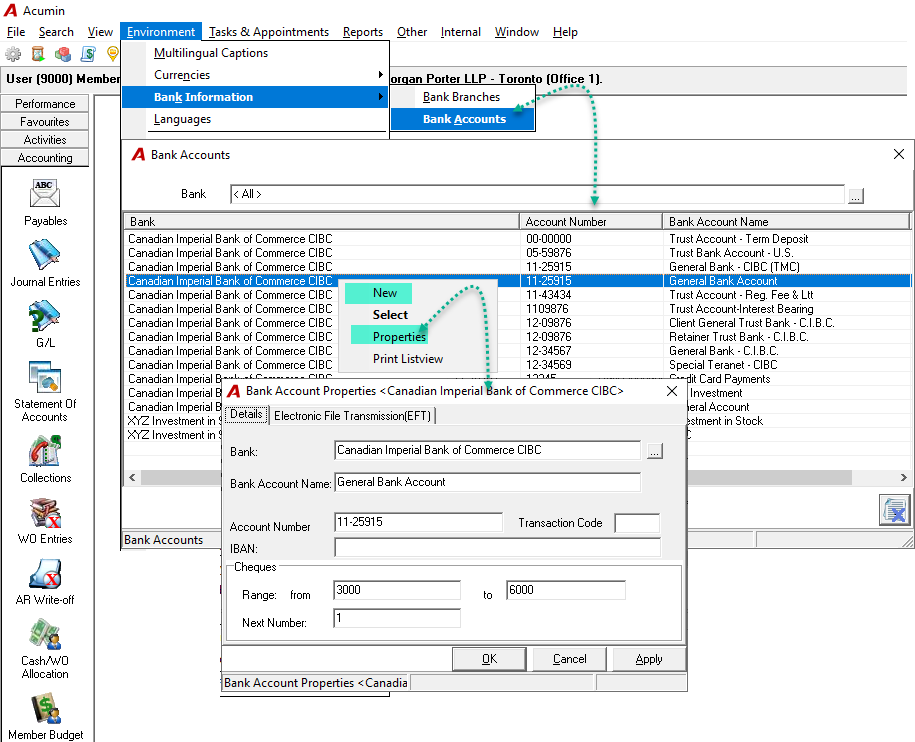
If multiple firms will use the account, create the bank account and set the cheque number range for the first firm. Then log into the second firm, select the newly created bank account, and set that firm's cheque range number. Repeat for each firm.
Field Definition
The following fields are available when defining or updating a bank account. Fields marked with an asterisk (*) are mandatory for bank or trust GL accounts that will issue printed cheques.
|
Field Name |
Definition |
|
Bank |
Use the ellipsis button to open the Bank Branches form and select the desired bank branch. |
|
Bank Account Name |
Enter the name of the bank account. |
|
*Account Number |
Enter the physical bank account number, including any dashes (e.g., This number will be included in the MICR line on printed cheques. |
|
Transaction Code |
Enter the transaction code, if applicable. This code will also appear in the MICR line on printed cheques. |
|
IBAN |
Enter the International Bank Account Number (IBAN), if applicable. |
|
Cheque Range “From/To” |
Define the range of cheque numbers assigned to this account by entering a starting and ending cheque number (e.g., |
|
Next Number |
Specify the next cheque number to be assigned for the next printed cheque. |
Additional Details
Transaction Code Support
The "Transaction code" field in the bank account supports the transaction code component in the MICR line when printing trust or general cheques. Acumin is supporting the transaction code 45 for U.S. dollar bank account held by Canadian firms.
MICR Line on Printed Cheques
The following components are included in the MICR line of printed cheques:
-
Account Number
-
Transaction Code (if applicable)
IBAN (International Bank Account Number)
The IBAN is an internationally recognized system for identifying bank accounts across national borders and is used primarily for international wire transfers.
-
It consists of 8 to 11 characters:
-
The first 4 characters represent the bank code.
-
The next 2 characters represent the country code.
-
The following 2 characters indicate the location code.
-
An optional 3 characters specify a particular branch.
-
RELATED DOCUMENT:
GL Bank Account - Setting-Up a New General or Trust GL Bank Account