.png)
Scope and Purpose
The purpose of this document is to introduce the month-end and year-end processes.
Its scope extends across the security implications of each.
Conversion Implications
During the deployment-process we leave all the months for the current period opened to facilitate conversion related adjustments. However, at the end of the go-live period the month end for all months except the current one for billing purposes should be closed.
Highlights
From a GL perspective, Acumin maintains transactional records related to their accounting object in consideration of additional action dates for various operational functions. Each accounting object or transaction has a “transaction” date, which is also the effective date of the related GL-operation ensuring the object and its GL-operations remain as an accurate representation of the transaction throughout its life cycle.
The GL-operations and related accounting objects are stored at their lowest level of detail to simultaneously support reporting objectives affecting the general ledger, sub-ledgers, and registers. As a result, the closing of the month or the fiscal year does not involve the closing of sub-ledgers or registers into the general ledger in the traditional sense. Instead, the stored GL transactions are reported under multiple contexts without implications to the data-structure, rendering the month and year end processes into data-entry control-mechanisms able to restrict the backdating of accounting transactions in consideration of the firm-defined security-model.
When an invoice is posted, the invoice stores the association to the corresponding time records (i.e., 30 hours). When the invoice is cancelled, the invoice record will have a status change from billed to cancelled effective the date of cancellation. If a WIP report is re-issued with an as-of date prior to the cancellation date, the affected entries will be considered billed and be excluded from the report, however if the same report is executed with an as-of date post invoice cancellation date, the affected entries will be considered un-billed and be included in the report.
Closed Accounting Period- Transaction Control
The month-end process locks-down the ability for users to transact in closed months unless they are granted explicit rights to execute the transaction in question.
Typically Granted Security Rights – Prior Month
Allow Prior Month Journal Entries <<753>>
This security item allows the authorized end-user to record journal entries with a transaction-date in a closed month. Typically, this right is granted to several accounting department members to ensure that month-end journal entries can be completed after its execution, retaining the potential to conclude final adjustments before the issuance of financial reports.
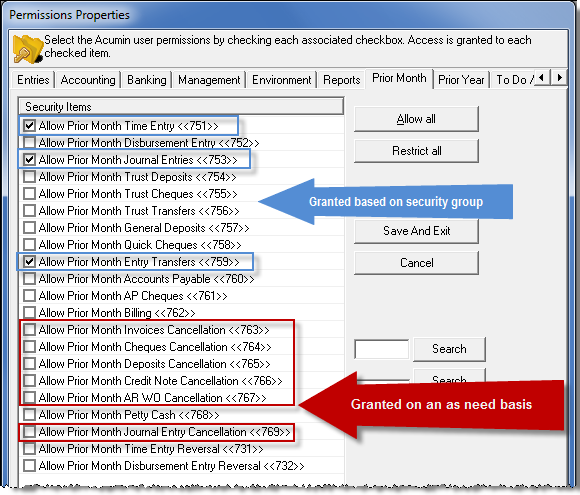
Allow Prior Month Time Entry <<751>>
This security item allows the authorized end-user to record time with an entry transaction-date in a closed month. Typically, this right is granted to all users to ensure that the timekeeper can capture all transactions – regardless of date. The management of latent time-entries and its decreasing value to the organization is presented to the reader through a series of management reports and inquiries to mitigate the granting of this right.
Management Reporting Impact: If a user enters a meeting dated a closed month, it will correct the under reported values for that month as well as be included in YTD totals.
Allow Prior Month Entry Transfers <<759>>
This security item allows the authorized end-user to transfer time or disbursement entries with an entry transaction-date in a closed month. The transfer function in this case includes the transfer of time and/or disbursements across matters as well as the transfer or correction of timekeeper and/or transaction date. Entry transfer inquiry and reporting tools provide a detailed audit trail of transfers completed regardless of their transaction date.
Use Case: This right is often granted to all users to ensure they can correct their posted entries regardless of date.
Management Reporting Impact on Worked Values: The transfer of time entries may impact entry valuations (implicated rates), triggering changes in worked values on the entry transaction date and affecting working member results.
Journalizing Time Impact: Firms that journalize the worked value of time as part of the month-end process, will capture the net effect because of the YTD journal entry reversing-entry process.
Unbilled Disbursements: The transfer of disbursement entries seldom triggers a re-evaluation as the latter can only occur when the affected disbursement was created through the disbursement entry function (implying a soft cost) and where the originating and destination matters for the affected soft cost do not share the same rate.
Allow Prior Month Cancellations for Invoices <<763>>, Cheques <<764>>, Deposits <<765>> Credit Notes <<766>>, AR Write-offs <<767>>. Journal Entries <<769>>
All these security items allow the authorized user to back-date the cancellation-date of the affected item into a closed accounting month.
Use Case: As cancellations are not a regular operating process, these security rights are typically granted on an as-need- basis. Depending on the reason for the cancellation, it may need to be backdated to the date of the original transaction, instead of using the current date.
Typically Granted Security Rights – Prior Year
The execution of the year-end process locks-down the ability for end-users to transact in closed fiscal years unless they are granted explicit rights to execute the transaction in question
Allow Prior Year Journal Entries <<773>>
This security item allows the authorized user to record journal entries with a transaction-date in a closed fiscal-year. Typically, this right is granted to selected accounting department members to ensure that year-end adjusting journal entries can be completed after its execution, retaining the potential to conclude final adjustments before the issuance of year-end financial reports.
Allow Prior Year Entry Transfers <<779>>
This security item allows the authorized user to transfer time or disbursement entries with an entry transaction-date in a closed fiscal-year. The transfer function in this case includes the transfer of time and/or disbursements across matters as well as the transfer or correction of timekeeper and/or transaction date. Entry transfer inquiry and reporting tools provide a detailed audit trail of transfers completed regardless of their transaction date.
Use Case: This right is often granted to all users to ensure they can correct their posted entries regardless of date.
Management Reporting Impact on Worked Values: The transfer of time entries may impact entry valuations (implicated rates), triggering changes in worked values on the entry transaction date and affecting working member results.
Journalizing Time Impact: Firms that journalize the worked value of time as part of the month-end process, will capture the net effect because of the YTD journal entry reversing-entry process.
Unbilled Disbursements: The transfer of disbursement entries seldom triggers a re-evaluation as the latter can only occur when the affected disbursement was created through the disbursement entry function (implying a soft cost) and where the originating and destination matters for the affected soft cost do not share the same rate.
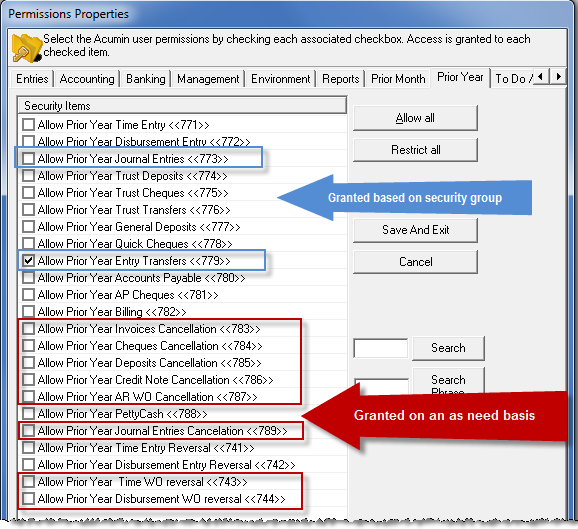
Allow Prior Year Cancellations for Invoices <<733>>, Cheques <<784>>, Deposits <<785>>, Credit Notes <<786>>, AR Write-offs <<787>>, Journal Entries <<789>>
All these security items allow the authorized user to back-date the cancellation-date of the affected item into a closed accounting year.
Use Case: As cancellations are not a regular operating process, these security rights are typically granted on an as-need- basis. Depending on the reason for the cancellation, it may need to be backdated to the date of the original transaction, instead of using the current date.
Allow Prior Year Time WO Reversal <<743>> and/or Disbursement WO Reversal <<744>>
Both security items allow the authorized user to reverse an unbilled entry write-off with a write-off date in a closed accounting year, thus affecting prior year closing and opening P&L and/or balance-sheet balances.
Use Case: Because of impact on often used measures affecting effective billing rates, variances and realization rates, the unbilled entry write-off is a rare occurrence, with its reversal even more rare, therefore these security rights are only granted on an as-need- basis so that their impact, can be journalized into the current fiscal year.
Other Security Considerations
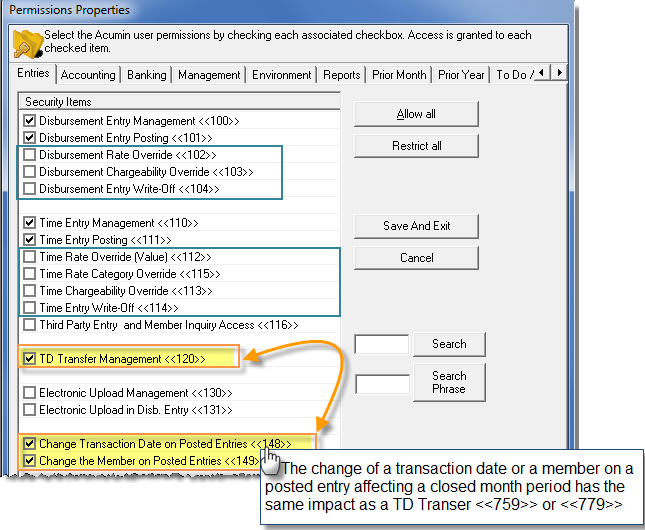
Time Chargeability Override <<113>>
Most firms restrict users from changing the chargeability of a time entry after it is posted.
Many firms that allow the recording of non-chargeable time in chargeable matters, use a time (activity) code to trigger the non-chargeable status, eliminating the requirement for users to make changes in chargeability without consideration to firm-policy, use-case or impact on closed month or year results.
The user can reverse the entry with the incorrect chargeability status and create a new with the correct one, as this process will be consistent with security rights on the user’s ability to record time entries with transactions dates in a closed-month and/or closed-prior year. Where a change in chargeability on a posted time entry cannot be accomplished by the user, a centralized process through accounting provides visibility of use-case and allow for a better understanding on changes to management reporting results.
Disbursement Chargeability Override <<103>>
Most firms restrict users from changing the chargeability of a disbursement entry after it is posted. They also do not allow the recording of non-chargeable disbursements into chargeable matters.
Where a disbursement type is negotiated as non-chargeable (i.e., copies) - a special client or matter level non-chargeable disbursement rate is created for the affected disbursement type instead. The ability to create and manage non-chargeable special client and matter disbursement rates eliminates the need for users to make changes in chargeability without consideration to firm-policy and use-case.
Due to the accounting implications affecting disbursement entries, where a change in chargeability on a posted disbursement entry is required, it is centralized with the accounting department.
Time Rate Override (Value) <<112>> or Time Rate Category Override <<115>>
Most firms follow strict time-entry rating policies which involve the use of carefully considered rate tables (categories) and where required negotiated client and/or matter special member rates, eliminating the requirement for users to make changes in time-entry rates without consideration to firm-policy and use-case.
Where a change in rate on a posted time entry is required, it is centralized with the accounting department.
Disbursement Rate Override (Value) <<102>>
Most organizations follow strict disbursement-entry rating policies which involve the use of carefully considered rate-structures - cost per unit, third party cost at an equal, greater, or lower value or fixed costs - and where required negotiated client and/or matter special disbursement-code rates, eliminating the requirement for users to make changes in disbursement-entry rates without consideration to firm-policy and use-case.
Where a change in rate on a posted disbursement entry is required, it is centralized with the accounting department.
Time Entry Write-off <<114>> and/or Disbursement Entry Write-off <<114>>
Unlike a write-down or a credit note – vehicles used to manage fees and disbursements billed, a write-off implies the end of the collection process, resulting in a “bad-debt expense” which is best managed through AR Write-offs. For this reason, many firms restrict the write-off of time and disbursements from most users with the following exceptions and limits
The File Closing Department: Firms grant access to those responsible for the file closing process to write-off unbilled time and/or disbursements – with limited values per timekeeper or per disbursement code not to exceed an amount per matter. This type of access enables those responsible to remove immaterial unbilled time and/or disbursement entries from the file. Due to the limit on amounts, the classification of the amount as “written-off” will not compromise the client and matter profiles when assessing the latter for viability within the organization.
As the unbilled time and/or disbursement write-offs are typically limited in volume and value, users with the right to write-off unbilled time and/or disbursement entries are also able to reverse unbilled time and/or disbursement entries with a write-off date in a closed fiscal period.
Impact of Unposted Invoices on Closed Periods
Unposted Invoices
It is possible that invoices generated during a given month are not processed and posted prior to month-end. These should be retained, and future dated to be finalized in an ensuing month or deleted.
To retain the invoice to be finalized in the ensuing month, the invoice preparer must remove (delete) any anticipated disbursements added to the invoice. This will ensure that if the actual disbursement is recorded in the ensuing month the latter is correctly included in the invoice as an unbilled disbursement, else a new more current anticipated disbursement is added, as well as e-date the invoice transaction date to a date within the month on which the invoice is expected to be posted and sent.
To delete the invoice to generate a new one with refreshed information at a more appropriate date, the invoice preparer can right-click delete from the show invoice detail filter form.
Although it is expected that the invoice preparer will “delete” these invoices, many firms delete all invoices with an invoice transaction within the month being closed or older before starting the month end-process.
Anticipated Disbursements Included on Non-Posted Invoices
Anticipated disbursements on non-posted invoices which remain un-deleted as at month-end or year-end, if deleted a later date will also delete the pre-billed negative entry and GL operations in unbilled disbursements and recovery affecting published results.
If the transaction date of an anticipated disbursement is within a closed fiscal year, its deletion will also result in a closing prior year entry adjustment affecting closing and opening balances.
Best Practice Consideration:
The authorized user to review non-posted invoices with a transaction date within the month-to-be closed or older prior to the execution of month-end and delete any of the non-posted invoices which are not brought forward by the invoice-preparer, as well as verify/adjust that those invoices brought forward, do not have anticipated disbursements with a transaction date within the month-to-be closed or older. As the month-end close is executed before the year-end close, the impact would already be mitigated by the time year end close is executed.
Impact of Invoice Cancellations on Closed Periods
When an invoice is posted, the invoice stores the association to the corresponding time records (i.e., 30 hours). When the invoice is cancelled, the invoice record will have a status change from billed to cancelled effective the date of cancellation. If a WIP report is re-issued with an as-of date prior to the cancellation date, the affected entries will be considered billed and be excluded from the report, however if the same report is executed with an as-of date post invoice cancellation date, the affected entries will be considered un-billed and be included in the report.
When the invoice is cancelled the latter will retain the same association to its corresponding time and disbursement records, so the application can report the 30 hours billed as of the date of the invoice and the 30.00 unbilled as of the date the invoice was cancelled.
Some firms allow end-users to modify time-records which are associated to cancelled-invoices. In other words, as time and disbursement records are updated to the status unbilled as of the cancellation date the user adjust the entries as if they would have never been billed – including modifications to time - for example changing 5.00 hours to 0.50 hours.
In this case, if a time record associated to a cancelled invoice is modified from 5.00 hours to 0.50 hours, then subsequent to the modification the sum of affected entry records will reflect the new adjusted value of the modified time record associated to the invoice record for a new total of 25.50 hours billed as at the date of the invoice and -25.50 billed as at the date the invoice was cancelled, representing a change from what may have been produced prior to the modification. This can be controlled (not permitted) with the position of an Acumin system setting.
Impact on WIP Re-statements:
This type of post invoice cancellation entry modification will result in a WIP re-statement as at invoice date and/or depending on the type of report being executed may present itself as an explainable difference.
Month-End Process
Preparing for Month-end
Many firms that invoice time and disbursement to the end of the month, on invoices dated in the new month, close the month at the end the first or second business day of the new month. Others invoice time and disbursement to the end of the month, on invoices dated the last day of the month, therefore the month-end close occurs on fifth or sixth business day of the new month.
Regardless of when the month is closed, users can start transacting in the new month without any implications. This includes new time, disbursements, accounts payable, journal entries, receipts, trust transactions etc.
Dealing with Un-posted Invoices:
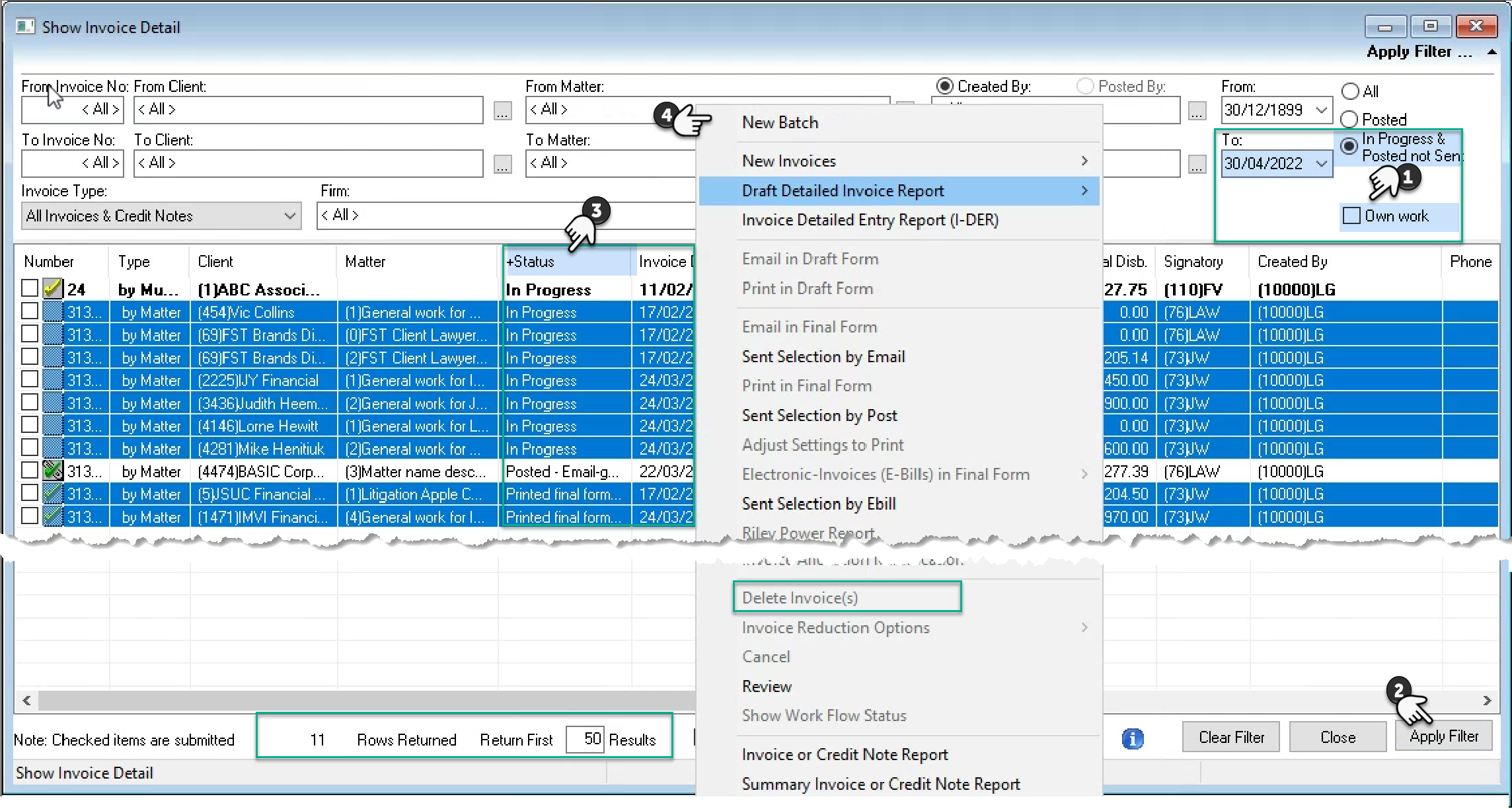
Review un-posted invoices with an invoice date within the month being-closed or older.
Select, “In-Progress and Posted Not Sent”, remove the “Own work” checkmark and enter the last day of the month being closed in the “to” date filter.
Press “Apply Filter” – bottom-right of the “Show Invoice Detail” form.
If the number of rows returned is equal to the return first “??” results limit, then change the limit and re-apply the filter. A limit of 0.00 means no limit.
Click on the status header to order the invoices based on status. Consider speaking with the users listed as created by or signatory for invoices which are not yet posted to assess their intentions and mitigate the risk that they inadvertently sent an invoice to the client before the latter was sent to be posted.
Multiple-select regular matter invoices not posted (see example below) that will not move forward, to access the right-click contextual menu and add them to a new or existing batch, so they can be deleted. It is also possible to delete one invoice at a time using the delete option on the same contextual menu.
Multiple matter invoices cannot be batched as they themselves are a batch, to delete a multiple matter invoice, you will need to delete its contents first.
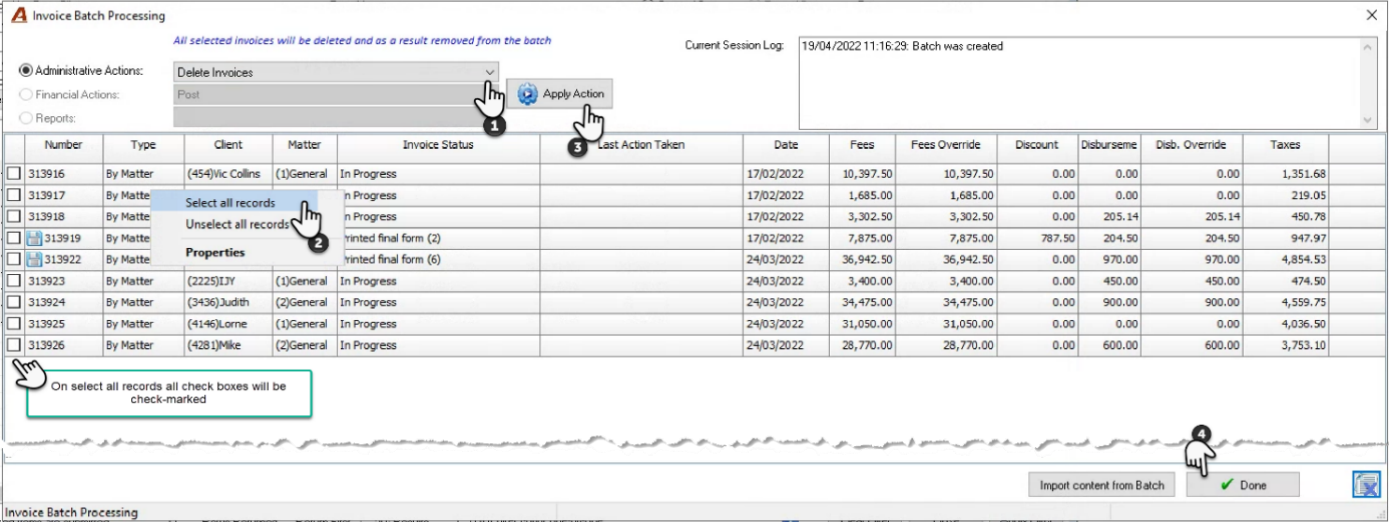
To delete multiple invoices at once, press on the on the drop-down box in the “Invoice Batch Processing” form and change the default from “Text Edit Time” to “Delete Invoices”. Right-click on the list to access the contextual menu, “select all records” and press on “Apply Action”. To release the “deleted” invoices” and return to the “Show Invoice Details” form press “Done”.
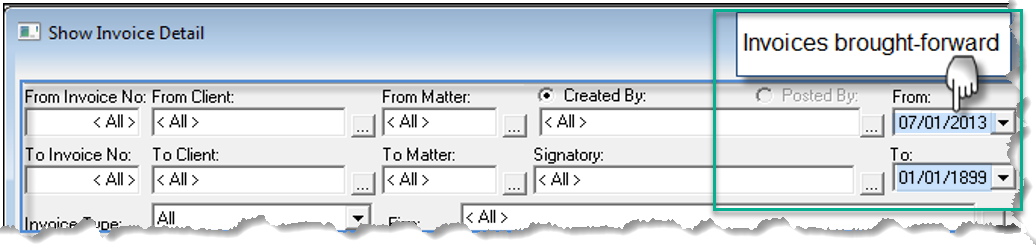
Filter for invoices dated within the new month, and if any invoices are retained, ensure the “anticipated disbursements” are deleted and the invoice date moved forward. If the invoice in final form was generated, add a paper clip to the invoice properties asking the invoice preparer to regenerate the invoice in final form as the date and content have been modified.
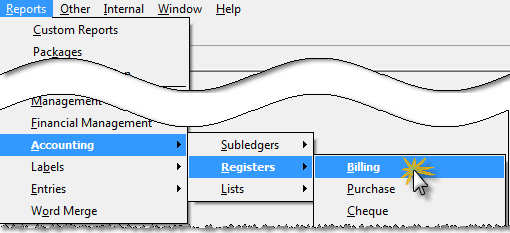
Depending on volume, it may be desirable to print the un-posted billing register instead.
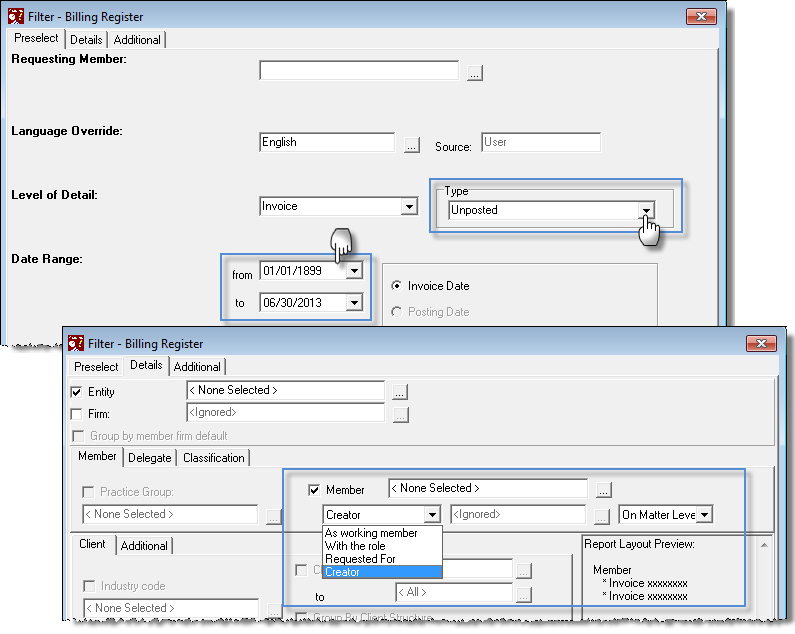
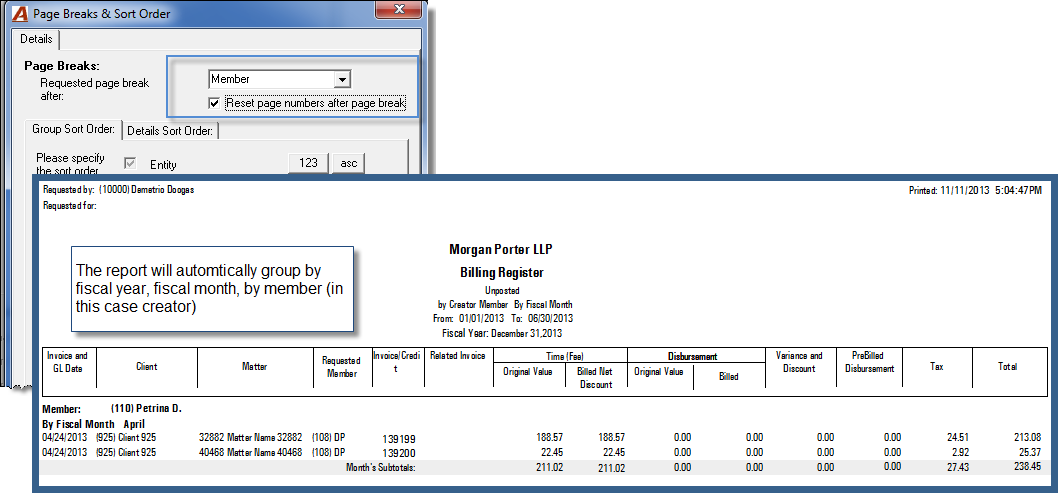
Review of Un-posted Time and Disbursements
Use the hours worked or the un-posted time entries report depending on use-case and next steps.
Hours Worked
From the dashboard section of the task bar press on the “Hours Worked” icon. Navigate to the “Month” tab.
Authorized users can remove the default member from the filter, so it is replaced with <None Selected> – bottom left of the month tab. Select the status “not posted” and press on the apply filter icon. All the un-posted entries for all members for the month will be included.
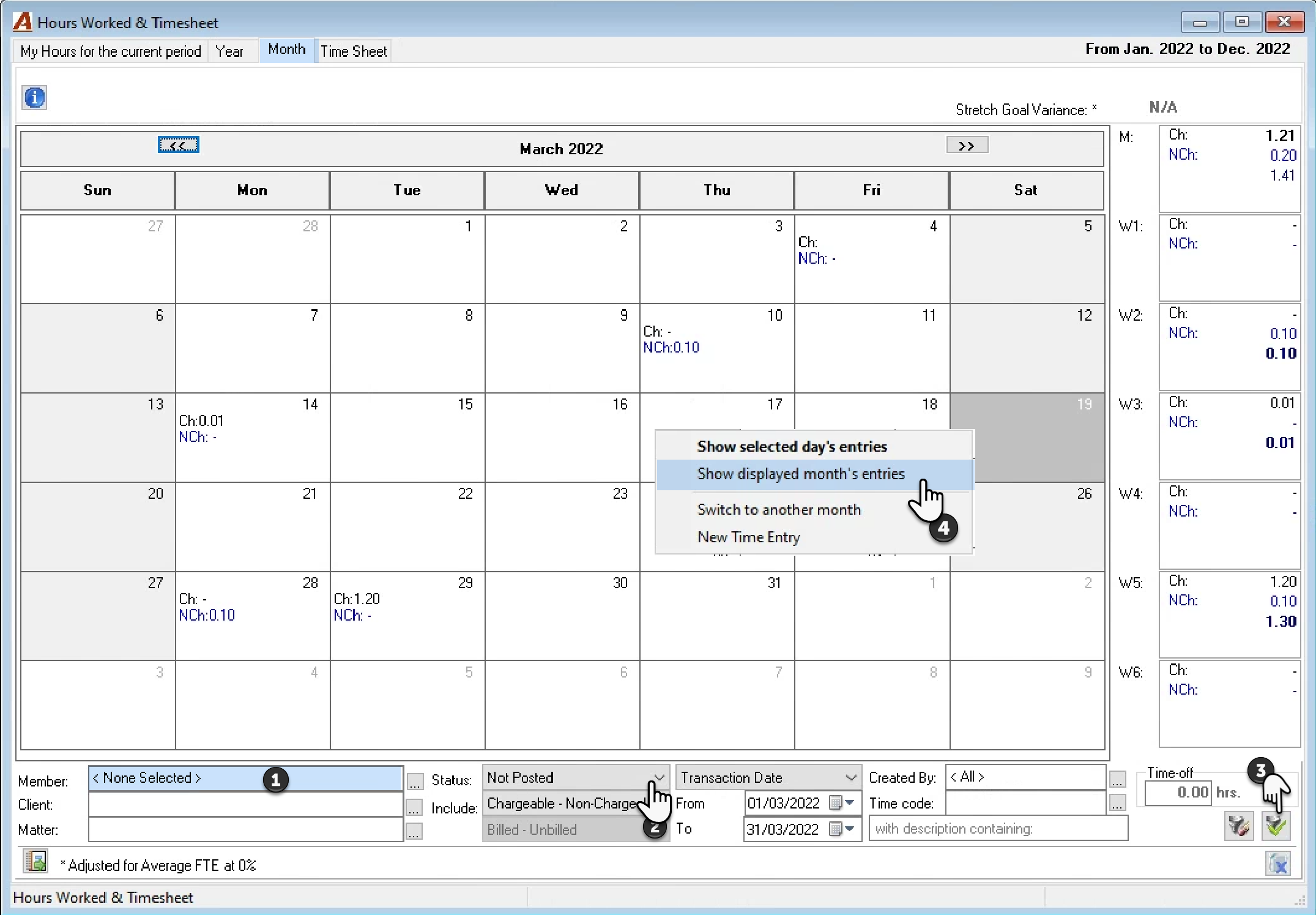
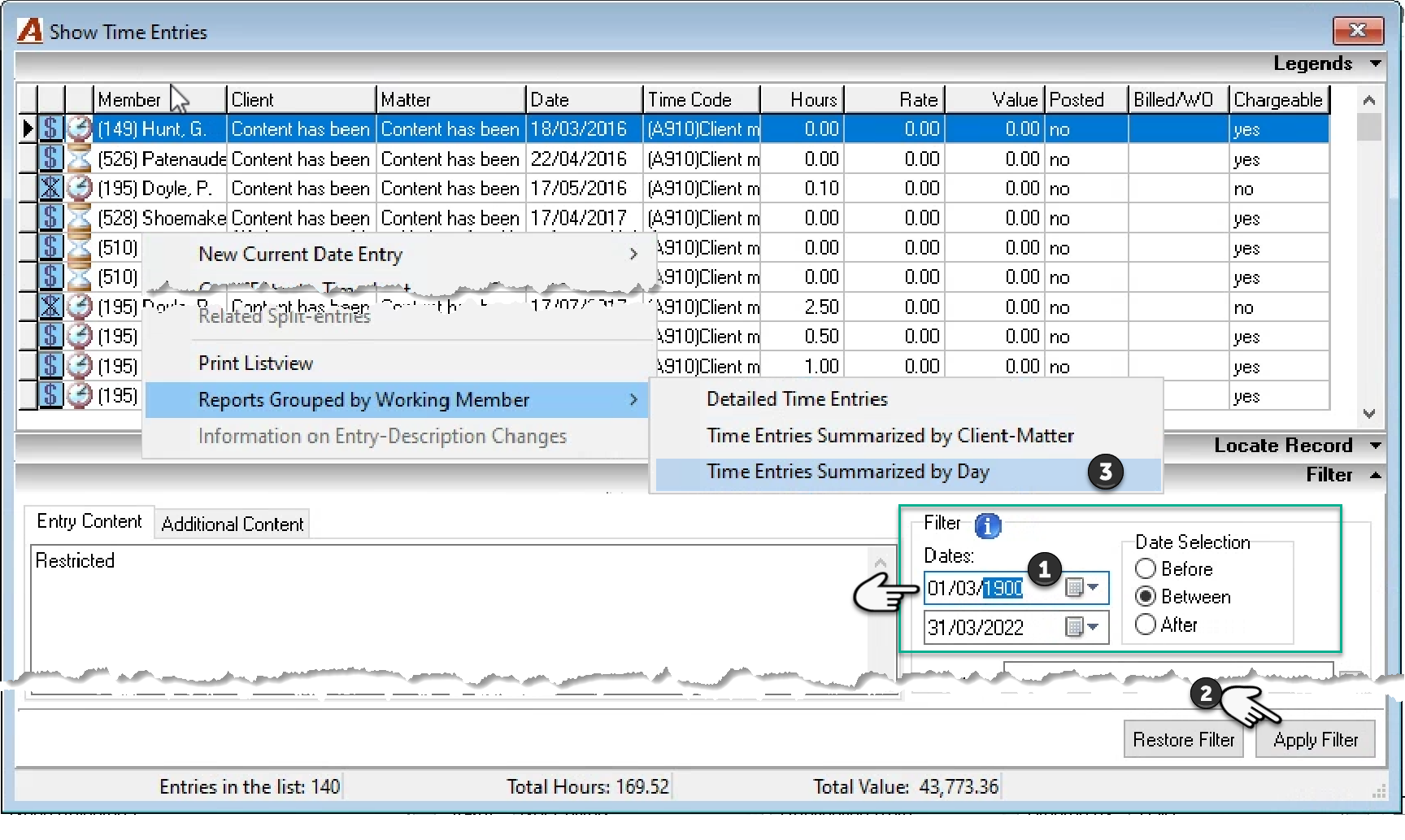
Right-click to access the contextual menu and select “Show displayed month’s entries” to launch the “Show Time Entries” form where you can expand the date filter to capture all the un-posted time entries until the last day of the month to be closed by entering 1900 as the from year.
Press apply filter and once the results are presented, right click to access the contextual menu, and execute a report grouped by working member summarized by day. Most organizations have a policy that all time must be posted as at the end of the fiscal month.
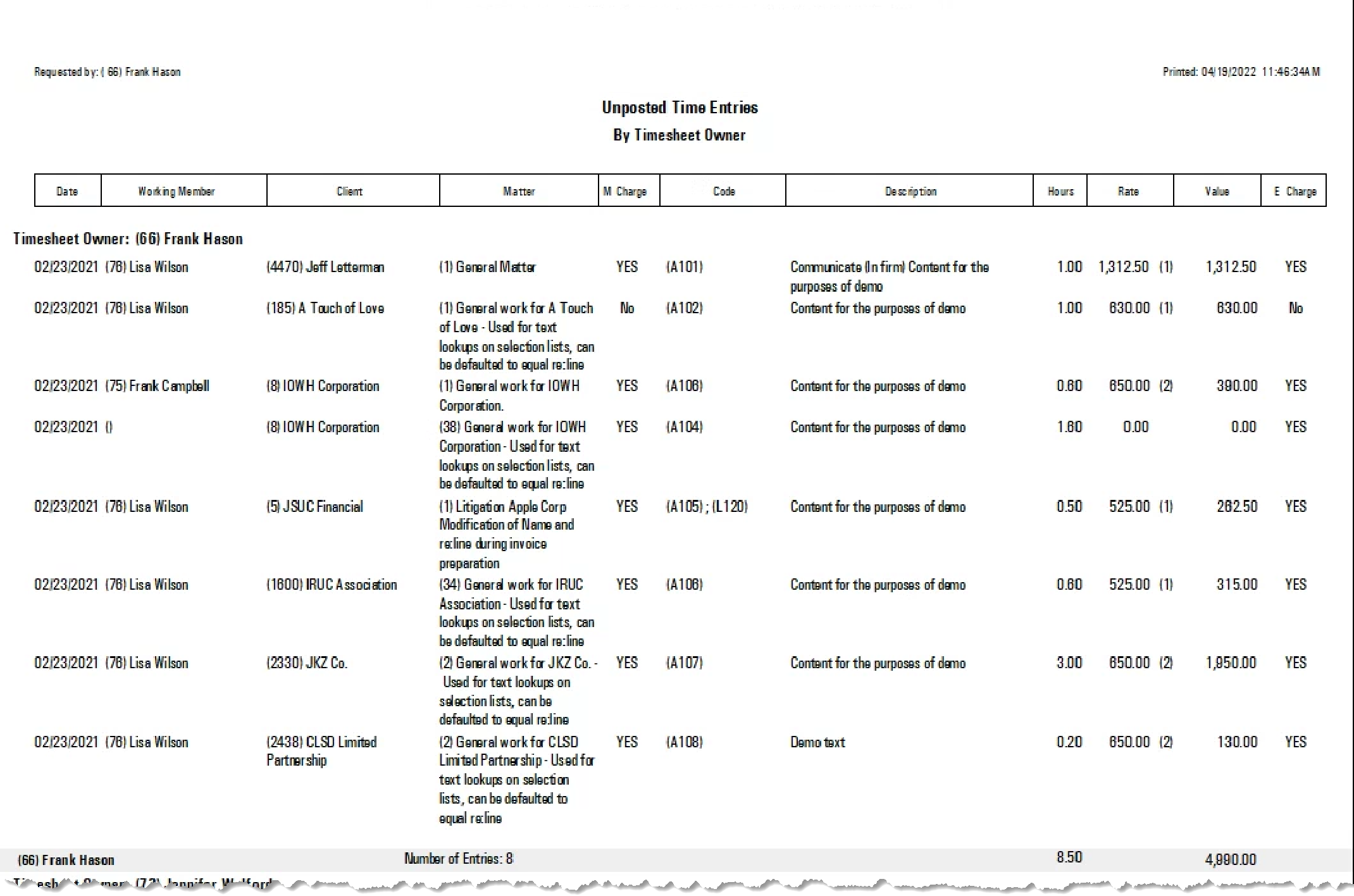
Unposted Time Entries Report
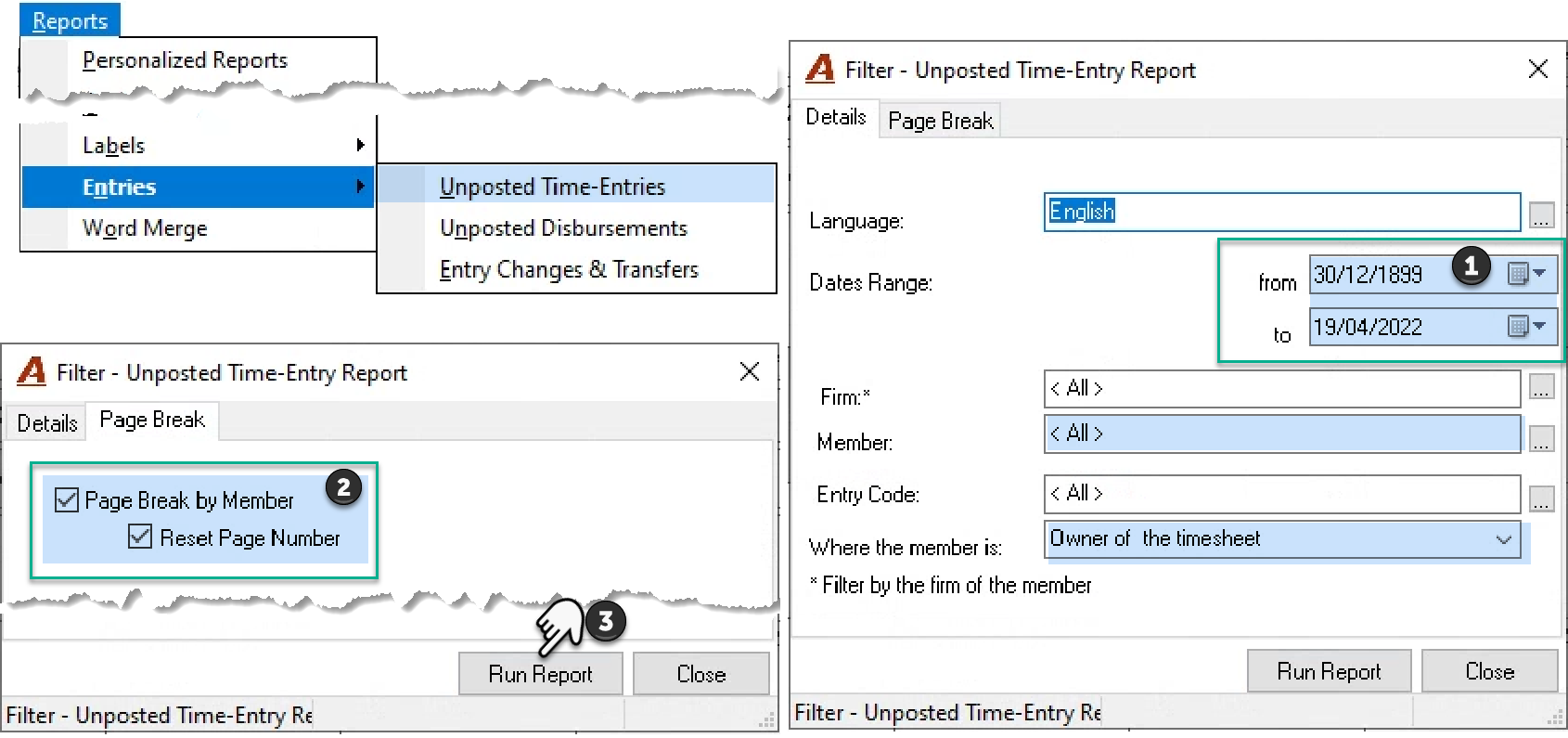
Select “Unposted Time-Entries” from the “Reports – Entries” submenu. Keep the from date as 30/12/1899 (open date) and confirm the to-date to equal the last day of the month being closed. Keep the “Owner of the Timesheet” default. Checkmark the “page break by member” and “reset page numbers” checkbox options on the “Page Break” tab if the report will be distributed to the user responsible for posting the time.
Unposted Disbursement Entries Report
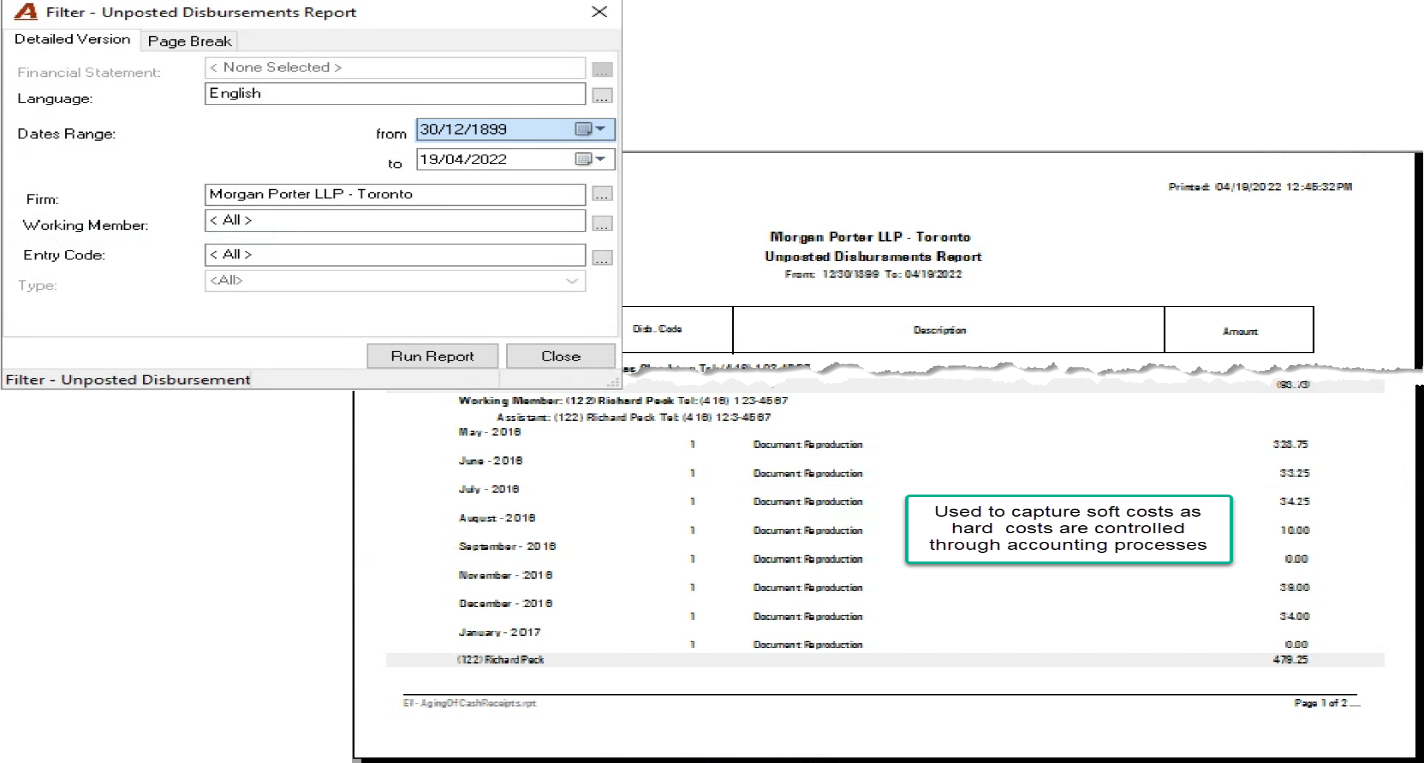
Select “Unposted Disbursement Entries” from the “Reports – Entries” submenu. Keep the from date as 30/12/1899 (open date) and confirm the to-date to equal the last day of the month being closed. Most organizations have a policy that all disbursements must be posted as at the end of the fiscal month.
Missing Time in Days:
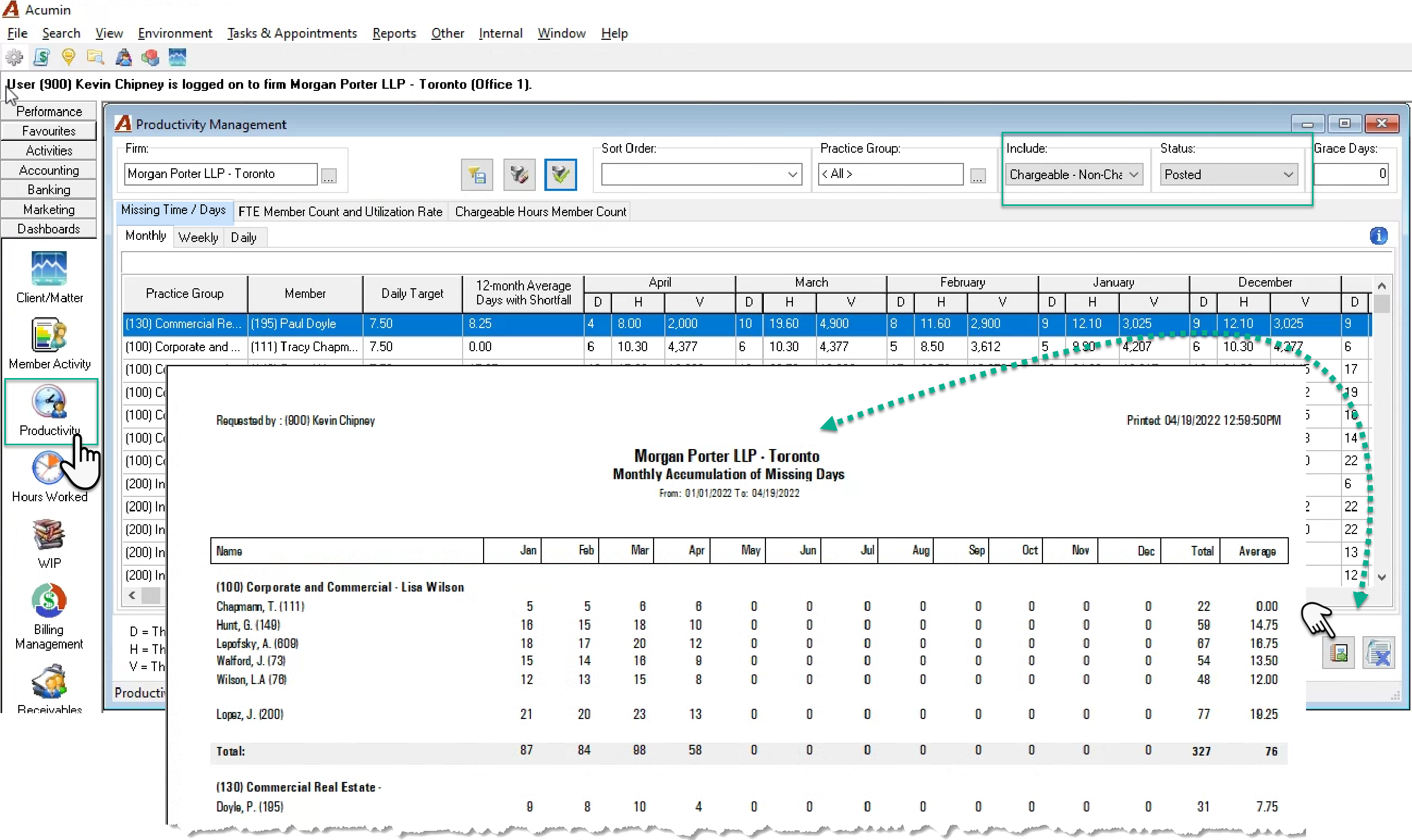
Once the un-posted time is posted, execute the low-time – no-time report or the missing time one to review users with latent time. The former is time management report, the latter is a Productivity dashboard report.
Consider including chargeable – non-chargeable entries as well as remaining with the status posted. Although un-posted entries are typically considered as work-product when assessing missing time during a fiscal period, it is considered best practice to only included posted entries when assessing this same measure as part of the month end process.
Other PRE-MONTH-end Requirements:
Firms that have other month-end requirements often add these as to-dos (tasks) on an internal month-end “non-chargeable time and disbursement” matter for use by the accounting team.
Executing the Month-end Process
From the Main Menu-bar, select Other to access the Month-End Close Procedure.
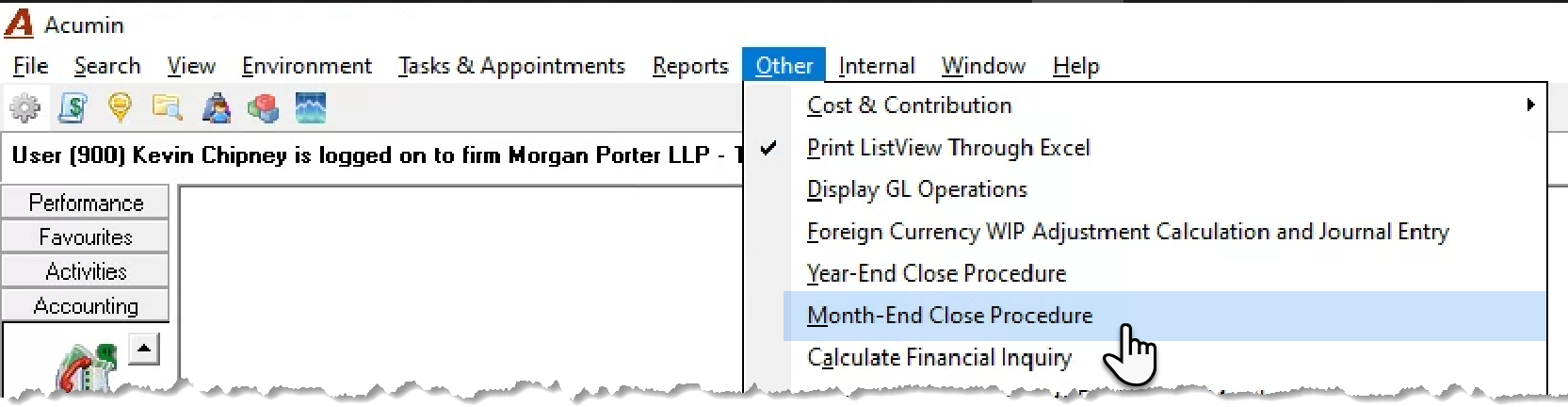
Confirm the month and the profit-centers (firms) to be closed and press “close month(s)”. A confirmation message is launched offering the option to continue or abort the process.
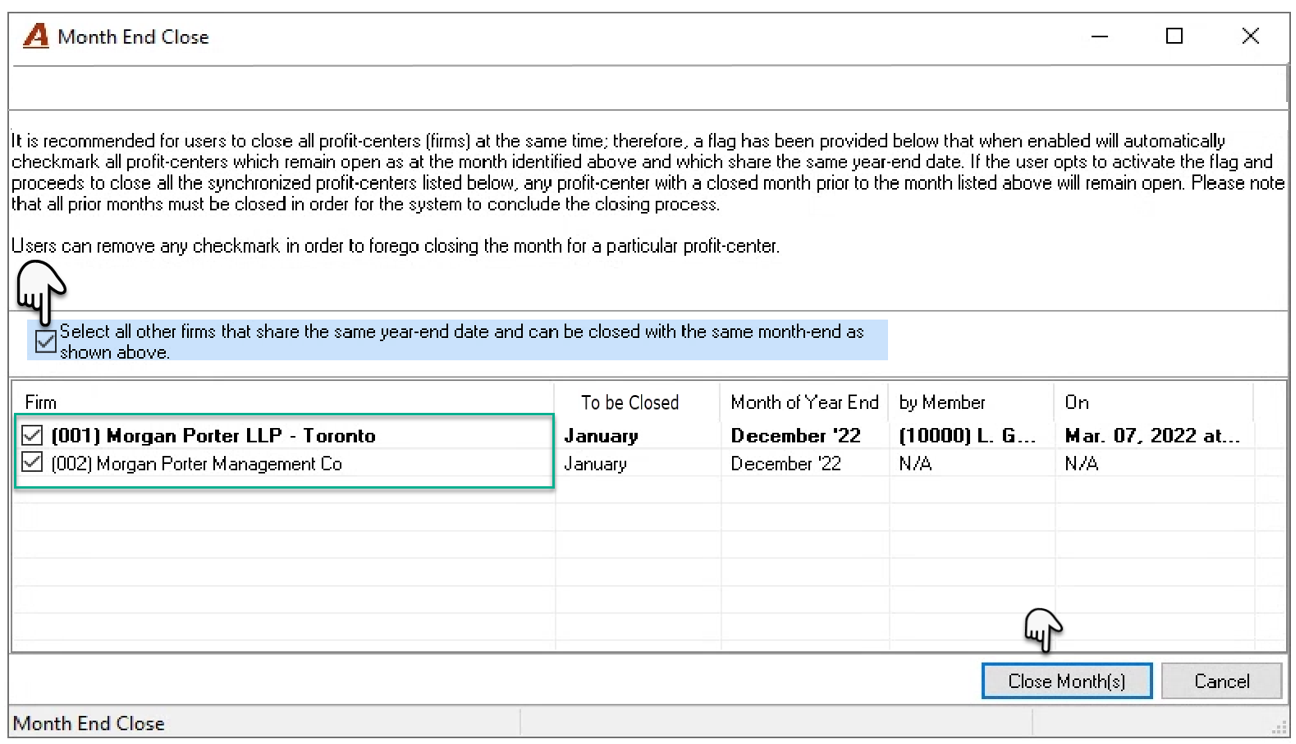
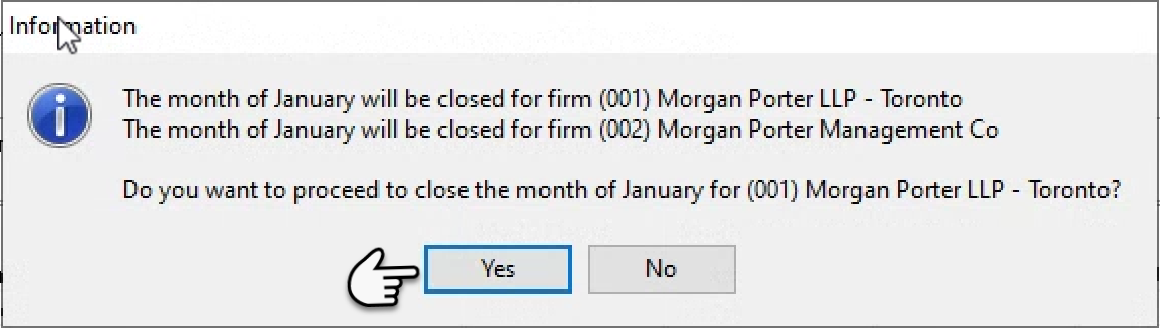
Press Yes to continue. Once the firms are closed a confirmation message is launched and the option to print a confirmation output offered.
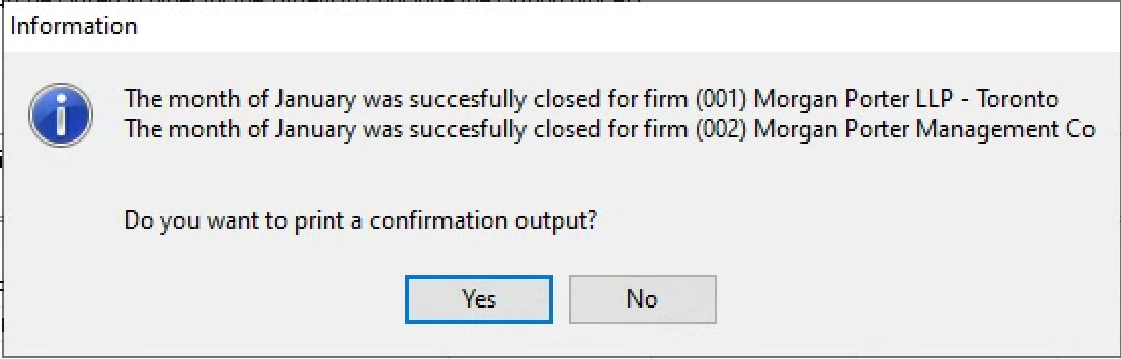
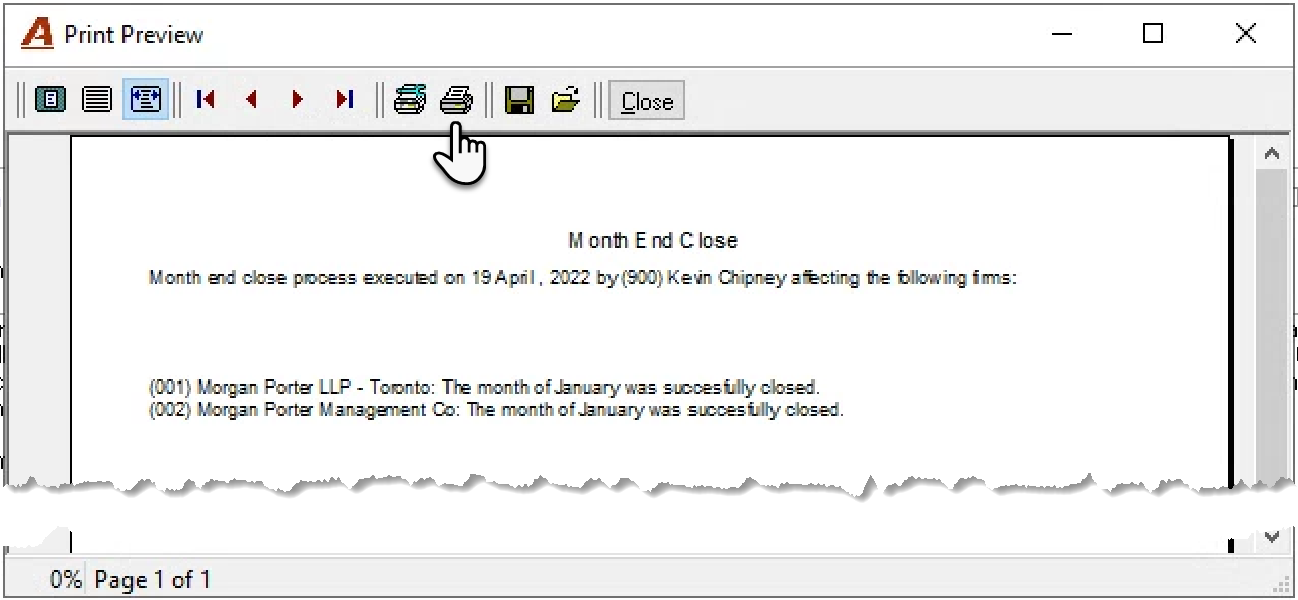
Once back on the main form the close-month process is complete, and users will no longer be able to transact within the closed month unless authorized.
To avoid timing differences on reporting, regardless of the organization’s business logic for the calculation of member-activity measures, it is recommended that the authorized user allow for the automated overnight update process for the day’s transactions before taking a back-up of the production database onto AcuminTraining.
Confirming the Overnight Process
Immediately after the month-end close is executed the settings for the calculation of the member activity overnight process should be confirmed to meet default member activity requirements of the firm and consistency between the as-at date and the default filter date of the member activity dashboard.
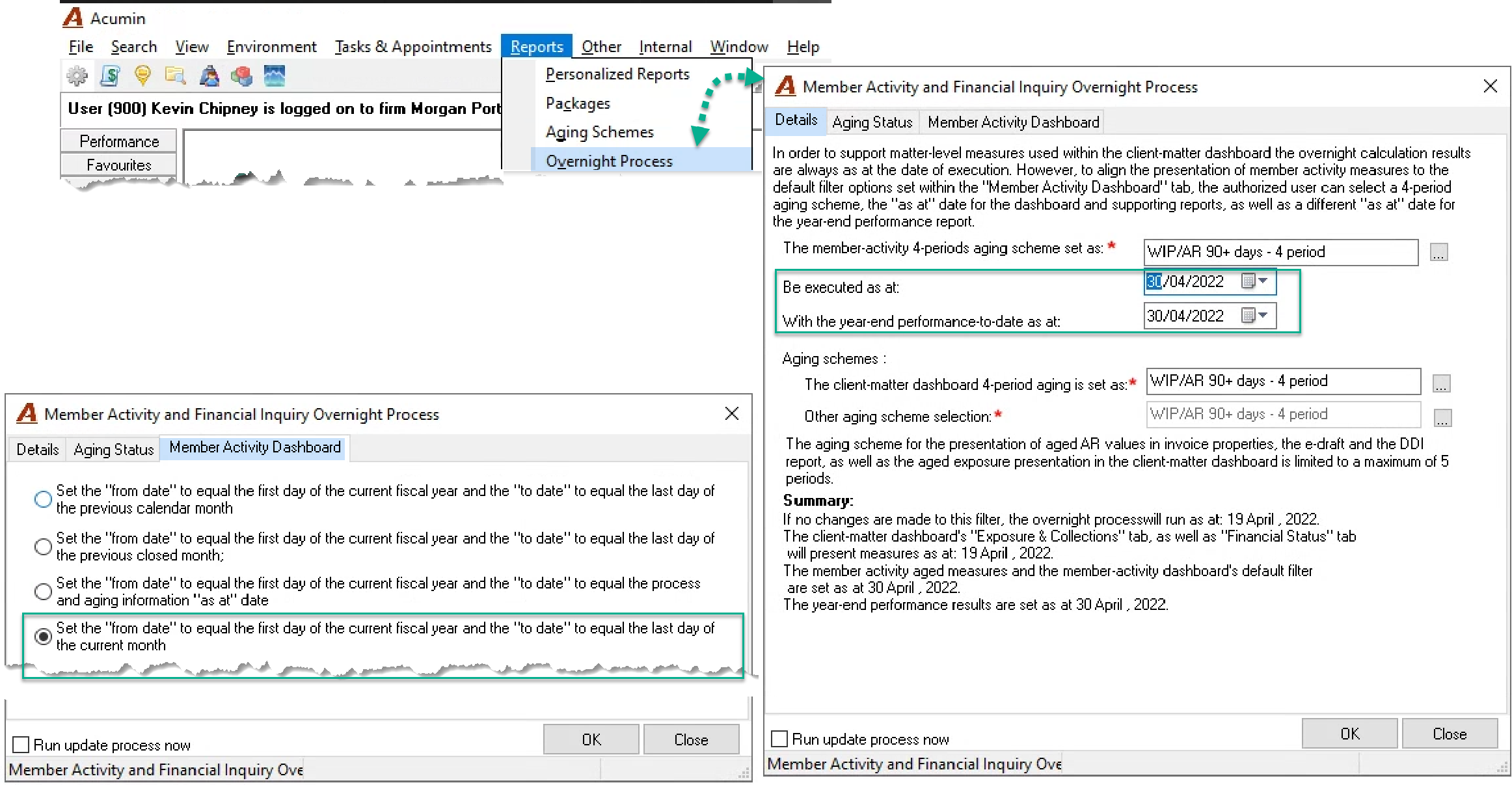
Proceed with the printing of any reports. Acumin’s historical reporting engine can restate previous positions reflecting permitted accounting transactions, therefore most firms limit the printing or reports to those needed for analysis and or decision making.
Month-end Reports
Although there are no mandatory reporting requirements as part of the month-end close process. Each firm reports information based on internal requirements; however, the following is a suggested list of balancing-type reports as well as most-often used reports within the client base.
Recommended balancing-type reports
To ensure that there are no timing differences, execute balancing exercises from a back-up of the Acumin database built immediately after the member activity overnight process is complete – typically as early as possible in the morning after the month-end close the day before.
Unbilled Time and Unbilled Disbursements
Aged WIP summary by working-member to the end of the month - include chargeable time hour and value and chargeable disbursement value.
Aged WIP summary by member responsible for the matter or by the client or matter level role used by the organization for assessing WIP management objectives – docketed to billed.
WIP Trust and AR summary by member responsible for the matter or by the client or matter level role used by the organization for assessing file management objectives – WIP, AR and Trust.
Firms that journalize unbilled time will produce the “General Ledger Supporting Details Summary” for unbilled time to confirm the reversal of the last journal entry and the balanced new unbilled time value.
The “General Ledger Supporting Details Summary for unbilled disbursements” should balance to the unbilled disbursement position reported on the Aged WIP report for chargeable disbursement values. Reconcilable differences include, timing differences, the backdating of disbursements into a closed period or if the closed period includes transactions described in the first section of this document.
Balancing expectations:
Total unbilled time hours across all firms should be the same for both the Aged WIP reports as well as the WIP trust and AR report.
Total unbilled time value across all firms should be the same for both Aged WIP reports, the WIP trust and AR report as well as the corresponding “General Ledger Supporting Details Summary” for organizations with unbilled time journalized at a transactional level.
Total unbilled disbursement value across all firms should be the same for both Aged WIP reports, the WIP trust and AR report as well as the corresponding “General Ledger Supporting Details Summary.”Trust
Trust balance report – the first page summary should agree to the report details.
Trust sub-ledger summary by member responsible for the matter or by the client or matter level role used by the organization for assessing file management objectives with respect to Trust.
Balancing expectations:
The total Trust balance across all firms should be the same for both the Trust balance report and the Trust sub-ledger summary report as well as for the WIP, Trust and AR report.
Accounts Receivable:
Aged AR summary by member responsible for the matter (or a role most often used by the firm).
General Ledger Supporting Details Summary for accounts receivable. Organizations with managed foreign currencies must include foreign currency receivable main accounts as well as their corresponding foreign currency exchange GL accounts.
Balancing expectations:
The total AR balance across all firms should be the same for both the Aged AR Summary Report and the “General Ledger Supporting Details Summary.”
Accounts Payable:
Aged Accounts Payable (or Accounts payable) by Invoice (GL) Date.
General Ledger Supporting Details Summary for accounts payable. Organizations with managed foreign currencies must include foreign currency receivable main accounts as well as their corresponding foreign currency exchange GL accounts.
Balancing expectations:
The total AP balance across all firms should be the same for both the payable report and the “General Ledger Supporting Details Summary.”
Financial Statements:
Income Statement - actual to budget and/or comparative to prior year. For greater details, from the financial statement properties form, print the detailed analysis (analysis button in between Save and Print). This is a 12-column report with month and year-to-date actual, budget, and prior year data by GL account (or sub-account) grouped by related financial statement line.
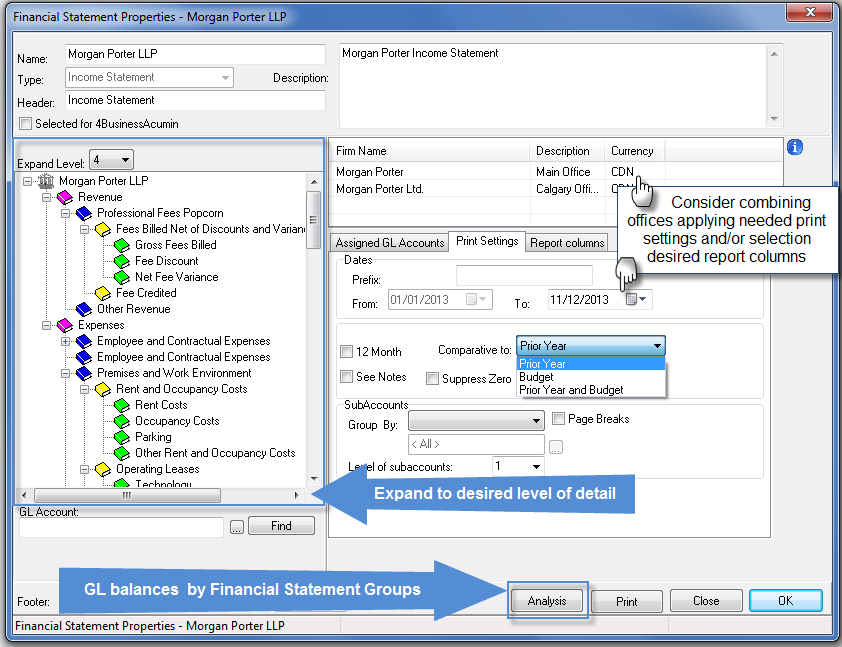
Balance sheet - comparative to prior year.
Management Reports:
The Firm Comparative Performance Reports (six sections): This report provides measures for the decision maker to analyze changes in production, revenue, WIP and AR. This report groups the hours into two main groups defined in system settings (typically presented as Lawyers and Other Timekeepers).
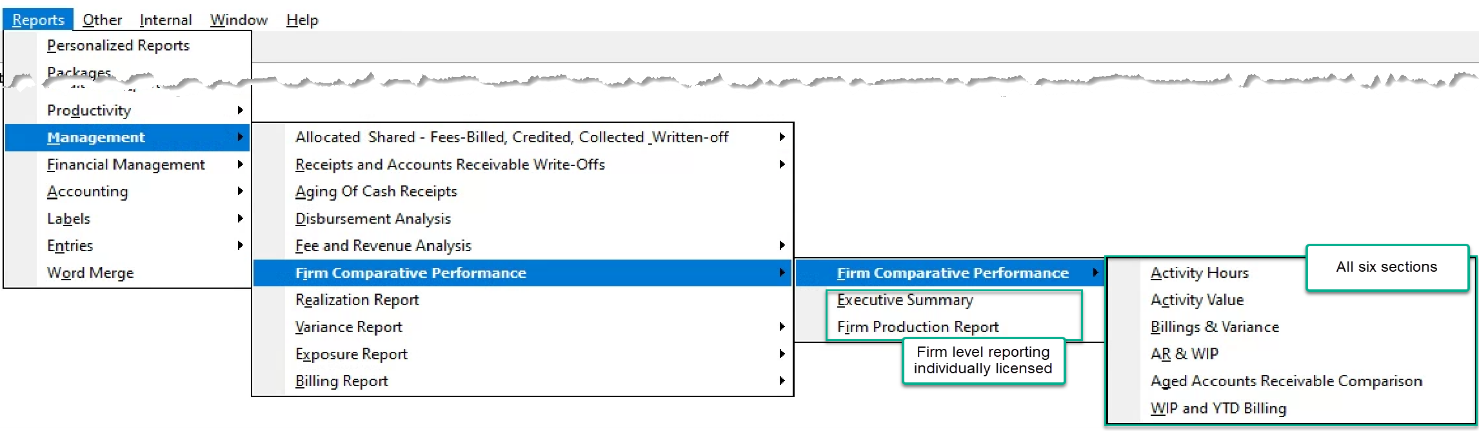
The Executive Summary: Individually licensed, this report provides high-level metrics for an overall picture of the business.
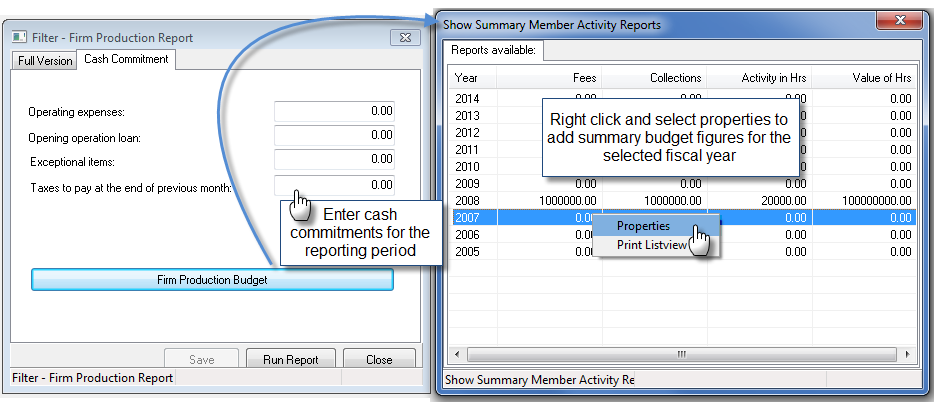
The Firm Production Report: Individually licensed, this report includes high level production metrics and allows the authorized user to enter and maintain an annual summary of budgeted figures (independent of the budget module for a potentially unique perspective) as well as enter ensuing cash-commitments.
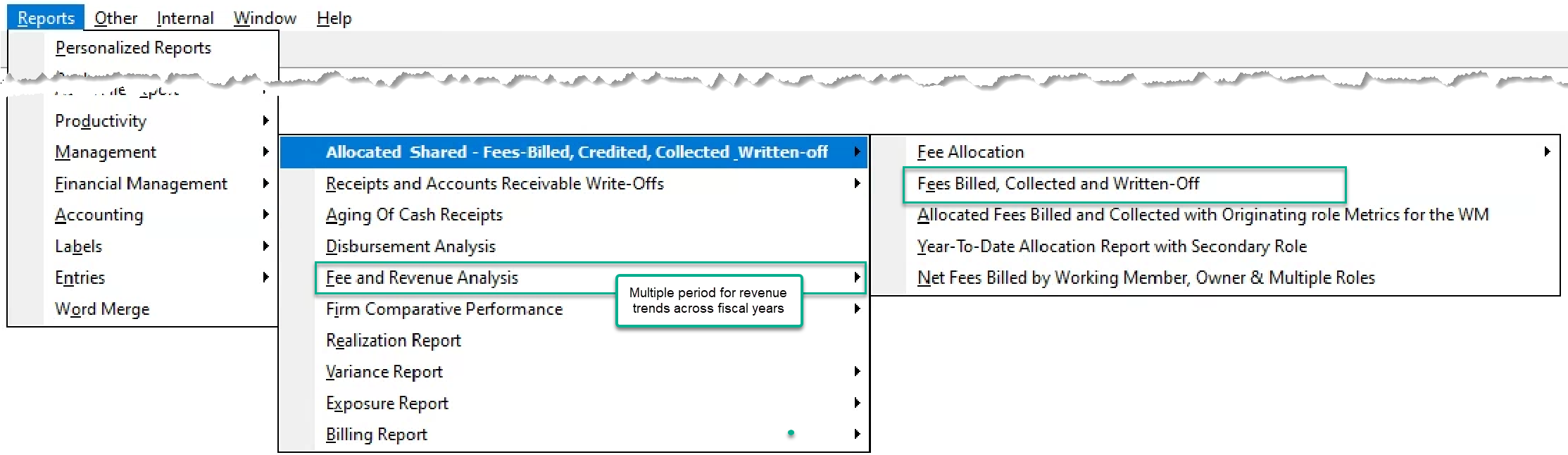
The Fees Billed, Receipts and Fees Written-off. Although there are multiple allocation-type reports, this report summarized by working member or by matter or client level role holder shows independent measures for fees billed, fees credited, fess collected and fees written-off for the period in context of the member and his or her role.
The Revenue Analysis for multiple periods report is used to analyze revenue across multiple periods. It supports the concept of “Top ???” clients
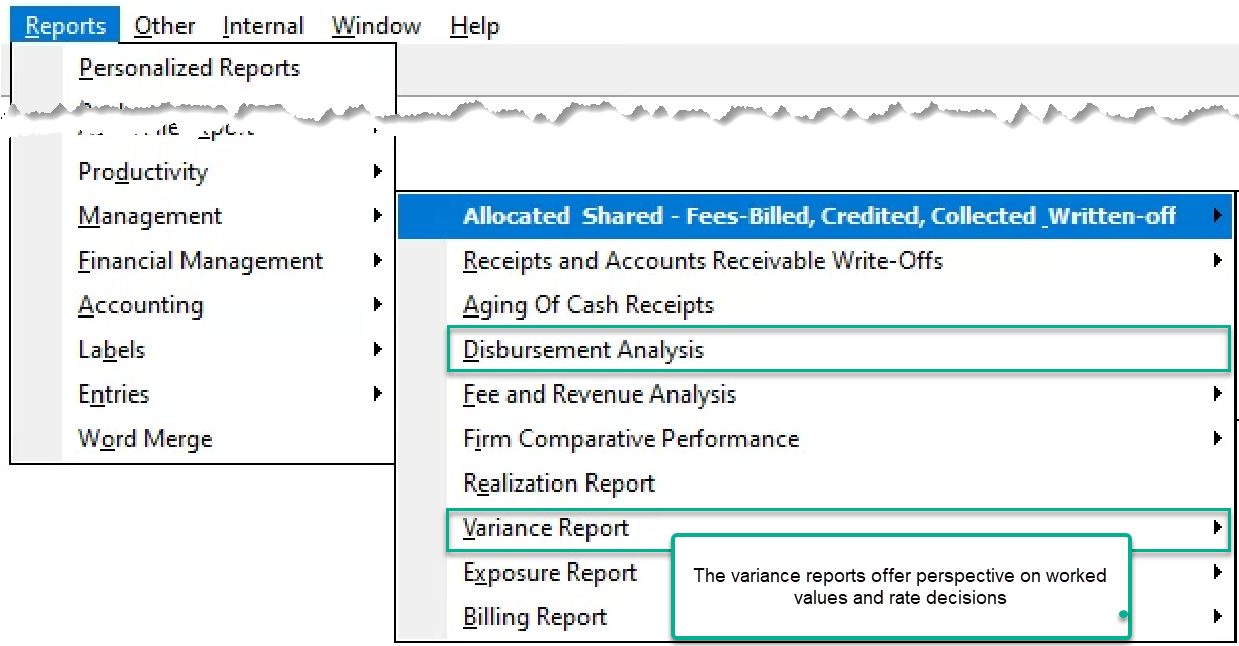
The Disbursements Analysis Report is used to analyze disbursement activity. This is not a balancing report.
The Variance Reports offer perspective on the realization of worked values and rate decisions
Productivity Reports:
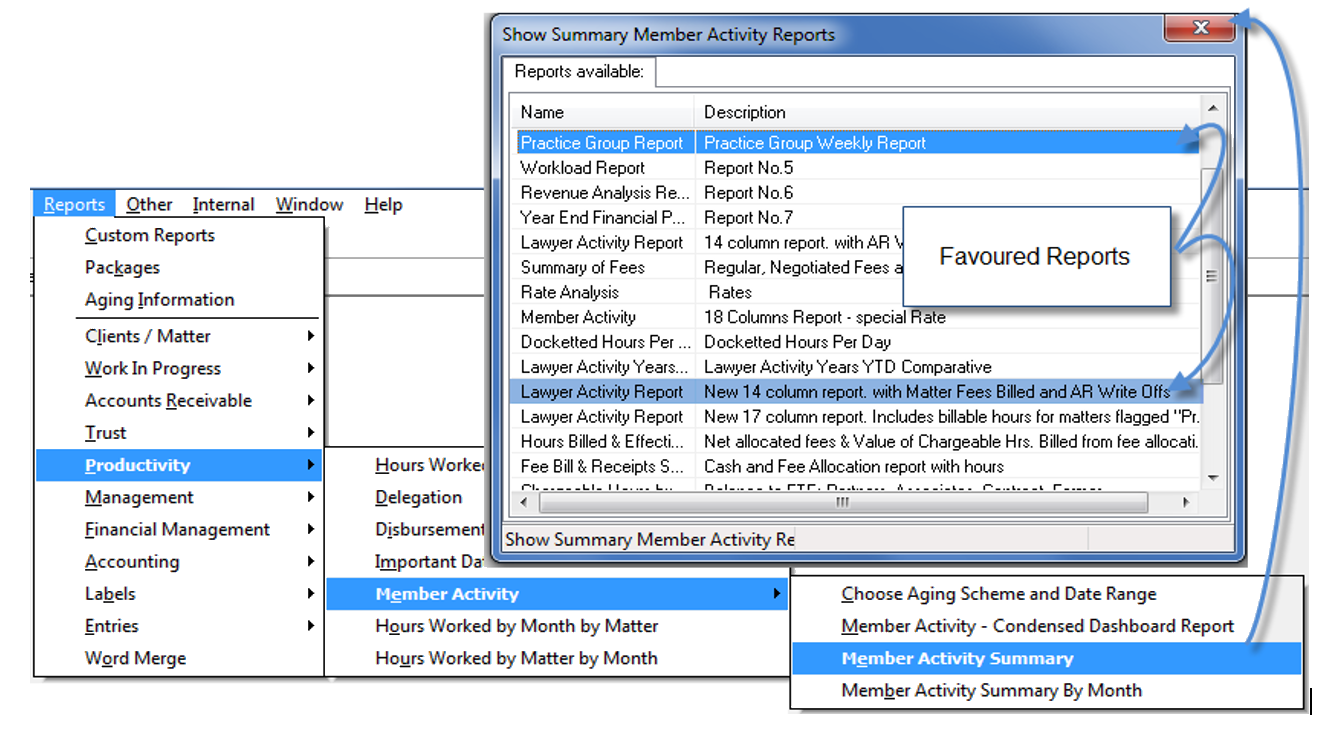
Member Activity Reports – Although there are multiple reports, the authorized user can create new ones. The practice group weekly report with missing days and the new 14-column report with matter fees billed and AR Write-offs are the ones most often used.
The Hours Worked - Chargeability Analysis Report – although all the hours worked reports provide insight on time and worked values, this provides a breakdown of how the time was spent in context of chargeability and type of work.
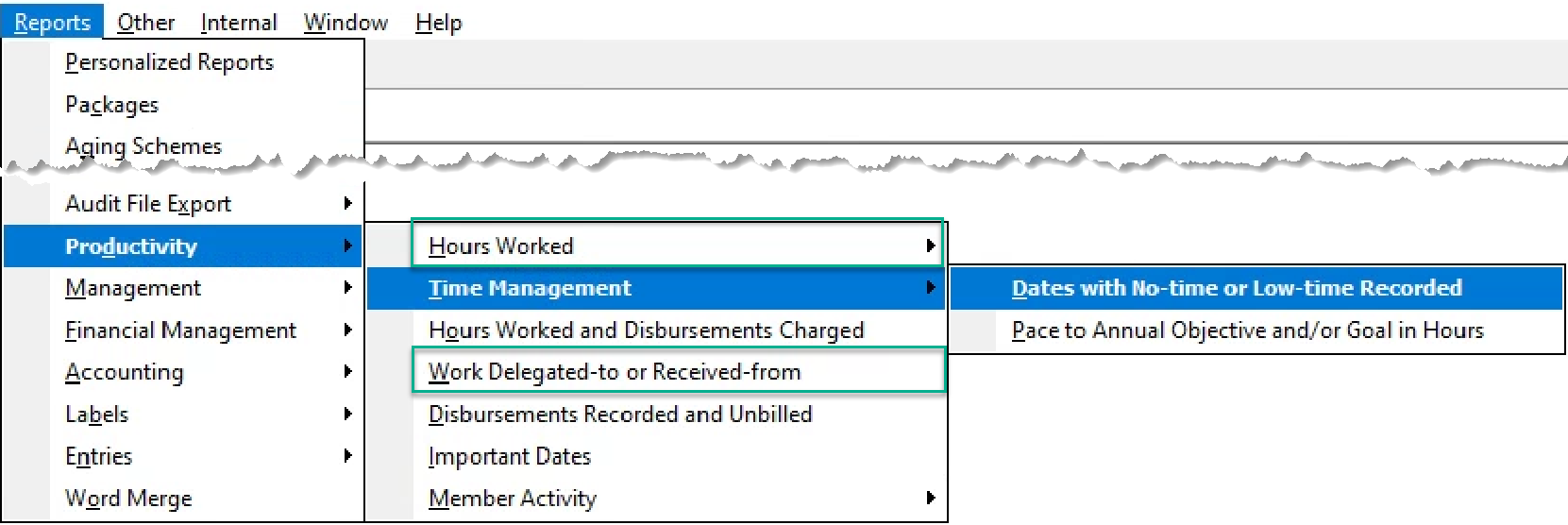
The Work Delegated-to or Received-from Report – provides information on the working members a role-defined member delegates work to as well as identifies for a working member who has been delegating them the work.
The Dates with No-time or Low-time Recorded Report – focuses on members and days were missing time meets the criteria selected for a more focused analysis.
Month-End Timing
It is possible to close the month at any time, as the decision to close a month and securing prior month-transaction access is not necessarily tied to the actual physical month.
For example, if the revenue budget for the month of December is achieved before the holiday-season – to reduce user error a firm will close the month of December early and allow for prior closed month time and disbursement entries, quick payments, and AP for the remaining of the month but restrict closed month invoicing.
Essentially, the application supports the various work models by relating security to the fiscal closed month requirements and allows the decision makers to implement the require processes based on desired outcomes.
Reverse the Month-End Close
It is possible to reverse the month-end close.
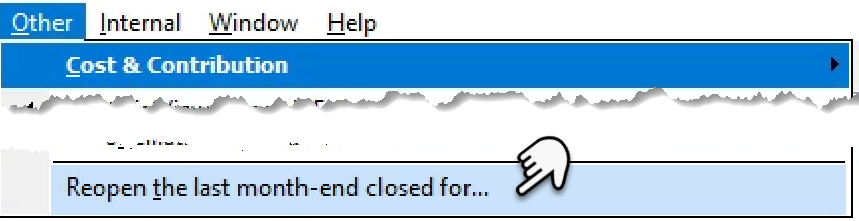
From the Main Menu-bar, select Other to access the “Reopen the last month-end close for...” option.
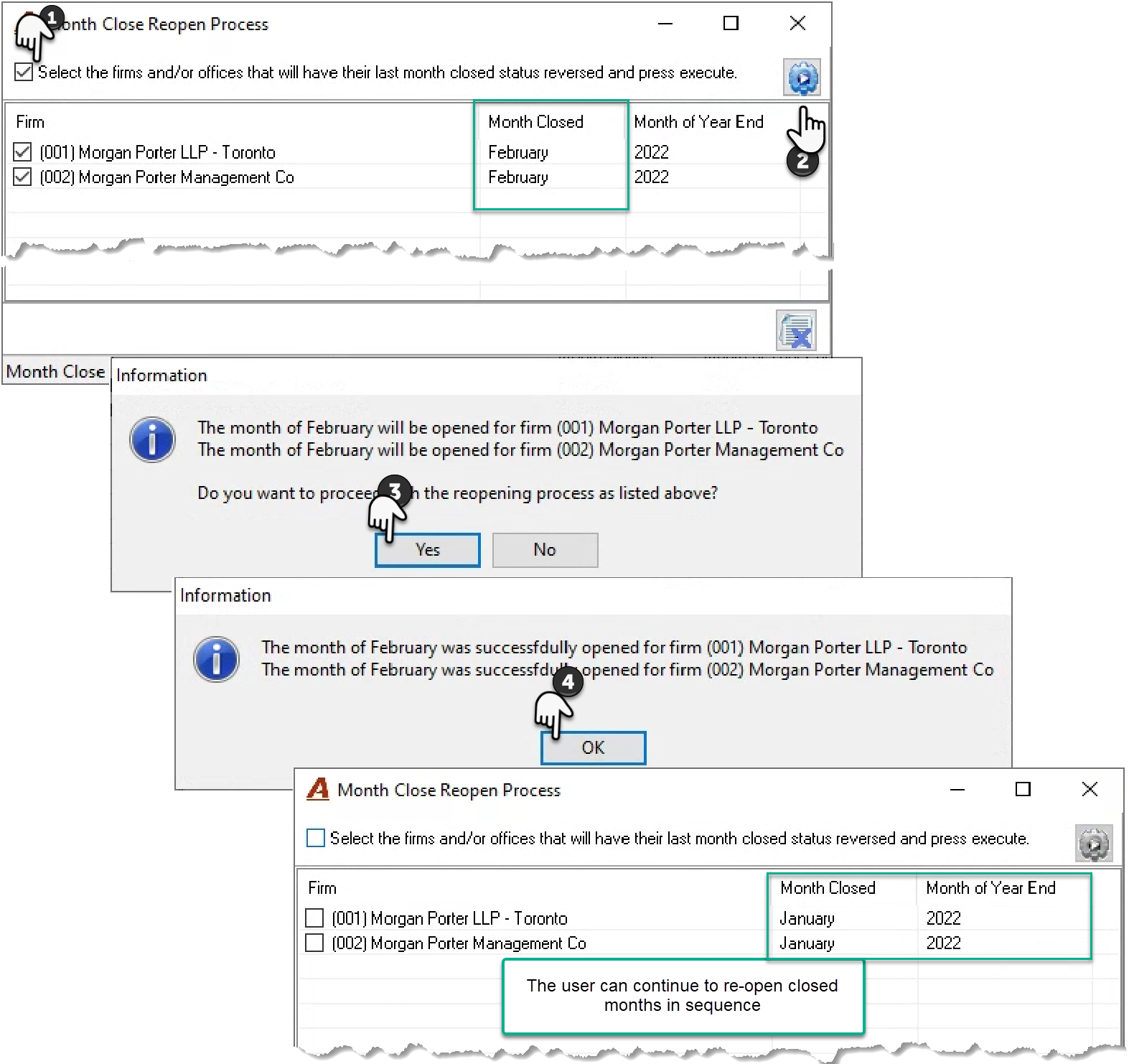
Select the firms to be re-open to enable and press the execute button. A series of confirmation messages will be provided until the process is complete. Once back on the “Month Close Reopen” form, it is possible to reopen the next available month. There is no limit as the process can only be executed for the las closed month.
Year-End Process
Preparing for Year-end
Although it is possible to re-open the last closed month (reverse the month end close process), it is not possible to re-open the last closed year, without programmatic intervention.
To re-open the last closed year for one or more firms please contact Dexco support with instructions on which firm needs the year reopened along with an approval for a service fee equal to 2.0 hours of service plus 15 minutes for each additional firm.
Definition and Purpose
The closing of a fiscal year does not involve the closing of sub-ledgers or registers into the general ledger in the traditional sense.
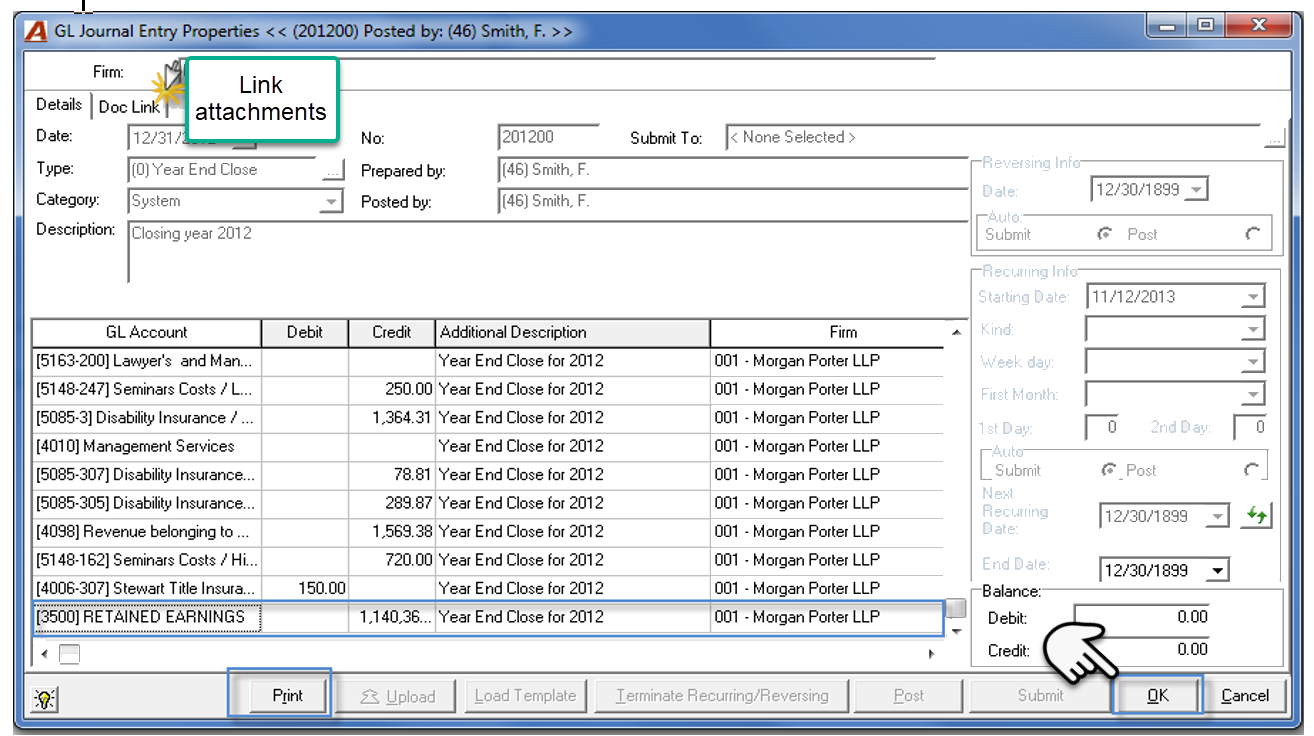
Although a system journal entry is automatically executed to zero-out income and expense accounts into the balance sheet, this automatically generated and maintained journal entry supports the presentation of GL transactions in context of presentation requirements for the “General Ledger”, “Sub-ledger” and/or “Register” for any reporting period.
This means that in addition to the system journal entry, as with the month-end process, the year-end process remains a data-entry control-mechanism invoked to restrict the backdating of accounting transactions in consideration of the organization-defined security-model.
As a result, the year-end close procedure serves two purposes:
-
To ensure an accurate reporting framework for readers of financial information through controlled user-access to transact in a closed fiscal year, as once invoked, the year-end closed flag limits the execution of transactions in a closed fiscal year to those users assigned specific rights to do so, and;
-
To facilitate financial reporting defaults through the execution of a system journal entry to close income and expense GL accounts into the balance sheet, without compromising cross fiscal year management reporting objectives.
Timing
Firms wait until the latter part of the first fiscal month of the New Year to close the prior fiscal year at the end of the business day.
The amount of time the organization waits to close the fiscal year is dependent on closed-year authorizations granted. For example, most firms disallow the recording of time and or disbursements into a prior fiscal year; therefore, they would close the year by the third week of the new fiscal period, as they consider 3-weeks enough time to secure all unrecorded time and/or disbursements with a transaction date within the fiscal year to-be-closed.
Accounting adjustments are not a consideration when scheduling the year-end close process. This is because authorized users can execute prior year journal entries, well after a year is closed. Prior year adjustments made on closed fiscal years will correctly update opening balances as well as the system generated closing journal entries.
Process
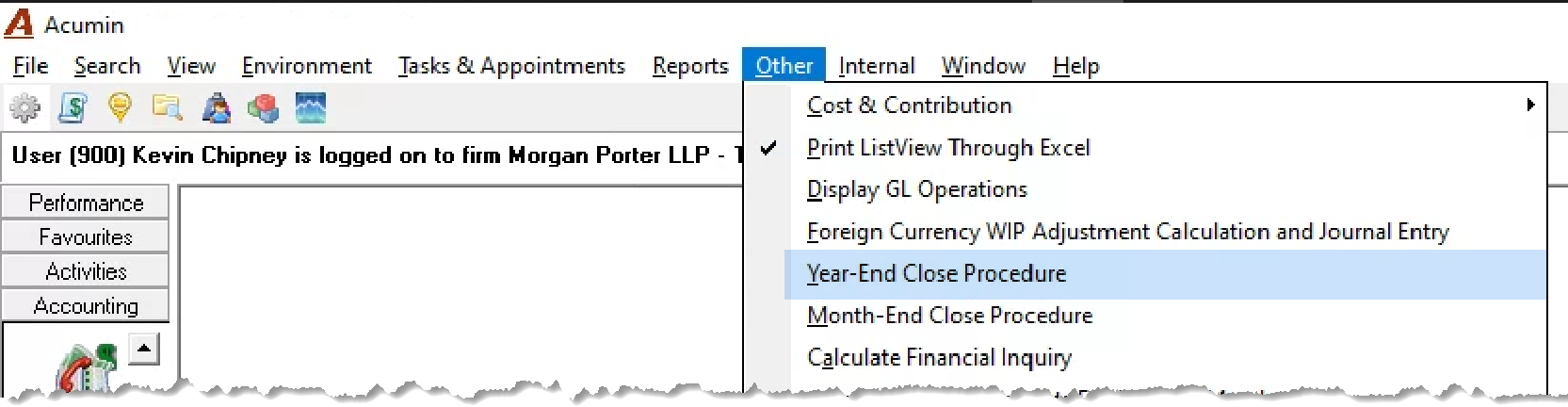
From the “Other” main menu option, select Year – End Close Procedure to initiate the process.
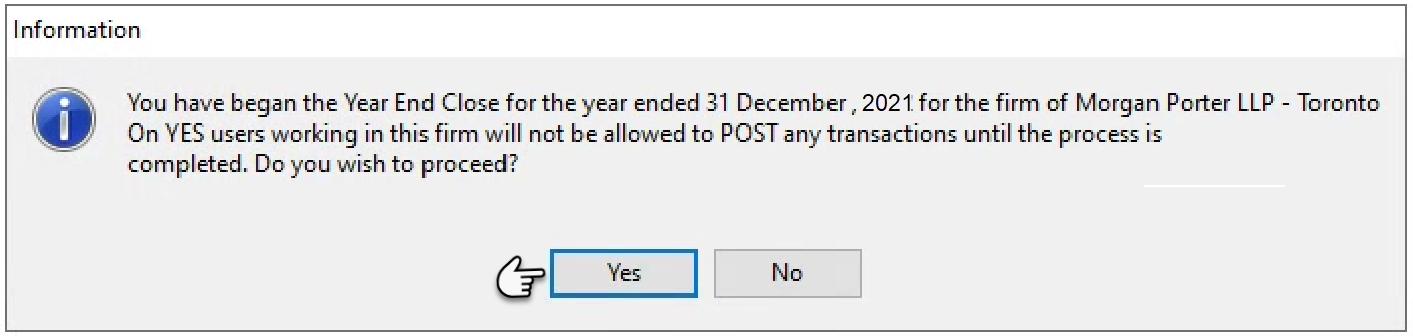
From the confirmation message, press YES to proceed onto the checklist. Confirm acceptance and understanding of the process by clicking on each checkbox and press OK to proceed.
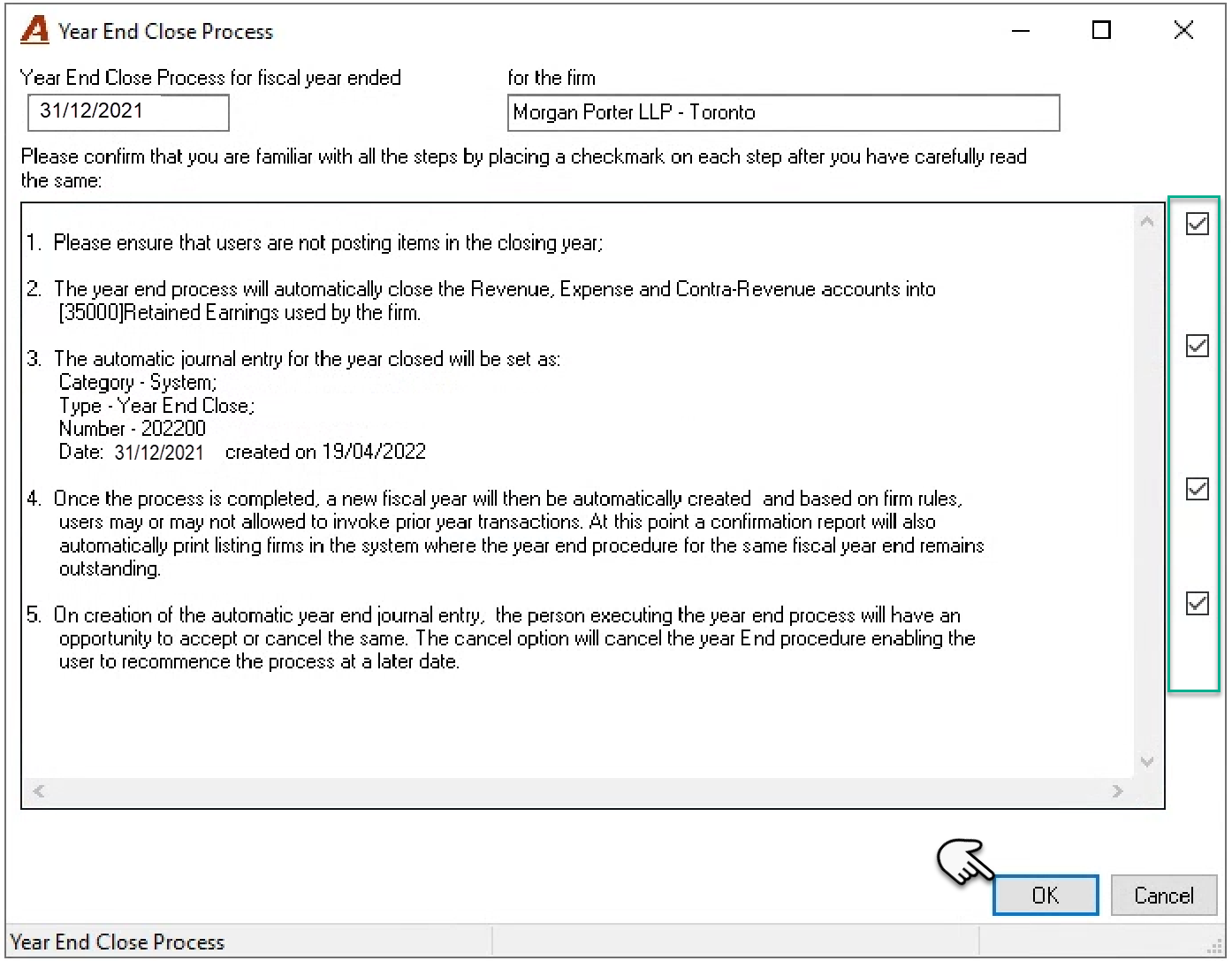
The prepopulated journal entry form will be launched. It is not necessary to print closing journal entry as it is always available, and it may change because of authorized prior year adjustments. Press OK to continue and once on the “Fiscal Year Properties” form, Close to complete.