.png)
Overview
When creating a new General Ledger (GL) account for general or trust bank, selecting the appropriate bank branch is a mandatory step. Certain fields will also be used to generate printed cheques from the associated bank/trust GL account. This guide walks you through accessing, managing, and defining the key details for bank branches.
Accessing Bank Branches
To view or manage bank branches:
-
Navigate to:
Environment → Bank Information → Bank Branches -
The Bank Branches Form will open.
From this form, you can:
-
New: Create a new bank branch.
-
Select/Properties: Access and edit the properties of existing branches.
-
Delete: Delete unused bank branches.
-
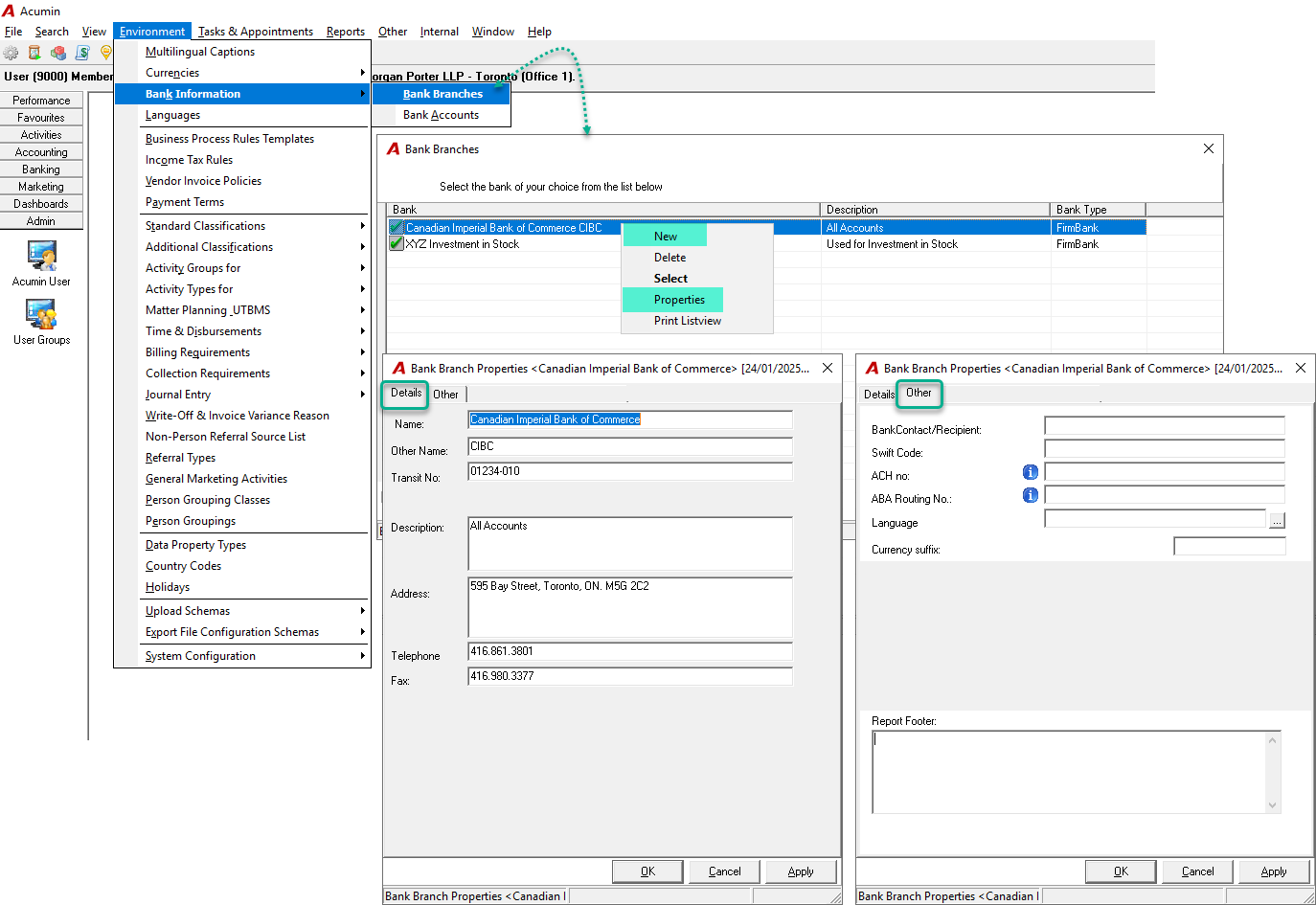
Field Definitions for Bank Branch Properties
The following fields are available when defining or updating a bank branch. These fields are organized under two tabs: Details and Other.
Fields marked with an * are mandatory for bank GL accounts that will be used to issue printed cheques.
|
Field Name |
Definition |
|
*Name |
Enter the bank institution’s name. This will print on the physical cheque. |
|
Other Name |
Enter any alternative name for the bank. |
|
*Transit Number |
Enter the transit number and bank code for the branch, separated by a dash (e.g., This will be included in the MICR line on printed cheques. |
|
Fractional Transit Number |
Enter the fractional transit number (primarily used for U.S. organizations). This appears in fractional form at the top of cheques. |
|
Description |
Provide a brief description of the bank (for reference purposes only). |
|
*Address |
Enter the branch address associated with the physical bank account. This will appear under the institution name on printed cheques. |
|
Telephone |
Enter the branch’s general phone number (for reference purposes only). |
|
Fax |
Enter the branch’s general fax number (for reference purposes only). |
Other tab
|
Bank Contact/Recipient |
Enter the contact name of the bank representative in the format: This information can be used when generating purchase letters in the Investment module. |
|
Swift Code |
Enter the Swift code if required. This is used if wire/transfer remittance information is printed on client documents. |
|
ACH no |
Enter the ACH number if required. This is used if wire/transfer remittance information is printed on client documents. |
|
ABA Routing NO |
Enter the ABA number if required. This is used for wire/transfer remittance information on client documents. |
|
Language |
n/a |
|
Currency suffix |
n/a |
|
Report Footer |
n/a |
Additional Information on Key Fields
Transit Number
-
A transit number is a unique identifier for a bank branch, represented as
XXXXX-YYY, where:-
XXXXXis the branch number. -
YYYis the institution code.
-
-
This number is essential for cheque processing and appears as part of the MICR line.
Swift Code
-
The Swift code is an internationally recognized identifier for banks, facilitating international wire transfers.
-
It consists of 8 to 11 characters:
-
The first 4 characters represent the bank code.
-
The next 2 represent the country code.
-
The following 2 represent the location code.
-
An optional 3 characters represent a specific branch.
-
ACH Number
-
The ACH (Automated Clearing House) number standardizes electronic payment processing in the U.S., including direct deposits and bill payments.
ABA Routing Number
-
The ABA (American Bankers Association) routing number is a nine-digit code used to identify banks in the U.S. for electronic payments, including direct deposits, checks, and wire transfers.
RELATED DOCUMENT:
Setting-Up a New General or Trust GL Bank Account