.png)
Journalizing Unbilled Time
Highlights
The requirement and frequency to account for unbilled time and report its changing value as a contra-asset, equity or revenue is dependent the firm’s regulatory requirements and reporting objectives.
The most effective way to capture changes in unbilled time is through a reversing journal entry for its full value. This ensures that any out of period functions – for example unbilled time entry corrections and/or invoice cancellations, are inherently considered.
Establish the Current Unbilled Time Value
The “Aged WIP” report found within the “Reports” – “Work-in-Progress” sub-menu is akin to an unbilled-time sub ledger – therefore it is the best output source for obtaining accurate unbilled-time transactional current value on a historical basis, as at month end.
Report Requirements
Select the to-date in consideration of the corresponding journal entry’s accounting period – typically the last day of the month being closed;
Remove all default groupings found within the “details” tab. These are not needed;
Ensure that the “firm” reporting-dimension found within the “details” tab is clicked ON and that it contains a value of <None Selected>. This is a requirement to capture the firm’s unbilled time value per firm (profit-center or office);
Establish the Previous Unbilled Time Value
The “General-ledger Supporting Details Summary” report found within the “Reports” – “Financial Management” sub-menu is the best out-put source for obtaining the previous unbilled-time value – the unbilled time GL balance.
Report Requirements
Remove the default firm to return a value of <All> for the “Matter Firm / Entity:” field;
Select the unbilled time asset GL account within the GL Account range fields;
Select the from-to-date in consideration of the corresponding journal entry’s accounting period – typically the last day of the month being closed. The “To-date” should be equal to the “To-date” of the “Aged WIP” report;
The Journal Entry
Standard Journal Entry
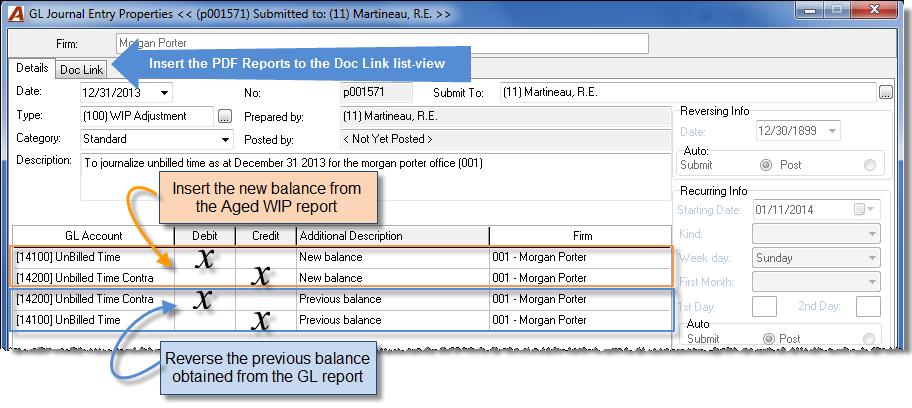
Based on a firm-defined frequency, complete a standard journal entry per firm (Profit-center or office) with a transaction date to match the “To-date” of supporting reports. Use the journal entry form to record the new unbilled time balance against the contra-asset, equity, or revenue GL account, and to reverse the previously recorded unbilled time GL balance.
Journal Entry Template and Auto-Reverse Option
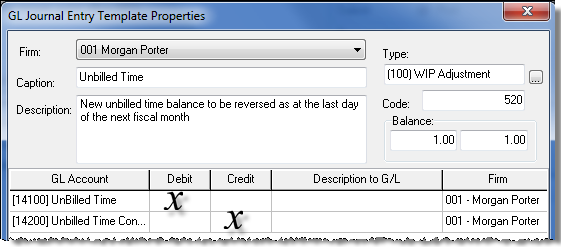
For each firm (profit-center or office) complete a journal entry template which is pre-set to record the new unbilled time balance against the contra-asset, equity or revenue GL account. Insert 1.00 to reflect the debit or credit position of the GL operation.
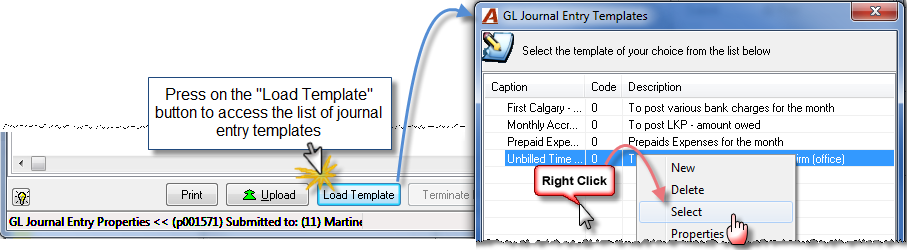
Based on required frequency, create a new journal-entry properties form and from within, launch the journal entry template.
To complete the journal entry:
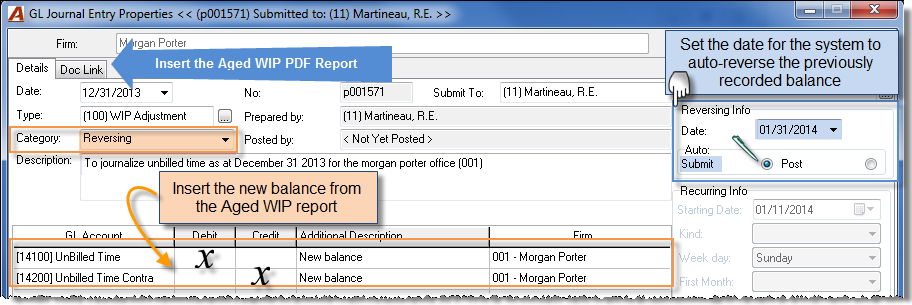
Set the transaction date of the entry to match the “To-date” of the supporting report.
Set the category as reversing. This action will open the properties fields found within the reversing info section on the GL Journal Entry Properties form.
Set the date for the system to auto-submit (or auto-post) the reversing journal entry to match the last day of the ensuing fiscal period.
Note: If the journal entry is set as a “reversing” journal entry, the system will automatically submit the un-posted reversing journal entry on the selected reversing-info date. It is recommended that the reversal be pre-set to auto-submit instead of auto-post for the authorized user to confirm it before posting it – a process typically concluded at the same time as the new journal entry is completed.
Repeat the process for each per firm (profit-center or office).
HINT
Save the filter for both the “Aged WIP” and the “General ledger Supporting Details Summary” reports for future user access from the user’s personalized list of reports.
Conversion Considerations
The unbilled time value to be reversed after go-live, should be the GL position converted as at go-live.
The initial unbilled time value to be recorded after go-live, should be the converted transaction value supported by Acumin’s Aged WIP (the subledger) as at go-live. This is the converted value used in the conversion balancing process.
The difference between the two values (if any) reflects difference between the converted transactional data so it is functional within Acumin and the converted GL position. This value must part of the initial journal entry.
RELATED DOCUMENTS: