.png)
QUESTION: I’m trying to issue a credit note for an invoice created in our legacy application and dated it as March 14th to align with original date but the following message popped up.
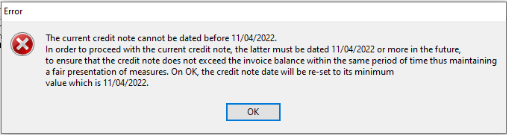
Please, could you let me know how to override a date and issue a credit note for March instead of April?
RESPONSE: The application has calculated April 11, as the oldest possible date for the credit note and there is no option to override unless you want to make it more in the future. This is probably because the converted invoice has activity with dates that prevent the credit note from going back to the invoice transaction date.
Although converted invoices are limited to the information captured by the previous application, therefore showing a more limited content within invoice properties, if you open the properties of the invoice you want to credit, the content of the “details” tab and/or “payments and notes” tab, will include the date of April 11th reflecting the cause for the limitation.
For Acumin created invoices you will have more flexibility on credit note date selection because the allocation process (the programs and storage of the information affecting allocated values for invoices and credit notes) in Acumin is more granular than your legacy application.