.png)
QUESTION: Is there a way for clerks to see the invoices that they have submitted, but haven’t been posted? They were able to see this before, but cant figure out how they can do this now.
RESPONSE: The concept of ownership requires that there only be one object owner, therefore the submission process transfers ownership from the submitter to the submitted-to member. As a result, use of the “own” filter must only show the results “owned” by the user. In previous versions there was an issue with the “own” filter checkbox option in the “Show Invoice Detail” filter a list view form, which has now been corrected.
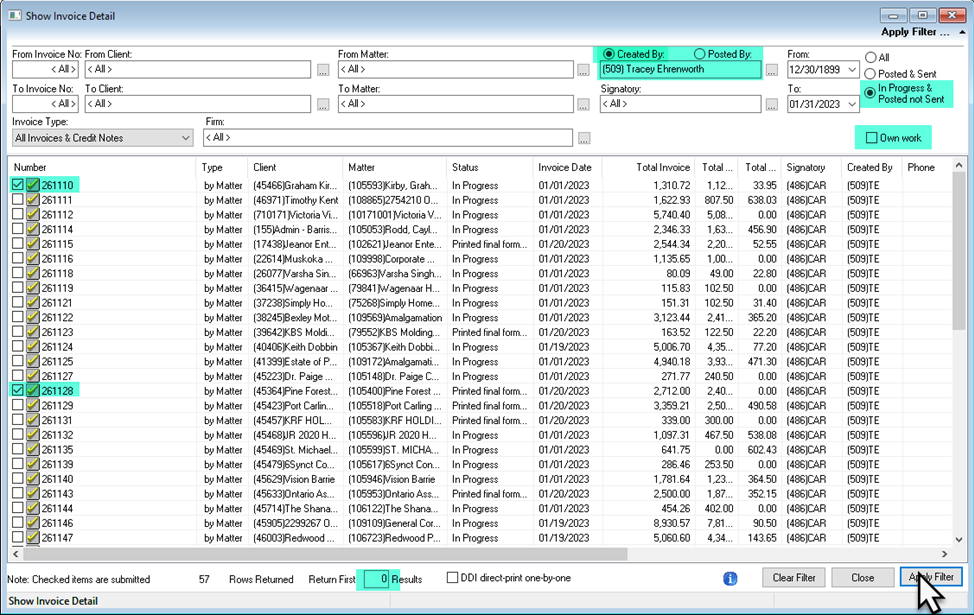
Although the invoices created and submitted by a member – in this case the assistant - are no longer listed when the “the position of the “own” filter checkbox option is check-marked, depending on security the user can remove the checkmark to filter by created by and gain visibility of all invoices created, whether owned by someone else or not. To see the list of invoices created and submitted, users without invoice third party access – the assistant - must:
· Disable the “Own Work” option to include all invoices from other owners.
· Enter their own member code in the created-by field.
· Retain the status filter as “In progress & Posted not Sent.”
· Change the “Return First” number to 0 to see all.
· Press the “Apply Filter” button.
The list will present all unposted and posted not sent invoices created by the user regardless of the owner, therefor including the submitted ones.