.png)
QUESTION: We are attempting to cancel an invoice that was paid from Trust and receiving the below error message.
We followed the steps by posting a Negative entry and a Positive entry and generated and posted a General Cheque, deposited the cheque to Trust where funds are moved back to Trust so we are able cancel the invoice.
I am unsure why the below error message is received as I believe we have followed proper steps.
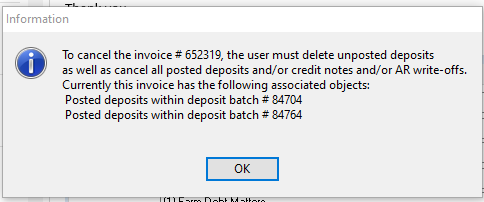
RESPONSE: To cancel an invoice, the associated objects must be cancelled first. In this case, the user needed to have cancelled the receipts used to pay the invoice which would have been included in the deposit batches listed on the message. The cancellation dates of these receipts need to be selected in context of whether the intention is to cancel the invoice with its minimum date or current date, as this date will drive the minimum date of the replacement invoice. It is a timeline of events. Invoice must exist for its receipt to exists on date equal to or more in the future than the invoice date - which must each be cancelled in the same order back to invoice.
Based on the screenshots provided it seems that instead of cancelling the receipts the user made new ones in negative. These are new receipt going in a different direction which must also be cancelled in the right order.
As a best next step, we recommend that you use a backup of the production database to restore AcuminTraining, so you can plan the cancellation order and confirm the final impact before it is repeated in production. This planning step may help mitigate additional complexities in case an incorrect business decision is made.
In conclusion, all of the receipts must be cancelled before you can cancel the invoice.