.png)
QUESTION: Is there any way to tell how many invoices are in the queue that still needs to be posted? It appears that the change has now grouped the posted and not sent invoices in this same grouping. We are hoping that there is a way to just see the number of invoices to be posted.
RESPONSE: To mitigate invoices not being sent to their recipients on a timely basis – a process that leads to invoice cancellations and potential collection issues – with this executable we added an internal control capturing when an invoice was sent, by whom and how; extending the invoice preparation cycle until the invoice is identified as sent. This is reflected in the filter’s label change. We also added greater granularity to the statuses available within the invoice preparation cycle to provide better invoice process management tools to identify in which part of the process the invoice preparation process is delayed.
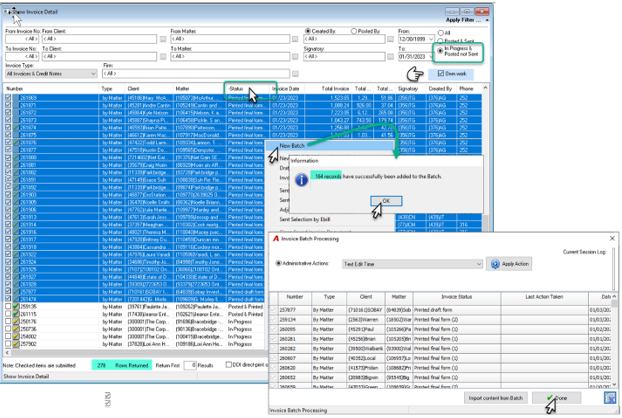
To identity how many of the invoices in the filtered results are ready to be posted, the best option is to use batching functionality to calculate the value . The steps are:
· Filter for all invoices “In Progress & Posted not Sent” to get your start point and owned. “Own” work check marked.
· Press on the status column header to reorder the listed results by status.
· Multiple select invoices grouped with status “Printed final form”.
· Right click and select the “New Batch” option in the contextual menu.
· An information form will appear with the total of the invoices to be included in the batch. In the example below, we have 164 invoices ready to be posted.
· Once inside the Batch form, press the “Done” button to release the selected invoices from the batch back into the list view.
Note: A user can only have one batch created at any one time, therefore once the reason for the batch is achieved, users press “Done” to release the invoices.