.png)
QUESTION: One of the lawyers has requested his WIP Lists be generated today which is out of our regular WIP List cycle run. I have filtered the dates as per his request and want the “Default Invoice Transaction Date” to be July 1st; however, the error message below keeps popping up. What am I doing wrong?
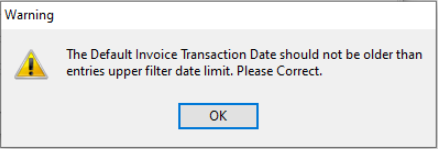
RESPONSE: The time entry filter will include time entries to July 1st, whereas the disbursement entry filter in your example will include disbursement entries to July 19th. For this reason, the invoice date has to be July 19th, at a minimum. It would not make sense if we allowed the invoice date to be older than the disbursement entries billed within that invoice date.
To proceed, either change the disbursement filter to July 1st, to match the time entry one and the default invoice date or change the default invoice date to July 19, (the maximum entry date to be potentially included).
Generally the billing management tool filter is executed for all members based on role. By executing it for one member you will clear the To-Bill tab for everyone else. We recommend that instead you do not generate the billing management tool but apply the details filter for this user to work from those results
If you run it for the one user everyone will lose their to-bill tab.
To access the filter we recommend, press on the building blocks button found on the custom tool bar. This is the button users press to reach their to-bill tab content. This action will launch the will launch the "Entry Filter" form.
The first tab of this form is labeled "Details". Make sure there is no clients and matters on the client matter filter list (right-click to empty list if you see any) and modify the filter options so you can execute for the one member based on role (as you were doing with the billing management tool).
Press run selection and access the results tab. It is like the E-WIP one (not the same). You can right click to execute print list view to get the list. Our recommendation is that you print-list view to excel by setting this option on in user preferences if you have not done this already. In excel you can improve the list as it will not look the same as the WIP list.
Alternatively, you can execute the WIP, Trust and AR report for this member. It has almost the same information as the WIP List.
In summary
Billing Management Tool Filter – Date Control
The billing management tool triggers the monthly billing process in context of filter options selected. As it is not possible to generate an invoice with an invoice date older than any time or disbursement entry date included in the same invoice, the billing management filter controls that the default invoice date if used is never older than the date entered in the to-date of the time or disbursement entry filter.
Billing Management Tool Filter – Member Selection
The billing management tool triggers the monthly billing process by generating the E-WIP (To Bill Tab) for all members involved in the process, This involves leaving the member field without content and selecting the client or matter level role responsible for making billing decisions for affected matters. By executing the filter for one member, the new results will generate a To-Bill tab for the one member only, therefore where a specific member or two need a different filter outcome, we recommend use of the “Details” tab filter found within the “Entry Filter” form to publish the content of the results tab.