.png)
Context
The objective of this document is to provide the law-firm-client with a how-to guide to build a model that supports their vision for measuring and reporting non-productive non-chargeable activity.
Highlights
The timekeeper – working member – is a native reporting dimension of the non-chargeable matter structure, therefore member specific matters are not always created to track time, unless there are privacy concerns and/or the need for working-member specific internal controls.
Due to the private nature of the expected time entry content when tracking non-productive non-chargeable time like Absences, Time-off and Vacation which impacts missed time and pace measures, it is considered best practice to have member-specific matters that are set up as restricted-matters with only the affected timekeeper and any other specifically selected members on the allowable list.
These restricted matters can also be set with a matter type “personal” to formalize a one-to-one relationship between matter and timekeeper. With the use of this matter type, the user that creates the matter can set the affected member into the specified member field in matter properties so only that working member can record time in that matter.
The use of non-chargeable activity-specific time codes for non-productive non-chargeable matters enhances the reporting experience when the stakeholders want visibility of the different types of non-productive time, for example absences (unplanned time-off), planned time-off, and/or vacation.
Best Practice Recommendation - Set-up
Absences, Time-off and Vacation Internal Client
Create a special internal firm client specific to this use-case.
Assign the client a special code – for example 99900, as well as a relevant name that includes the name of the firm. For example, “Morgan Porter LLP Absences, Time-Off and Vacations” or “Morgan Porter LLP -HR Management Non-Productive Time”.
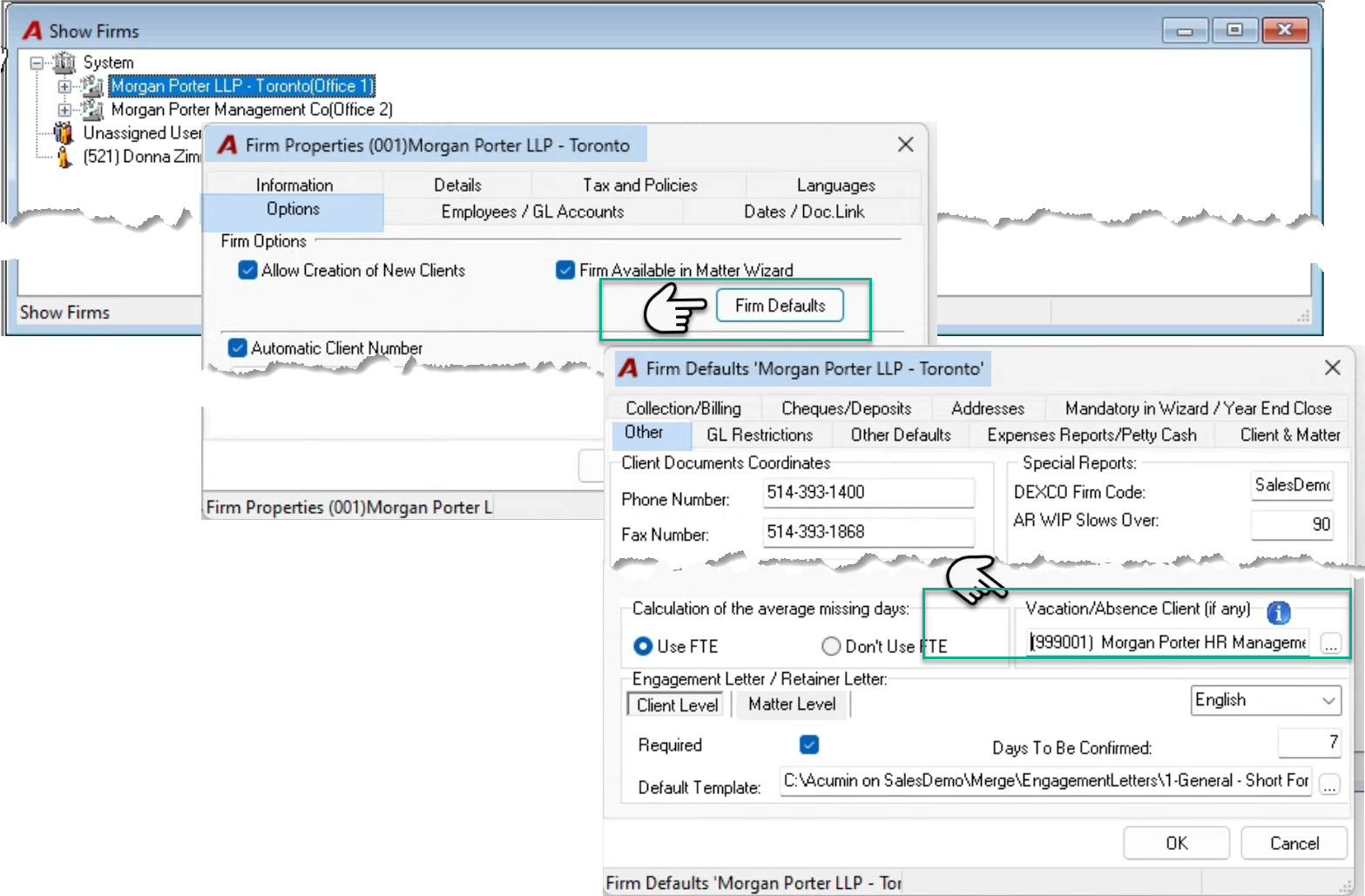
Assign the client to the “Vacation/Absences Client” field found in the “Other” tab of the firms defaults form of the properties for the main firm (001). From the main menu bar, select “View – Firms” to launch the “Show Firms” tree view. Highlight the main firm (001) and right click to select properties. Navigate to the “Options” tab and press on the “Firm Defaults” button.
Once on the “Firm Defaults…” form, navigate the “Other” tab to insert the new client into the “Vacation/Absences” field – bottom right.
Absences, Time-off and Vacation Member-Based Matters
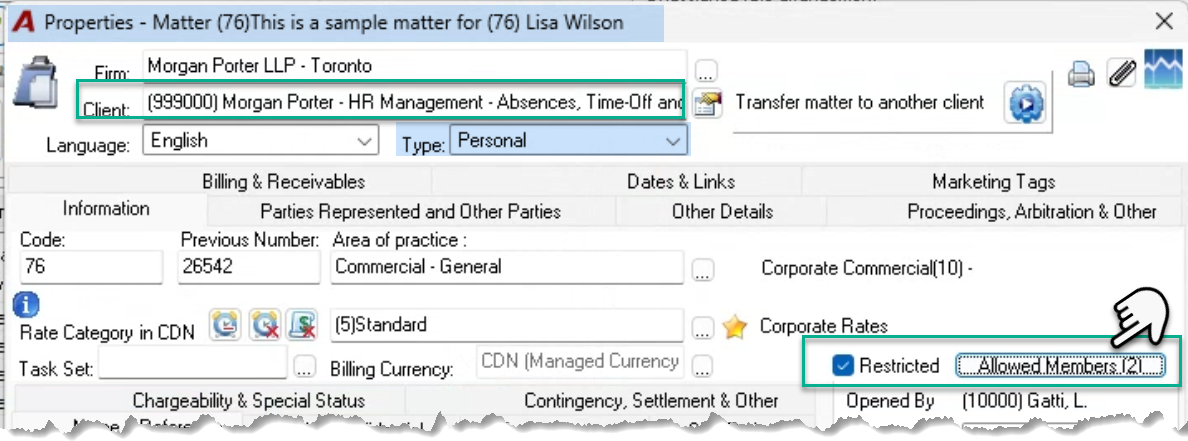
Create a member-specific restricted matter with a matter type “Personal”, per timekeeper required to track time for non-productive non-chargeable activities in context of absences, time-off and vacation. Select a clearly defined area of practice, for example, “Non-productive Non-chargeable activity”, “Absences, Time-Off and Vacation”, or “Human Resource Management”.
Include the timekeeper along with a limited list of other allowable members to reduce exposure of time entry content and optimize privacy.
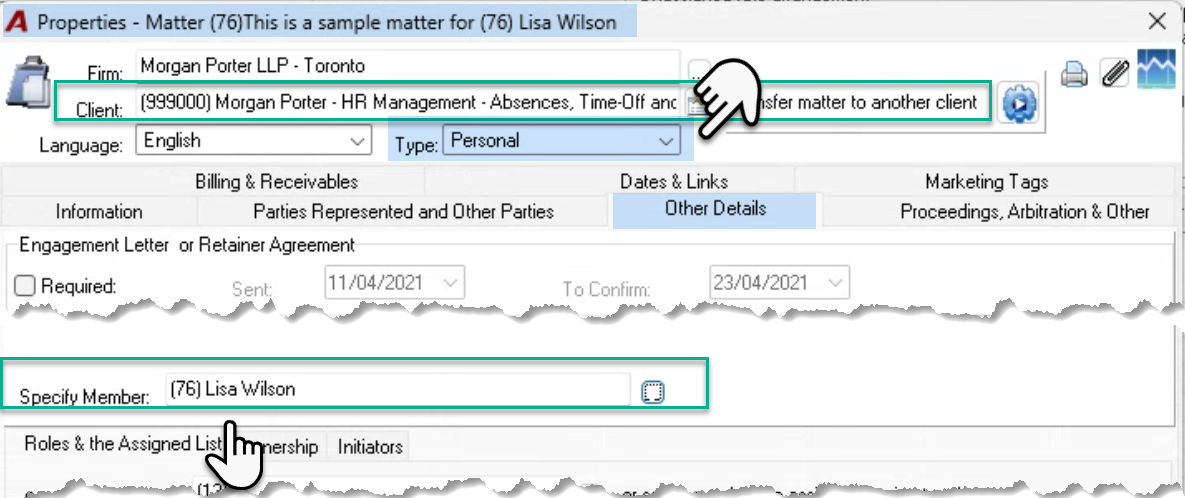
Set the matter with the matter type “Personal” to create a formal relationship between the matter and the affected timekeeper. Navigate to the “Other Details” tab, to select the affected member into the “Specify Member” field. Once this field is populated only time entries for the member set will be permitted, reducing the chance of matter error when timekeepers record non-productive time.
Most firms that work with task sets, also create, and assign an internal task set that includes a limited number of time codes to be used with the “Non-productive” time matters. As part of the structure, firms create several activity-specific time codes to breakdown time-off into logical segments like vacation and sick days. Even if internal task sets are not used, use time (activity) codes to segregate the type of non-productive time so Vacation can be separated from unplanned time-off (sick-days or personal days).
Consider setting the HR Manager and HR positions holders (if any) into the various matter level roles for additional reporting dimensions beyond the timekeeper (working member).
Use Case
Timekeepers enter they non-productive time into their assigned HR Matter. They can record and post future dated time to this type of matter, reflecting planned time-off on their missed-time, pace-to-target and hours worked measures.
Timekeepers can access the details of their matter using familiar matter tools like the client and matter dashboard or the DDI report.