.png)
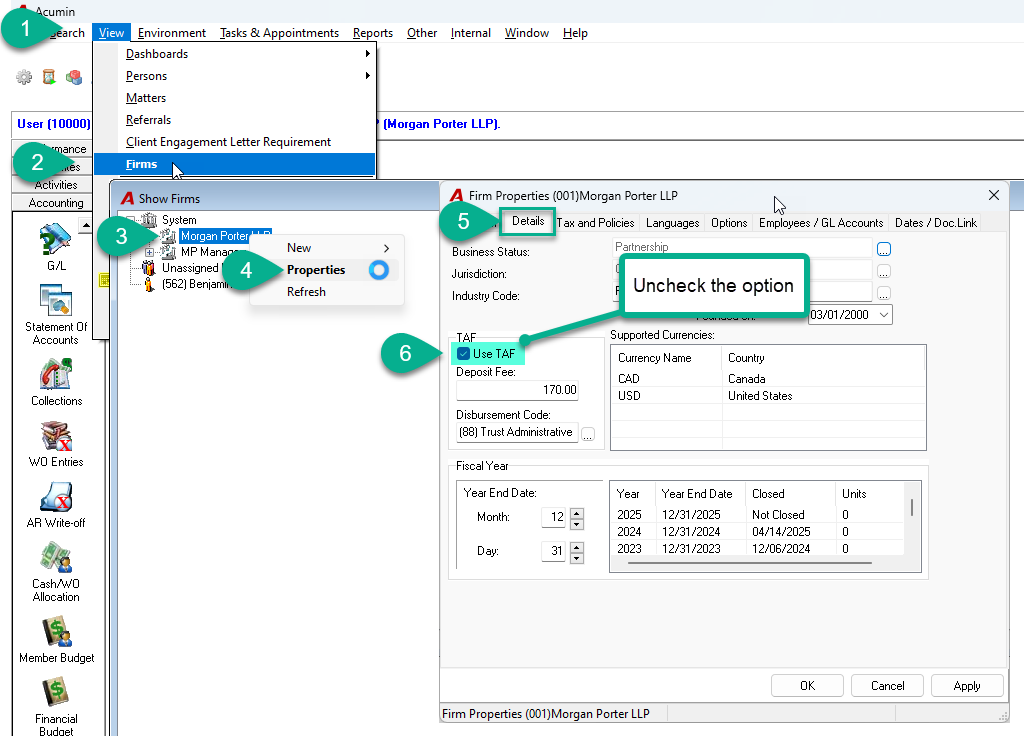
To deactivate the Trust Administration Fee (TAF) option in your environment, please follow the instructions below. This option must be disabled by each firm currently using it.
Step-by-step instructions
-
Open Firm Properties
-
Go to the Details tab
-
Uncheck the option “Use TAF”
-
Click Apply, then OK
-
Log out of Acumin
-
Log back in for the change to take effect
Additional Documents:
Trust - Configuring TAF Automation for BC Law Society Compliance | Acumin Documentation
Trust - New TAF Process for prior versions for BC Law Society Compliance | Acumin Documentation