.png)
The Parties Represented Category List defines the contact categories that appear in the Contact Categories column within the Parties Represented section at both the client and matter levels. These categories also appear in the Categories section of the contact's properties
It is also used to define the Party Represented contact in the Potential Conflicts form and the Search Tool in the Hit Found In/As column.
Key Information
-
Most contact categories are firm-defined.
-
You can modify existing categories, add new ones, or delete unused ones.
-
Categories that have been used at least once cannot be deleted.
Accessing the Parties Represented Category Table
To view or manage the list of Parties Represented Categories:
-
Navigate to:
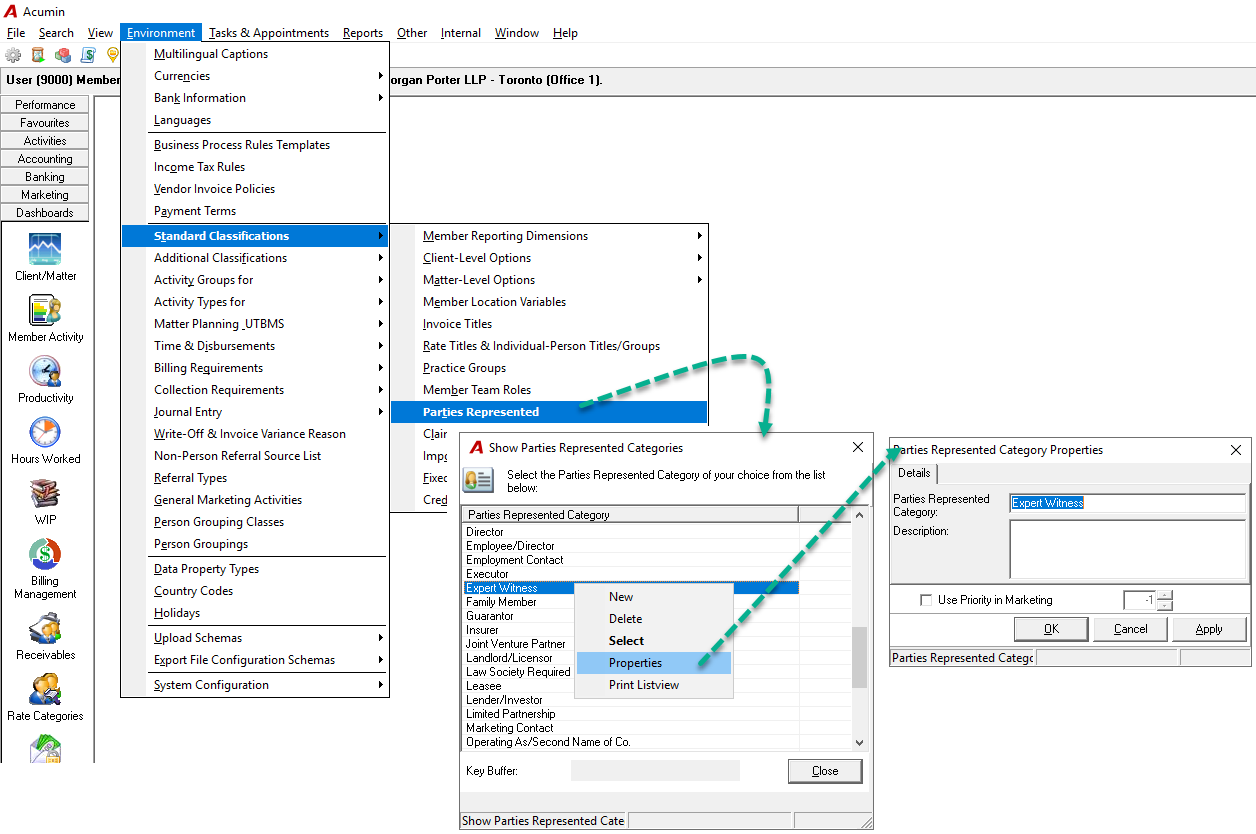
Environment → Standard Classifications → Parties Represented -
In the Show Parties Represented Category grid, right-click to display the context menu.
-
Available options include:
-
New: Create a new Parties Represented Category.
-
Delete: Remove an unused category from the list. (Note: Categories that have been used cannot be deleted.)
-
Properties: Open the properties form to edit the label and options.
-
Print Listview: Print a list of all categories currently shown in the grid.
-
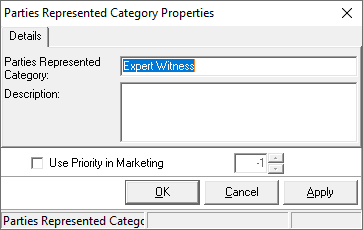
Parties Represented Category Properties Form
-
Parties Represented Category:
The name of the category. This will appear in contact properties, search results, and conflict searches. -
Description:
An optional field for adding more detail about the category. -
Use Priority in Marketing:
An option used when licensed for marketing functionality.
RELATED DOCUMENTS: