.png)
The Submit‑To member is set at the firm level because it can vary by location (centralized vs. decentralized processing).
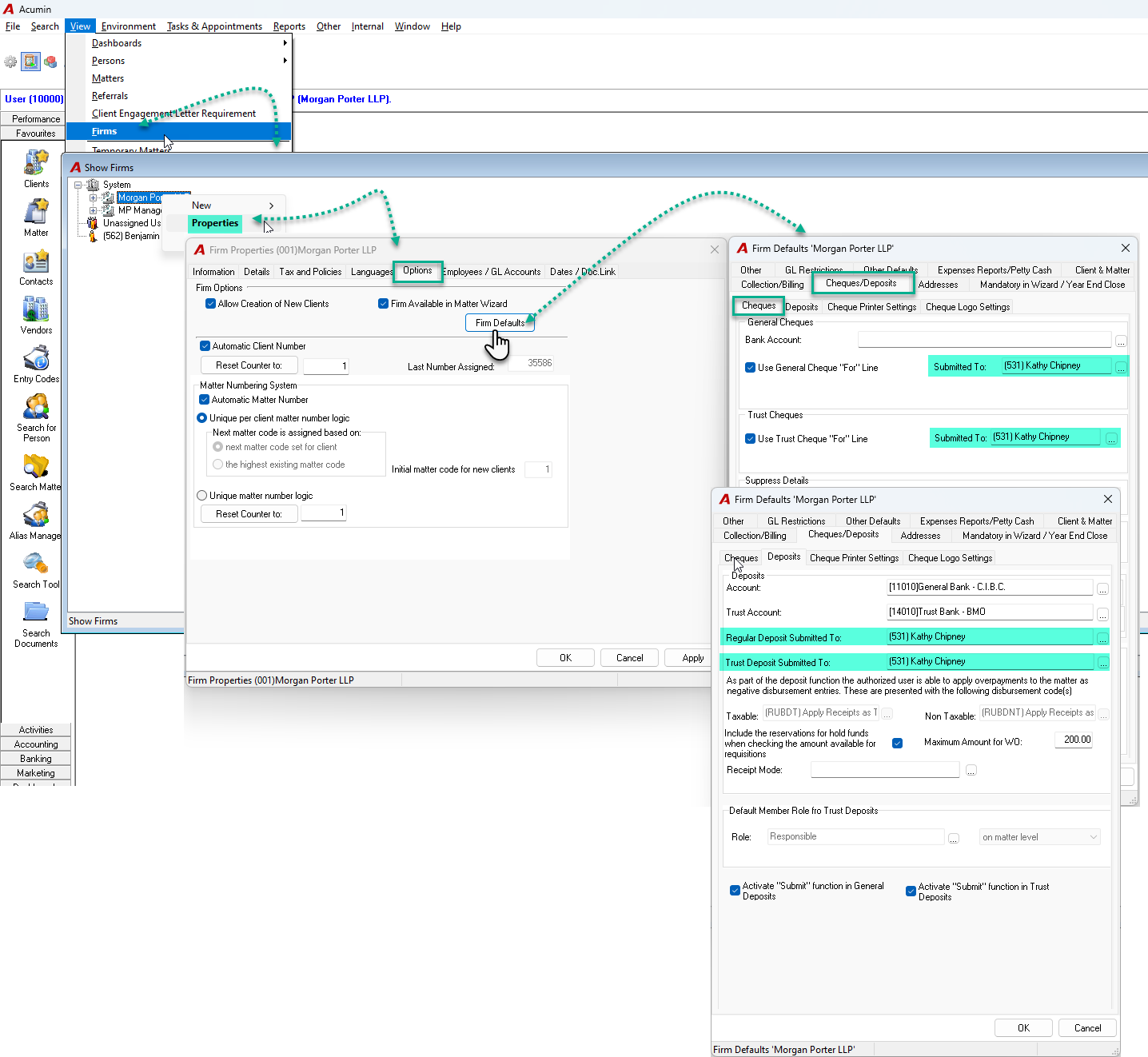
How to set it
-
Go to View → Firm
-
In Show Firm, select the firm and click Properties
-
In Firm Properties, open the Options tab and click Firm Defaults button
-
In Firm Defaults, go to the Cheques/Deposits tab
Cheques sub‑tab
-
Select the Submit‑To member for:
-
General Cheques
-
Trust Cheques
-
Deposits sub‑tab
-
Select the Submit‑To member for:
-
General Deposits
-
Trust Deposits
-
Additional Information
-
Accumulated trust cheques created from payments (via invoices or Trust Payments) will automatically appear on the Submit‑To member’s list defined for Trust Cheques.
-
Post‑dated payments (cheques or transfers) will be routed to the Submit‑To member defined for General Deposits.
OTHER DOCUMENTS: