.png)
Overview
While the matter numbering system in Acumin is typically configured at the initial setup, some firms choose to incorporate specific elements into their matter numbers—such as the year of creation. In these cases, the matter numbering system may need to be reset annually to reflect the new year for example.
Instructions:
To update the next matter number to reflect a new year (e.g., starting with "2026"), follow the steps below:
-
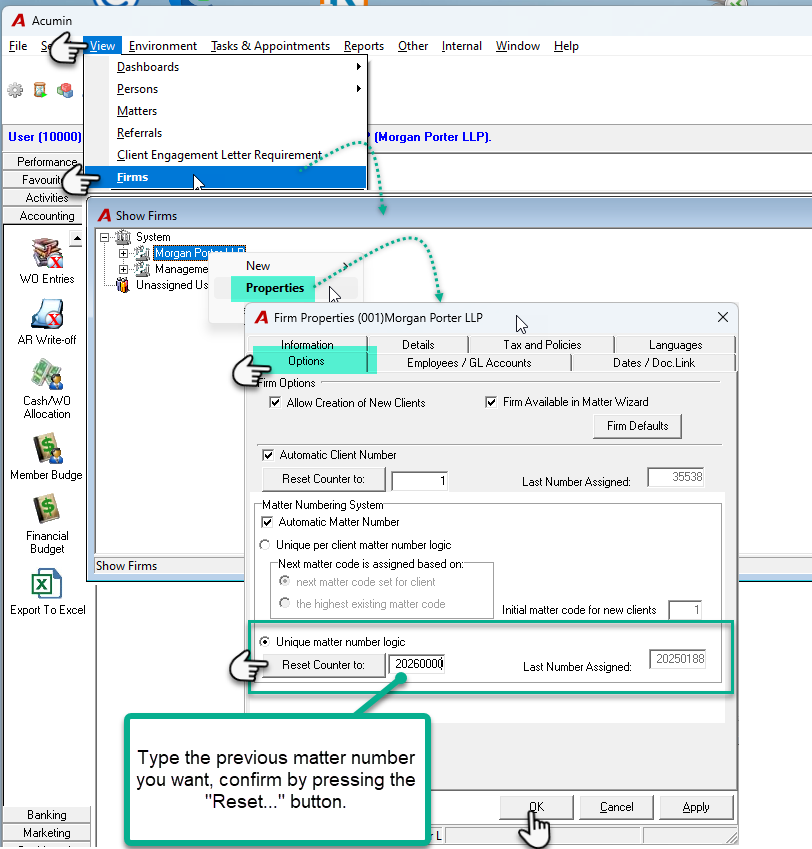
Access Firm Properties
-
Navigate to the properties of your main firm (Firm Code: 001).
-
-
Open the Options Subtab
-
In the Firm Properties window, click on the Options tab.
-
-
Update the Matter Numbering System
-
In the Matter Numbering System section, enter the last number before your desired starting number for the new year.
-
Example: To begin numbering at 20260001, enter 20260000.
-
-
-
Reset the Counter
-
Click the Reset Counter To button to confirm and apply the new starting number.
-
-
Save Your Changes
-
Click OK to save and exit the form.
-
-
Verify the Update
-
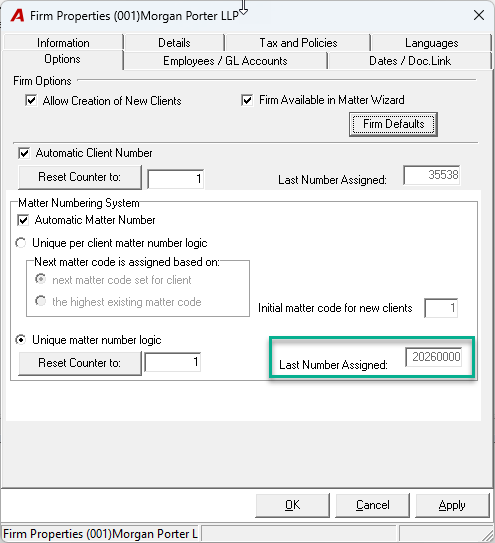
Reopen the Firm Properties window to confirm that your changes were applied.
-
The Last Number Assigned field should now display 20260000.
-
-
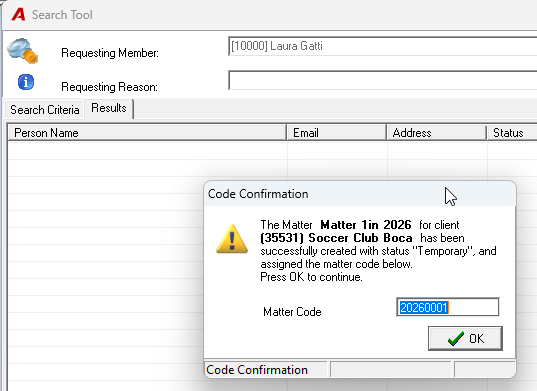
Once a new matter is created, Acumin will automatically assign the next number in sequence—20260001 in this example.