.png)
Overview
The Vendor Invoice Policy object is used to define specific sales tax schemes to ensure consistent and accurate tax application across vendor-related transactions. These policies simplify selection for end-users by providing predefined options.
Each policy label should clearly reflect its content and intended use case, helping users quickly identify the right policy during invoice processing.
Vendor invoice policies can be created and modified by your organization as needed.
Steps to Create a New Vendor Invoice Policy
Follow the steps below to create a new Vendor Invoice Policy:
-
Navigate to:
Environment > Vendor Invoice Policies -
In the Vendor Invoice Policies window, right-click anywhere in the list and select New.
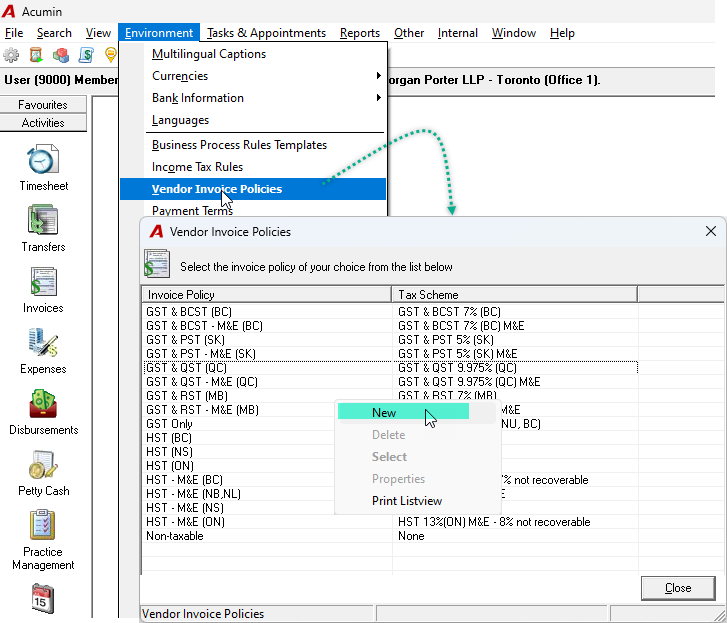
-
In the Vendor Invoice Policy Properties window:
-
Enter a Name for the policy.
-
Enter a Description to help users understand when to use it.
-
Click the ellipsis (...) button to select the appropriate Tax Scheme.
-
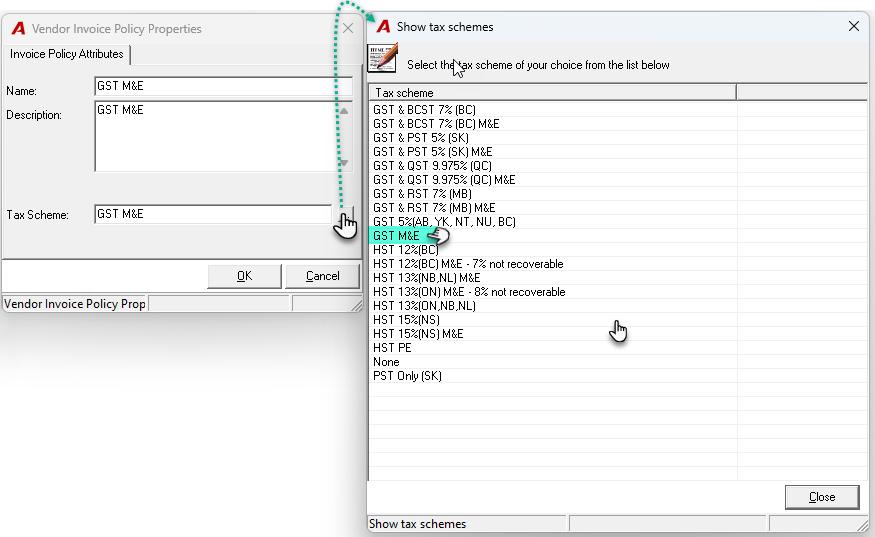
-
Click OK to save the new policy.
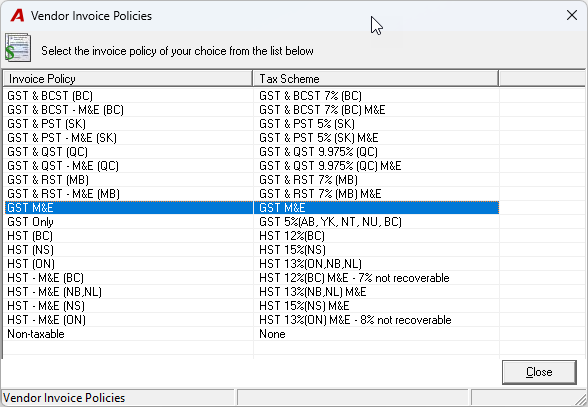
✅ Where Vendor Invoice Policies Are Used
Once created, the new Vendor Invoice Policy will appear in the list and can be used in the following modules:
-
General Payments
-
Payables
-
Vendor Properties
-
Expense Reports
-
Petty Cash Vouchers
RELATED DOCUMENTATION
Sales Tax - Sales Tax Introduction - Quick Start