.png)
Overview
The "Area of Practice" is an organization-defined mandatory matter-level reporting dimension designed to classify an otherwise broad book of business into sub-groups reflecting the areas of law where the firm offers its services. Typically, these groups or segments are based on shared characteristics of work-product in context of areas of law. Acumin leverages these segments in matter properties as "Areas of Practice".
The overall aim of work-product segmentation is to identify high yield segments, so they are leveraged in consideration of target markets. Work product segmentation assumes that different areas of law segments need different resources and programs. The work-product segmentation titles are designed to identify the most profitable segments, as well to allow the development of key segment profiles to better understand its needs and return on investment. Insights from segmentation analysis are subsequently used to support resource planning, profitability analysis as well as marketing strategy development and planning.
Each matter must be assigned to an area of practice. Subject to licensing, the organization can use the "Area of Practice Group" and "Area of Practice Class" to consolidate the more granular "Area of Practice" to further facilitate the selection of "Area of Practice" on matter creation, to align the "Areas of Practice" associated to matters to member-based "Practice Groups" and to further support the overall aim of "work-product" segmentation.
Best Practice Consideration
It is considered best-practice for organizations to publish and maintain a concrete and manageable list of "Areas of Practice" designed to support reporting considerations regarding "work-product". The classification is intended to provide meaningful results on the type of work completed by the members of the organization, therefore there should only be as many titles as there are logical groupings that would provide actionable results.
Points to Consider
Due to the potential granularity needed for the "Area of Practice", it is recommended that the list content be created in context of the "Area of Practice Group" and the "Area of Practice Class". Both combine the more granular areas of practice assigned to matters to define the type of work in larger groupings for more tactical and strategic reporting experiences as well as to facilitate the selection of the best Area of practice on matter selection and to align matter-based "Areas of Practice" to member-based "Practice Groups". Although most organizations work with only one parent group to reflect the member-based "Practice Group" – "Area of Practice Class", the "Area of Practice Group" – potentially a second parent; offers an alternate reporting perspective for "work-product". If used, the respective lists for "Areas of Practice Classes" or "Area of Practice Groups" should be kept to a limited number of titles.
Where possible, the "Area of Practice Classes" should match the list of "Practice Groups" used to classify members. Created within this context, the "Area of Practice Class" attribute will be directly related to the "Areas of Practice" in a parent-child relationship, as well as conceptually related to the member-level dimension "Practice Group".
Note:
Organizations tracking non-chargeable time should consider creating areas of practice and areas of practice groups in context of the firm's non-chargeable time structure, in order to see the benefits when reporting this type of information.
Area of Practice:
Access
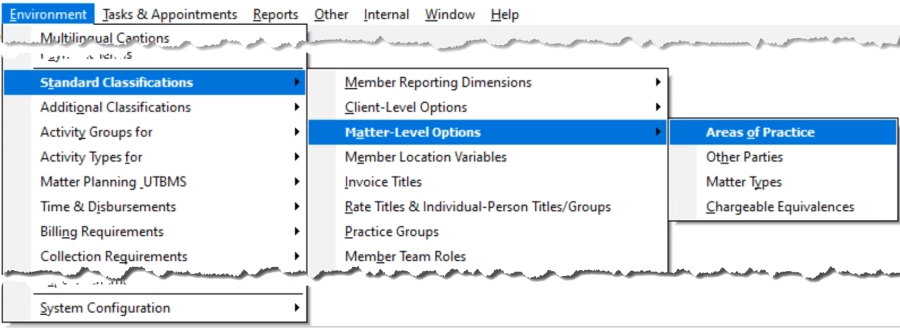
To manage the content of titles for "Areas of Practice" and use its metrics, access the list of titles, found within the Standard Classification Matter-Level Options sub-menu option of the Environment main menu option.
List Content Setup
The next step in the setup process is to add a list of areas of practice titles in context of the firm's areas of practice groups. This is a more granular breakdown of the work-product classifications for the firm to use when creating new matters.
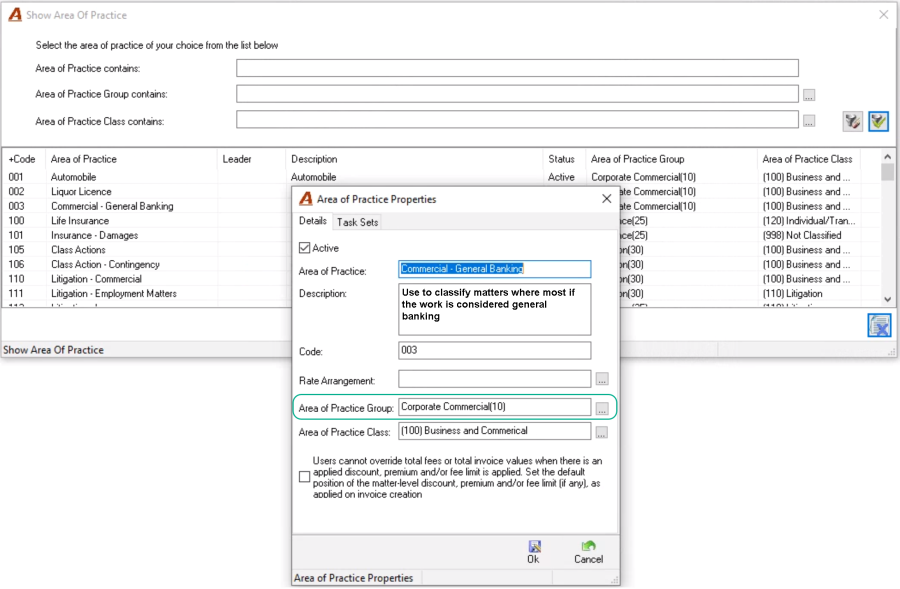
Your environment may have a list of pre-set attribute-content which was decided at implementation; however, new attribute-content can be added or existing one modified from within the "Area of Practice" properties form.
From the "Show Area of Practice" filter and list view access the right-click contextual menu options. Authorized users can select "New" to create a new title or access "Properties" to modify existing titles including the caption the code and/or description.
Users will make their selection based on caption; therefore, it is recommended to include the use case in the description field which also shows on the list.
If the firm is using "Areas of Practice Groups", "Areas of Practice Classes" or "Rate Arrangements", these can be associated at this time.
Note:
Should an existing selection be already in use (assigned to a matter), authorized users will need to remap affected matters to a different selection before the former can be deleted.
Enhanced Sales Tax Impact:
If the organization has the enhanced sales tax management license the authorized user will have the option to pre-set a default client-invoice policy for matters using the "Area of Practice" being created. This client invoice policy – if used – will take precedence over any billing address considerations therefore it should only be used under special circumstances where the applied client invoice policy would be the best-default when creating new matters associated to the affected "Area of Practice".
Example: The organization may wish to have matters associated with the area of practice "Real Estate – International" to have a default client invoice policy equal non-taxable, regardless of billing address considerations, if billing within the province.
Use of Task Sets:
Organizations licensed with uniform task-based systems can associate the applicable task sets where relevant. During matter creation, the user will be able to select from task sets relevant to the area of practice.
Area of Practice Class:
Access
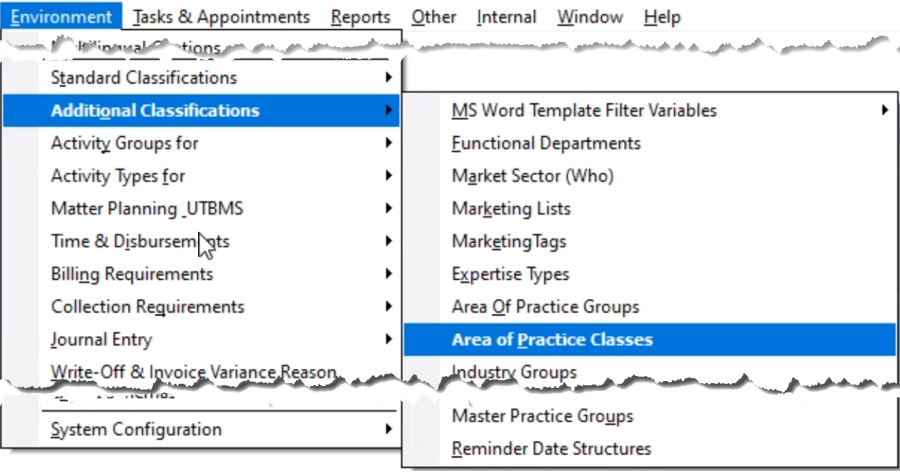
To implement the "Area of Practice Classes" reporting-dimension and use its metrics, access the list of attribute-content, found within the Additional Classification sub-menu option of the Environment main menu option.
List Content Setup
The next step in the setup process is to add a list of "Areas of Practice Class" titles in context of the "Areas of Practice" titles the firm uses when creating new matters and the and the use case attributed to the "Areas of Practice Groups" – if any. Your environment may have a list of pre-set attribute-content which was decided at implementation; however, new attribute-content can be added or existing one modified from within the "Area of Practice Class" properties form.
The "Areas of Practice Class" titles are akin to one of two potential parents for the "Areas of Practice" so users can see the "work-product" metrics from a different perspective. Typically, the "Areas of Practice Class" titles are used to facilitate the selection on matter creation whereas the "Areas of Practice Groups" titles are used to create an alignment between the matter-based "Areas of Practice" the firm uses to classify work-product (matters) and the member-based "Practice Groups" the firm uses to classify members. If both are used with different content, the provide different reporting perspectives.
From the "Show Areas of Practice Class" list view, access the right-click contextual menu options. Authorized users can select "New" to create a new title or access "Properties" to modify existing titles including the caption the code and/or description.
Users will make their selection based on caption; therefore, it is recommended to include the use case in the description field which also shows on the list. If the "Area of Practice Class" attribute is used to align corresponding "Practice Group" titles the corresponding "Practice Group" leader, can also be associated to the corresponding "Area of Practice Group".
Note:
Should an existing selection be already in use (assigned to an "Area of Practice"), authorized users will need to remap affected "Areas of Practice" to a different selection before the former can be deleted.
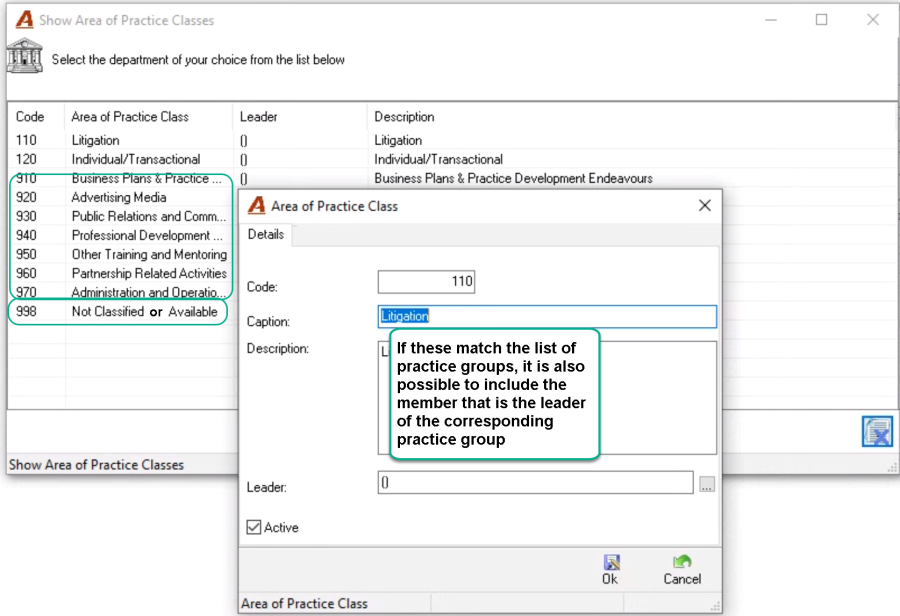
It is considered best practice for the list of selections to include the option "Not Classified or Available" as it will group the two separate Area of Practices "Not Classified" and "Not Available".
In addition, to support the firm's non-chargeable time structure and reporting requirements, it is recommended to create "Area of Practice Class" titles to group non-chargeable firm endeavours captured through a non-chargeable time matter and areas of practice structure. (AOP groups coded 910 to 970 for example).
Area of Practice Group:
Access
To implement the "Area of Practice Group" reporting-dimension and use its metrics, access the list of attribute-content, found within the Additional Classification sub-menu option of the Environment main menu option.
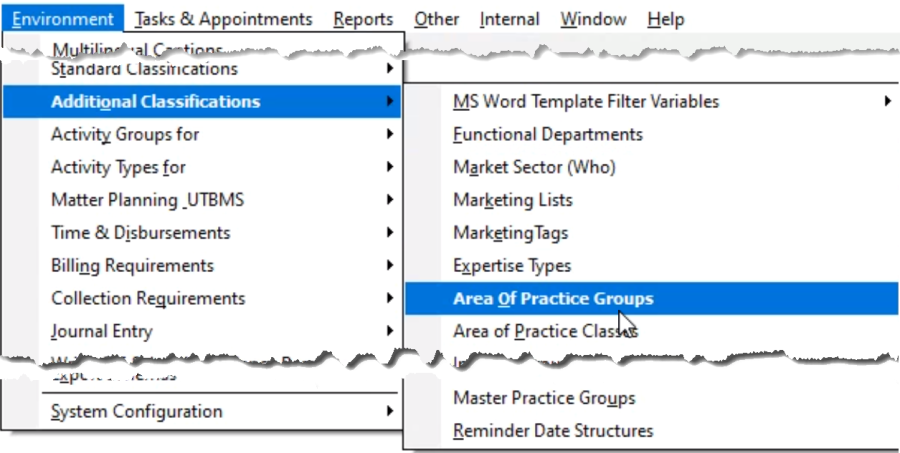
List Content Setup
The next step in the setup process is to add a list of "Areas of Practice Group" titles in context of the "Areas of Practice" titles the firm uses when creating new matters and the and the use case attributed to the "Areas of Practice Classes" – if any. Your environment may have a list of pre-set attribute-content which was decided at implementation; however, new attribute-content can be added or existing one modified from within the "Area of Practice Group" properties form.
The "Area of Practice Groups" titles are akin to one of two potential parents for the "Areas of Practice" so users can see the "work-product" metrics from a different perspective. Typically, the "Areas of Practice Groups" titles are used to create an alignment between the matter-based "Areas of Practice" the firm uses to classify work-product (matters) and the member-based "Practice Groups" the firm uses to classify members, whereas the "Areas of Practice Class" titles are used to facilitate the selection on matter creation. If both are used with different content, the provide different reporting perspectives.
From the "Show Area of Practice Groups" list view, access the right-click contextual menu options. Authorized users can select "New" to create a new title or access "Properties" to modify existing titles including the caption the code and/or description.
Users will make their selection based on caption; therefore, it is recommended to include the use case in the description field which also shows on the list. If the "Area of Practice Group" attribute is used to align corresponding "Practice Group" titles the corresponding "Practice Group" leader, can also be associated to the corresponding "Area of Practice Group".
Note:
Should an existing selection be already in use (assigned to an "Area of Practice"), authorized users will need to remap affected "Areas of Practice" to a different selection before the former can be deleted.
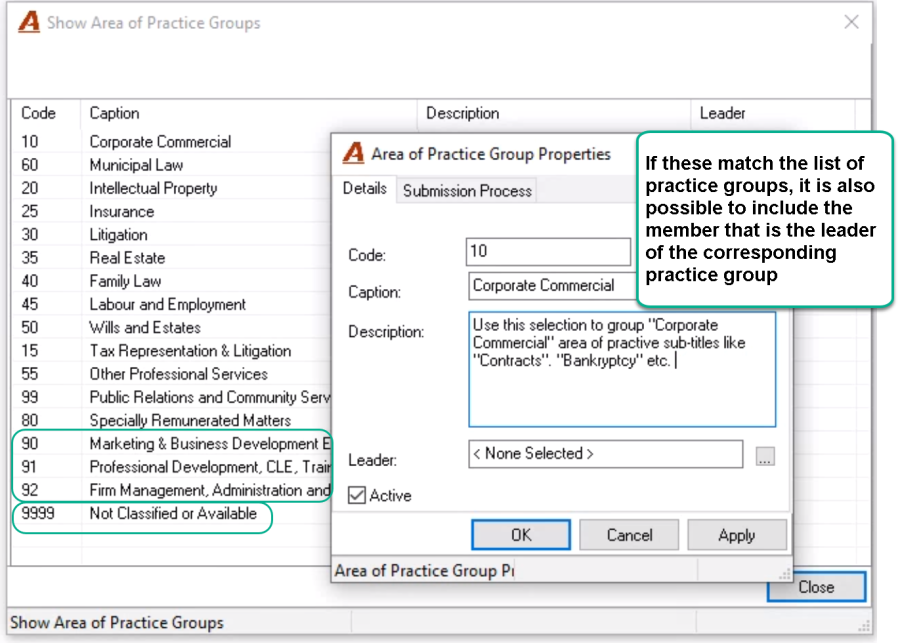
It is considered best practice for the list of selections to include the option "Not Classified or Available" as it will group the two separate Area of Practices "Not Classified" and "Not Available".
In addition, to support the firm's non-chargeable time structure and reporting requirements, it is recommended to create "Area of Practice Group" titles to group non-chargeable firm endeavours captured through a non-chargeable time matter and areas of practice structure. (AOP groups coded 90 to 92 for example).
Populating the Professional Title and Client Industry Fields
"Areas of Practice" titles can either be added as part of the new matter creation process, or as a post-open activity in matter properties. To populate the applicable field, either enter the code (if known) or click on the ellipsis button and select the desired title.
Matter Wizard
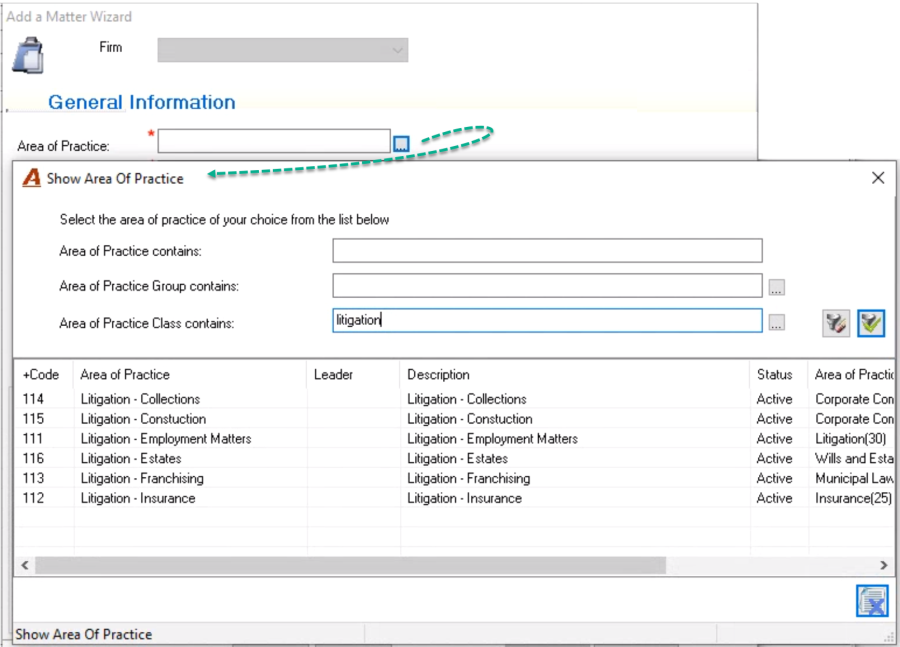
Matter Properties
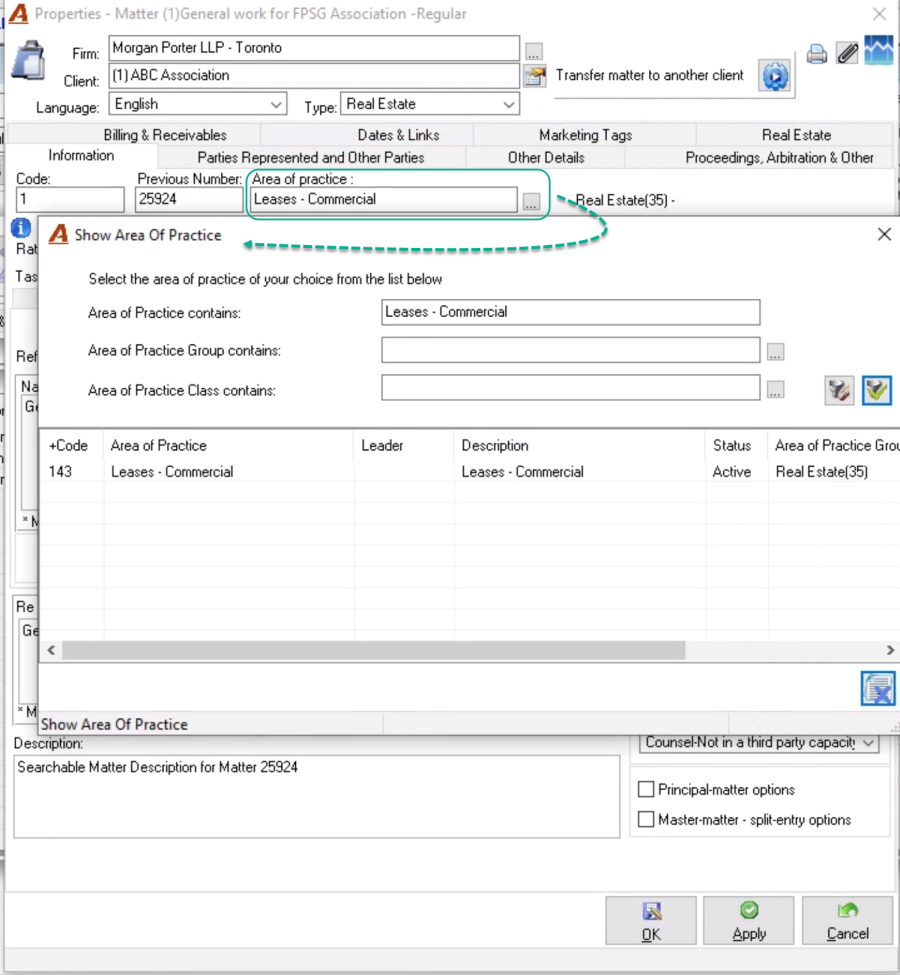
Reporting Opportunities
Most reports that use the "Big Filter" can be generated by "Area of Practice" and/or "Area of Practice Group" or "Area of Practice Class".
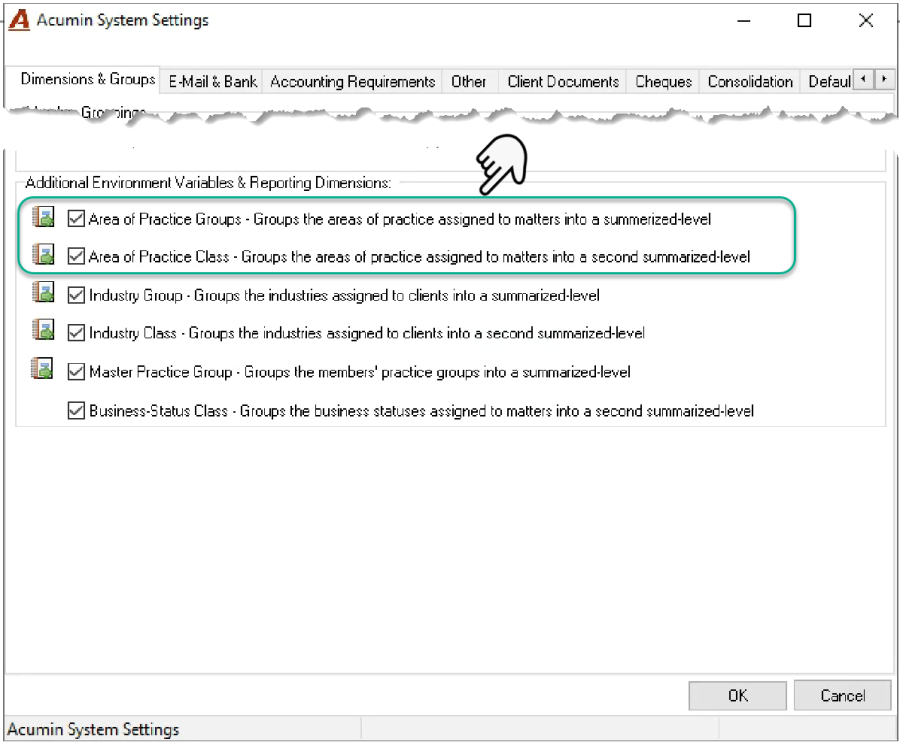
To enable the options to filter or group by "Area of Practice Group" or "Area of Practice Class" on affected reports, checkmark the attribute that will be used as a reporting dimension. The list of licensed options is found within "System Settings" – "Dimensions and Groups" – "Additional environment Variables & Reporting Dimensions"
When generating reports by "Areas of Practice", checkmark the "Areas of Practice" checkbox, as without the checkmark the calculation of the report will ignore the "Areas of Practice" metric. To generate a report for a specific "Areas of Practice" click on the ellipsis button to populate the field with the applicable "Areas of Practice". To group by "Areas of Practice", leave the field checkmark and empty.
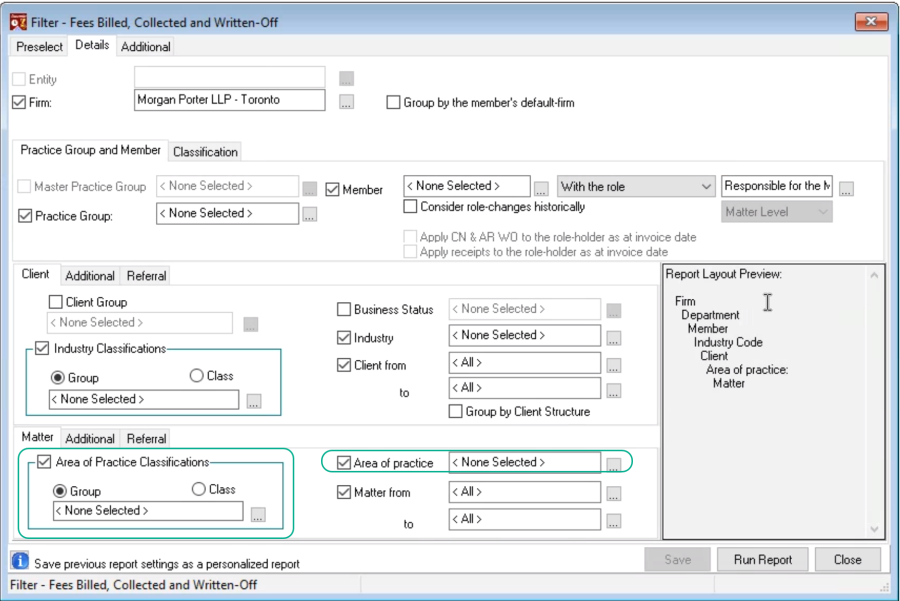
In addition to or instead of reporting by "Areas of Practice", most of the reports can also be generated by one of the "Areas of Practice Classification". In this case checkmark the "Areas of Practice Classification" checkbox, as without the checkmark the calculation of the report will ignore the "Areas of Practice Classifications" metric, and then select the reporting dimension – Group or Class. To generate a report for a specific "Area of Practice Group" or "Area of Practice Class" click on the ellipsis button to populate the field with the applicable "Area of Practice Group" or "Area of Practice Class". To group by "Area of Practice Group" or "Area of Practice Class", leave the field checkmark and empty.