.png)
Overview
The BC Law Society has updated its rules for the Trust Administration Fee (TAF). These changes affect when and how TAF must be applied to client matters.
Key regulatory changes
-
The previous exemption for fees and retainers has been removed.
-
A threshold amount now determines when TAF applies.
-
Only trust deposits and transfers made on or after January 1, 2026, are included in the Aggregate Trust Amount (ATA).
Who This Applies To
These instructions apply to law firms using:
-
Version 2.0 prior to version 2.5.A31.3819 and up
-
Older versions 14.0 and 11.9
These firms must deactivate the existing TAF functionality to prevent the creation of TAF disbursements under the old BC Law Society rules. As of January 1, 2026, firms must follow the new TAF rules.
Trust - How to deactivate the Trust Administrative Fee (TAF) option | Acumin Documentation
Because the new ATA calculation feature exists only in the latest Acumin version 2.0, firms on earlier versions must:
-
Disable the old TAF functionality
-
Manually create TAF disbursements when required
Background & Impact
To support firms during the transition until they upgrade to the required version, Dexco has created queries that allow firms to:
-
Determine the current ATA for a matter
-
Confirm whether a TAF disbursement has already been created
-
Confirm whether the matter is exempt
-
Generate the TAF report for the BC Law Society
Using this information, users can decide:
-
Whether a TAF disbursement must be created
-
To generate the TAF report for the BC Law Society
Conditions for Applying TAF
A TAF disbursement must be manually created and posted when:
-
The Aggregate Trust Amount (ATA) determined by the BC Law Society is reached or more. (For example $10,000.01 and more)
-
No TAF disbursement has previously been created
-
The matter is not exempt
Transition Approach
Dexco has developed two queries to streamline the transition:
-
A query to run each time a trust deposit or transfer is made, showing:
– The calculated ATA (not the trust balance)
– Whether a TAF disbursement already exists
– Whether the matter is exempt
-
A query to generate the TAF report for the selected period
Note: Once the old TAF functionality is disabled, the previous TAF report is no longer available. The new query supports reporting under the updated rules.
If a firm chooses not to purchase these queries, it must maintain its own tracking system outside of Acumin and produce its own TAF reports.
Using the Two Queries
1. Step 1: Acquire the Queries
If you have not already purchased them, send a request to:
Support@dexco.com
You will receive both queries via your support ticket. Users should save the queries in an accessible location where they can be easily copied and pasted into Acumin.
2. Step 2: Determine Who Will Run the ATA Query
The employee who prepares the Trust Deposit Green Book or reviews trust deposits can also run the ATA query using the Run Query feature in Acumin.
For detailed instructions on running queries, see:
SQL Queries - How to run a SQL query and generate the result in Excel in Acumin
3. Step 3: Determine Who Will Run the TAF Report Query
The employee responsible for sending the TAF report to the BC Law Society can run the TAF report query using the Run Query feature in Acumin.
For detailed instructions on running queries, see:
SQL Queries - How to run a SQL query and generate the result in Excel in Acumin
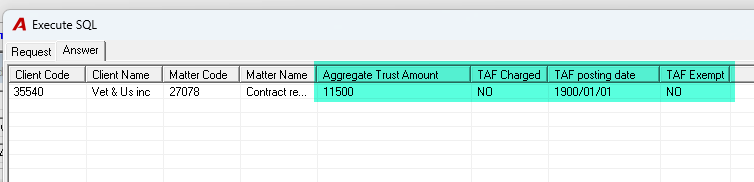
Interpreting the ATA Query Results
After running the ATA query, review the Result tab.
You will see:
-
Client and matter code
-
Aggregate Trust Amount
-
This is the amount coming from trust deposits and trust transfers dated on or after January 1, 2026 (as per the overview rules, only those dates are considered for ATA).
-
-
TAF Charged
-
“Yes” / “No” indicating whether a TAF disbursement has already been automatically or manually applied in the file.
-
-
TAF posting date
-
If populated, this indicates a TAF disbursement has been automatically created.
-
If empty, this indicates no TAF disbursement has been created, OR a manual TAF disbursement has been created, thus this field was not updated.
-
-
Exempt
-
Indicates whether the file is exempt from the application of TAF.
-
Use this information with the Conditions for Applying TAF section above to determine if you must manually create and post a TAF disbursement.
The only scenario where a TAF disbursement has to be created is the following:
-
The Aggregate Trust Amount (ATA) is ex: 10,000.01 or more:
-
ATA = $11500.00
-
-
No TAF disbursement has previously been created:
-
TAF Charged = No and/or
-
TAF posting date = no date.
-
-
The matter is not exempt:
-
Tax Exempt = No
-
If Your Firm Does Not Acquire the Queries
You must maintain your own list outside Acumin that tracks:
-
Trust deposits/transfers on or after January 1, 2026, to get the Aggregate Trust Amount per matter.
-
Create your own TAF reports for submission to the BC Law Society.
Support / Contact
For help with acquiring the queries, implementing the changes, or running/interpreting the queries, contact Dexco Support: